
언어 선택

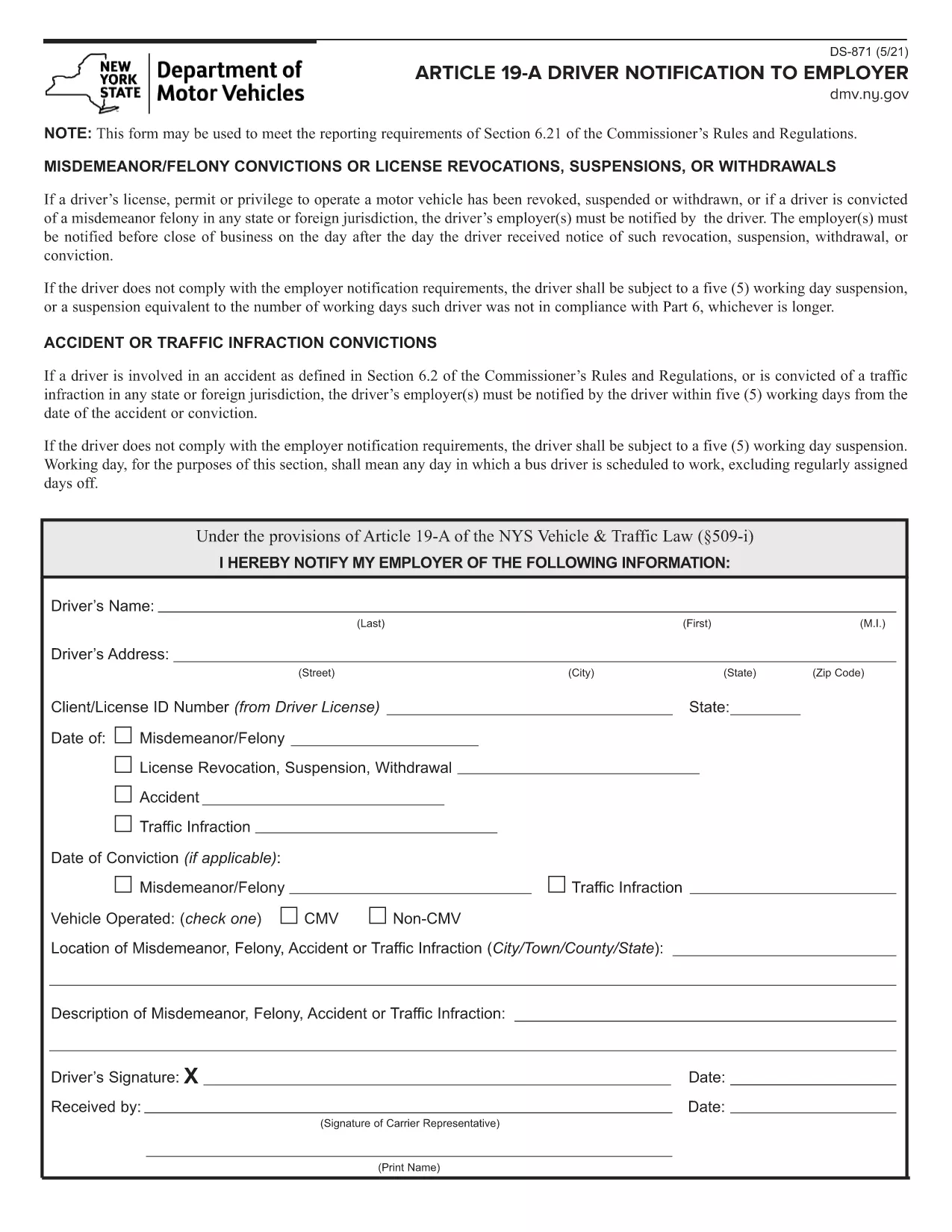
DS-871 Driver Notification to Employer (Fillable PDF)

  1. 언어 영어
  2. 국가 미국
  3. 활동 운전 면허증
  4. 상태 뉴욕
DS-871 Driver Notification to Employer (Fillable PDF)

The DS-871 is the New York State Department of Motor Vehicles (DMV) form used by drivers to notify their employer of a suspension, revocation, or restriction under Article 19‑A. Employers need this documentation to stay compliant with state regulations.

This page offers a fillable PDF version of the DS-871, so you can complete the form directly in your browser without printing, scanning, or using a separate PDF editor. The Formize PDF Filler loads instantly, preserves your data, and lets you download a clean, signed copy ready for submission.

Below you’ll find a quick overview of the form, step‑by‑step instructions for filling it out online, common pitfalls to watch for, and guidance on where to send the finished document.

자주하는 질문
  • What is the purpose of Form DS‑871?

    DS‑871 satisfies the New York DMV’s requirement that drivers notify their employer of any license suspension, revocation, or restriction under Article 19‑A.

  • Do I need a printer to use the fillable PDF?

    No. The form is fully editable online via the Formize PDF Filler. You only need to print a copy if your employer specifically requests a hard copy.

  • Can I save my progress and finish later?

    Yes. The Formize app lets you download a draft PDF that retains your entered data, so you can reopen it later and continue editing.

  • Is an electronic signature accepted?

    Most New York DMV employers accept an electronic signature created with the Formize signature tool. Check with your HR department if a wet‑ink signature is required.

  • Where should I send the completed DS‑871?

    Send the completed form to your employer’s HR or safety department. Keep a copy for your records in case the DMV requests proof of notification.

  • What if I make a mistake after submitting?

    Download a new copy of the fillable PDF, correct the error, and resend the updated version. The DMV does not require a specific form revision number.

  • Is there a filing fee for DS‑871?

    No. The DS‑871 is a free notification form; there is no charge to download or submit it.

  • Do I need to attach additional documents?

    Only attach supporting documents if your employer requests proof of the suspension (e.g., a copy of the DMV notice).

어떻게

4개의 간단한 단계를 통해 온라인으로 DS-871를 무료로 작성하는 방법:

  1. 1
    Open the Fillable Form
    Click the **Fill out this form** button on this page. The Formize PDF Filler app will load the DS‑871 PDF directly in your browser.
  2. 2
    Enter Your Information
    Type your name, license number, employer details, and the reason for the notification into the highlighted fields. All data is saved automatically as you type.
  3. 3
    Review and Sign
    Check each field for accuracy. Use the built‑in signature tool to add your electronic signature if required.
  4. 4
    Download or Email
    When you’re satisfied, click **Download PDF** to save a copy or **Email PDF** to send it straight to your employer.
Formize PDF 필러 앱
에 대한

운전 면허증 신청서

대부분의 국가에서는 운전 면허증을 소지해야 도로를 달릴 수 있습니다. 운전 면허증을 취득하는 것은 자동차를 운전하려는 모든 사람에게 중요한 이정표입니다.

DS-871는 운전 면허증을 신청하려는 사람들로부터 정보를 수집하는 데 사용되는 문서인 운전 면허증 신청 양식 중 하나입니다. 일반적으로 신청자의 이름, 생년월일, ID 번호, 연락처 정보, 운전 면허증 기록 및 경험에 대한 필드가 포함됩니다.

특징

PDF 필러

온라인에서 PDF 양식을 채우는 가장 쉬운 방법

  • DS-871를 빠르게 작성하세요.
    온라인에서 DS-871을(를) 빠르게 채우는 방법을 찾고 계십니까? 온라인 무료 PDF 양식 필러를 사용하면 1분 이내에 이 PDF 문서를 편집하고 채우는 방법을 알 수 있습니다.
  • 사용하기 쉬운 온라인 PDF 편집기
    다시 스캔하여 다시 보내기 전에 편집할 수 있도록 PDF 파일을 인쇄하는 데 지쳤습니까? 온라인에서 무료로 PDF 문서를 편집하세요. 온라인 PDF 편집기를 사용하여 시간과 종이를 절약하십시오.
  • 훌륭한 도구, 모든 플랫폼
    Mac에서 DS-871를 채우는 방법이나 PDF 필러를 무료로 사용하는 방법이 궁금하십니까? 당사의 온라인 PDF 도구는 모든 플랫폼에서 작동합니다.
  • 안전한 파일 저장
    완료된 "DS-871" 파일은 Amazon 클라우드 호스팅에서 관리하는 보안 데이터베이스에 저장됩니다. 언제든지 시스템에서 파일을 삭제할 수 있습니다. 어쨌든 이러한 파일은 24시간 후에 자동으로 삭제됩니다.
  • DS-871님과 채팅
    무료 PDF 리더 도우미인 Chatize에서 "DS-871"와 채팅하세요. "DS-871"에서 질문하고 답변을 받으세요. 위의 문서와 채팅 버튼을 클릭하세요.

필링 세션 삭제

선택한 필링 세션을 삭제하시겠습니까?이 경우 양식 작성 진행 상황이 손실됩니다.

편집 세션 삭제

선택한 편집 세션을 삭제하시겠습니까? 이 경우 양식 작성 및 편집 진행 상황이 손실됩니다.