
언어 선택

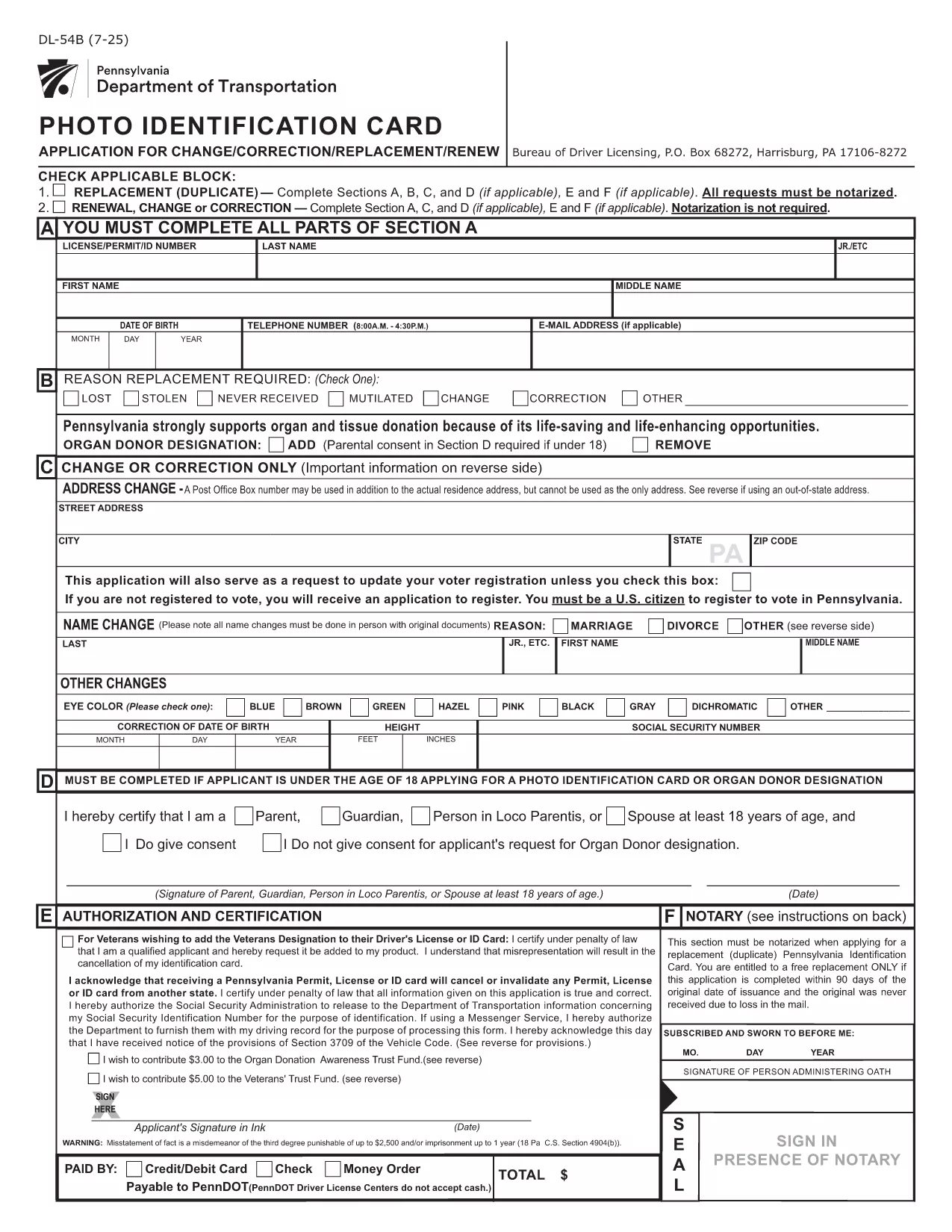
Pennsylvania DL-54B Photo Identification Card Change Form (Fillable PDF)

  1. 언어 영어
  2. 국가 미국
  3. 활동 운전 면허증
  4. 상태 펜실베니아
Pennsylvania DL-54B Photo Identification Card Change Form (Fillable PDF)

The DL-54B is Pennsylvania’s official Photo Identification Card change form. It is used when you need to update personal information—most commonly an out‑of‑state address—on your PennDOT ID card.

What Is the DL-54B Form?

The DL-54B is a printable, fillable PDF provided by the Pennsylvania Department of Transportation (PennDOT). It captures the same data required on a paper application, but with the convenience of electronic completion.

When Do You Need the DL-54B?

  • Moving to an address outside Pennsylvania while maintaining a PA driver’s license or ID.
  • Correcting any personal details on your existing Photo ID card.
  • Updating information after a name change, marital status change, or other legal updates.

How to Complete the DL-54B Online with Formize

Instead of downloading the PDF and editing it in a separate editor, simply click the "Fill out this form" button on this page. The Formize PDF Filler app will load the fillable PDF directly in your browser.

Common Mistakes to Avoid

  • Leaving required fields blank – the form will not submit.
  • Providing an out‑of‑state address that does not meet PennDOT’s exemption criteria (e.g., not a federal or military employee).
  • Signing the form with a stylus that does not register as a digital signature.

Submit Your Form and Next Steps

After you finish filling out the DL-54B, click Submit to download a completed copy. Mail the signed form, along with any required fees, to the PennDOT Bureau of Driver Licensing (P.O. Box 68272, Harrisburg, PA 17106‑8272).

Need a printable version? Use the download link below to get the official PDF.

자주하는 질문
  • Can I submit the DL-54B electronically?

    PennDOT currently requires a mailed, signed paper copy. The online filler only helps you complete the PDF faster.

  • What fee is required with the DL-54B?

    A standard ID card fee applies. Include a check or money order payable to "PennDOT" with your submission.

  • Do I need a Pennsylvania driver’s license to use this form?

    No. The DL-54B is for the Pennsylvania Photo Identification Card, which is available to residents without a driver’s license.

  • Will the form accept an out‑of‑state address for anyone?

    Only federal or state government employees, armed forces personnel, or their families can keep a PA ID with an out‑of‑state address.

  • How long does it take to receive my updated ID after mailing?

    Processing typically takes 7‑10 business days once PennDOT receives your completed form and payment.

  • Can I correct mistakes after I’ve mailed the form?

    If you discover an error, submit a new DL-54B with the correct information and include a brief note explaining the correction.

어떻게

4개의 간단한 단계를 통해 온라인으로 DL-54B를 무료로 작성하는 방법:

  1. 1
    Click the Fill‑out Button
    Press the "Fill out this form" button on the page to launch the Formize PDF Filler.
  2. 2
    Wait for the Filler to Load
    The fillable PDF loads directly in your browser – no extra software needed.
  3. 3
    Complete All Required Fields
    Enter your new address, personal details, and sign electronically where indicated.
  4. 4
    Save or Download Your Completed Form
    When finished, click "Save" to download the completed PDF and print it for mailing to PennDOT.
Formize PDF 필러 앱
에 대한

운전 면허증 신청서

대부분의 국가에서는 운전 면허증을 소지해야 도로를 달릴 수 있습니다. 운전 면허증을 취득하는 것은 자동차를 운전하려는 모든 사람에게 중요한 이정표입니다.

DL-54B는 운전 면허증을 신청하려는 사람들로부터 정보를 수집하는 데 사용되는 문서인 운전 면허증 신청 양식 중 하나입니다. 일반적으로 신청자의 이름, 생년월일, ID 번호, 연락처 정보, 운전 면허증 기록 및 경험에 대한 필드가 포함됩니다.

특징

PDF 필러

온라인에서 PDF 양식을 채우는 가장 쉬운 방법

  • DL-54B를 빠르게 작성하세요.
    온라인에서 DL-54B을(를) 빠르게 채우는 방법을 찾고 계십니까? 온라인 무료 PDF 양식 필러를 사용하면 1분 이내에 이 PDF 문서를 편집하고 채우는 방법을 알 수 있습니다.
  • 사용하기 쉬운 온라인 PDF 편집기
    다시 스캔하여 다시 보내기 전에 편집할 수 있도록 PDF 파일을 인쇄하는 데 지쳤습니까? 온라인에서 무료로 PDF 문서를 편집하세요. 온라인 PDF 편집기를 사용하여 시간과 종이를 절약하십시오.
  • 훌륭한 도구, 모든 플랫폼
    Mac에서 DL-54B를 채우는 방법이나 PDF 필러를 무료로 사용하는 방법이 궁금하십니까? 당사의 온라인 PDF 도구는 모든 플랫폼에서 작동합니다.
  • 안전한 파일 저장
    완료된 "DL-54B" 파일은 Amazon 클라우드 호스팅에서 관리하는 보안 데이터베이스에 저장됩니다. 언제든지 시스템에서 파일을 삭제할 수 있습니다. 어쨌든 이러한 파일은 24시간 후에 자동으로 삭제됩니다.
  • DL-54B님과 채팅
    무료 PDF 리더 도우미인 Chatize에서 "DL-54B"와 채팅하세요. "DL-54B"에서 질문하고 답변을 받으세요. 위의 문서와 채팅 버튼을 클릭하세요.

필링 세션 삭제

선택한 필링 세션을 삭제하시겠습니까?이 경우 양식 작성 진행 상황이 손실됩니다.

편집 세션 삭제

선택한 편집 세션을 삭제하시겠습니까? 이 경우 양식 작성 및 편집 진행 상황이 손실됩니다.