
언어 선택

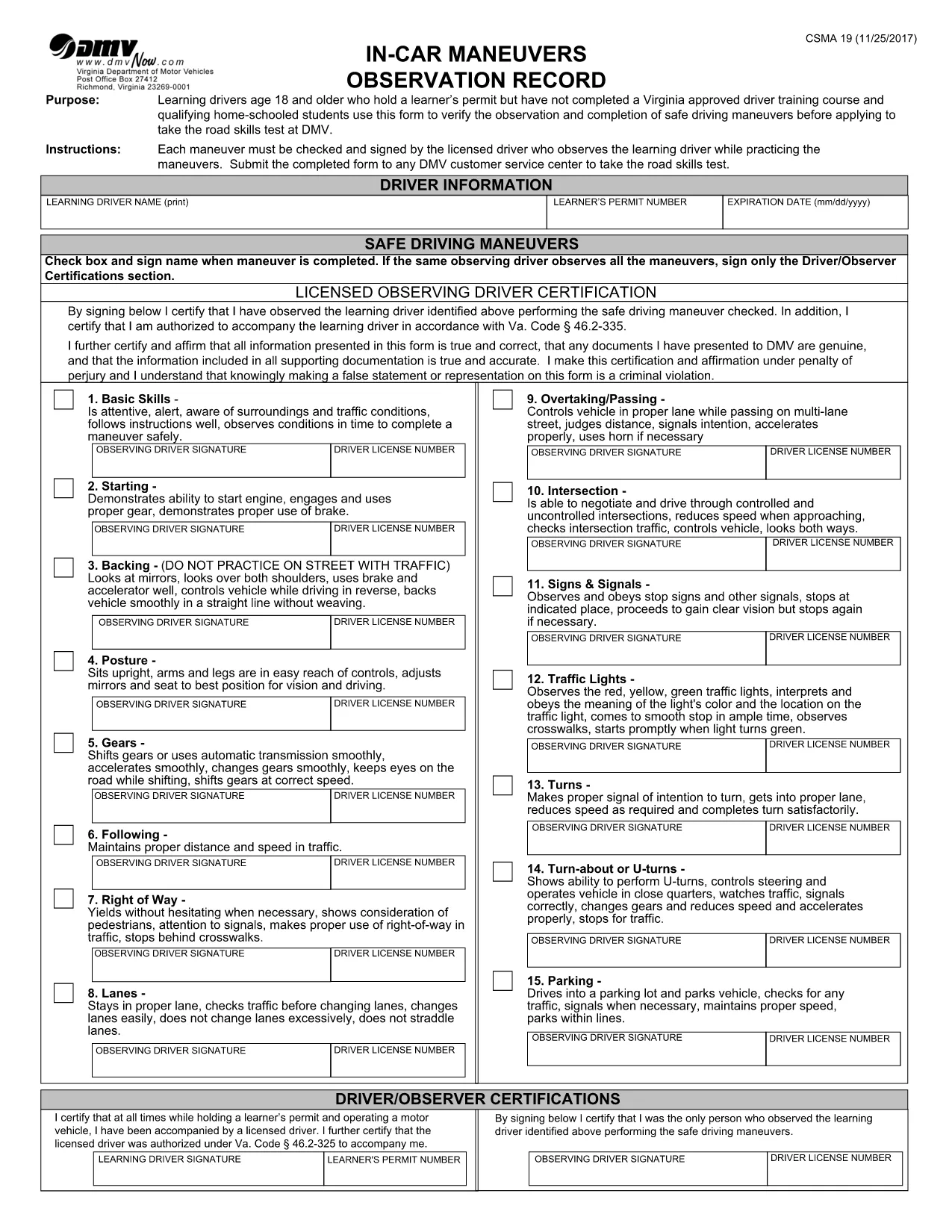
Virginia CSMA‑19 In‑Car Maneuvers Observation Record (Fillable PDF)

  1. 국가 미국
  2. 언어 영어
  3. 활동 운전 면허증
  4. 상태 여자 이름
Virginia CSMA‑19 In‑Car Maneuvers Observation Record (Fillable PDF)

The CSMA‑19 In‑Car Maneuvers Observation Record is the official Virginia DMV form used by home‑school learners, permit holders, and drivers who have not completed a state‑approved driver‑training course. It logs the required in‑vehicle practice hours and verifies that each maneuver meets safety standards before you can take the road‑skills test.

What Is the CSMA‑19 Form?

CSMA‑19 captures essential details such as driver name, permit number, dates of practice, and signatures from the supervising instructor. The form is required for:

  • Home‑school learners who need to document at‑least 45 hours of supervised driving.
  • Permit holders not enrolled in a DMV‑approved driver‑training program.
  • Anyone needing proof of completed in‑car maneuvers for a road‑skills test.

How to Complete the CSMA‑19 Online

Instead of downloading, printing, and scanning, you can fill the form directly in your browser using Formize’s built‑in PDF filler. Follow the simple steps below.

Common Mistakes to Avoid

  • Leaving signature fields blank: Both the driver and the supervising instructor must sign each section.
  • Incorrect date format: Use MM/DD/YYYY as required by the DMV.
  • Missing mileage or hour totals: Double‑check that the total hours add up correctly before saving.

Where to Submit the Completed Form

Once all fields are filled and saved, you can either print the completed PDF and bring it to your local Virginia DMV office, or email a scanned copy if your DMV branch accepts electronic submissions.

Need help? Review the Virginia DMV driver‑education guidelines for additional details.

자주하는 질문
  • Who is required to use the CSMA‑19 form?

    Any Virginia learner’s permit holder who is not enrolled in a DMV‑approved driver‑training course, including home‑school students, must use CSMA‑19 to log in‑car practice hours.

  • Can I submit the CSMA‑19 electronically?

    Most Virginia DMV offices accept a printed copy. Some locations allow a scanned PDF via email—check with your local branch for their policy.

  • Do I need a notary for the supervisor’s signature?

    No. The supervising instructor’s signature must be handwritten, but a notary is not required.

  • How many total hours must be recorded?

    Virginia requires at least 45 hours of supervised driving, including 15 hours of night driving, before you can take the road‑skills test.

  • What if I make a mistake after saving?

    Open the saved PDF again with Formize’s filler, correct the error, and re‑save. The filler preserves all previously entered data.

  • Is the Formize filler free?

    Yes, filling out the CSMA‑19 PDF with Formize is completely free and does not require a subscription.

어떻게

4개의 간단한 단계를 통해 온라인으로 CSMA-19를 무료로 작성하는 방법:

  1. 1
    Click the Fill‑out Button
    On this page, click the blue “Fill out this form” button. The Formize PDF Filler app will open in a new tab.
  2. 2
    Wait for the Filler to Load
    The PDF loads automatically. All form fields become editable—no extra software is required.
  3. 3
    Enter Your Information
    Complete each section: driver details, dates, maneuver codes, and both signatures. The filler validates dates and required fields in real time.
  4. 4
    Save or Print the Completed Record
    When you’re done, click “Save” to download a filled PDF, or click “Print” to produce a hard copy for DMV submission.
Formize PDF 필러 앱
에 대한

운전 면허증 신청서

대부분의 국가에서는 운전 면허증을 소지해야 도로를 달릴 수 있습니다. 운전 면허증을 취득하는 것은 자동차를 운전하려는 모든 사람에게 중요한 이정표입니다.

CSMA-19는 운전 면허증을 신청하려는 사람들로부터 정보를 수집하는 데 사용되는 문서인 운전 면허증 신청 양식 중 하나입니다. 일반적으로 신청자의 이름, 생년월일, ID 번호, 연락처 정보, 운전 면허증 기록 및 경험에 대한 필드가 포함됩니다.

특징

PDF 필러

온라인에서 PDF 양식을 채우는 가장 쉬운 방법

  • CSMA-19를 빠르게 작성하세요.
    온라인에서 CSMA-19을(를) 빠르게 채우는 방법을 찾고 계십니까? 온라인 무료 PDF 양식 필러를 사용하면 1분 이내에 이 PDF 문서를 편집하고 채우는 방법을 알 수 있습니다.
  • 사용하기 쉬운 온라인 PDF 편집기
    다시 스캔하여 다시 보내기 전에 편집할 수 있도록 PDF 파일을 인쇄하는 데 지쳤습니까? 온라인에서 무료로 PDF 문서를 편집하세요. 온라인 PDF 편집기를 사용하여 시간과 종이를 절약하십시오.
  • 훌륭한 도구, 모든 플랫폼
    Mac에서 CSMA-19를 채우는 방법이나 PDF 필러를 무료로 사용하는 방법이 궁금하십니까? 당사의 온라인 PDF 도구는 모든 플랫폼에서 작동합니다.
  • 안전한 파일 저장
    완료된 "CSMA-19" 파일은 Amazon 클라우드 호스팅에서 관리하는 보안 데이터베이스에 저장됩니다. 언제든지 시스템에서 파일을 삭제할 수 있습니다. 어쨌든 이러한 파일은 24시간 후에 자동으로 삭제됩니다.
  • CSMA-19님과 채팅
    무료 PDF 리더 도우미인 Chatize에서 "CSMA-19"와 채팅하세요. "CSMA-19"에서 질문하고 답변을 받으세요. 위의 문서와 채팅 버튼을 클릭하세요.

필링 세션 삭제

선택한 필링 세션을 삭제하시겠습니까?이 경우 양식 작성 진행 상황이 손실됩니다.

편집 세션 삭제

선택한 편집 세션을 삭제하시겠습니까? 이 경우 양식 작성 및 편집 진행 상황이 손실됩니다.