
언어 선택

DL-56 National Driver Register File Check (Fillable PDF)

  1. 국가 미국
  2. 언어 영어
  3. 활동 운전 면허증
  4. 상태 여자 이름
DL-56 National Driver Register File Check (Fillable PDF)

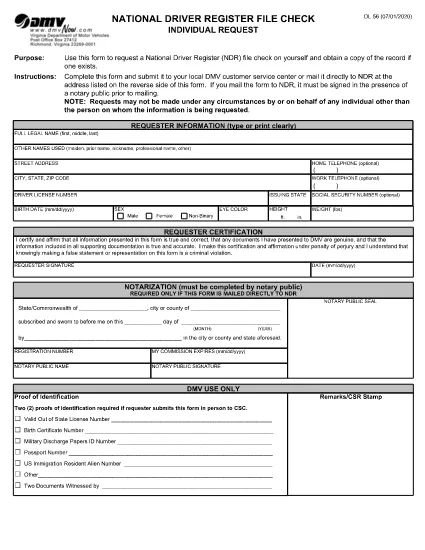
The DL-56 is the official request form used to obtain a file check from the National Driver Register (NDR). This government‑issued form lets you verify whether your driving record contains any cancellations, suspensions, or revocations that could affect licensing, employment, or insurance.

What Is the DL-56 Form?

The DL‑56 form is a simple, one‑page PDF that collects basic personal information (name, address, driver’s license number) and a notarized signature. Once submitted, the NDR returns a copy of any existing file entries associated with your driver’s license.

Who Needs a DL-56 File Check?

  • Job applicants whose position requires a clean driving record.
  • Individuals applying for a commercial driver’s license or occupational license.
  • Insurance companies assessing risk.
  • Drivers who have had a license suspended, revoked, or cancelled and need to confirm the status.

How to Complete the DL-56 Form Online

Instead of downloading the PDF and editing it in a separate editor, simply click the "Fill out this form" button on the page. The Formize PDF Filler app will load, allowing you to fill, sign, and save the document directly in your browser.

Common Mistakes to Avoid

  • Missing notarization: The NDR requires a notarized signature for mailed submissions.
  • Incorrect driver’s license number: Double‑check the number to prevent delays.
  • Leaving blank fields: Even optional fields should be marked "N/A" if not applicable.

Submit Your Request & What Happens Next

After completing the form, you can either:

  1. Download the completed PDF, have it notarized, and mail it to the address listed on the form.
  2. Save the PDF, upload it through the DMV’s online portal (if available), and follow any additional electronic submission instructions.

The NDR will process your request within 10‑15 business days and send the file check results to the address you provided.

자주하는 질문
  • What does the DL-56 form request?

    It requests a file check from the National Driver Register to see if any adverse actions (cancellation, suspension, revocation) are recorded against your driver’s license.

  • Do I need a notary for the DL-56 form?

    Yes, if you are submitting the form by mail. The notarized signature verifies your identity for the NDR.

  • How long does it take to receive the file check?

    The NDR typically processes requests within 10‑15 business days and mails the results to the address you provide.

  • Can I submit the DL-56 form electronically?

    Many states accept a digitally completed form that you later notarize and mail. Check your state DMV’s website for any fully online options.

  • Is there a fee to request a DL-56 file check?

    The federal NDR service is free. However, some states may charge a processing fee for handling the request.

  • What if my name has changed since my license was issued?

    Enter your current legal name and include any supporting documentation (e.g., marriage certificate) that explains the name change.

어떻게

5개의 간단한 단계를 통해 온라인으로 DL-56 form를 무료로 작성하는 방법:

  1. 1
    Open the Fillable Form
    Click the "Fill out this form" button on this page. The Formize PDF Filler will load instantly in your browser.
  2. 2
    Enter Your Personal Information
    Complete all required fields: full legal name, mailing address, driver’s license number, and date of birth.
  3. 3
    Attach Supporting Documents
    If the form requests additional proof (e.g., identification), upload the files using the attachment field.
  4. 4
    Sign Electronically
    Use the built‑in e‑signature tool to sign the form. Remember, a notarized signature is required for mailed submissions.
  5. 5
    Save and Submit
    Download the completed PDF, have it notarized if you plan to mail it, or follow any online submission instructions provided by your state DMV.
Formize PDF 필러 앱
에 대한

운전 면허증 신청서

대부분의 국가에서는 운전 면허증을 소지해야 도로를 달릴 수 있습니다. 운전 면허증을 취득하는 것은 자동차를 운전하려는 모든 사람에게 중요한 이정표입니다.

DL-56 form는 운전 면허증을 신청하려는 사람들로부터 정보를 수집하는 데 사용되는 문서인 운전 면허증 신청 양식 중 하나입니다. 일반적으로 신청자의 이름, 생년월일, ID 번호, 연락처 정보, 운전 면허증 기록 및 경험에 대한 필드가 포함됩니다.

특징

PDF 필러

온라인에서 PDF 양식을 채우는 가장 쉬운 방법

  • DL-56 form를 빠르게 작성하세요.
    온라인에서 DL-56 form을(를) 빠르게 채우는 방법을 찾고 계십니까? 온라인 무료 PDF 양식 필러를 사용하면 1분 이내에 이 PDF 문서를 편집하고 채우는 방법을 알 수 있습니다.
  • 사용하기 쉬운 온라인 PDF 편집기
    다시 스캔하여 다시 보내기 전에 편집할 수 있도록 PDF 파일을 인쇄하는 데 지쳤습니까? 온라인에서 무료로 PDF 문서를 편집하세요. 온라인 PDF 편집기를 사용하여 시간과 종이를 절약하십시오.
  • 훌륭한 도구, 모든 플랫폼
    Mac에서 DL-56 form를 채우는 방법이나 PDF 필러를 무료로 사용하는 방법이 궁금하십니까? 당사의 온라인 PDF 도구는 모든 플랫폼에서 작동합니다.
  • 안전한 파일 저장
    완료된 "DL-56 form" 파일은 Amazon 클라우드 호스팅에서 관리하는 보안 데이터베이스에 저장됩니다. 언제든지 시스템에서 파일을 삭제할 수 있습니다. 어쨌든 이러한 파일은 24시간 후에 자동으로 삭제됩니다.
  • DL-56 form님과 채팅
    무료 PDF 리더 도우미인 Chatize에서 "DL-56 form"와 채팅하세요. "DL-56 form"에서 질문하고 답변을 받으세요. 위의 문서와 채팅 버튼을 클릭하세요.

필링 세션 삭제

선택한 필링 세션을 삭제하시겠습니까?이 경우 양식 작성 진행 상황이 손실됩니다.

편집 세션 삭제

선택한 편집 세션을 삭제하시겠습니까? 이 경우 양식 작성 및 편집 진행 상황이 손실됩니다.