
언어 선택

Virginia DMV DMS-004 Fillable PDF – Payment Authorization Form

  1. 국가 미국
  2. 언어 영어
  3. 활동 운전 면허증
  4. 상태 여자 이름
Virginia DMV DMS-004 Fillable PDF – Payment Authorization Form

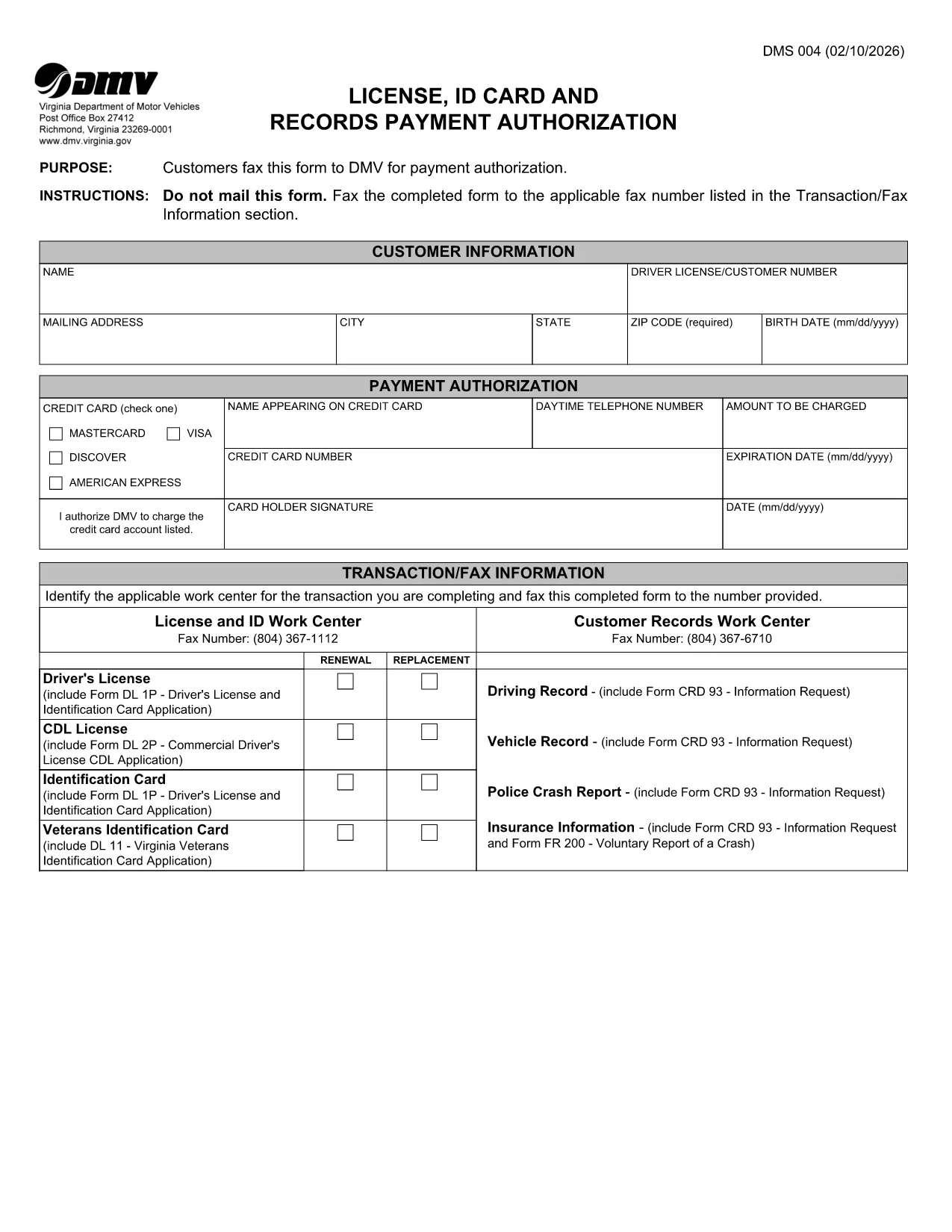
The DMS-004 is the official Virginia Department of Motor Vehicles (DMV) form used to authorize payment for a driver's license, ID card, or records request. This fillable PDF lets you complete the payment authorization quickly, without printing or faxing.

Our online Formize PDF Filler loads the DMS-004 directly in your browser, so you can type, sign, and submit the form in minutes. No additional software is required.

What Is the DMS-004 Form?

The DMS-004, titled "License, ID Card and Records Payment Authorization," captures:

  • Applicant’s personal information (name, address, driver’s license number)
  • Details of the requested service (license renewal, new ID, record copy)
  • Payment method and authorization signature

It is required whenever you need to pay the DMV for a license, ID card, or official record request.

How to Fill Out DMS-004 Online with Formize

Follow the simple steps below to complete the form without ever leaving the page.

Common Mistakes to Avoid

Even a tiny error can delay processing. Keep these tips in mind:

  • Double‑check the driver’s license number – a single digit off will cause a rejection.
  • Use a valid credit or debit card number; the form does not accept expired cards.
  • Sign exactly where the signature box appears; digital signatures are accepted.
  • Do not leave any mandatory fields blank; the Formize validator will highlight them.

Where to Submit the Completed Form

After you finish, you have two options:

  • Fax – The form automatically generates a fax‑ready PDF you can send to the number listed in the “Transaction/Fax Information” section.
  • Upload – Use the Virginia DMV online portal to upload the completed PDF directly.

Both methods are accepted, but the online upload is faster and provides an instant confirmation.

자주하는 질문
  • What is the purpose of the DMS-004 form?

    The DMS-004 authorizes the Virginia DMV to process payment for a driver's license, state ID card, or official records request.

  • Can I fill out DMS-004 on a mobile device?

    Yes. The Formize PDF Filler is fully responsive, allowing you to complete the form on smartphones or tablets.

  • Is a digital signature accepted?

    A digital signature created within the Formize app meets the DMV’s requirements and is treated the same as a handwritten signature.

  • Do I need to print the form after filling it out?

    No. You can fax the completed PDF directly from the app or upload the file to the DMV’s online portal.

  • What payment methods are accepted on DMS-004?

    The form accepts credit or debit card numbers. Ensure the card is current and has sufficient funds.

  • How long does it take for the DMV to process the form?

    Processing is typically 2–3 business days after the DMV receives the completed and authorized form.

  • Can I save a draft and finish later?

    Yes. The Formize app allows you to save a draft locally in your browser and return to it anytime before submission.

  • What should I do if I make a mistake?

    Edit the field directly in the Formize app before final submission. If you have already submitted, contact the Virginia DMV to request a correction.

어떻게

4개의 간단한 단계를 통해 온라인으로 DMS-004를 무료로 작성하는 방법:

  1. 1
    Open the Fillable Form
    Click the "Fill out this form" button on the page. The Formize PDF Filler app loads the DMS-004 directly in your browser.
  2. 2
    Enter Your Information
    Type in all required fields: personal details, service requested, and payment information. The form validates entries in real time.
  3. 3
    Add Your Digital Signature
    Use your mouse, trackpad, or touchscreen to sign in the signature box. Formize captures a secure digital signature.
  4. 4
    Review and Submit
    Click the "Review" button to ensure no fields are missing. Then choose to either fax the PDF automatically or download it for online upload to the Virginia DMV portal.
Formize PDF 필러 앱
에 대한

운전 면허증 신청서

DMS-004은(는) 개인이 공공 도로에서 자동차를 운전할 수 있도록 허용하는 공식 정부 발급 문서인 운전 면허증을 취득하거나 갱신하는 과정에서 사용되는 문서인 운전 면허증 양식 중 하나입니다. 이러한 양식은 관할권에 따라 다를 수 있지만 일반적으로 다음이 포함됩니다.

신청 양식: 이 양식은 운전 면허증을 신청하는 데 사용되며 일반적으로 이름, 주소, 생년월일, 사회 보장 번호와 같은 개인 정보를 요구합니다.

신분증 서류: 개인은 일반적으로 신청서와 함께 자신의 신원, 거주지 및 국가 내 법적 존재를 증명하는 특정 신분증을 제공해야 합니다. 여기에는 유효한 여권, 출생 증명서, 사회 보장 카드 또는 기타 정부 발행 신분증이 포함될 수 있습니다.

거주 증명서: 많은 관할권에서는 신청자에게 주소 확인을 위해 공과금 청구서, 임대 계약서, 은행 명세서 등 거주 증명서를 제출하도록 요구합니다.

건강 검진 양식: 일부 관할권에서는 신청자가 안전 운전에 필요한 신체적, 정신적 요구 사항을 충족하는지 확인하기 위해 건강 검진을 요구할 수 있습니다. 일반적으로 의료 전문가가 이 양식을 작성합니다.

운전자 교육 이수 양식: 초보 운전자의 경우 운전자 교육 프로그램을 이수해야 할 수도 있습니다. 운전 면허증을 신청하려면 성공적인 이수를 나타내는 양식이나 증명서가 필요한 경우가 많습니다.

시력 테스트 양식: 시력 테스트는 일반적으로 운전면허 신청 과정에서 실시됩니다. 안과 전문의 또는 승인된 직원이 신청자의 시력을 평가하고 필수 양식을 작성합니다.

이러한 양식은 일반적으로 지역 자동차 관리국(DMV) 또는 운전 면허를 담당하는 동등한 정부 기관에서 구할 수 있습니다. 귀하의 관할권에 적용되는 특정 요구 사항과 양식은 다를 수 있으므로 확인하는 것이 중요합니다.

특징

PDF 필러

온라인에서 PDF 양식을 채우는 가장 쉬운 방법

  • DMS-004를 빠르게 작성하세요.
    온라인에서 DMS-004을(를) 빠르게 채우는 방법을 찾고 계십니까? 온라인 무료 PDF 양식 필러를 사용하면 1분 이내에 이 PDF 문서를 편집하고 채우는 방법을 알 수 있습니다.
  • 사용하기 쉬운 온라인 PDF 편집기
    다시 스캔하여 다시 보내기 전에 편집할 수 있도록 PDF 파일을 인쇄하는 데 지쳤습니까? 온라인에서 무료로 PDF 문서를 편집하세요. 온라인 PDF 편집기를 사용하여 시간과 종이를 절약하십시오.
  • 훌륭한 도구, 모든 플랫폼
    Mac에서 DMS-004를 채우는 방법이나 PDF 필러를 무료로 사용하는 방법이 궁금하십니까? 당사의 온라인 PDF 도구는 모든 플랫폼에서 작동합니다.
  • 안전한 파일 저장
    완료된 "DMS-004" 파일은 Amazon 클라우드 호스팅에서 관리하는 보안 데이터베이스에 저장됩니다. 언제든지 시스템에서 파일을 삭제할 수 있습니다. 어쨌든 이러한 파일은 24시간 후에 자동으로 삭제됩니다.
  • DMS-004님과 채팅
    무료 PDF 리더 도우미인 Chatize에서 "DMS-004"와 채팅하세요. "DMS-004"에서 질문하고 답변을 받으세요. 위의 문서와 채팅 버튼을 클릭하세요.

필링 세션 삭제

선택한 필링 세션을 삭제하시겠습니까?이 경우 양식 작성 진행 상황이 손실됩니다.

편집 세션 삭제

선택한 편집 세션을 삭제하시겠습니까? 이 경우 양식 작성 및 편집 진행 상황이 손실됩니다.