
언어 선택

TPT 599 – Third Party Tester Notification Form (Fillable PDF)

  1. 국가 미국
  2. 언어 영어
  3. 활동 운전 면허증
  4. 상태 여자 이름
TPT 599 – Third Party Tester Notification Form (Fillable PDF)

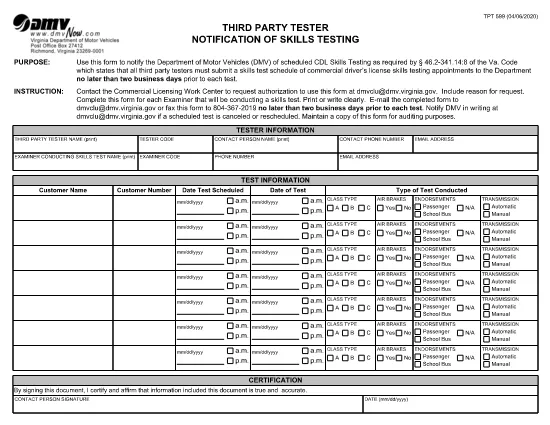
The TPT 599 is the Virginia Department of Motor Vehicles (DMV) form used by third‑party testers to notify the DMV of scheduled Commercial Driver’s License (CDL) skills testing. This form must be submitted at least two business days before the test date.

With Formize’s fillable PDF technology, you can complete the TPT 599 directly in your browser—no extra software required. Simply click the “Fill out this form” button, fill each field, and download or submit the completed document.

What is the TPT 599 Form?

The TPT 599 serves as an official notification to the Virginia DMV that a third‑party tester will conduct a CDL skills test. It includes details such as the tester’s name, test date, location, and the driver’s information.

How to Complete the TPT 599 Online

Follow the step‑by‑step guide below to fill the form quickly and accurately using the Formize PDF Filler.

Common Mistakes to Avoid

  • Leaving required fields blank – the form will not validate.
  • Using an incorrect test date format (MM/DD/YYYY).
  • Forgetting to sign the form electronically or physically before submission.
  • Submitting the form after the two‑business‑day deadline.

Download & Fill the PDF Instantly

Click the button below, wait for the Formize PDF Filler to load, and start entering your information. The fillable version automatically saves your progress.

Where to Submit the Completed Form

After completing the TPT 599, you can either:

  1. Email the PDF to the DMV’s designated address.
  2. Print and mail it to the address listed on the form.
  3. Upload it through the DMV’s online portal, if available.

Keeping a copy for your records is always recommended.

자주하는 질문
  • What does TPT 599 stand for?

    TPT 599 is the Virginia DMV’s Third Party Tester Notification of Skills Testing form, required for CDL skills test scheduling.

  • Do I need a PDF reader to fill TPT 599?

    No. With Formize’s fillable PDF, you can complete the form directly in your web browser without any additional software.

  • How far in advance must I submit the form?

    The form must be submitted at least two business days before the scheduled skills test.

  • Can I edit the form after I’ve saved it?

    Yes. Open the saved PDF again with the Formize filler, make changes, and re‑save.

  • Is an electronic signature accepted?

    Virginia DMV accepts electronic signatures on the TPT 599 when submitted electronically. If you mail the form, a handwritten signature is required.

  • What if I make a mistake after submission?

    Contact the DMV immediately. You may need to submit a corrected TPT 599 or an amendment form.

  • Is there a fee to file TPT 599?

    No fee is charged for submitting the TPT 599 notification itself.

  • Can I use the same TPT 599 for multiple tests?

    Each scheduled test requires its own completed TPT 599 form.

어떻게

5개의 간단한 단계를 통해 온라인으로 TPT 599를 무료로 작성하는 방법:

  1. 1
    Open the Fillable Form
    Click the “Fill out this form” button on the page. The Formize PDF Filler will load in your browser.
  2. 2
    Wait for the Filler to Load
    A few seconds may pass while the fillable PDF is prepared. Do not refresh the page.
  3. 3
    Enter All Required Information
    Complete each field—tester name, driver details, test date, location, and signatures. The filler highlights required fields.
  4. 4
    Review and Validate
    Use the “Validate” button to check for missing or incorrectly formatted entries.
  5. 5
    Save or Submit
    Download the finished PDF for your records or follow the submission instructions on the form to send it to the Virginia DMV.
Formize PDF 필러 앱
에 대한

운전 면허증 신청서

대부분의 국가에서는 운전 면허증을 소지해야 도로를 달릴 수 있습니다. 운전 면허증을 취득하는 것은 자동차를 운전하려는 모든 사람에게 중요한 이정표입니다.

TPT 599는 운전 면허증을 신청하려는 사람들로부터 정보를 수집하는 데 사용되는 문서인 운전 면허증 신청 양식 중 하나입니다. 일반적으로 신청자의 이름, 생년월일, ID 번호, 연락처 정보, 운전 면허증 기록 및 경험에 대한 필드가 포함됩니다.

특징

PDF 필러

온라인에서 PDF 양식을 채우는 가장 쉬운 방법

  • TPT 599를 빠르게 작성하세요.
    온라인에서 TPT 599을(를) 빠르게 채우는 방법을 찾고 계십니까? 온라인 무료 PDF 양식 필러를 사용하면 1분 이내에 이 PDF 문서를 편집하고 채우는 방법을 알 수 있습니다.
  • 사용하기 쉬운 온라인 PDF 편집기
    다시 스캔하여 다시 보내기 전에 편집할 수 있도록 PDF 파일을 인쇄하는 데 지쳤습니까? 온라인에서 무료로 PDF 문서를 편집하세요. 온라인 PDF 편집기를 사용하여 시간과 종이를 절약하십시오.
  • 훌륭한 도구, 모든 플랫폼
    Mac에서 TPT 599를 채우는 방법이나 PDF 필러를 무료로 사용하는 방법이 궁금하십니까? 당사의 온라인 PDF 도구는 모든 플랫폼에서 작동합니다.
  • 안전한 파일 저장
    완료된 "TPT 599" 파일은 Amazon 클라우드 호스팅에서 관리하는 보안 데이터베이스에 저장됩니다. 언제든지 시스템에서 파일을 삭제할 수 있습니다. 어쨌든 이러한 파일은 24시간 후에 자동으로 삭제됩니다.
  • TPT 599님과 채팅
    무료 PDF 리더 도우미인 Chatize에서 "TPT 599"와 채팅하세요. "TPT 599"에서 질문하고 답변을 받으세요. 위의 문서와 채팅 버튼을 클릭하세요.

필링 세션 삭제

선택한 필링 세션을 삭제하시겠습니까?이 경우 양식 작성 진행 상황이 손실됩니다.

편집 세션 삭제

선택한 편집 세션을 삭제하시겠습니까? 이 경우 양식 작성 및 편집 진행 상황이 손실됩니다.