
언어 선택

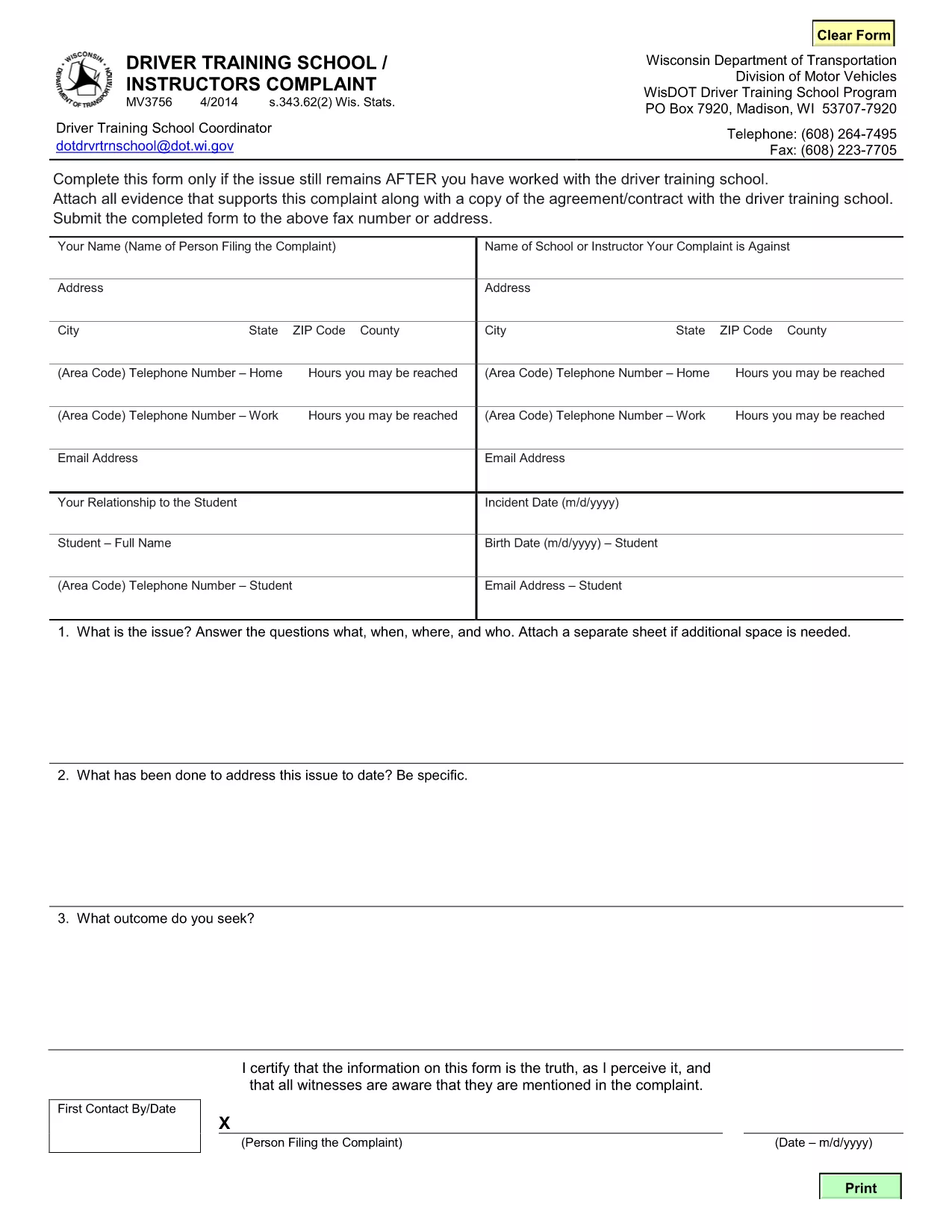
MV3756 Driver Training School & Instructor Complaint Form

  1. 언어 영어
  2. 국가 미국
  3. 활동 운전 면허증
  4. 상태 위스콘신
MV3756 Driver Training School & Instructor Complaint Form

The MV3756 is the official Wisconsin Department of Transportation (WisDOT) complaint form used to report issues with driver training schools or instructors. Whether you experienced inadequate instruction, contract violations, or safety concerns, this fillable PDF lets you submit a detailed complaint quickly.

Formize hosts a secure, browser‑based PDF filler so you never need to download, print, or scan the document. Just click the button, fill the fields, and submit the completed form directly to WisDOT.

Below you’ll find step‑by‑step instructions, common pitfalls to watch out for, and answers to the most frequently asked questions about the MV3756 form.

자주하는 질문
  • What type of issues can I report with MV3756?

    The form covers any misconduct by a driver‑training school or instructor, including contract breaches, unsafe training practices, or failure to provide promised services.

  • Do I need a Wisconsin address to use this form?

    No. The MV3756 can be submitted by anyone who has taken a driver‑training course in Wisconsin, regardless of where you currently reside.

  • Can I submit the form without attachments?

    While attachments are optional, providing copies of agreements, receipts, or photos greatly strengthens your complaint and speeds up processing.

  • How long does it take for WisDOT to respond?

    WisDOT typically acknowledges receipt within 5‑7 business days and may request additional information before taking action.

  • Is there a fee to file an MV3756 complaint?

    No. Filing the MV3756 form is completely free.

  • What if I make a mistake after submitting?

    Contact the WisDOT Complaint Unit directly (phone or email) and reference your submission ID. They can guide you on amending the complaint.

  • Can I save my progress and finish later?

    Yes. The Formize PDF filler allows you to save a draft locally on your device and reload it when you’re ready to finish.

  • Is my personal information secure?

    Formize uses SSL encryption, and the PDF is stored only for the duration of the session. No data is retained after you submit the form.

어떻게

5개의 간단한 단계를 통해 온라인으로 MV3756를 무료로 작성하는 방법:

  1. 1
    Open the Fillable Form
    Click the **Fill out this form** button on the page. Formize will load the MV3756 PDF directly in your browser.
  2. 2
    Enter Your Information
    Complete each required field—your name, contact details, school name, and a clear description of the issue.
  3. 3
    Attach Supporting Documents
    Use the attachment fields to upload copies of contracts, receipts, or any evidence that supports your complaint.
  4. 4
    Review & Sign
    Double‑check all entries for accuracy, then add your electronic signature using the built‑in signing tool.
  5. 5
    Submit the Form
    Press **Submit**. The completed MV3756 will be securely sent to the Wisconsin DOT’s complaint processing center.
Formize PDF 필러 앱
에 대한

운전 면허증 신청서

MV3756은(는) 개인이 공공 도로에서 자동차를 운전할 수 있도록 허용하는 공식 정부 발급 문서인 운전 면허증을 취득하거나 갱신하는 과정에서 사용되는 문서인 운전 면허증 양식 중 하나입니다. 이러한 양식은 관할권에 따라 다를 수 있지만 일반적으로 다음이 포함됩니다.

신청 양식: 이 양식은 운전 면허증을 신청하는 데 사용되며 일반적으로 이름, 주소, 생년월일, 사회 보장 번호와 같은 개인 정보를 요구합니다.

신분증 서류: 개인은 일반적으로 신청서와 함께 자신의 신원, 거주지 및 국가 내 법적 존재를 증명하는 특정 신분증을 제공해야 합니다. 여기에는 유효한 여권, 출생 증명서, 사회 보장 카드 또는 기타 정부 발행 신분증이 포함될 수 있습니다.

거주 증명서: 많은 관할권에서는 신청자에게 주소 확인을 위해 공과금 청구서, 임대 계약서, 은행 명세서 등 거주 증명서를 제출하도록 요구합니다.

건강 검진 양식: 일부 관할권에서는 신청자가 안전 운전에 필요한 신체적, 정신적 요구 사항을 충족하는지 확인하기 위해 건강 검진을 요구할 수 있습니다. 일반적으로 의료 전문가가 이 양식을 작성합니다.

운전자 교육 이수 양식: 초보 운전자의 경우 운전자 교육 프로그램을 이수해야 할 수도 있습니다. 운전 면허증을 신청하려면 성공적인 이수를 나타내는 양식이나 증명서가 필요한 경우가 많습니다.

시력 테스트 양식: 시력 테스트는 일반적으로 운전면허 신청 과정에서 실시됩니다. 안과 전문의 또는 승인된 직원이 신청자의 시력을 평가하고 필수 양식을 작성합니다.

이러한 양식은 일반적으로 지역 자동차 관리국(DMV) 또는 운전 면허를 담당하는 동등한 정부 기관에서 구할 수 있습니다. 귀하의 관할권에 적용되는 특정 요구 사항과 양식은 다를 수 있으므로 확인하는 것이 중요합니다.

특징

PDF 필러

온라인에서 PDF 양식을 채우는 가장 쉬운 방법

  • MV3756를 빠르게 작성하세요.
    온라인에서 MV3756을(를) 빠르게 채우는 방법을 찾고 계십니까? 온라인 무료 PDF 양식 필러를 사용하면 1분 이내에 이 PDF 문서를 편집하고 채우는 방법을 알 수 있습니다.
  • 사용하기 쉬운 온라인 PDF 편집기
    다시 스캔하여 다시 보내기 전에 편집할 수 있도록 PDF 파일을 인쇄하는 데 지쳤습니까? 온라인에서 무료로 PDF 문서를 편집하세요. 온라인 PDF 편집기를 사용하여 시간과 종이를 절약하십시오.
  • 훌륭한 도구, 모든 플랫폼
    Mac에서 MV3756를 채우는 방법이나 PDF 필러를 무료로 사용하는 방법이 궁금하십니까? 당사의 온라인 PDF 도구는 모든 플랫폼에서 작동합니다.
  • 안전한 파일 저장
    완료된 "MV3756" 파일은 Amazon 클라우드 호스팅에서 관리하는 보안 데이터베이스에 저장됩니다. 언제든지 시스템에서 파일을 삭제할 수 있습니다. 어쨌든 이러한 파일은 24시간 후에 자동으로 삭제됩니다.
  • MV3756님과 채팅
    무료 PDF 리더 도우미인 Chatize에서 "MV3756"와 채팅하세요. "MV3756"에서 질문하고 답변을 받으세요. 위의 문서와 채팅 버튼을 클릭하세요.

필링 세션 삭제

선택한 필링 세션을 삭제하시겠습니까?이 경우 양식 작성 진행 상황이 손실됩니다.

편집 세션 삭제

선택한 편집 세션을 삭제하시겠습니까? 이 경우 양식 작성 및 편집 진행 상황이 손실됩니다.