
언어 선택

Georgia MV-300 – Request Cancellation of Temporary Operating Permit

  1. 국가 미국
  2. 언어 영어
  3. 부서 Georgia Department of Revenue
  4. 활동 차량 등록
Georgia MV-300 – Request Cancellation of Temporary Operating Permit

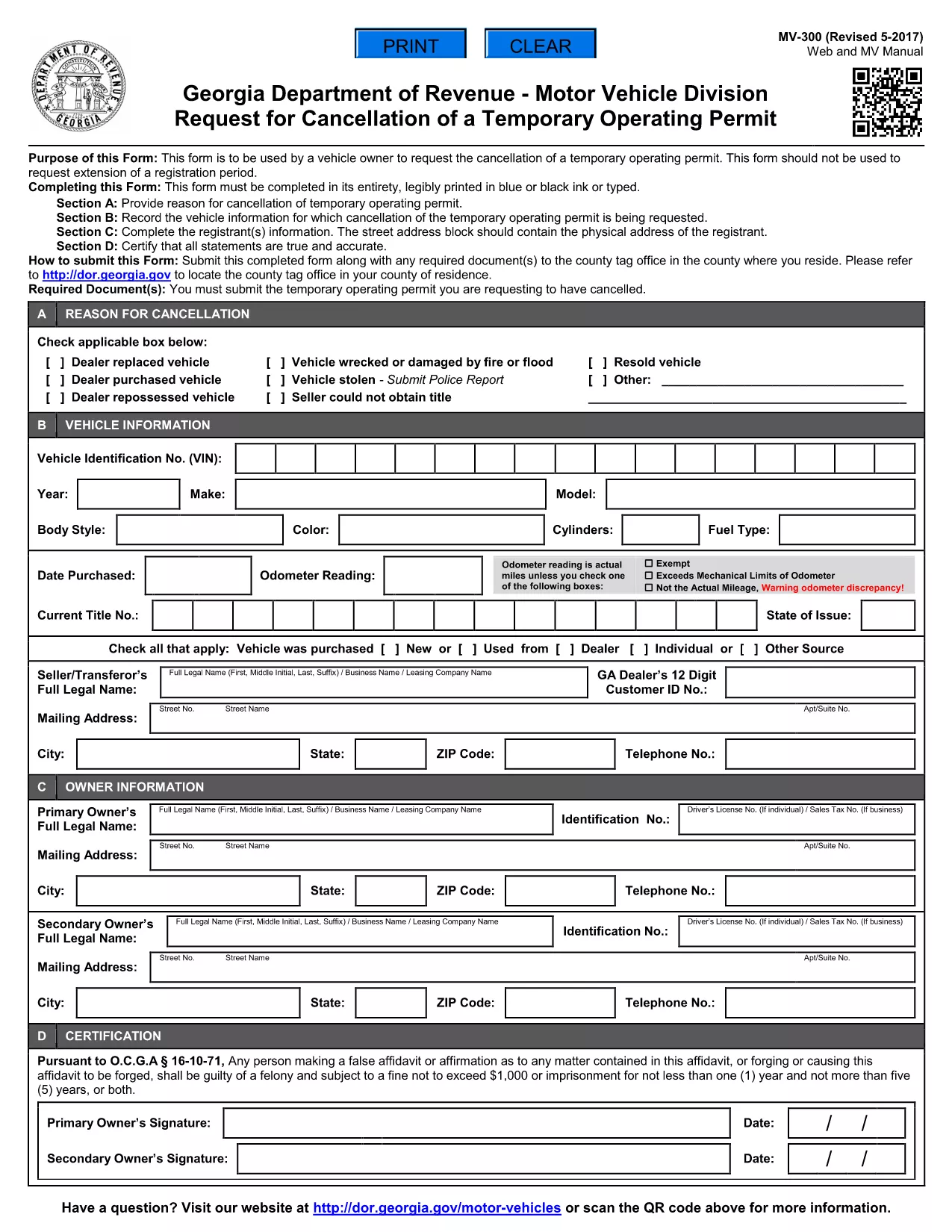
The MV-300 is the official Georgia Department of Revenue Motor Vehicle Division form used to request the cancellation of a temporary operating permit. Whether you’re a dealer, fleet manager, or private vehicle owner, you can now complete this form entirely online with Formize’s fillable PDF tool.

What Is the MV-300 Form?

The MV-300 serves a single purpose: to formally request the termination of a temporary operating permit issued by the Georgia Department of Revenue. It is not intended for extensions, renewals, or any other type of permit request.

How to Complete the MV-300 Online

Follow these simple steps to fill out the MV-300 without leaving your browser:

  • Click the "Fill out this form" button on this page.
  • Wait a few seconds while the Formize PDF Filler app loads the fillable version of the MV-300.
  • Enter the required information in each field (vehicle details, permit number, owner signature, etc.).
  • Review the completed form for accuracy.
  • Click Submit to download the finished PDF or to email it directly to the Motor Vehicle Division.

Common Mistakes to Avoid

  • Using the wrong form: MV-300 is only for cancellation, not for extensions.
  • Leaving required fields blank: Every field marked with an asterisk (*) must be completed.
  • Incorrect permit number: Verify the number on your temporary permit before entering it.
  • Missing signatures: Both the vehicle owner and the authorized dealer must sign.

Where to Submit the Completed Form

After you’ve filled out and saved the PDF, you have two submission options:

  • Mail: Send the printed form to the address listed on the form’s instructions.
  • Electronic: Email a scanned copy to mvforms@dor.ga.gov (if your local office accepts electronic submissions).

Need Help? Frequently Asked Questions

Below are answers to the most common questions about the MV-300.

자주하는 질문
  • Can I use the MV-300 to extend a temporary operating permit?

    No. The MV-300 is strictly for cancellation. For extensions, you must use the appropriate renewal form.

  • Do I need a notary for the MV-300?

    A notary is not required for the MV-300, but the signatures must be legible and match the names on the permit.

  • What if I lose my temporary operating permit?

    Contact the Georgia Department of Revenue for a replacement permit number before completing the MV-300.

  • Is there a filing fee for cancelling a temporary permit?

    There is no fee to submit the MV-300 cancellation request.

  • How long does it take for the cancellation to be processed?

    Processing typically takes 5‑7 business days after the department receives the completed form.

  • Can I fill out the MV-300 on a mobile device?

    Yes. The Formize PDF Filler works on smartphones and tablets, making it easy to complete the form anywhere.

어떻게

4개의 간단한 단계를 통해 온라인으로 MV-300를 무료로 작성하는 방법:

  1. 1
    Open the Fillable Form
    Click the "Fill out this form" button on this page. The Formize PDF Filler will open in a new window.
  2. 2
    Enter Your Information
    Type directly into each field – vehicle details, permit number, owner contact info, and signatures.
  3. 3
    Review and Save
    Check that all required fields are completed, then click "Save" to download the finished PDF to your device.
  4. 4
    Submit to the Motor Vehicle Division
    Mail or email the completed PDF according to the instructions on the form.
Formize PDF 필러 앱
에 대한

차량 등록 양식

자동차, 트레일러 또는 보트를 소유하거나 임대하는 경우 차량을 법적으로 등록하고 안전하게 유지하기 위해 특정 의무를 충족해야 합니다.

MV-300는 차량 등록 양식 중 하나로 해당 주 또는 지방 당국에 자동차를 등록하는 데 사용되는 문서입니다. 이러한 양식은 일반적으로 사람이 신차 또는 중고차를 구입하거나 차량을 가지고 새로운 주 또는 지방으로 이사할 때 필요합니다.

차량 등록에 필요한 정확한 요구 사항과 양식은 위치에 따라 다를 수 있지만 일반적으로 프로세스에는 차량, 소유자 및 차량에 대한 모든 유치권에 대한 정보를 제공하는 것이 포함됩니다.

등록 양식과 수수료가 제출되면 주 또는 지방 당국은 차량 소유자에게 등록 증명서 또는 번호판을 발급합니다. 이 등록을 통해 차량은 일반 도로와 고속도로에서 합법적으로 운행할 수 있습니다.

특징

PDF 필러

온라인에서 PDF 양식을 채우는 가장 쉬운 방법

  • MV-300를 빠르게 작성하세요.
    온라인에서 MV-300을(를) 빠르게 채우는 방법을 찾고 계십니까? 온라인 무료 PDF 양식 필러를 사용하면 1분 이내에 이 PDF 문서를 편집하고 채우는 방법을 알 수 있습니다.
  • 사용하기 쉬운 온라인 PDF 편집기
    다시 스캔하여 다시 보내기 전에 편집할 수 있도록 PDF 파일을 인쇄하는 데 지쳤습니까? 온라인에서 무료로 PDF 문서를 편집하세요. 온라인 PDF 편집기를 사용하여 시간과 종이를 절약하십시오.
  • 훌륭한 도구, 모든 플랫폼
    Mac에서 MV-300를 채우는 방법이나 PDF 필러를 무료로 사용하는 방법이 궁금하십니까? 당사의 온라인 PDF 도구는 모든 플랫폼에서 작동합니다.
  • 안전한 파일 저장
    완료된 "MV-300" 파일은 Amazon 클라우드 호스팅에서 관리하는 보안 데이터베이스에 저장됩니다. 언제든지 시스템에서 파일을 삭제할 수 있습니다. 어쨌든 이러한 파일은 24시간 후에 자동으로 삭제됩니다.
  • MV-300님과 채팅
    무료 PDF 리더 도우미인 Chatize에서 "MV-300"와 채팅하세요. "MV-300"에서 질문하고 답변을 받으세요. 위의 문서와 채팅 버튼을 클릭하세요.

필링 세션 삭제

선택한 필링 세션을 삭제하시겠습니까?이 경우 양식 작성 진행 상황이 손실됩니다.

편집 세션 삭제

선택한 편집 세션을 삭제하시겠습니까? 이 경우 양식 작성 및 편집 진행 상황이 손실됩니다.