
언어 선택

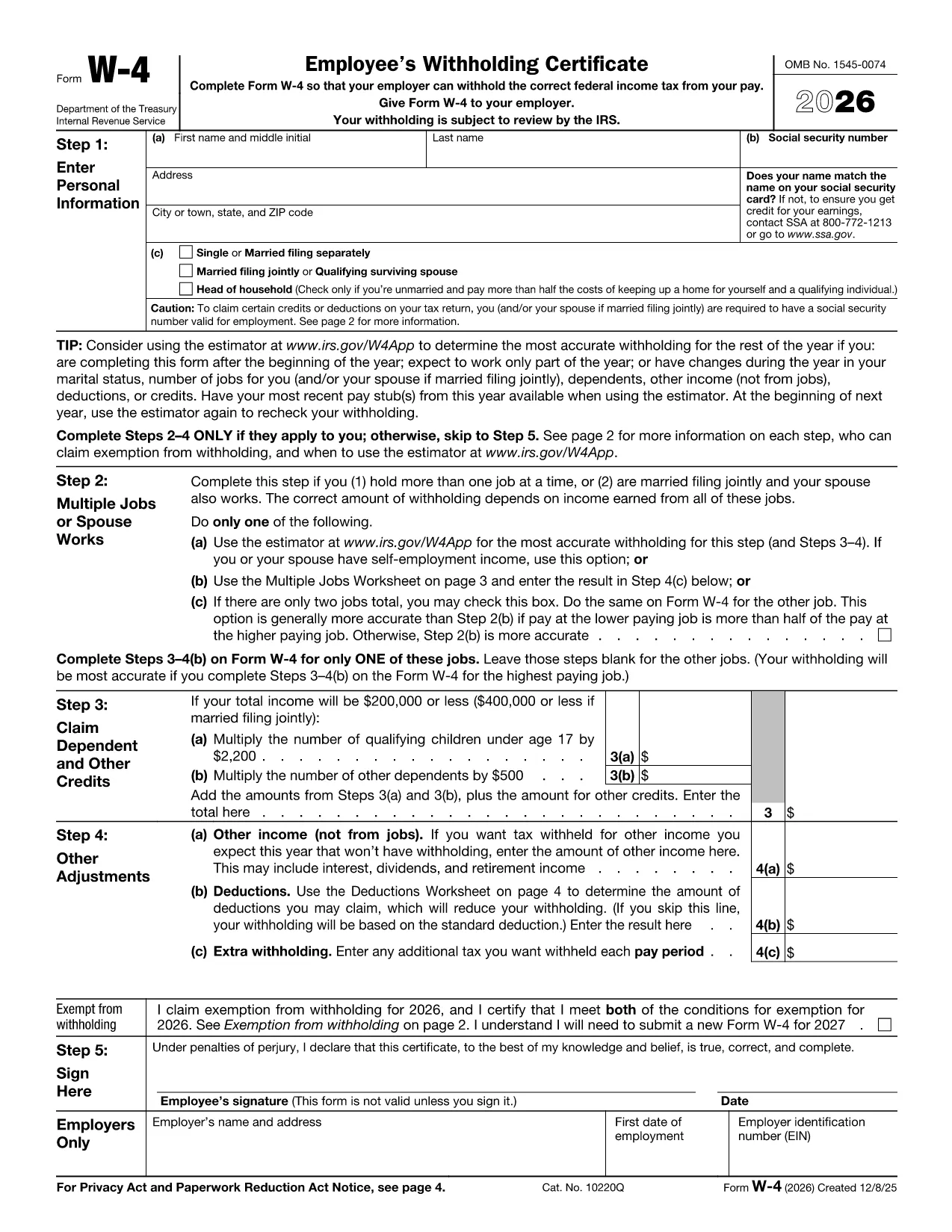
2026 IRS W‑4 Employee Tax Withholding Form (Fillable PDF)

  1. 국가 미국
  2. 언어 영어
  3. 활동 구실
  4. 부서 IRS
2026 IRS W‑4 Employee Tax Withholding Form (Fillable PDF)

The 2026 IRS W‑4 is the official employee tax‑withholding form you use when starting a new job or when your personal or financial situation changes. Filling it out correctly ensures the right amount of federal income tax is taken from each paycheck.

Why You Need the 2026 W‑4 Form

Employers must have a current W‑4 on file for every employee. An up‑to‑date form helps you avoid over‑withholding (which reduces your take‑home pay) or under‑withholding (which could lead to a tax bill at filing time).

How to Fill Out the 2026 W‑4 Online

Instead of downloading the PDF and editing it with a separate program, simply click the "Fill out this form" button on this page. The Formize PDF Filler app will load directly in your browser, letting you complete the form instantly.

Common Mistakes to Avoid

  • Leaving the “Step 4 (Other Adjustments)” section blank when you have extra income or deductions.
  • Signing and dating the form in the wrong place.
  • Using an old version of the W‑4 (always use the 2026 edition).

Submit and Keep Records

After you finish, click Submit in the Formize app. Your completed PDF can be saved to your device and a copy should be kept for your records. Give the signed form to your employer’s payroll department.

Need more help? Review the FAQs below or consult the IRS Publication 505 for detailed withholding guidance.

자주하는 질문
  • When should I submit a new W‑4?

    Submit a new W‑4 whenever your filing status, number of dependents, or other tax‑affecting circumstances change, such as a marriage, birth, or significant raise.

  • Do I need to file the W‑4 with the IRS?

    No. The W‑4 is given only to your employer. The IRS receives the information indirectly through your employer’s payroll reports.

  • Can I edit a submitted W‑4?

    You cannot edit a submitted form, but you can complete a new W‑4 and give it to your employer to replace the old one.

  • Is the 2026 W‑4 available in paper form?

    Yes, you can request a paper copy from your employer or download the PDF and print it, but the online Formize filler offers a faster, error‑checking experience.

  • What if I make a mistake after submitting?

    Complete a new W‑4 with the correct information and submit it to your employer as soon as possible. This will update future withholdings.

  • Where can I find more detailed guidance?

    Refer to IRS Publication 505, "Tax Withholding and Estimated Tax," for comprehensive instructions on how the W‑4 impacts your tax liability.

어떻게

4개의 간단한 단계를 통해 온라인으로 2026 W-4를 무료로 작성하는 방법:

  1. 1
    Open the Fillable Form
    Click the "Fill out this form" button on the page. The Formize PDF Filler loads directly in your browser.
  2. 2
    Complete Each Section
    Enter your personal information, filing status, dependents, and any extra withholding adjustments as prompted.
  3. 3
    Review for Accuracy
    Double‑check all entries, especially Social Security Number and signature fields, to avoid processing delays.
  4. 4
    Save and Submit
    Save the completed PDF to your device, then submit a copy to your employer’s payroll department.
Formize PDF 필러 앱
에 대한

세금 양식

2026 W-4는 개인 또는 기업의 소득, 공제 및 납세 의무에 대한 정보를 관련 세무 당국에 보고하는 데 사용되는 문서인 세금 양식 중 하나입니다. 이 양식은 세법을 준수하고 납세 의무를 이행하는 데 필요합니다. 세금 양식은 국가 및 특정 세금 요건에 따라 다릅니다. 다음은 몇 가지 일반적인 세금 양식 유형입니다.

개인 세금 양식: 이 양식은 개인 납세자가 개인 소득과 청구 공제, 공제 및 면제를 신고하는 데 사용됩니다. 예를 들어 미국의 1040 양식 또는 영국의 자진 신고서 양식이 있습니다.

사업세 양식: 사업세 양식은 회사, 파트너십 또는 자영업자가 사업 소득, 비용 및 기타 세금 관련 정보를 보고하는 데 사용됩니다. 예를 들어 미국의 Schedule C 양식(사업 이익 또는 손실) 또는 영국의 CT600 양식(회사 세금 신고서)이 있습니다.

급여 세금 양식: 이 양식은 고용주가 직원의 급여에서 원천징수된 임금, 급여 및 세금을 보고하는 데 사용됩니다. 예를 들어 미국의 W-2 양식 또는 영국의 P60 양식이 있습니다.

판매세 양식: 판매세 양식은 기업이 과세 대상 상품이나 서비스에 대해 징수한 판매세를 신고하고 송금하는 데 사용됩니다. 구체적인 판매세 양식은 관할권에 따라 다릅니다.

부가가치세(VAT) 양식: VAT 양식은 판매 시 징수된 VAT를 신고 및 납부하고 구매 시 VAT 공제를 청구하기 위해 부가가치세를 부과하는 국가에서 사용됩니다. 그 예로는 많은 국가에서 사용되는 VAT 신고 양식이 있습니다.

추정 세금 양식: 추정 세금 양식은 자영업 소득, 투자 소득 등 원천징수 대상이 아닌 소득에 대한 추정세를 신고하고 납부하는 데 사용됩니다.

이는 존재할 수 있는 수많은 세금 양식 중 몇 가지 예일 뿐입니다. 필요한 특정 양식은 해당 국가 또는 관할권의 세법 및 규정에 따라 다릅니다. 귀하의 상황에 어떤 양식이 적용되는지 결정하려면 세무 당국의 지침을 참조하거나 전문가의 조언을 구하는 것이 중요합니다.

특징

PDF 필러

온라인에서 PDF 양식을 채우는 가장 쉬운 방법

  • 2026 W-4를 빠르게 작성하세요.
    온라인에서 2026 W-4을(를) 빠르게 채우는 방법을 찾고 계십니까? 온라인 무료 PDF 양식 필러를 사용하면 1분 이내에 이 PDF 문서를 편집하고 채우는 방법을 알 수 있습니다.
  • 사용하기 쉬운 온라인 PDF 편집기
    다시 스캔하여 다시 보내기 전에 편집할 수 있도록 PDF 파일을 인쇄하는 데 지쳤습니까? 온라인에서 무료로 PDF 문서를 편집하세요. 온라인 PDF 편집기를 사용하여 시간과 종이를 절약하십시오.
  • 훌륭한 도구, 모든 플랫폼
    Mac에서 2026 W-4를 채우는 방법이나 PDF 필러를 무료로 사용하는 방법이 궁금하십니까? 당사의 온라인 PDF 도구는 모든 플랫폼에서 작동합니다.
  • 안전한 파일 저장
    완료된 "2026 W-4" 파일은 Amazon 클라우드 호스팅에서 관리하는 보안 데이터베이스에 저장됩니다. 언제든지 시스템에서 파일을 삭제할 수 있습니다. 어쨌든 이러한 파일은 24시간 후에 자동으로 삭제됩니다.
  • 2026 W-4님과 채팅
    무료 PDF 리더 도우미인 Chatize에서 "2026 W-4"와 채팅하세요. "2026 W-4"에서 질문하고 답변을 받으세요. 위의 문서와 채팅 버튼을 클릭하세요.

필링 세션 삭제

선택한 필링 세션을 삭제하시겠습니까?이 경우 양식 작성 진행 상황이 손실됩니다.

편집 세션 삭제

선택한 편집 세션을 삭제하시겠습니까? 이 경우 양식 작성 및 편집 진행 상황이 손실됩니다.