
언어 선택

IRS Form 14039 – Fillable Identity Theft Affidavit PDF

  1. 국가 미국
  2. 언어 영어
  3. 활동 구실
  4. 부서 IRS
IRS Form 14039 – Fillable Identity Theft Affidavit PDF

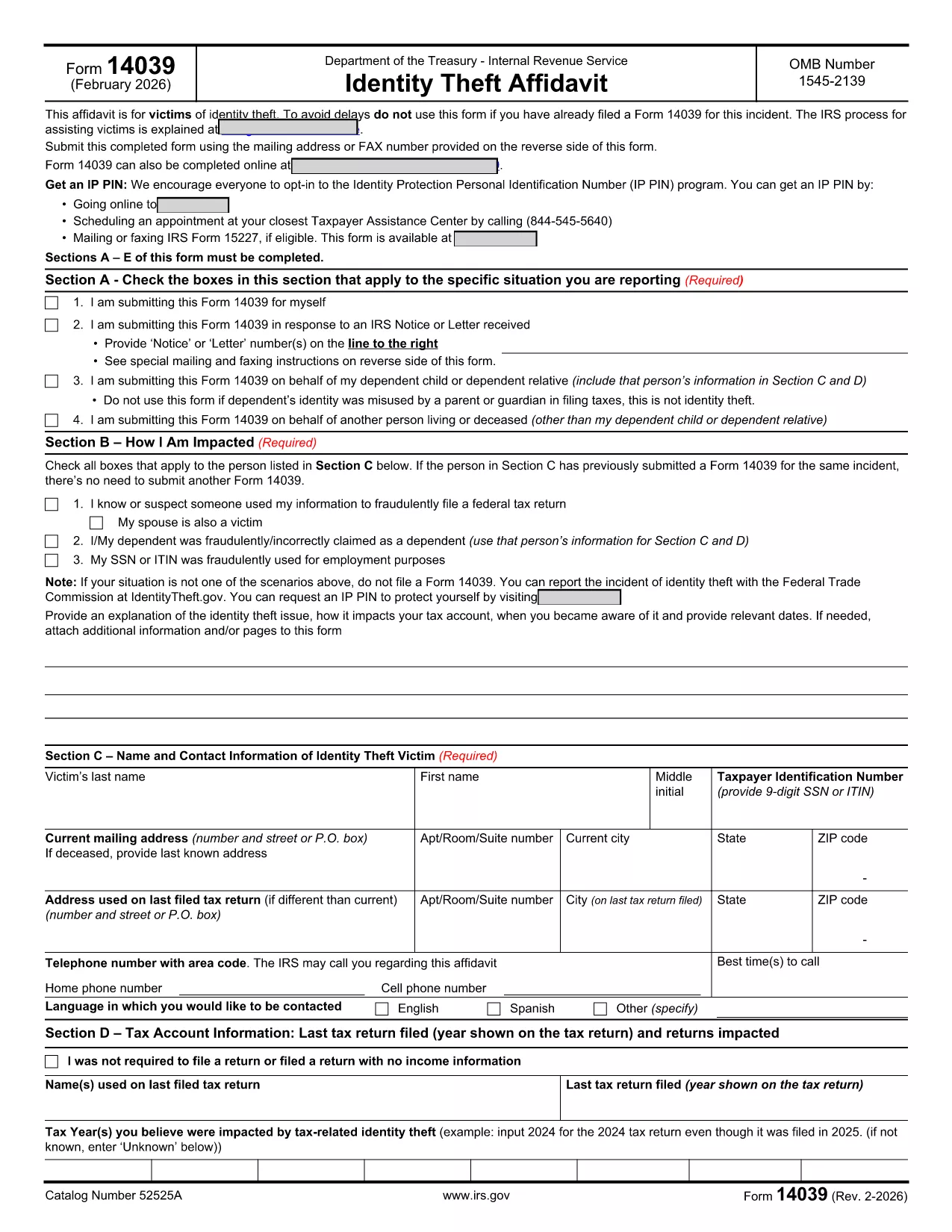
IRS Form 14039, also known as the Identity Theft Affidavit, is the official document you use to report tax‑related identity theft to the Internal Revenue Service. Whether your Social Security number or ITIN has been misused for a fraudulent return, employment, or any other purpose, this form lets you alert the IRS quickly and securely.

Formize.com hosts a fully fillable PDF version of Form 14039, so you can complete the affidavit directly in your browser—no extra software required. Just click the “Fill out this form” button, wait for the Formize PDF Filler app to load, and start entering your information.

What Is IRS Form 14039?

The form is a two‑page affidavit that collects personal details, a description of the identity‑theft incident, and the tax years affected. It is required whenever the IRS notifies you of a suspected fraud or when you discover unauthorized use of your taxpayer information.

Key Sections of the Form

  • Section A – Type of Situation: Choose why you are filing (self‑initiated, response to IRS notice, etc.).
  • Section B – How You Are Impacted: Check the boxes that match your experience (e.g., fraudulent return filed, SSN used for employment).
  • Section C – Victim Contact Information: Provide your name, SSN/ITIN, mailing address, and phone number.
  • Section D – Tax Account Information: List the tax year(s) you believe were compromised.
  • Section E – Penalty of Perjury & Signature: Sign under penalty of perjury to certify the information is true.
  • Section F – Representative Information: Fill out only if you are filing on behalf of someone else.

How to Complete the Form Online

Follow the simple steps below to submit a completed Form 14039 using Formize’s fillable PDF:

Common Mistakes to Avoid

  • Leaving any required field blank – the PDF validator will block submission.
  • Using an outdated version of the form. Always download the latest PDF (Rev. 2‑2026) from the IRS.
  • Forgetting to sign the affidavit. An unsigned form will be returned.
  • Submitting the form to the wrong address. Follow the mailing/fax instructions on the reverse side.

Where to Submit the Completed Form

After you finish, you can either:

  • Print the PDF and mail it to the address listed in the form’s instructions.
  • Fax it to the number provided on the reverse side.
  • Attach the PDF to a secure message in your IRS online account (if available).

Using Formize’s fillable version ensures the PDF is correctly formatted, reducing the chance of processing delays.

자주하는 질문
  • Who should file IRS Form 14039?

    Anyone who believes their SSN or ITIN has been used fraudulently for tax filing, employment, or other purposes should file Form 14039.

  • Can I file Form 14039 electronically?

    The IRS does not currently accept an electronic submission of Form 14039. You must print and mail or fax the completed form.

  • Do I need a lawyer to complete the Identity Theft Affidavit?

    No. The form is designed for individuals to complete on their own. If you have a representative, you can fill out Section F.

  • What if I file the wrong tax year?

    Specify the tax year(s) you suspect were compromised in Section D. If you’re unsure, write “Unknown” and provide any supporting details.

  • How long does the IRS take to respond?

    Processing times vary, but the IRS typically acknowledges receipt within 30 days. They may contact you for additional information.

  • Is the Formize fillable PDF free?

    Yes. Formize provides the fillable version of Form 14039 at no cost.

  • Can I use the same Form 14039 for multiple incidents?

    Each incident should be reported on a separate, newly completed Form 14039.

어떻게

5개의 간단한 단계를 통해 온라인으로 IRS Form 14039를 무료로 작성하는 방법:

  1. 1
    Open the Fillable Form
    Click the “Fill out this form” button on the page. The Formize PDF Filler app will load in a new window.
  2. 2
    Enter Your Information
    Complete each section (A‑F) directly in the browser. The form validates required fields in real time.
  3. 3
    Review and Sign
    Double‑check all entries, then use the built‑in e‑signature tool to add your signature under penalty of perjury.
  4. 4
    Save or Print
    Save the completed PDF to your computer, or print it if you need to mail or fax the affidavit to the IRS.
  5. 5
    Submit to the IRS
    Follow the mailing or fax instructions on the reverse side of the form, or upload the PDF through your IRS online account.
Formize PDF 필러 앱
에 대한

세금 양식

IRS Form 14039는 세금 관련 정보를 해당 세무 당국에 보고하는 데 사용되는 문서인 세금 양식 중 하나입니다. 납세자의 상황과 위치에 따라 연방, 주 및 지방 세금 양식을 포함하여 다양한 유형의 세금 양식이 있습니다.

특징

PDF 필러

온라인에서 PDF 양식을 채우는 가장 쉬운 방법

  • IRS Form 14039를 빠르게 작성하세요.
    온라인에서 IRS Form 14039을(를) 빠르게 채우는 방법을 찾고 계십니까? 온라인 무료 PDF 양식 필러를 사용하면 1분 이내에 이 PDF 문서를 편집하고 채우는 방법을 알 수 있습니다.
  • 사용하기 쉬운 온라인 PDF 편집기
    다시 스캔하여 다시 보내기 전에 편집할 수 있도록 PDF 파일을 인쇄하는 데 지쳤습니까? 온라인에서 무료로 PDF 문서를 편집하세요. 온라인 PDF 편집기를 사용하여 시간과 종이를 절약하십시오.
  • 훌륭한 도구, 모든 플랫폼
    Mac에서 IRS Form 14039를 채우는 방법이나 PDF 필러를 무료로 사용하는 방법이 궁금하십니까? 당사의 온라인 PDF 도구는 모든 플랫폼에서 작동합니다.
  • 안전한 파일 저장
    완료된 "IRS Form 14039" 파일은 Amazon 클라우드 호스팅에서 관리하는 보안 데이터베이스에 저장됩니다. 언제든지 시스템에서 파일을 삭제할 수 있습니다. 어쨌든 이러한 파일은 24시간 후에 자동으로 삭제됩니다.
  • IRS Form 14039님과 채팅
    무료 PDF 리더 도우미인 Chatize에서 "IRS Form 14039"와 채팅하세요. "IRS Form 14039"에서 질문하고 답변을 받으세요. 위의 문서와 채팅 버튼을 클릭하세요.

필링 세션 삭제

선택한 필링 세션을 삭제하시겠습니까?이 경우 양식 작성 진행 상황이 손실됩니다.

편집 세션 삭제

선택한 편집 세션을 삭제하시겠습니까? 이 경우 양식 작성 및 편집 진행 상황이 손실됩니다.