
언어 선택

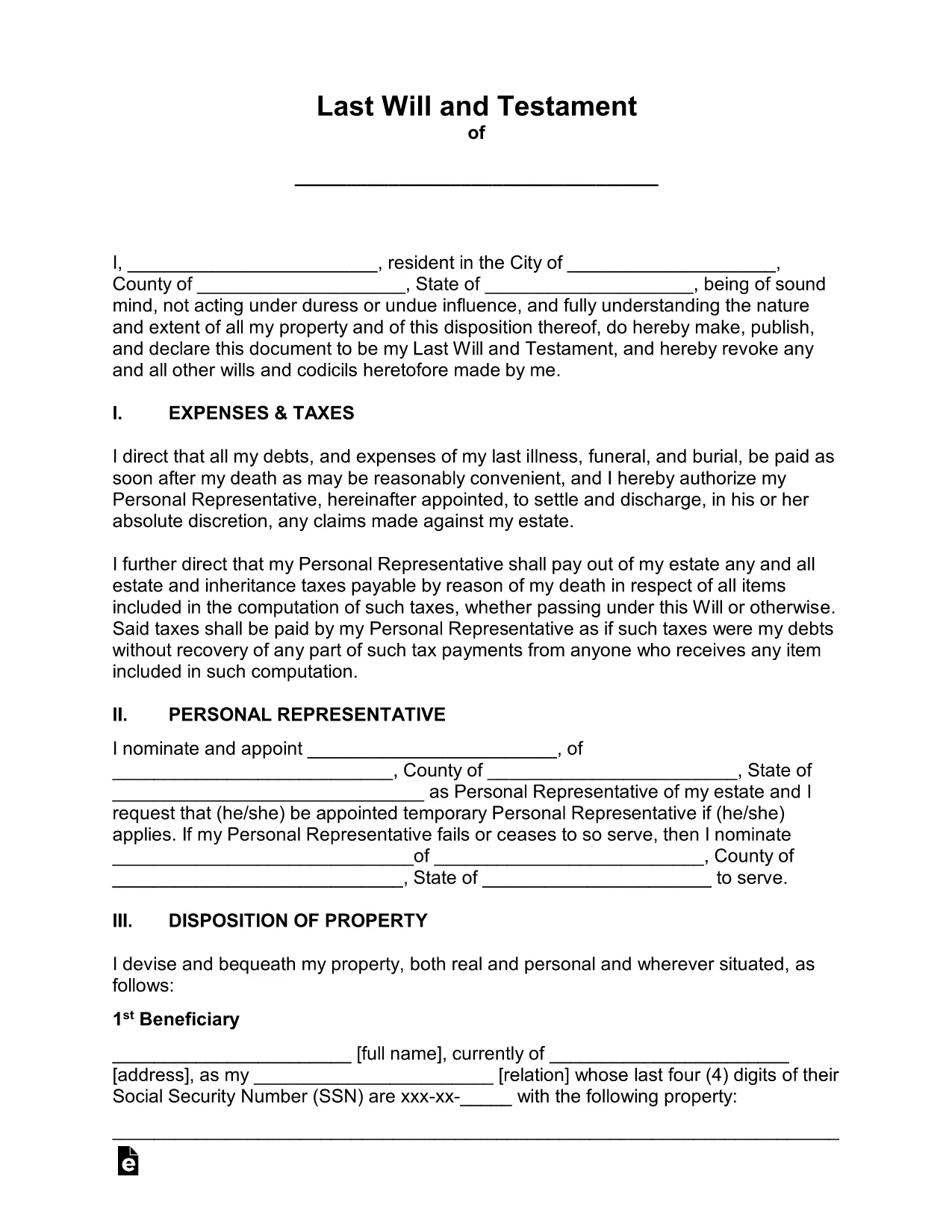
Free Fillable Legal Will Form Template

  1. 국가 미국
  2. 언어 영어
  3. 부서 Legal
  4. 활동 Estate Planning
Free Fillable Legal Will Form Template

Planning for the future has never been easier. Our free fillable legal will form lets you create a binding Last Will and Testament in minutes—no printer, no fax, no attorney fees.

Why Use a Fillable Will Form?

Traditional paper wills require careful handwriting, legible printing, and often a notary. A fillable PDF eliminates those hassles. You can type directly into each field, save changes, and securely store the document online. The form complies with U.S. estate‑planning standards, making it suitable for most states.

How to Complete the Legal Will Form Online

Simply click the "Fill out this form" button on this page. The Formize PDF Filler app will load in your browser, and you can start entering your information right away. No extra software download is needed.

Common Mistakes to Avoid When Drafting a Will

  • Leaving fields blank – every section should be completed or marked as "N/A".
  • Using vague language – be specific about assets, beneficiaries, and guardians.
  • Forgetting to sign and date – an unsigned will is not legally enforceable.
  • Not updating the will after major life events – revisit the form after marriage, divorce, birth, or purchase of significant assets.

Key Sections of the Will Template

The template includes:

  • Testator Information – your full legal name and address.
  • Executor Appointment – who will manage your estate.
  • Beneficiary Designations – how assets are distributed.
  • Guardian Selection – for minor children or dependents.
  • Signature & Witnesses – legal signing requirements.

When you finish, click Save to download a completed PDF, then print, sign, and store it in a safe place.

자주하는 질문
  • Is a fillable PDF will legally binding?

    Yes, as long as it is signed, dated, and witnessed according to your state’s requirements, a fillable PDF has the same legal effect as a handwritten will.

  • Do I need a notary for this will?

    Most states do not require a notary for a will, but they do require two disinterested witnesses. Check your local laws for any specific requirements.

  • Can I edit the form after I download it?

    After you download the completed PDF, you can reopen it in Formize’s editor to make further changes, but you’ll need to re‑sign any edited sections.

  • What if I have a large estate with many assets?

    The template includes sections for real property, personal belongings, financial accounts, and digital assets. You can add supplemental schedules if needed.

  • How should I store my finished will?

    Store the signed original in a fire‑proof safe, and give copies to your executor, a trusted family member, or your attorney. Keep a digital copy in a secure cloud service.

  • Is this form suitable for all U.S. states?

    The template follows general U.S. will‑making principles and works in most states. However, some states have unique provisions (e.g., community property). Review local statutes or consult an attorney if you have specific concerns.

어떻게

5개의 간단한 단계를 통해 온라인으로 legal will form를 무료로 작성하는 방법:

  1. 1
    Open the Fillable Form
    Click the "Fill out this form" button on the page. The Formize PDF Filler will launch directly in your browser.
  2. 2
    Wait for the Filler to Load
    A few seconds may pass while the app loads. Once ready, you’ll see editable fields highlighted in blue.
  3. 3
    Enter Your Information
    Type your personal details, executor name, beneficiaries, and any guardians into the appropriate sections.
  4. 4
    Review and Validate
    Double‑check each entry for accuracy. Use the built‑in validation to catch missed required fields.
  5. 5
    Sign & Download
    Add your electronic signature, have the required witnesses sign, then click "Download" to save the completed will to your device.
Formize PDF 필러 앱
에 대한

{키워드} 템플릿

PDF 문서를 보고 작성하기 위한 기존 기능 세트와 웹 애플리케이션 및 반응형 레이아웃의 이점을 결합하면 몇 분 만에 legal will form을(를) 완료할 수 있습니다.
특징

PDF 필러

온라인에서 PDF 양식을 채우는 가장 쉬운 방법

  • legal will form를 빠르게 작성하세요.
    온라인에서 legal will form을(를) 빠르게 채우는 방법을 찾고 계십니까? 온라인 무료 PDF 양식 필러를 사용하면 1분 이내에 이 PDF 문서를 편집하고 채우는 방법을 알 수 있습니다.
  • 사용하기 쉬운 온라인 PDF 편집기
    다시 스캔하여 다시 보내기 전에 편집할 수 있도록 PDF 파일을 인쇄하는 데 지쳤습니까? 온라인에서 무료로 PDF 문서를 편집하세요. 온라인 PDF 편집기를 사용하여 시간과 종이를 절약하십시오.
  • 훌륭한 도구, 모든 플랫폼
    Mac에서 legal will form를 채우는 방법이나 PDF 필러를 무료로 사용하는 방법이 궁금하십니까? 당사의 온라인 PDF 도구는 모든 플랫폼에서 작동합니다.
  • 안전한 파일 저장
    완료된 "legal will form" 파일은 Amazon 클라우드 호스팅에서 관리하는 보안 데이터베이스에 저장됩니다. 언제든지 시스템에서 파일을 삭제할 수 있습니다. 어쨌든 이러한 파일은 24시간 후에 자동으로 삭제됩니다.
  • legal will form님과 채팅
    무료 PDF 리더 도우미인 Chatize에서 "legal will form"와 채팅하세요. "legal will form"에서 질문하고 답변을 받으세요. 위의 문서와 채팅 버튼을 클릭하세요.

필링 세션 삭제

선택한 필링 세션을 삭제하시겠습니까?이 경우 양식 작성 진행 상황이 손실됩니다.

편집 세션 삭제

선택한 편집 세션을 삭제하시겠습니까? 이 경우 양식 작성 및 편집 진행 상황이 손실됩니다.