
언어 선택

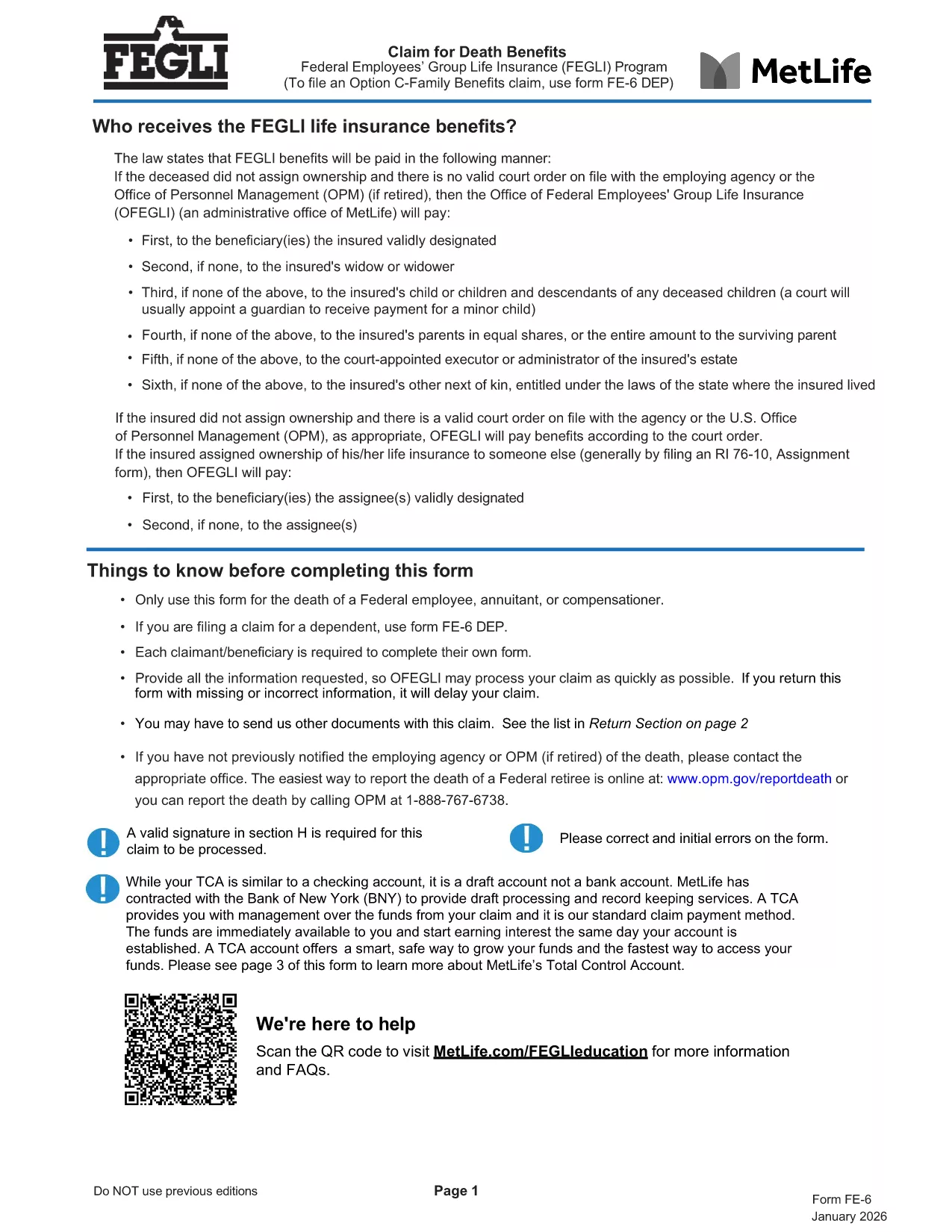
FE-6 Claim for Death Benefits – Fillable PDF Form

  1. 언어 영어
  2. 국가 미국
  3. 부서 인사관리실
  4. 부문 연방 직원 그룹 라인 보험 양식
FE-6 Claim for Death Benefits – Fillable PDF Form

The FE-6 Claim for Death Benefits is the official form used by the Office of Personnel Management (OPM) to request Federal Employees Group Life Insurance (FEGLI) benefits after the death of a federal employee, annuitant, or compensation recipient. With Formize you can open the fillable PDF directly in your browser, fill it out, and save a completed copy without installing any software.

What Is the FE-6 Form?

The FE-6 collects essential information about the deceased, the claimant, and the type of benefit being requested. It is required for:

  • Life‑insurance death benefits for a federal employee or annuitant.
  • Beneficiary designations and payment options (e.g., Total Control Account).
  • Claims for eligible dependents (use FE‑6 DEP for dependents).

How to Complete the FE-6 Online with Formize

Instead of downloading the PDF and opening a separate editor, simply click the **"Fill out this form"** button below. The Formize PDF Filler app loads the fillable document in seconds, letting you type directly into each field.

  1. Click the button – the form opens in a secure, browser‑based editor.
  2. Enter the required data – follow the on‑screen prompts for each section (deceased information, claimant details, beneficiary choices, etc.).
  3. Attach supporting documents – upload a certified copy of the death certificate and any other required paperwork.
  4. Save and download the completed PDF to your computer.
  5. Print or email the file to the address listed in the final section of the form.

Common Mistakes to Avoid

  • Leaving any required field blank – OPM will reject incomplete claims.
  • Using an uncertified death certificate – the document must bear an official stamp or signature.
  • Submitting the wrong version – ensure you are using the current FE-6 (2026 revision).
  • Not signing the form – a handwritten or electronic signature is mandatory.

Where to Send Your Completed Claim

After you have saved the filled PDF, mail it with the certified death certificate to:

Office of Federal Employees Group Life Insurance
P.O. Box 6080
Scranton, PA 18505‑6080
(For overnight delivery: OFEGLI 10 Ed Preate Drive, Moosic, PA 18507)

If you are a federal employee filing on behalf of a dependent, send the completed FE‑6 DEP to the same address or to your employing agency.

자주하는 질문
  • Who can use the FE-6 form?

    The FE-6 is for the estate of a deceased federal employee, annuitant, or compensation recipient. Dependents use the separate FE‑6 DEP form.

  • Do I need a certified death certificate?

    Yes. OPM requires a certified copy with an official stamp or signature. Uncertified copies will cause a delay or rejection.

  • Can I fill out the FE-6 on a mobile device?

    The Formize PDF Filler works on most modern smartphones and tablets. For best results, use a larger screen or a desktop browser.

  • How long does OPM take to process the claim?

    Processing typically takes 30‑45 days after receipt of a complete, signed claim and certified death certificate.

  • What if I make a mistake after submitting?

    Contact the Office of Federal Employees Group Life Insurance at 1‑800‑633‑4542. They can advise whether a corrected form must be resubmitted.

  • Is there a filing fee for the FE-6?

    No. Filing the FE-6 claim is free of charge.

  • Can I submit the claim electronically?

    OPM currently requires a mailed hard copy with the certified death certificate. The PDF can be filled electronically, but the final submission is by mail.

어떻게

5개의 간단한 단계를 통해 온라인으로 FE-6 form를 무료로 작성하는 방법:

  1. 1
    Open the FE-6 Form
    Click the "Fill out this form" button on the page. The Formize PDF Filler loads the official FE-6 PDF directly in your browser.
  2. 2
    Enter Required Information
    Complete each section—deceased’s details, claimant information, and beneficiary selections—exactly as instructed.
  3. 3
    Upload Supporting Documents
    Add a certified copy of the death certificate and any other required files using the upload field.
  4. 4
    Save and Download
    When all fields are filled, click "Save" to download the completed PDF to your device.
  5. 5
    Submit the Claim
    Print (or email) the saved form and mail it with the death certificate to the OPM address shown in the form.
Formize PDF 필러 앱
에 대한

인사관리처(OPM) 양식

FE-6 form는 공무원 인력 및 연방 직원 복지 관리를 담당하는 연방 정부의 독립 기관인 미국 인사 관리국에서 사용하는 공식 양식 중 하나입니다. OPM은 연방 고용과 관련된 정책 및 규정을 수립하고 다양한 인사 프로그램을 관리하며 연방 직원, 퇴직자 및 취업 지원자에게 서비스를 제공합니다.

다음은 인사 관리 사무실 양식의 몇 가지 예입니다.

표준 양식 86(SF-86) : 이 양식은 보안 허가를 신청하는 개인의 신원 조사 과정에 사용됩니다. 이는 포괄적인 개인, 고용, 교육 및 재정 정보는 물론 해외 접촉 및 활동에 대한 세부 정보를 수집합니다.

표준 양식 2809(SF-2809) : 이 양식은 연방 직원, 퇴직자 및 적격 가족 구성원에게 건강 보험 혜택을 제공하는 연방 직원 건강 혜택(FEHB) 프로그램에 등록하는 데 사용됩니다.

표준 양식 2817(SF-2817): 이 양식은 퇴직 또는 연방 서비스에서 퇴직한 후 연방 근로자 치과 및 안과 보험 프로그램(FEDVIP)에 따른 보장 지속을 신청하는 데 사용됩니다.

표준 양식 3107(SF-3107) : 공무원 퇴직 제도(CSRS)에 따라 퇴직 급여를 신청하는 데 사용되는 양식입니다.

표준 양식 2801(SF-2801) : 이 양식은 연방 직원 퇴직 시스템(FERS)에 따라 퇴직 혜택을 신청하는 데 사용됩니다.

표준 양식 15(SF-15) : 이 양식은 연방 고용 시 퇴역 군인 우선권을 신청하는 데 사용됩니다. 연방 정부에서 취업 기회를 찾고 있는 재향군인이나 자격을 갖춘 가족이 제출합니다.

이러한 예는 연방 고용 및 직원 혜택과 관련하여 사용되는 몇 가지 일반적인 OPM 양식을 나타냅니다. 그러나 OPM에는 다양한 인사 프로그램, 퇴직, 보험 및 기타 연방 고용 측면과 관련된 다양한 다른 형식이 있습니다. 필요한 특정 양식은 거래, 프로그램 또는 추구하는 혜택의 성격에 따라 달라질 수 있습니다. 정확하고 최신 정보를 얻으려면 미국 인사 관리국 공식 웹사이트(www.opm.gov)를 참조하거나 OPM 또는 관련 인사 담당자에게 지침을 구하는 것이 좋습니다. 연방 고용 또는 혜택 관련 요구 사항과 관련된 특정 OPM 양식에 관한 최신 정보.

특징

PDF 필러

온라인에서 PDF 양식을 채우는 가장 쉬운 방법

  • FE-6 form를 빠르게 작성하세요.
    온라인에서 FE-6 form을(를) 빠르게 채우는 방법을 찾고 계십니까? 온라인 무료 PDF 양식 필러를 사용하면 1분 이내에 이 PDF 문서를 편집하고 채우는 방법을 알 수 있습니다.
  • 사용하기 쉬운 온라인 PDF 편집기
    다시 스캔하여 다시 보내기 전에 편집할 수 있도록 PDF 파일을 인쇄하는 데 지쳤습니까? 온라인에서 무료로 PDF 문서를 편집하세요. 온라인 PDF 편집기를 사용하여 시간과 종이를 절약하십시오.
  • 훌륭한 도구, 모든 플랫폼
    Mac에서 FE-6 form를 채우는 방법이나 PDF 필러를 무료로 사용하는 방법이 궁금하십니까? 당사의 온라인 PDF 도구는 모든 플랫폼에서 작동합니다.
  • 안전한 파일 저장
    완료된 "FE-6 form" 파일은 Amazon 클라우드 호스팅에서 관리하는 보안 데이터베이스에 저장됩니다. 언제든지 시스템에서 파일을 삭제할 수 있습니다. 어쨌든 이러한 파일은 24시간 후에 자동으로 삭제됩니다.
  • FE-6 form님과 채팅
    무료 PDF 리더 도우미인 Chatize에서 "FE-6 form"와 채팅하세요. "FE-6 form"에서 질문하고 답변을 받으세요. 위의 문서와 채팅 버튼을 클릭하세요.

필링 세션 삭제

선택한 필링 세션을 삭제하시겠습니까?이 경우 양식 작성 진행 상황이 손실됩니다.

편집 세션 삭제

선택한 편집 세션을 삭제하시겠습니까? 이 경우 양식 작성 및 편집 진행 상황이 손실됩니다.