
언어 선택

OPM Form 630B – Request to Donate Annual Leave

  1. 언어 영어
  2. 국가 미국
  3. 부서 인사관리실
  4. 부문 OPM 양식
OPM Form 630B – Request to Donate Annual Leave

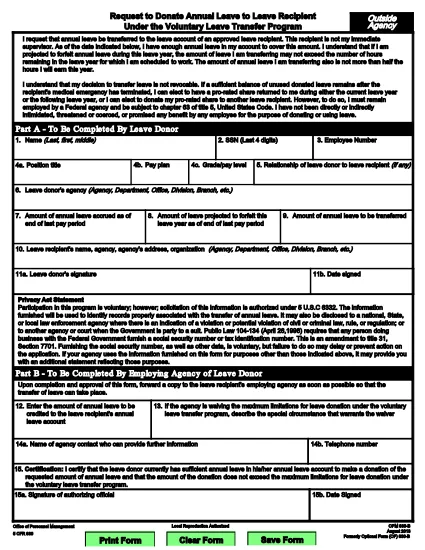
The OPM Form 630B (Request to Donate Annual Leave to a Leave Recipient) is the official document used by federal employees participating in the Voluntary Leave Transfer Program (Leave Share). This fillable PDF lets you donate your annual leave to a coworker facing a medical emergency without the need for paper handling.

What Is OPM Form 630B?

Form 630B is issued by the U.S. Office of Personnel Management (OPM). It authorizes the transfer of annual leave from a donor to an eligible recipient outside the donor’s immediate supervisory chain. The form is required for both DOI and non‑DOI agencies.

How to Fill Out the Form Online

Instead of downloading the PDF and editing it manually, simply click the "Fill out this form" button on this page. The Formize PDF Filler app will load the fillable version automatically.

  • Step 1: Click the button and wait for the Formize editor to appear.
  • Step 2: Complete each field – donor information, recipient details, and leave amount.
  • Step 3: Add electronic signatures for both the donor and the authorizing official.
  • Step 4: Review the form, then click Submit to download the completed PDF.

Common Mistakes & Tips

  • Do not exceed the donor’s available leave balance.
  • Ensure the recipient is not the donor’s immediate supervisor.
  • All required signatures must be present; missing signatures will delay processing.
  • Enter the correct date format (MM/DD/YYYY) to avoid validation errors.

Where to Submit the Completed Form

After saving the filled PDF, forward it to your agency’s Human Resources office or the designated Leave Share coordinator. Keep a copy for your records.

Need more guidance? Review the OPM Leave Share policy or contact your agency’s HR representative.

자주하는 질문
  • Who can receive leave through the Voluntary Leave Transfer Program?

    Any federal employee who has exhausted their paid leave and is facing a medical emergency, provided the donor’s immediate supervisor is not the recipient.

  • Can I donate more leave than I have available?

    No. The donor must have enough accrued annual leave to cover the amount requested on Form 630B.

  • Do I need a paper copy of Form 630B?

    No. The fillable PDF can be completed, signed, and saved electronically, then submitted digitally to HR.

  • What happens if the form is missing a signature?

    The HR office will return the form for correction, which can delay the donation process.

  • Is there a deadline for submitting the form?

    Submit the completed Form 630B as soon as possible after the donation decision. Agencies may have internal processing timelines.

  • Can I edit the form after I’ve saved it?

    Yes. Open the saved PDF in the Formize PDF Filler again to make changes before final submission.

  • Is there a cost to use the fillable OPM Form 630B?

    No. The fillable PDF and the Formize service are free for federal employees.

어떻게

5개의 간단한 단계를 통해 온라인으로 OPM Form 630B를 무료로 작성하는 방법:

  1. 1
    Open the Fillable Form
    Click the "Fill out this form" button on the page. The Formize PDF Filler will load the OPM 630B form directly in your browser.
  2. 2
    Enter Required Information
    Complete donor and recipient details, specify the amount of leave to donate, and fill in dates as requested.
  3. 3
    Add Electronic Signatures
    Use the signature fields to sign as the donor and have the authorizing official sign electronically.
  4. 4
    Review and Save
    Check every field for accuracy, then click "Save" to download the completed PDF to your device.
  5. 5
    Submit to HR
    Email or upload the saved PDF to your agency’s HR office or Leave Share coordinator for processing.
Formize PDF 필러 앱
에 대한

인사관리처(OPM) 양식

OPM Form 630B는 공무원 인력 및 연방 직원 복지 관리를 담당하는 연방 정부의 독립 기관인 미국 인사 관리국에서 사용하는 공식 양식 중 하나입니다. OPM은 연방 고용과 관련된 정책 및 규정을 수립하고 다양한 인사 프로그램을 관리하며 연방 직원, 퇴직자 및 취업 지원자에게 서비스를 제공합니다.

다음은 인사 관리 사무실 양식의 몇 가지 예입니다.

표준 양식 86(SF-86) : 이 양식은 보안 허가를 신청하는 개인의 신원 조사 과정에 사용됩니다. 이는 포괄적인 개인, 고용, 교육 및 재정 정보는 물론 해외 접촉 및 활동에 대한 세부 정보를 수집합니다.

표준 양식 2809(SF-2809) : 이 양식은 연방 직원, 퇴직자 및 적격 가족 구성원에게 건강 보험 혜택을 제공하는 연방 직원 건강 혜택(FEHB) 프로그램에 등록하는 데 사용됩니다.

표준 양식 2817(SF-2817): 이 양식은 퇴직 또는 연방 서비스에서 퇴직한 후 연방 근로자 치과 및 안과 보험 프로그램(FEDVIP)에 따른 보장 지속을 신청하는 데 사용됩니다.

표준 양식 3107(SF-3107) : 공무원 퇴직 제도(CSRS)에 따라 퇴직 급여를 신청하는 데 사용되는 양식입니다.

표준 양식 2801(SF-2801) : 이 양식은 연방 직원 퇴직 시스템(FERS)에 따라 퇴직 혜택을 신청하는 데 사용됩니다.

표준 양식 15(SF-15) : 이 양식은 연방 고용 시 퇴역 군인 우선권을 신청하는 데 사용됩니다. 연방 정부에서 취업 기회를 찾고 있는 재향군인이나 자격을 갖춘 가족이 제출합니다.

이러한 예는 연방 고용 및 직원 혜택과 관련하여 사용되는 몇 가지 일반적인 OPM 양식을 나타냅니다. 그러나 OPM에는 다양한 인사 프로그램, 퇴직, 보험 및 기타 연방 고용 측면과 관련된 다양한 다른 형식이 있습니다. 필요한 특정 양식은 거래, 프로그램 또는 추구하는 혜택의 성격에 따라 달라질 수 있습니다. 정확하고 최신 정보를 얻으려면 미국 인사 관리국 공식 웹사이트(www.opm.gov)를 참조하거나 OPM 또는 관련 인사 담당자에게 지침을 구하는 것이 좋습니다. 연방 고용 또는 혜택 관련 요구 사항과 관련된 특정 OPM 양식에 관한 최신 정보.

특징

PDF 필러

온라인에서 PDF 양식을 채우는 가장 쉬운 방법

  • OPM Form 630B를 빠르게 작성하세요.
    온라인에서 OPM Form 630B을(를) 빠르게 채우는 방법을 찾고 계십니까? 온라인 무료 PDF 양식 필러를 사용하면 1분 이내에 이 PDF 문서를 편집하고 채우는 방법을 알 수 있습니다.
  • 사용하기 쉬운 온라인 PDF 편집기
    다시 스캔하여 다시 보내기 전에 편집할 수 있도록 PDF 파일을 인쇄하는 데 지쳤습니까? 온라인에서 무료로 PDF 문서를 편집하세요. 온라인 PDF 편집기를 사용하여 시간과 종이를 절약하십시오.
  • 훌륭한 도구, 모든 플랫폼
    Mac에서 OPM Form 630B를 채우는 방법이나 PDF 필러를 무료로 사용하는 방법이 궁금하십니까? 당사의 온라인 PDF 도구는 모든 플랫폼에서 작동합니다.
  • 안전한 파일 저장
    완료된 "OPM Form 630B" 파일은 Amazon 클라우드 호스팅에서 관리하는 보안 데이터베이스에 저장됩니다. 언제든지 시스템에서 파일을 삭제할 수 있습니다. 어쨌든 이러한 파일은 24시간 후에 자동으로 삭제됩니다.
  • OPM Form 630B님과 채팅
    무료 PDF 리더 도우미인 Chatize에서 "OPM Form 630B"와 채팅하세요. "OPM Form 630B"에서 질문하고 답변을 받으세요. 위의 문서와 채팅 버튼을 클릭하세요.

필링 세션 삭제

선택한 필링 세션을 삭제하시겠습니까?이 경우 양식 작성 진행 상황이 손실됩니다.

편집 세션 삭제

선택한 편집 세션을 삭제하시겠습니까? 이 경우 양식 작성 및 편집 진행 상황이 손실됩니다.