
언어 선택

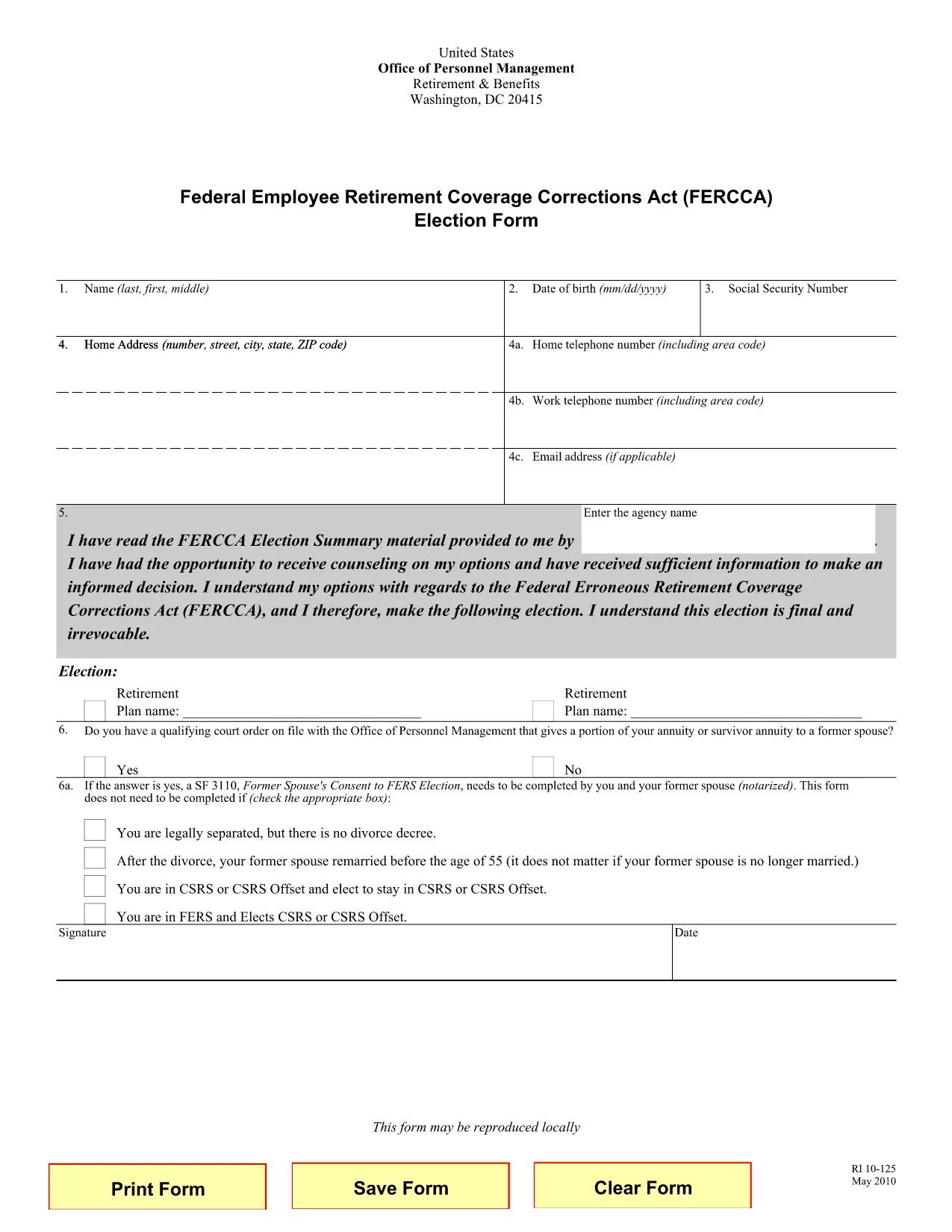
RI 10-125 Fillable PDF Form – Complete Online

  1. 국가 미국
  2. 언어 영어
  3. 부서 인사관리실
  4. 부문 퇴직 및 보험 양식
RI 10-125 Fillable PDF Form – Complete Online

The RI 10‑125 is the Office of Personnel Management’s “Retirement Information” form used by federal employees transitioning to retirement under CSRS, CSRS‑Offset, or FERS. Download the official fillable PDF and complete it instantly with Formize’s secure online PDF filler.

What Is the RI 10‑125 Form?

This form collects essential data about your military service, spouse status, and retirement election choices. It is required when you are applying for a retirement benefit that involves specific pay system elections and spouse‑related considerations.

How to Fill the RI 10‑125 Online

Follow the simple steps below to fill the form without installing any software.

  1. Click the “Fill out this form” button on this page.
  2. Wait a few seconds while the Formize PDF Filler loads.
  3. Enter your information in each fillable field. The interface highlights required fields.
  4. Use the “Validate” button to check for missing or inconsistent data.
  5. When you’re satisfied, click “Download” to save a completed PDF or “Print” to submit a hard copy.

Common Mistakes to Avoid

  • Leaving required fields blank – the validator will flag them.
  • Entering an outdated spouse status – the form asks for the current marital situation, even if the former spouse remarried.
  • Choosing the wrong retirement election (CSRS vs. FERS) – double‑check your pay system before submitting.

Where to Submit the Completed Form

After you have saved the completed PDF, mail or upload it to your agency’s Human Resources office according to your retirement instructions. For CSRS/CSRS‑Offset, send it to the OPM retirement processing center; for FERS, forward it to your employing agency.

Need help? Review the FAQs below or contact your agency’s HR representative.

자주하는 질문
  • Who needs to fill out the RI 10‑125 form?

    Any federal employee who is retiring under CSRS, CSRS‑Offset, or FERS and whose retirement involves spouse or military service considerations must complete the RI 10‑125.

  • Can I edit the PDF after I download it?

    Yes, the PDF remains fillable, but using Formize’s online filler ensures you won’t need additional software to make changes.

  • Is the form accepted if I submit it electronically?

    Most agencies accept a digitally signed PDF. Check with your HR office, but the completed form can be emailed or uploaded per agency instructions.

  • What if I make a mistake while filling the form online?

    Simply use the “Clear” or edit the field directly in the Formize interface, then re‑validate before downloading again.

  • How long does it take to fill the RI 10‑125?

    Most users complete the form in 5‑10 minutes when they have their personal and service information ready.

  • Do I need a PDF reader to view the completed form?

    No, the Formize filler lets you view and download the completed PDF directly in your browser. A PDF reader is only needed if you want to open it later on another device.

어떻게

5개의 간단한 단계를 통해 온라인으로 RI 10-125를 무료로 작성하는 방법:

  1. 1
    Click the Fill Button
    Press the “Fill out this form” button on this page to launch the Formize PDF Filler.
  2. 2
    Wait for the Filler to Load
    A few seconds later the online filler appears; no download or installation is required.
  3. 3
    Enter Your Information
    Complete each highlighted field with accurate data. Required fields are marked with an asterisk.
  4. 4
    Validate and Review
    Use the built‑in validator to catch missing or inconsistent entries, then review the completed form.
  5. 5
    Save or Print
    When everything looks correct, click “Download” to save the filled PDF or “Print” to submit a hard copy.
Formize PDF 필러 앱
에 대한

인사관리처(OPM) 양식

RI 10-125는 공무원 인력 및 연방 직원 복지 관리를 담당하는 연방 정부의 독립 기관인 미국 인사 관리국에서 사용하는 공식 양식 중 하나입니다. OPM은 연방 고용과 관련된 정책 및 규정을 수립하고 다양한 인사 프로그램을 관리하며 연방 직원, 퇴직자 및 취업 지원자에게 서비스를 제공합니다.

다음은 인사 관리 사무실 양식의 몇 가지 예입니다.

표준 양식 86(SF-86) : 이 양식은 보안 허가를 신청하는 개인의 신원 조사 과정에 사용됩니다. 이는 포괄적인 개인, 고용, 교육 및 재정 정보는 물론 해외 접촉 및 활동에 대한 세부 정보를 수집합니다.

표준 양식 2809(SF-2809) : 이 양식은 연방 직원, 퇴직자 및 적격 가족 구성원에게 건강 보험 혜택을 제공하는 연방 직원 건강 혜택(FEHB) 프로그램에 등록하는 데 사용됩니다.

표준 양식 2817(SF-2817): 이 양식은 퇴직 또는 연방 서비스에서 퇴직한 후 연방 근로자 치과 및 안과 보험 프로그램(FEDVIP)에 따른 보장 지속을 신청하는 데 사용됩니다.

표준 양식 3107(SF-3107) : 공무원 퇴직 제도(CSRS)에 따라 퇴직 급여를 신청하는 데 사용되는 양식입니다.

표준 양식 2801(SF-2801) : 이 양식은 연방 직원 퇴직 시스템(FERS)에 따라 퇴직 혜택을 신청하는 데 사용됩니다.

표준 양식 15(SF-15) : 이 양식은 연방 고용 시 퇴역 군인 우선권을 신청하는 데 사용됩니다. 연방 정부에서 취업 기회를 찾고 있는 재향군인이나 자격을 갖춘 가족이 제출합니다.

이러한 예는 연방 고용 및 직원 혜택과 관련하여 사용되는 몇 가지 일반적인 OPM 양식을 나타냅니다. 그러나 OPM에는 다양한 인사 프로그램, 퇴직, 보험 및 기타 연방 고용 측면과 관련된 다양한 다른 형식이 있습니다. 필요한 특정 양식은 거래, 프로그램 또는 추구하는 혜택의 성격에 따라 달라질 수 있습니다. 정확하고 최신 정보를 얻으려면 미국 인사 관리국 공식 웹사이트(www.opm.gov)를 참조하거나 OPM 또는 관련 인사 담당자에게 지침을 구하는 것이 좋습니다. 연방 고용 또는 혜택 관련 요구 사항과 관련된 특정 OPM 양식에 관한 최신 정보.

특징

PDF 필러

온라인에서 PDF 양식을 채우는 가장 쉬운 방법

  • RI 10-125를 빠르게 작성하세요.
    온라인에서 RI 10-125을(를) 빠르게 채우는 방법을 찾고 계십니까? 온라인 무료 PDF 양식 필러를 사용하면 1분 이내에 이 PDF 문서를 편집하고 채우는 방법을 알 수 있습니다.
  • 사용하기 쉬운 온라인 PDF 편집기
    다시 스캔하여 다시 보내기 전에 편집할 수 있도록 PDF 파일을 인쇄하는 데 지쳤습니까? 온라인에서 무료로 PDF 문서를 편집하세요. 온라인 PDF 편집기를 사용하여 시간과 종이를 절약하십시오.
  • 훌륭한 도구, 모든 플랫폼
    Mac에서 RI 10-125를 채우는 방법이나 PDF 필러를 무료로 사용하는 방법이 궁금하십니까? 당사의 온라인 PDF 도구는 모든 플랫폼에서 작동합니다.
  • 안전한 파일 저장
    완료된 "RI 10-125" 파일은 Amazon 클라우드 호스팅에서 관리하는 보안 데이터베이스에 저장됩니다. 언제든지 시스템에서 파일을 삭제할 수 있습니다. 어쨌든 이러한 파일은 24시간 후에 자동으로 삭제됩니다.
  • RI 10-125님과 채팅
    무료 PDF 리더 도우미인 Chatize에서 "RI 10-125"와 채팅하세요. "RI 10-125"에서 질문하고 답변을 받으세요. 위의 문서와 채팅 버튼을 클릭하세요.

필링 세션 삭제

선택한 필링 세션을 삭제하시겠습니까?이 경우 양식 작성 진행 상황이 손실됩니다.

편집 세션 삭제

선택한 편집 세션을 삭제하시겠습니까? 이 경우 양식 작성 및 편집 진행 상황이 손실됩니다.