
언어 선택

RI 20-97 – Military Earnings Request Form (Fillable PDF)

  1. 국가 미국
  2. 언어 영어
  3. 부서 인사관리실
  4. 부문 퇴직 및 보험 양식
RI 20-97 – Military Earnings Request Form (Fillable PDF)

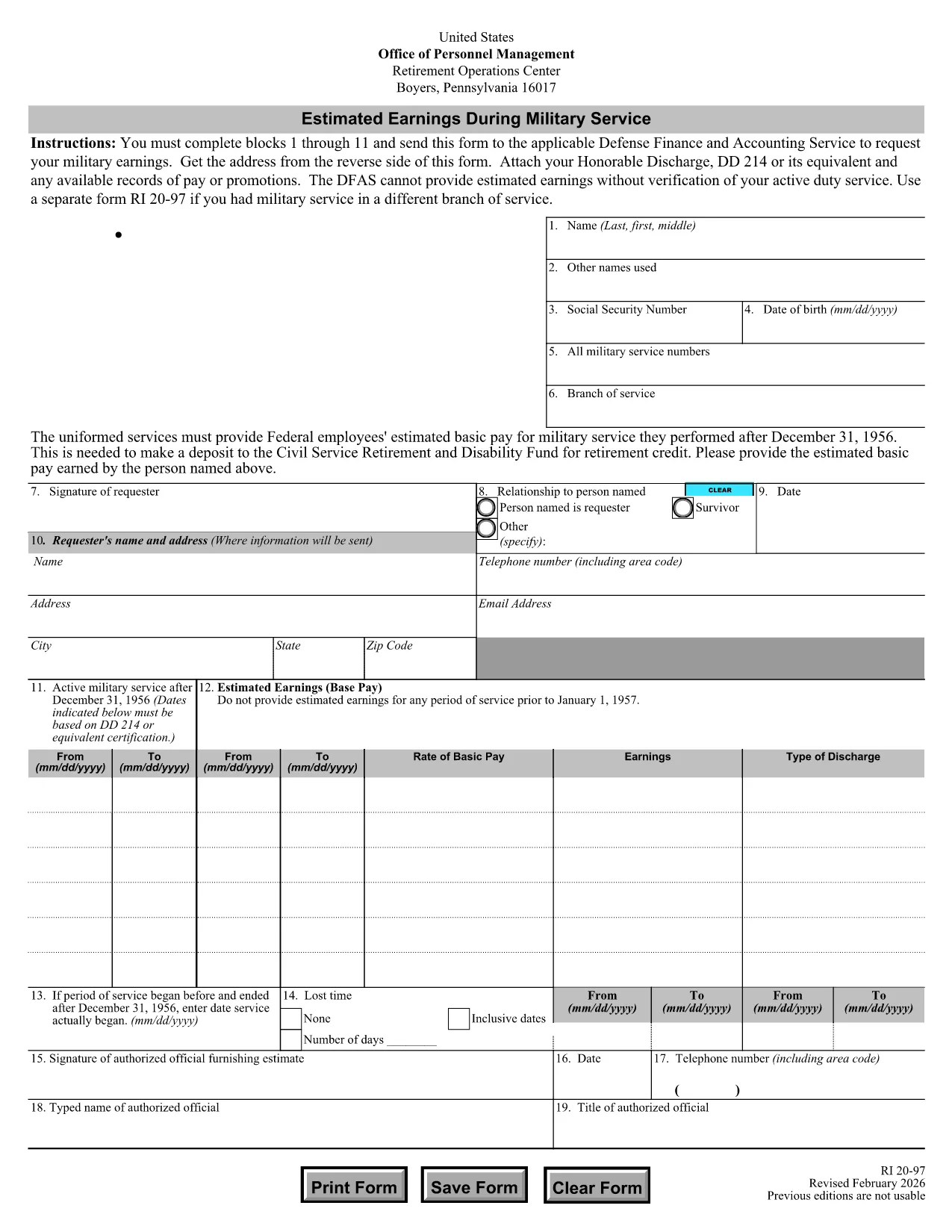
The RI 20-97 is the U.S. Office of Personnel Management (OPM) form used to request an estimate of your military earnings for retirement credit. Federal employees who have served in the armed forces use this form to ensure their service pay is counted toward their civil service pension.

What Is the RI 20-97 Form?

This official PDF, provided by OPM, captures personal details, service dates, pay grade, and any special pay received. Once completed, the form is sent to the Defense Finance and Accounting Service (DFAS) for calculation.

How to Complete the RI 20-97 Online with Formize

Instead of downloading, printing, and scanning, you can fill out the form directly on our site:

  1. Click the "Fill out this form" button below.
  2. The Formize PDF Filler app loads the fillable RI 20-97 template.
  3. Enter your information in each field (blocks 1‑11).
  4. Upload supporting documents such as your DD‑214.
  5. Review, e‑sign, and submit the form securely.

Common Mistakes & Tips for a Successful Submission

  • Missing DD‑214: The form will be rejected if you don’t attach a copy of your discharge papers.
  • Incorrect Service Dates: Double‑check start and end dates; even a one‑day error can delay processing.
  • Skipping Optional Fields: Fill in all optional fields when applicable; they help DFAS calculate a more accurate estimate.
  • Signature Errors: Both electronic and wet signatures are accepted – make sure the signature field is not left blank.

Supporting Documents You’ll Need

Prepare these items before you start:

  • DD‑214 or official military service record
  • Pay statements or promotion orders (if available)
  • Any previous RI 20‑97 submissions for reference

Where to Send Your Completed Form

After you finish the online fill, the Formize app will give you two options:

  • Download a PDF copy to mail to DFAS
  • Securely upload the completed form directly to DFAS through the provided portal link

Following these steps ensures your military earnings are counted toward your federal retirement benefits.

자주하는 질문
  • Who needs to fill out the RI 20-97 form?

    Any current or former federal employee who served in the U.S. military and wants their service earnings counted toward their civil service retirement credit.

  • Can I use a wet signature on the RI 20-97?

    Yes. Both electronic and wet signatures are accepted. If you print the form, sign it, and mail it, DFAS will process it without issue.

  • What if I don’t have my DD‑214?

    The DD‑214 is required for verification. If it’s lost, request a replacement from the National Archives before submitting the RI 20‑97.

  • How long does DFAS take to calculate my earnings?

    Processing typically takes 2‑4 weeks after receipt of a complete, correctly signed RI 20‑97 with all supporting documents.

  • Is the Formize filler secure?

    Yes. Formize uses SSL encryption and complies with federal data‑privacy standards, ensuring your personal and military information is protected.

  • Do I need to fill out every field?

    All mandatory fields (blocks 1‑11) must be completed. Optional fields should be filled when applicable to improve accuracy.

  • Can I submit the form directly to DFAS from Formize?

    After completing the form, you can either download a PDF to mail or use the secure upload link provided by Formize to send it directly to DFAS.

  • What is the difference between the RI 20‑97 and the RI‑20‑97‑2023 version?

    The content is the same; the year in the file name reflects the most recent revision. All versions are accepted by DFAS as long as they are the official OPM form.

어떻게

5개의 간단한 단계를 통해 온라인으로 RI 20-97를 무료로 작성하는 방법:

  1. 1
    Open the Fillable Form
    Click the "Fill out this form" button on the page. The Formize PDF Filler will load the RI 20-97 template instantly.
  2. 2
    Enter Your Information
    Complete fields 1 through 11 with accurate personal and service details. Use dropdowns and date pickers for consistency.
  3. 3
    Attach Supporting Documents
    Upload your DD‑214 and any pay records using the attachment area. The system validates file types before you proceed.
  4. 4
    Review and Sign
    Double‑check every entry, then add an electronic signature or upload a scanned wet signature as required.
  5. 5
    Submit or Download
    Choose to submit directly to DFAS through the secure portal, or download the completed PDF to mail it yourself.
Formize PDF 필러 앱
에 대한

인사관리처(OPM) 양식

RI 20-97는 공무원 인력 및 연방 직원 복지 관리를 담당하는 연방 정부의 독립 기관인 미국 인사 관리국에서 사용하는 공식 양식 중 하나입니다. OPM은 연방 고용과 관련된 정책 및 규정을 수립하고 다양한 인사 프로그램을 관리하며 연방 직원, 퇴직자 및 취업 지원자에게 서비스를 제공합니다.

다음은 인사 관리 사무실 양식의 몇 가지 예입니다.

표준 양식 86(SF-86) : 이 양식은 보안 허가를 신청하는 개인의 신원 조사 과정에 사용됩니다. 이는 포괄적인 개인, 고용, 교육 및 재정 정보는 물론 해외 접촉 및 활동에 대한 세부 정보를 수집합니다.

표준 양식 2809(SF-2809) : 이 양식은 연방 직원, 퇴직자 및 적격 가족 구성원에게 건강 보험 혜택을 제공하는 연방 직원 건강 혜택(FEHB) 프로그램에 등록하는 데 사용됩니다.

표준 양식 2817(SF-2817): 이 양식은 퇴직 또는 연방 서비스에서 퇴직한 후 연방 근로자 치과 및 안과 보험 프로그램(FEDVIP)에 따른 보장 지속을 신청하는 데 사용됩니다.

표준 양식 3107(SF-3107) : 공무원 퇴직 제도(CSRS)에 따라 퇴직 급여를 신청하는 데 사용되는 양식입니다.

표준 양식 2801(SF-2801) : 이 양식은 연방 직원 퇴직 시스템(FERS)에 따라 퇴직 혜택을 신청하는 데 사용됩니다.

표준 양식 15(SF-15) : 이 양식은 연방 고용 시 퇴역 군인 우선권을 신청하는 데 사용됩니다. 연방 정부에서 취업 기회를 찾고 있는 재향군인이나 자격을 갖춘 가족이 제출합니다.

이러한 예는 연방 고용 및 직원 혜택과 관련하여 사용되는 몇 가지 일반적인 OPM 양식을 나타냅니다. 그러나 OPM에는 다양한 인사 프로그램, 퇴직, 보험 및 기타 연방 고용 측면과 관련된 다양한 다른 형식이 있습니다. 필요한 특정 양식은 거래, 프로그램 또는 추구하는 혜택의 성격에 따라 달라질 수 있습니다. 정확하고 최신 정보를 얻으려면 미국 인사 관리국 공식 웹사이트(www.opm.gov)를 참조하거나 OPM 또는 관련 인사 담당자에게 지침을 구하는 것이 좋습니다. 연방 고용 또는 혜택 관련 요구 사항과 관련된 특정 OPM 양식에 관한 최신 정보.

특징

PDF 필러

온라인에서 PDF 양식을 채우는 가장 쉬운 방법

  • RI 20-97를 빠르게 작성하세요.
    온라인에서 RI 20-97을(를) 빠르게 채우는 방법을 찾고 계십니까? 온라인 무료 PDF 양식 필러를 사용하면 1분 이내에 이 PDF 문서를 편집하고 채우는 방법을 알 수 있습니다.
  • 사용하기 쉬운 온라인 PDF 편집기
    다시 스캔하여 다시 보내기 전에 편집할 수 있도록 PDF 파일을 인쇄하는 데 지쳤습니까? 온라인에서 무료로 PDF 문서를 편집하세요. 온라인 PDF 편집기를 사용하여 시간과 종이를 절약하십시오.
  • 훌륭한 도구, 모든 플랫폼
    Mac에서 RI 20-97를 채우는 방법이나 PDF 필러를 무료로 사용하는 방법이 궁금하십니까? 당사의 온라인 PDF 도구는 모든 플랫폼에서 작동합니다.
  • 안전한 파일 저장
    완료된 "RI 20-97" 파일은 Amazon 클라우드 호스팅에서 관리하는 보안 데이터베이스에 저장됩니다. 언제든지 시스템에서 파일을 삭제할 수 있습니다. 어쨌든 이러한 파일은 24시간 후에 자동으로 삭제됩니다.
  • RI 20-97님과 채팅
    무료 PDF 리더 도우미인 Chatize에서 "RI 20-97"와 채팅하세요. "RI 20-97"에서 질문하고 답변을 받으세요. 위의 문서와 채팅 버튼을 클릭하세요.

필링 세션 삭제

선택한 필링 세션을 삭제하시겠습니까?이 경우 양식 작성 진행 상황이 손실됩니다.

편집 세션 삭제

선택한 편집 세션을 삭제하시겠습니까? 이 경우 양식 작성 및 편집 진행 상황이 손실됩니다.