
언어 선택

SF 3110 – Former Spouse’s Consent to FERS Election (Fillable PDF)

  1. 언어 영어
  2. 국가 미국
  3. 부서 인사관리실
  4. 부문 표준 양식
SF 3110 – Former Spouse’s Consent to FERS Election (Fillable PDF)

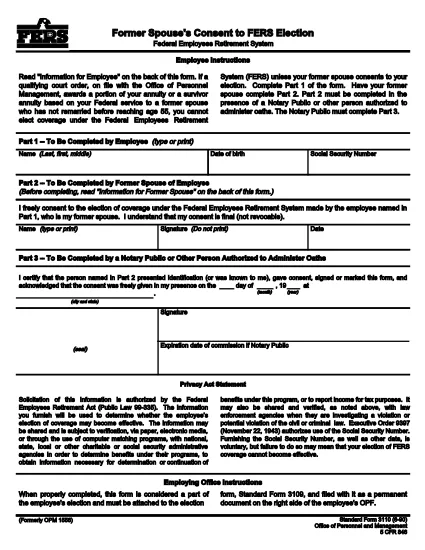
The SF 3110 is the official United States government form titled “Former Spouse’s Consent to Federal Employees Retirement System (FERS) Election.” It is used when a former spouse must give written consent for a federal employee to elect FERS coverage for themselves or their former spouse.

This form is required under 5 CFR 846 and is commonly requested during divorce or separation proceedings involving federal employees. The form must be completed, signed, and submitted to the appropriate agency (usually the Office of Personnel Management or the employing agency).

What is the SF 3110 Form?

SF 3110 captures the former spouse’s free consent, includes basic identifying information for both parties, and provides a space for the signature and date. The form is short—typically two pages—and can be completed electronically using a fillable PDF.

When and Why You Need SF 3110

Use this form whenever:

  • A federal employee wishes to change or retain FERS coverage after a divorce.
  • The employee’s former spouse must formally consent to the election.
  • An agency requests proof of consent for benefits processing.

Submitting a correctly completed SF 3110 helps avoid delays in retirement benefit calculations.

How to Complete the Form Online

Instead of downloading and editing the PDF manually, click the “Fill out this form” button on our page. The Formize PDF Filler will load instantly, allowing you to type, sign, and save the document directly in your browser.

Common Mistakes to Avoid

  • Leaving any required field blank (especially the employee’s name and Social Security Number).
  • Using a printed copy for an electronic signature—digital signatures are accepted and faster.
  • Submitting an outdated version; always use the latest PDF (revision 06/1990).

Where to Submit the Completed Form

After saving the filled PDF, email or mail it to the agency listed on the form (usually the employee’s HR office or OPM). Keep a copy for your records.

Need the fillable PDF now? Click below to start the online filler.

자주하는 질문
  • What is the purpose of SF 3110?

    SF 3110 provides a written consent from a former spouse allowing a federal employee to elect or retain FERS coverage after a divorce.

  • Can I fill out SF 3110 on a mobile device?

    Yes. The Formize fillable PDF works on most smartphones and tablets with a modern browser.

  • Do I need a printer to submit the form?

    No. A digitally signed PDF is acceptable for most agencies, but check the specific agency’s submission guidelines.

  • How often is the SF 3110 updated?

    The current revision date is June 1990. Use the latest PDF provided by OPM to ensure compliance.

  • What if I make a mistake after saving?

    Open the saved PDF again in the Formize filler, correct the error, and re‑save. The fillable version allows unlimited edits before final submission.

  • Is there a fee to use the Formize PDF filler?

    No. Formize provides free online filling for government PDFs like SF 3110.

어떻게

5개의 간단한 단계를 통해 온라인으로 SF 3110를 무료로 작성하는 방법:

  1. 1
    Open the Fillable Form
    Click the “Fill out this form” button on the page. The Formize PDF Filler will launch in a new tab.
  2. 2
    Enter All Required Information
    Type the employee’s name, SSN, and your consent statement directly into the fields. Use the tab key to move between sections.
  3. 3
    Add Your Digital Signature
    Select the signature field, draw or type your signature, and confirm.
  4. 4
    Save and Download
    When you’re finished, click “Save” to download a copy of the completed PDF to your computer.
  5. 5
    Submit to the Appropriate Agency
    Email or mail the saved PDF to the HR office or OPM as instructed on the form.
Formize PDF 필러 앱
에 대한

인사관리처(OPM) 양식

SF 3110는 공무원 인력 및 연방 직원 복지 관리를 담당하는 연방 정부의 독립 기관인 미국 인사 관리국에서 사용하는 공식 양식 중 하나입니다. OPM은 연방 고용과 관련된 정책 및 규정을 수립하고 다양한 인사 프로그램을 관리하며 연방 직원, 퇴직자 및 취업 지원자에게 서비스를 제공합니다.

다음은 인사 관리 사무실 양식의 몇 가지 예입니다.

표준 양식 86(SF-86) : 이 양식은 보안 허가를 신청하는 개인의 신원 조사 과정에 사용됩니다. 이는 포괄적인 개인, 고용, 교육 및 재정 정보는 물론 해외 접촉 및 활동에 대한 세부 정보를 수집합니다.

표준 양식 2809(SF-2809) : 이 양식은 연방 직원, 퇴직자 및 적격 가족 구성원에게 건강 보험 혜택을 제공하는 연방 직원 건강 혜택(FEHB) 프로그램에 등록하는 데 사용됩니다.

표준 양식 2817(SF-2817): 이 양식은 퇴직 또는 연방 서비스에서 퇴직한 후 연방 근로자 치과 및 안과 보험 프로그램(FEDVIP)에 따른 보장 지속을 신청하는 데 사용됩니다.

표준 양식 3107(SF-3107) : 공무원 퇴직 제도(CSRS)에 따라 퇴직 급여를 신청하는 데 사용되는 양식입니다.

표준 양식 2801(SF-2801) : 이 양식은 연방 직원 퇴직 시스템(FERS)에 따라 퇴직 혜택을 신청하는 데 사용됩니다.

표준 양식 15(SF-15) : 이 양식은 연방 고용 시 퇴역 군인 우선권을 신청하는 데 사용됩니다. 연방 정부에서 취업 기회를 찾고 있는 재향군인이나 자격을 갖춘 가족이 제출합니다.

이러한 예는 연방 고용 및 직원 혜택과 관련하여 사용되는 몇 가지 일반적인 OPM 양식을 나타냅니다. 그러나 OPM에는 다양한 인사 프로그램, 퇴직, 보험 및 기타 연방 고용 측면과 관련된 다양한 다른 형식이 있습니다. 필요한 특정 양식은 거래, 프로그램 또는 추구하는 혜택의 성격에 따라 달라질 수 있습니다. 정확하고 최신 정보를 얻으려면 미국 인사 관리국 공식 웹사이트(www.opm.gov)를 참조하거나 OPM 또는 관련 인사 담당자에게 지침을 구하는 것이 좋습니다. 연방 고용 또는 혜택 관련 요구 사항과 관련된 특정 OPM 양식에 관한 최신 정보.

특징

PDF 필러

온라인에서 PDF 양식을 채우는 가장 쉬운 방법

  • SF 3110를 빠르게 작성하세요.
    온라인에서 SF 3110을(를) 빠르게 채우는 방법을 찾고 계십니까? 온라인 무료 PDF 양식 필러를 사용하면 1분 이내에 이 PDF 문서를 편집하고 채우는 방법을 알 수 있습니다.
  • 사용하기 쉬운 온라인 PDF 편집기
    다시 스캔하여 다시 보내기 전에 편집할 수 있도록 PDF 파일을 인쇄하는 데 지쳤습니까? 온라인에서 무료로 PDF 문서를 편집하세요. 온라인 PDF 편집기를 사용하여 시간과 종이를 절약하십시오.
  • 훌륭한 도구, 모든 플랫폼
    Mac에서 SF 3110를 채우는 방법이나 PDF 필러를 무료로 사용하는 방법이 궁금하십니까? 당사의 온라인 PDF 도구는 모든 플랫폼에서 작동합니다.
  • 안전한 파일 저장
    완료된 "SF 3110" 파일은 Amazon 클라우드 호스팅에서 관리하는 보안 데이터베이스에 저장됩니다. 언제든지 시스템에서 파일을 삭제할 수 있습니다. 어쨌든 이러한 파일은 24시간 후에 자동으로 삭제됩니다.
  • SF 3110님과 채팅
    무료 PDF 리더 도우미인 Chatize에서 "SF 3110"와 채팅하세요. "SF 3110"에서 질문하고 답변을 받으세요. 위의 문서와 채팅 버튼을 클릭하세요.

필링 세션 삭제

선택한 필링 세션을 삭제하시겠습니까?이 경우 양식 작성 진행 상황이 손실됩니다.

편집 세션 삭제

선택한 편집 세션을 삭제하시겠습니까? 이 경우 양식 작성 및 편집 진행 상황이 손실됩니다.