
언어 선택

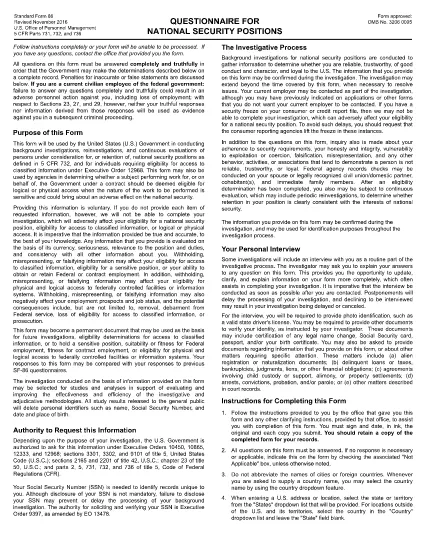
SF-86 Questionnaire – Fillable PDF for Security Clearance

  1. 언어 영어
  2. 국가 미국
  3. 부서 인사관리실
  4. 부문 표준 양식
SF-86 Questionnaire – Fillable PDF for Security Clearance

The SF-86 (Standard Form 86) is the U.S. government’s official questionnaire used for background investigations, reinvestigations, and continuous evaluations of individuals seeking access to classified information or national‑security positions. Completing it accurately is essential for obtaining a security clearance.

This page provides a fillable PDF version of the SF-86 that you can complete directly in your browser using the Formize PDF Filler app. No additional software or printing is required.

What Is the SF-86 Form?

The SF-86 collects detailed personal information, including:

  • Education and employment history (last 10 years)
  • Foreign contacts, travel, and residences
  • Criminal record, financial disclosures, and drug use
  • Military service and security‑related activities

Agencies use this data to assess eligibility for a security clearance.

Key Sections of the SF-86

Understanding the major sections helps you gather the right documents before you start:

  1. Personal Information – name, date of birth, Social Security number.
  2. Residence History – every address for the past 10 years.
  3. Employment & Education – employers, schools, dates, and supervisors.
  4. Foreign Contacts & Travel – individuals, countries, and trips abroad.
  5. Legal & Financial Matters – arrests, convictions, bankruptcies, debts.

How to Complete the SF-86 Online

Follow these simple steps to fill out the form quickly and securely:

  • Click the "Fill out this form" button below.
  • Wait a few seconds while the Formize PDF Filler loads.
  • Enter your information field‑by‑field; the app auto‑saves as you go.
  • When finished, click "Save & Download" to get a completed PDF copy.
  • Submit the saved PDF to your agency or upload it through e‑QIP as instructed.

Common Mistakes & Tips

Tip 1: Answer every question truthfully. Incomplete or false information can delay or deny your clearance.

Tip 2: Use exact dates (MM/DD/YYYY) and full legal names for contacts.

Tip 3: Keep supporting documents (travel itineraries, employment letters) handy for reference.

Tip 4: Review the form twice before saving. The Formize filler highlights required fields you might have missed.

Ready to start? Click below to launch the fillable SF-86 PDF.

자주하는 질문
  • What is the SF-86 used for?

    The SF-86 is the standard questionnaire for background investigations and security clearances for U.S. government, military, and contractor positions.

  • Can I fill out the SF-86 on a mobile device?

    Yes. The Formize PDF Filler works on most modern smartphones and tablets, but a desktop browser provides the best experience.

  • Is the fillable PDF version official?

    Yes. The PDF linked below is the official OPM form, now available as a fillable document through Formize.

  • Do I need an e‑QIP account to use this form?

    No. You can complete the PDF offline with Formize and then upload the finished file to e‑QIP if your agency requires it.

  • How long does it take to complete the SF-86?

    Preparation time varies, but most applicants finish the form in 2–4 hours. Gather employment, travel, and foreign‑contact records beforehand.

  • What happens if I make a mistake?

    Incorrect or omitted information can delay your clearance. Use the Formize auto‑save and review features, then double‑check before submitting.

  • Is my data secure while using Formize?

    Formize uses SSL encryption and does not store your personal data on its servers after you download the completed PDF.

어떻게

5개의 간단한 단계를 통해 온라인으로 SF-86를 무료로 작성하는 방법:

  1. 1
    Click the Fill Out Button
    Press the "Fill out this form" button on this page to open the SF-86 in the Formize PDF Filler.
  2. 2
    Wait for the Filler to Load
    The Formize app loads in a few seconds; a loading bar will appear at the top of the screen.
  3. 3
    Enter Your Information
    Complete each section of the questionnaire. The filler auto‑saves as you type and highlights any required fields you missed.
  4. 4
    Save and Download
    When all fields are filled, click "Save & Download" to get a completed PDF copy on your device.
  5. 5
    Submit to Your Agency
    Follow your agency’s instructions—usually uploading the PDF to e‑QIP or providing a printed copy to your security officer.
Formize PDF 필러 앱
에 대한

인사관리처(OPM) 양식

SF-86는 공무원 인력 및 연방 직원 복지 관리를 담당하는 연방 정부의 독립 기관인 미국 인사 관리국에서 사용하는 공식 양식 중 하나입니다. OPM은 연방 고용과 관련된 정책 및 규정을 수립하고 다양한 인사 프로그램을 관리하며 연방 직원, 퇴직자 및 취업 지원자에게 서비스를 제공합니다.

다음은 인사 관리 사무실 양식의 몇 가지 예입니다.

표준 양식 86(SF-86) : 이 양식은 보안 허가를 신청하는 개인의 신원 조사 과정에 사용됩니다. 이는 포괄적인 개인, 고용, 교육 및 재정 정보는 물론 해외 접촉 및 활동에 대한 세부 정보를 수집합니다.

표준 양식 2809(SF-2809) : 이 양식은 연방 직원, 퇴직자 및 적격 가족 구성원에게 건강 보험 혜택을 제공하는 연방 직원 건강 혜택(FEHB) 프로그램에 등록하는 데 사용됩니다.

표준 양식 2817(SF-2817): 이 양식은 퇴직 또는 연방 서비스에서 퇴직한 후 연방 근로자 치과 및 안과 보험 프로그램(FEDVIP)에 따른 보장 지속을 신청하는 데 사용됩니다.

표준 양식 3107(SF-3107) : 공무원 퇴직 제도(CSRS)에 따라 퇴직 급여를 신청하는 데 사용되는 양식입니다.

표준 양식 2801(SF-2801) : 이 양식은 연방 직원 퇴직 시스템(FERS)에 따라 퇴직 혜택을 신청하는 데 사용됩니다.

표준 양식 15(SF-15) : 이 양식은 연방 고용 시 퇴역 군인 우선권을 신청하는 데 사용됩니다. 연방 정부에서 취업 기회를 찾고 있는 재향군인이나 자격을 갖춘 가족이 제출합니다.

이러한 예는 연방 고용 및 직원 혜택과 관련하여 사용되는 몇 가지 일반적인 OPM 양식을 나타냅니다. 그러나 OPM에는 다양한 인사 프로그램, 퇴직, 보험 및 기타 연방 고용 측면과 관련된 다양한 다른 형식이 있습니다. 필요한 특정 양식은 거래, 프로그램 또는 추구하는 혜택의 성격에 따라 달라질 수 있습니다. 정확하고 최신 정보를 얻으려면 미국 인사 관리국 공식 웹사이트(www.opm.gov)를 참조하거나 OPM 또는 관련 인사 담당자에게 지침을 구하는 것이 좋습니다. 연방 고용 또는 혜택 관련 요구 사항과 관련된 특정 OPM 양식에 관한 최신 정보.

특징

PDF 필러

온라인에서 PDF 양식을 채우는 가장 쉬운 방법

  • SF-86를 빠르게 작성하세요.
    온라인에서 SF-86을(를) 빠르게 채우는 방법을 찾고 계십니까? 온라인 무료 PDF 양식 필러를 사용하면 1분 이내에 이 PDF 문서를 편집하고 채우는 방법을 알 수 있습니다.
  • 사용하기 쉬운 온라인 PDF 편집기
    다시 스캔하여 다시 보내기 전에 편집할 수 있도록 PDF 파일을 인쇄하는 데 지쳤습니까? 온라인에서 무료로 PDF 문서를 편집하세요. 온라인 PDF 편집기를 사용하여 시간과 종이를 절약하십시오.
  • 훌륭한 도구, 모든 플랫폼
    Mac에서 SF-86를 채우는 방법이나 PDF 필러를 무료로 사용하는 방법이 궁금하십니까? 당사의 온라인 PDF 도구는 모든 플랫폼에서 작동합니다.
  • 안전한 파일 저장
    완료된 "SF-86" 파일은 Amazon 클라우드 호스팅에서 관리하는 보안 데이터베이스에 저장됩니다. 언제든지 시스템에서 파일을 삭제할 수 있습니다. 어쨌든 이러한 파일은 24시간 후에 자동으로 삭제됩니다.
  • SF-86님과 채팅
    무료 PDF 리더 도우미인 Chatize에서 "SF-86"와 채팅하세요. "SF-86"에서 질문하고 답변을 받으세요. 위의 문서와 채팅 버튼을 클릭하세요.

필링 세션 삭제

선택한 필링 세션을 삭제하시겠습니까?이 경우 양식 작성 진행 상황이 손실됩니다.

편집 세션 삭제

선택한 편집 세션을 삭제하시겠습니까? 이 경우 양식 작성 및 편집 진행 상황이 손실됩니다.