
언어 선택

DS-5504 Fillable PDF – Name Change, Data Correction & Limited Passport Replacement

  1. 언어 영어
  2. 국가 미국
  3. 활동 여권
DS-5504 Fillable PDF – Name Change, Data Correction & Limited Passport Replacement

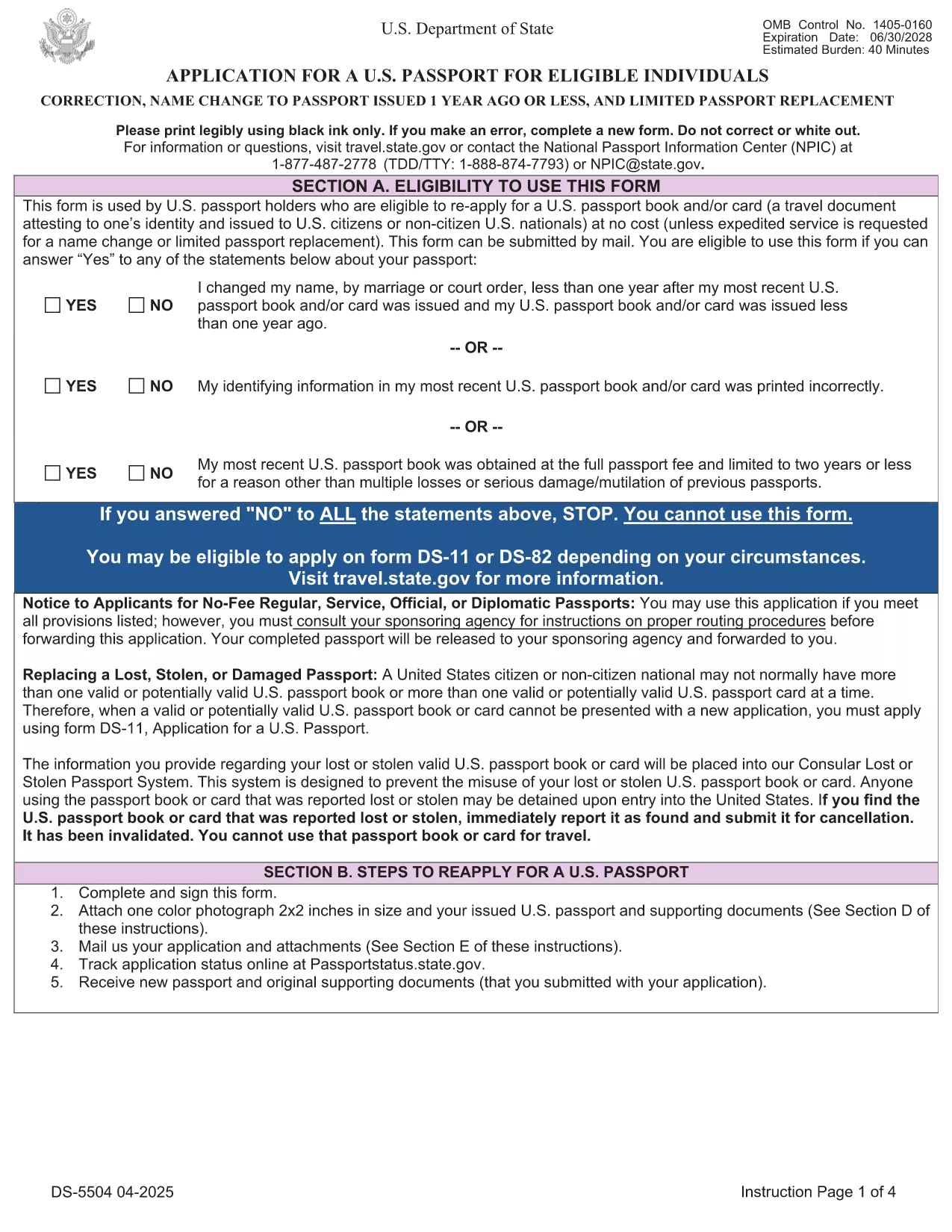
The DS-5504 is the official U.S. Department of State application used when you need to change the name on a passport, correct a printing error, or replace a limited‑validity passport. With Formize’s fillable PDF tool you can complete the form online, avoid manual errors, and print a clean copy ready for submission.

What Is the DS-5504 Form?

DS-5504 is designed for three specific situations:

  • Name change – if your legal name changed within one year of your last passport issuance.
  • Data correction – to fix a typo or incorrect personal information on an existing passport.
  • Limited passport replacement – when a temporary or limited‑validity passport expires or is damaged.

How to Fill Out DS-5504 with Formize

Instead of downloading the PDF and opening a separate editor, simply click the “Fill out this form” button on this page. The Formize PDF Filler app loads in your browser, letting you:

  1. Enter personal details directly into interactive fields.
  2. Upload a passport‑style photo.
  3. Save a draft and return later if needed.
  4. Download the completed, printable PDF with one click.

Common Mistakes to Avoid

  • Using a name change older than one year – the form will be rejected.
  • Leaving the signature line blank or signing on the wrong page.
  • Submitting an incorrect passport number or expiration date.
  • Forgetting to attach the required supporting documents (photo, legal name‑change proof, etc.).

Required Supporting Documents

Depending on your request, you will need to include:

  • Current valid U.S. passport (or limited‑validity passport).
  • One recent color passport photo (2" x 2").
  • Legal name‑change documentation (marriage certificate, court order) – if applicable.
  • Proof of the printing error (e.g., a copy of the original passport showing the mistake).

Where to Submit Your Completed Form

After printing, mail the DS-5504 package to the address listed in the form’s instructions or bring it to a regional passport agency. The application is free of charge; expedited processing is available for a fee.

Need help? Review the official DS‑5504 PDF for detailed instructions.

자주하는 질문
  • Can I use DS-5504 for a name change after one year?

    No. The DS‑5504 is only valid for name changes that occurred within one year of your most recent passport issuance. For older changes, use form DS‑82.

  • Is there a fee to file DS-5504?

    The DS‑5504 application itself is free. Fees only apply if you request expedited processing or need a new passport book.

  • Do I need a photo for a data‑correction request?

    Yes. All DS‑5504 submissions require one recent color passport photo, even if you are only correcting printed information.

  • Can I submit the completed form electronically?

    The State Department currently requires a printed, signed PDF with supporting documents. Electronic submission is not accepted for DS‑5504.

  • What if my limited‑validity passport is still valid?

    You can use DS‑5504 to replace a limited‑validity passport that is damaged, lost, or you simply need a full‑validity book. Include the limited passport and a written explanation.

  • How long does processing take?

    Regular processing usually takes 6‑8 weeks. Expedited service (for a fee) can reduce the time to 2‑3 weeks.

  • Can I use Formize on a mobile device?

    Yes. The Formize PDF Filler works on most modern smartphones and tablets, letting you fill out DS‑5504 on the go.

어떻게

5개의 간단한 단계를 통해 온라인으로 DS-5504를 무료로 작성하는 방법:

  1. 1
    Open the Fillable Form
    Click the "Fill out this form" button on the page. The Formize PDF Filler loads instantly in your browser.
  2. 2
    Enter Your Information
    Complete each interactive field – personal details, passport number, reason for the request, and upload your passport‑style photo.
  3. 3
    Review & Sign
    Double‑check all entries for accuracy, then add your electronic signature in the designated box.
  4. 4
    Download & Print
    Save the completed PDF, print a clean copy on white paper, and attach any required supporting documents.
  5. 5
    Submit to the State Department
    Mail or deliver the package to the address specified in the form instructions, or schedule an appointment at a passport agency.
Formize PDF 필러 앱
에 대한

여권 양식

DS-5504는 여권을 신청할 때 사용하는 서류로, 소지자의 신원과 국적을 증명하고 해외여행을 할 수 있는 여행증명서인 여권 양식 중 하나입니다. 여권 양식은 여권을 발급하는 국가에 따라 다를 수 있지만 일반적으로 이름, 생년월일, 출생지와 같은 신청자의 개인 정보와 신청자의 부모 및 이전 여권 또는 여행 문서에 대한 정보가 포함됩니다. .

미국에서 가장 일반적인 두 가지 여권 양식은 DS-11과 DS-82입니다. DS-11 양식은 최초 지원자, 미성년자 또는 DS-82 양식을 사용할 자격이 없는 개인에게 사용됩니다. DS-82 양식은 적격 지원자의 우편 여권 갱신에 사용됩니다. 두 양식 모두 지원자는 개인 정보와 여권 사진 및 시민권 증명서와 같은 지원 문서를 제공해야 합니다.

다른 국가에서는 여권 양식 및 요구 사항이 다를 수 있지만 기본 프로세스에는 일반적으로 여권 신청서 작성, 증빙 서류 제공, 정부 시설 또는 대사관에서 여권 담당자와의 인터뷰 참석이 포함됩니다. 여권 신청 절차는 몇 주 또는 몇 달이 걸릴 수 있으므로 계획된 여행보다 훨씬 일찍 신청하는 것이 좋습니다.

특징

PDF 필러

온라인에서 PDF 양식을 채우는 가장 쉬운 방법

  • DS-5504를 빠르게 작성하세요.
    온라인에서 DS-5504을(를) 빠르게 채우는 방법을 찾고 계십니까? 온라인 무료 PDF 양식 필러를 사용하면 1분 이내에 이 PDF 문서를 편집하고 채우는 방법을 알 수 있습니다.
  • 사용하기 쉬운 온라인 PDF 편집기
    다시 스캔하여 다시 보내기 전에 편집할 수 있도록 PDF 파일을 인쇄하는 데 지쳤습니까? 온라인에서 무료로 PDF 문서를 편집하세요. 온라인 PDF 편집기를 사용하여 시간과 종이를 절약하십시오.
  • 훌륭한 도구, 모든 플랫폼
    Mac에서 DS-5504를 채우는 방법이나 PDF 필러를 무료로 사용하는 방법이 궁금하십니까? 당사의 온라인 PDF 도구는 모든 플랫폼에서 작동합니다.
  • 안전한 파일 저장
    완료된 "DS-5504" 파일은 Amazon 클라우드 호스팅에서 관리하는 보안 데이터베이스에 저장됩니다. 언제든지 시스템에서 파일을 삭제할 수 있습니다. 어쨌든 이러한 파일은 24시간 후에 자동으로 삭제됩니다.
  • DS-5504님과 채팅
    무료 PDF 리더 도우미인 Chatize에서 "DS-5504"와 채팅하세요. "DS-5504"에서 질문하고 답변을 받으세요. 위의 문서와 채팅 버튼을 클릭하세요.

필링 세션 삭제

선택한 필링 세션을 삭제하시겠습니까?이 경우 양식 작성 진행 상황이 손실됩니다.

편집 세션 삭제

선택한 편집 세션을 삭제하시겠습니까? 이 경우 양식 작성 및 편집 진행 상황이 손실됩니다.