
언어 선택

SSA-671 Railroad Employment Questionnaire (Fillable PDF)

  1. 언어 영어
  2. 국가 미국
  3. 활동 사회 보장
이 양식을 작성하십시오
SSA-671 Railroad Employment Questionnaire (Fillable PDF)

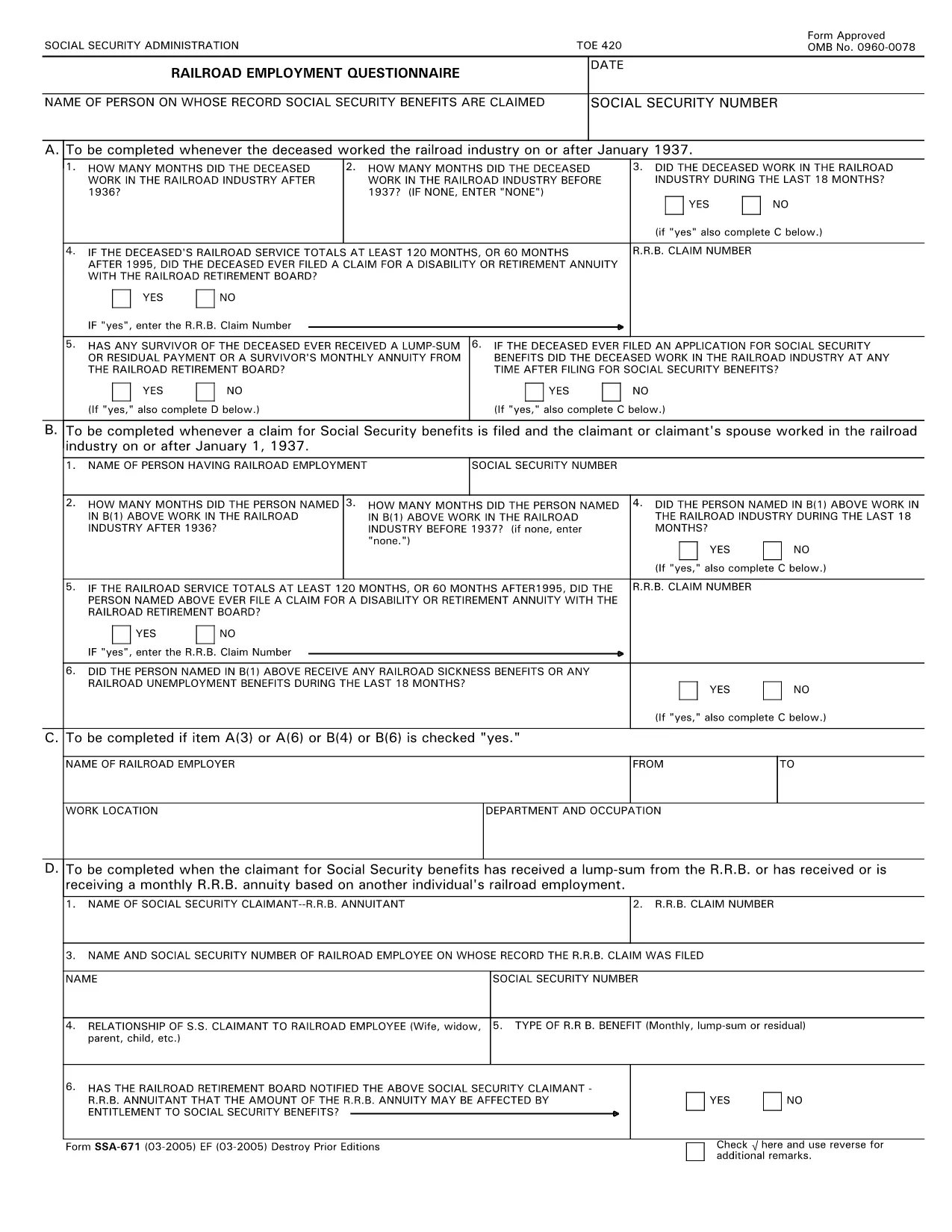
The SSA‑671, also known as the Railroad Employment Questionnaire, is required by the Social Security Administration (SSA) to verify railroad employment history. Accurate completion ensures you receive proper credit for railroad work in your Social Security record.

Our fillable PDF version lets you complete the questionnaire directly in your browser—no extra software needed. Simply click the button below, fill out each field, and download or print the finished form.

Key sections of the form include personal identification, employer details, dates of employment, and the type of railroad work performed. All fields marked with an asterisk (*) are mandatory.

Using the online Formize PDF Filler reduces errors, speeds up processing, and keeps a digital copy for your records.

자주하는 질문
  • Who needs to fill out SSA‑671?

    Anyone who has worked for a railroad employer and needs to have that employment credited toward Social Security benefits.

  • Can I submit the form electronically?

    Yes. After completing the fillable PDF, you can email or upload the PDF to your local SSA office if they accept electronic submissions.

  • What happens if I leave a required field blank?

    The SSA may reject the questionnaire, causing delays in crediting your railroad employment. All fields marked * must be completed.

  • Do I need a PDF editor to use this form?

    No. The Formize online filler lets you complete the PDF in the browser without any additional software.

  • How long does it take to fill out SSA‑671?

    Typically 5‑10 minutes if you have your employment details handy.

  • Where should I send the completed form?

    Mail it to your local Social Security Administration office or follow the submission instructions on the SSA website.

  • Is there a fee to use the Formize PDF Filler?

    No. Formize provides free online filling for this government form.

  • Can I save a draft and finish later?

    Yes. The Formize app lets you download a partially completed PDF and resume editing later.

어떻게

5개의 간단한 단계를 통해 온라인으로 SSA-671를 무료로 작성하는 방법:

  1. 1
    Click the Fill Out Button
    Press the "Fill out this form" button on the page to launch the Formize PDF Filler directly in your browser.
  2. 2
    Wait for the Filler to Load
    The Formize app loads automatically—no download or installation is required.
  3. 3
    Complete Each Field
    Enter your information in the fillable fields. Required fields are marked with an asterisk (*).
  4. 4
    Review and Save
    Double‑check all entries, then click "Save" to download a copy or "Print" to create a hard copy.
  5. 5
    Submit to SSA
    Send the completed PDF to the Social Security Administration by mail or upload it through your local SSA portal.
Formize PDF 필러 앱
에 대한

사회 보장 양식

SSA-671는 미국 사회보장국(SSA)에서 제공하는 다양한 혜택과 서비스를 신청하는 데 사용되는 문서인 사회보장 양식 중 하나입니다. SSA는 은퇴 혜택, 장애 혜택, 생존자 혜택, SSI(Supplemental Security Income)를 포함하여 적격 개인 및 가족에게 재정 지원을 제공하도록 설계된 프로그램을 관리하는 연방 기관입니다.

몇 가지 일반적인 사회보장 양식은 다음과 같습니다.

사회보장 퇴직 급여 신청서: 이 양식은 개인의 근로 이력 및 소득에 따라 퇴직 급여를 신청하는 데 사용됩니다.

사회 보장 장애 혜택 신청서: 이 양식은 개인이 일을 할 수 없는 신체적 또는 정신적 상태가 있는 경우 장애 혜택을 신청하는 데 사용됩니다.

사회 보장 유족 혜택 신청서: 이 양식은 개인의 배우자나 부모가 사망하고 유족 혜택을 받을 자격이 있는 경우 유족 혜택을 신청하는 데 사용됩니다.

Medicare 등록 신청서: 이 양식은 65세 이상 개인과 특정 장애 또는 질병이 있는 사람을 위한 연방 건강 보험 프로그램인 Medicare에 등록하는 데 사용됩니다.

주소 변경 양식: 이 양식은 SSA로 개인의 주소를 업데이트하는 데 사용됩니다.

소득 기록 요청 양식: 이 양식은 사회 보장 혜택을 계산하는 데 사용되는 개인의 소득 기록 사본을 요청하는 데 사용됩니다.

이 양식은 온라인, 우편 또는 지역 사회보장국 사무실에서 직접 작성할 수 있습니다. 적시에 정확한 사회 보장 혜택 처리를 위해 필요한 모든 양식을 주의 깊게 검토하고 작성하는 것이 중요합니다.

특징

PDF 필러

온라인에서 PDF 양식을 채우는 가장 쉬운 방법

  • SSA-671를 빠르게 작성하세요.
    온라인에서 SSA-671을(를) 빠르게 채우는 방법을 찾고 계십니까? 온라인 무료 PDF 양식 필러를 사용하면 1분 이내에 이 PDF 문서를 편집하고 채우는 방법을 알 수 있습니다.
  • 사용하기 쉬운 온라인 PDF 편집기
    다시 스캔하여 다시 보내기 전에 편집할 수 있도록 PDF 파일을 인쇄하는 데 지쳤습니까? 온라인에서 무료로 PDF 문서를 편집하세요. 온라인 PDF 편집기를 사용하여 시간과 종이를 절약하십시오.
  • 훌륭한 도구, 모든 플랫폼
    Mac에서 SSA-671를 채우는 방법이나 PDF 필러를 무료로 사용하는 방법이 궁금하십니까? 당사의 온라인 PDF 도구는 모든 플랫폼에서 작동합니다.
  • 안전한 파일 저장
    완료된 "SSA-671" 파일은 Amazon 클라우드 호스팅에서 관리하는 보안 데이터베이스에 저장됩니다. 언제든지 시스템에서 파일을 삭제할 수 있습니다. 어쨌든 이러한 파일은 24시간 후에 자동으로 삭제됩니다.
  • SSA-671님과 채팅
    무료 PDF 리더 도우미인 Chatize에서 "SSA-671"와 채팅하세요. "SSA-671"에서 질문하고 답변을 받으세요. 위의 문서와 채팅 버튼을 클릭하세요.

필링 세션 삭제

선택한 필링 세션을 삭제하시겠습니까?이 경우 양식 작성 진행 상황이 손실됩니다.

편집 세션 삭제

선택한 편집 세션을 삭제하시겠습니까? 이 경우 양식 작성 및 편집 진행 상황이 손실됩니다.