
언어 선택

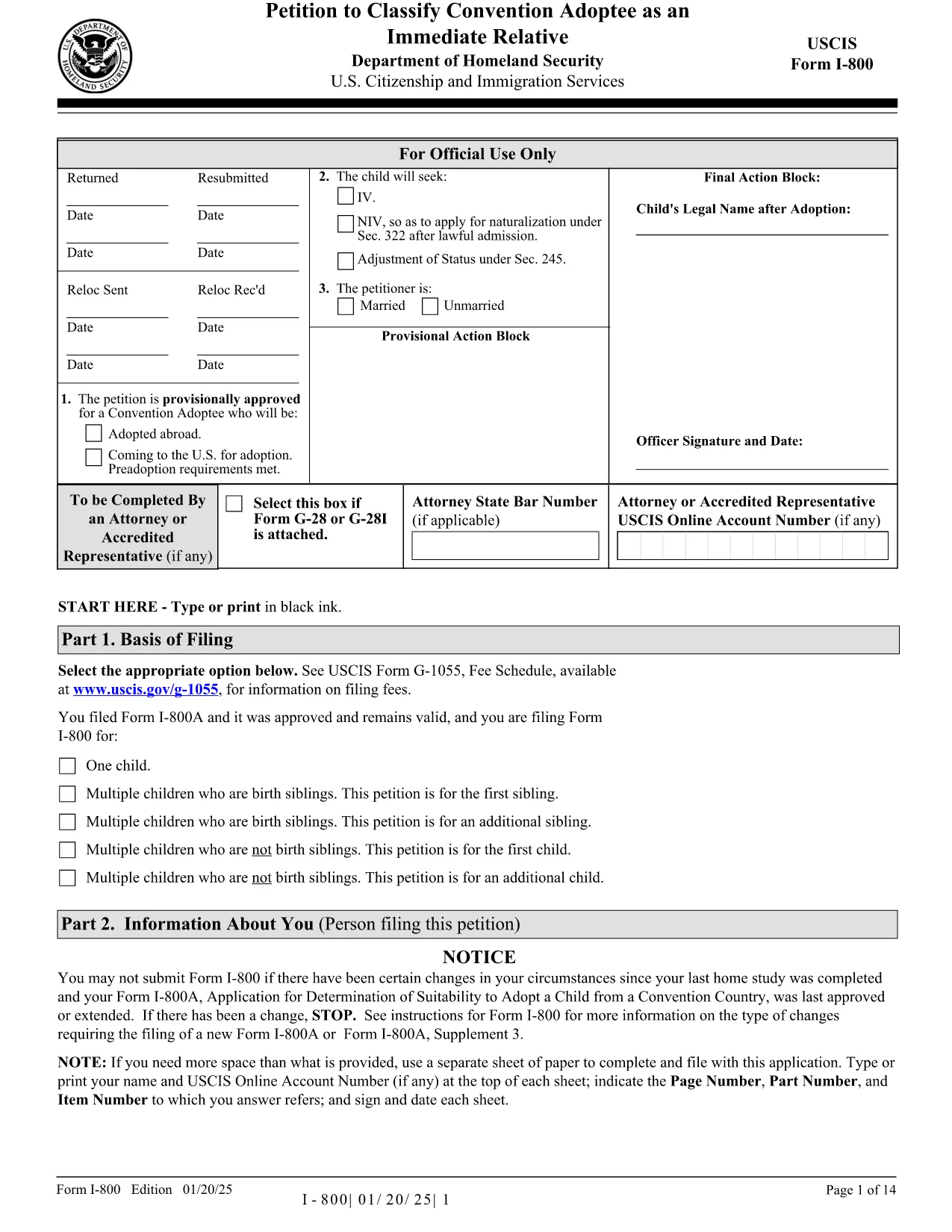
Form I-800 – Petition to Classify a Convention Adoptee

  1. 국가 미국
  2. 언어 영어
  3. 부서 미국 시민권 및 이민 서비스
Form I-800 – Petition to Classify a Convention Adoptee

The Form I-800 (Petition to Classify Convention Adoptee as an Immediate Relative) is used by U.S. citizen prospective adoptive parents to finalize the immigration process for a child adopted from a Hague Convention country. This page provides the official fillable PDF, step‑by‑step instructions, and tips to ensure a smooth filing.

What is Form I-800?

Form I-800 is filed after you have an approved Form I-800A (Application for Determination of Suitability to Adopt a Child from a Convention Country). It requests the U.S. Citizenship and Immigration Services (USCIS) to recognize the child as an immediate relative, allowing the child to obtain an immigrant visa.

Eligibility & Required Documents

  • U.S. citizen petitioner (adoptive parent) – must be at least 21 years old.
  • Approved Form I-800A approval notice.
  • Proof of the child’s habitually residing in a Convention country.
  • Article 16 report, adoption agency statements, and post‑placement plans (if applicable).
  • Form I-864 (Affidavit of Support) or I-864EZ.
  • Any required medical examinations, translations, and certifications.

How to Complete the Fillable Form Online

Instead of downloading the PDF and editing it with a separate editor, simply click the "Fill out this form" button on this page. The Formize PDF Filler app will load the fillable version instantly. Follow the on‑screen prompts, save your progress, and download the completed PDF ready for submission.

Common Mistakes to Avoid

  • Using pages from different edition dates – all pages must match the edition date shown at the bottom of the form.
  • Leaving required fields blank (e.g., Part 2 – Information About You).
  • Submitting original documents unless specifically requested.
  • Failing to attach English translations for foreign‑language documents.
  • Paying the filing fee with a personal check – USCIS now requires electronic payment methods.

Where to File & Pay the Fee

Mail the completed Form I-800 and supporting evidence to the USCIS Adoption Lockbox (Dallas, TX). Payment can be made with a credit/debit card using Form G‑1450, or via ACH with Form G‑1650. Check the latest fee schedule on the USCIS website before filing.

Ready to start? Click the button below to open the fillable version and begin your adoption petition today.

자주하는 질문
  • Do I need an approved Form I-800A before filing Form I-800?

    Yes. USCIS requires an approved Form I-800A before you can submit Form I-800.

  • Can I file Form I-800 online?

    Form I-800 itself must be submitted as a PDF by mail, but you can fill it out online using the Formize fillable version.

  • What is the current filing fee for Form I-800?

    Check the USCIS Fee Schedule for the most up‑to‑date amount. Payment must be made electronically (credit/debit card or ACH).

  • How long does USCIS take to process Form I-800?

    Processing times vary; typically 6‑12 months. You can check real‑time estimates on the USCIS case status page.

  • What should I do if I receive a Request for Evidence (RFE)?

    Respond promptly with the requested documents, following the RFE deadline. Include the RFE notice number on all correspondence.

  • Can I submit original documents with my Form I-800?

    Only submit originals if USCIS specifically asks for them. Otherwise, provide clear photocopies and certified translations.

  • Is there a way to track my mailed Form I-800?

    Yes. Use a traceable mailing service (USPS Certified Mail, FedEx, UPS) and keep the receipt for your records.

  • What if the child is adopted from a non‑Convention country?

    Form I-800 is only for Convention adoptees. For non‑Convention cases, you must file Form I-600 or I-600A.

어떻게

5개의 간단한 단계를 통해 온라인으로 Form I-800를 무료로 작성하는 방법:

  1. 1
    Open the Fillable Form
    Click the "Fill out this form" button on the page. The Formize PDF Filler app loads the official Form I-800 instantly.
  2. 2
    Enter Your Information
    Complete each section, following the on‑screen prompts. Required fields are highlighted in red.
  3. 3
    Save and Review
    Use the "Save" button to store your progress. Review all entries for accuracy before finalizing.
  4. 4
    Download the Completed PDF
    When all fields are filled, click "Download" to get a PDF ready for mailing to USCIS.
  5. 5
    Submit to USCIS
    Mail the downloaded Form I-800 with supporting documents and the correct filing fee to the USCIS Adoption Lockbox.
Formize PDF 필러 앱
에 대한

{키워드} 템플릿

PDF 문서를 보고 작성하기 위한 기존 기능 세트와 웹 애플리케이션 및 반응형 레이아웃의 이점을 결합하면 몇 분 만에 Form I-800을(를) 완료할 수 있습니다.
특징

PDF 필러

온라인에서 PDF 양식을 채우는 가장 쉬운 방법

  • Form I-800를 빠르게 작성하세요.
    온라인에서 Form I-800을(를) 빠르게 채우는 방법을 찾고 계십니까? 온라인 무료 PDF 양식 필러를 사용하면 1분 이내에 이 PDF 문서를 편집하고 채우는 방법을 알 수 있습니다.
  • 사용하기 쉬운 온라인 PDF 편집기
    다시 스캔하여 다시 보내기 전에 편집할 수 있도록 PDF 파일을 인쇄하는 데 지쳤습니까? 온라인에서 무료로 PDF 문서를 편집하세요. 온라인 PDF 편집기를 사용하여 시간과 종이를 절약하십시오.
  • 훌륭한 도구, 모든 플랫폼
    Mac에서 Form I-800를 채우는 방법이나 PDF 필러를 무료로 사용하는 방법이 궁금하십니까? 당사의 온라인 PDF 도구는 모든 플랫폼에서 작동합니다.
  • 안전한 파일 저장
    완료된 "Form I-800" 파일은 Amazon 클라우드 호스팅에서 관리하는 보안 데이터베이스에 저장됩니다. 언제든지 시스템에서 파일을 삭제할 수 있습니다. 어쨌든 이러한 파일은 24시간 후에 자동으로 삭제됩니다.
  • Form I-800님과 채팅
    무료 PDF 리더 도우미인 Chatize에서 "Form I-800"와 채팅하세요. "Form I-800"에서 질문하고 답변을 받으세요. 위의 문서와 채팅 버튼을 클릭하세요.

필링 세션 삭제

선택한 필링 세션을 삭제하시겠습니까?이 경우 양식 작성 진행 상황이 손실됩니다.

편집 세션 삭제

선택한 편집 세션을 삭제하시겠습니까? 이 경우 양식 작성 및 편집 진행 상황이 손실됩니다.