
언어 선택

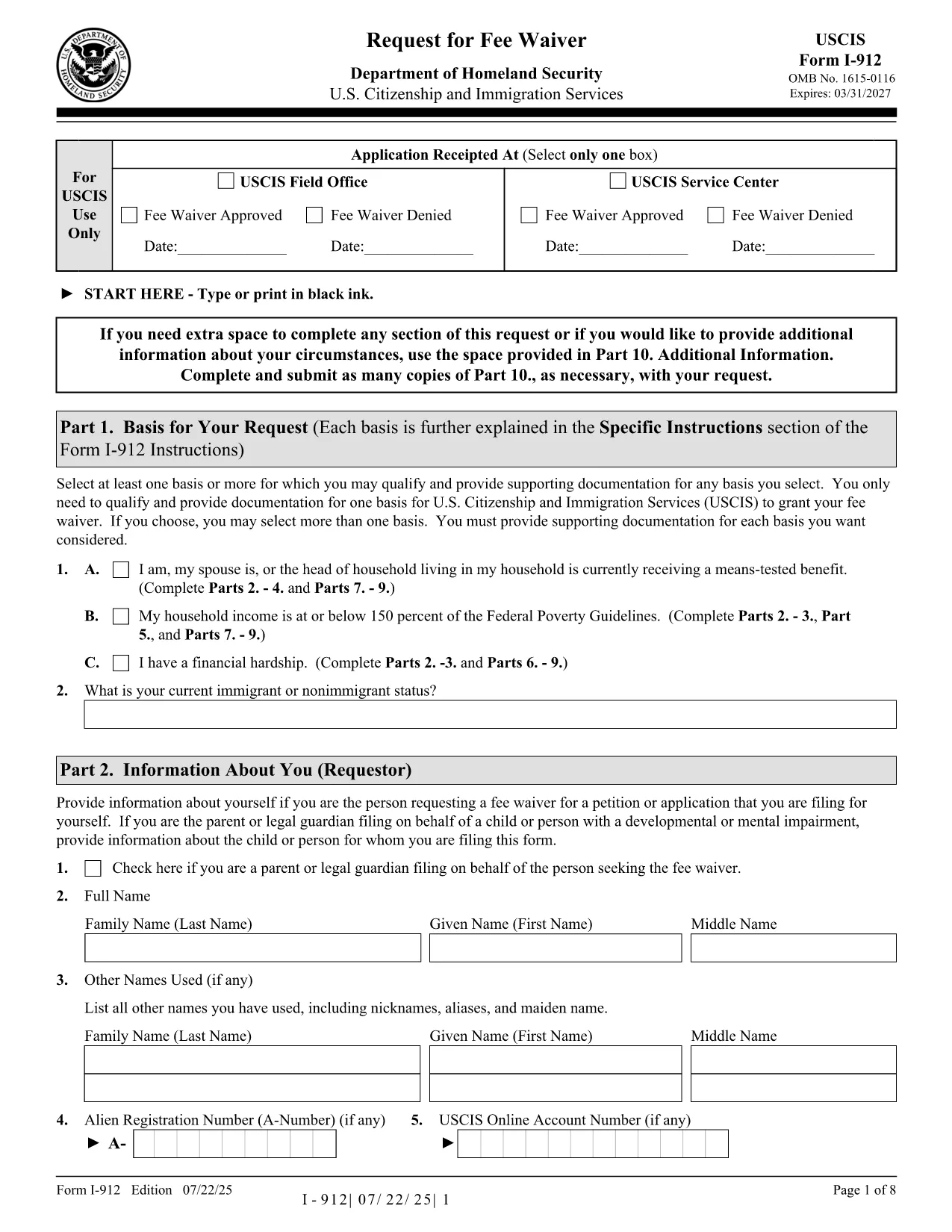
Form I-912 – Request for Fee Waiver (Fillable PDF)

  1. 국가 미국
  2. 언어 영어
  3. 부서 미국 시민권 및 이민 서비스
Form I-912 – Request for Fee Waiver (Fillable PDF)

The USCIS Form I-912, Request for Fee Waiver lets you ask for a waiver of filing fees when you cannot afford them. With Formize you can fill the official PDF directly in your browser—no printer, scanner, or PDF editor required.

What Is Form I-912?

Form I-912 is used alongside an immigration application (e.g., N-400, I-130) to demonstrate financial hardship. You must attach it to the primary form before the USCIS receives the application.

How to Complete the I-912 Fee Waiver Online

Our fillable version mirrors the exact layout of the USCIS PDF, ensuring your submission is accepted.

Common Mistakes to Avoid

  • Leaving the signature line blank – USCIS rejects unsigned forms.
  • Submitting a PDF from a different edition – always use the latest edition linked below.
  • Missing supporting documents – include proof of income, public benefits, or a letter explaining your situation.

Where to Submit Your Completed Form

Attach the completed I-912 to the immigration form you are filing and mail it to the address listed in that form’s instructions, or upload it via your USCIS online account.

자주하는 질문
  • Who is eligible for an I-912 fee waiver?

    Anyone who can demonstrate an inability to pay the filing fee, including recipients of means‑tested public benefits, low‑income households, or those facing financial hardship.

  • Do I need to submit the I-912 before the main application?

    Yes. Attach the completed I-912 to your immigration form before USCIS receives the primary application. Late submissions are rejected.

  • Can I submit a digital signature?

    USCIS accepts a digital signature created with the Formize PDF Filler. Ensure the signature field is filled before downloading or uploading the form.

  • What supporting documents should I include?

    Include recent tax returns, benefit award letters, pay stubs, or a letter from a social services agency that confirms your current financial situation.

  • Is the fillable PDF the same as the official USCIS version?

    Yes. The fillable version is an exact replica of the official USCIS PDF (edition dated 07/22/25), so USCIS will accept it without issue.

어떻게

4개의 간단한 단계를 통해 온라인으로 I-912를 무료로 작성하는 방법:

  1. 1
    Open the Fillable Form
    Click the “Fill out this form” button on the page. The Formize PDF Filler loads instantly in your browser.
  2. 2
    Enter Your Information
    Type directly into each field—income, household size, and reason for the waiver. The interface validates required fields in real time.
  3. 3
    Review and Sign
    Double‑check all entries, then add your digital signature using the built‑in signature tool.
  4. 4
    Save or Submit
    Download the completed PDF for your records or upload it with your immigration application through your USCIS account.
Formize PDF 필러 앱
에 대한

{키워드} 템플릿

PDF 문서를 보고 작성하기 위한 기존 기능 세트와 웹 애플리케이션 및 반응형 레이아웃의 이점을 결합하면 몇 분 만에 I-912을(를) 완료할 수 있습니다.
특징

PDF 필러

온라인에서 PDF 양식을 채우는 가장 쉬운 방법

  • I-912를 빠르게 작성하세요.
    온라인에서 I-912을(를) 빠르게 채우는 방법을 찾고 계십니까? 온라인 무료 PDF 양식 필러를 사용하면 1분 이내에 이 PDF 문서를 편집하고 채우는 방법을 알 수 있습니다.
  • 사용하기 쉬운 온라인 PDF 편집기
    다시 스캔하여 다시 보내기 전에 편집할 수 있도록 PDF 파일을 인쇄하는 데 지쳤습니까? 온라인에서 무료로 PDF 문서를 편집하세요. 온라인 PDF 편집기를 사용하여 시간과 종이를 절약하십시오.
  • 훌륭한 도구, 모든 플랫폼
    Mac에서 I-912를 채우는 방법이나 PDF 필러를 무료로 사용하는 방법이 궁금하십니까? 당사의 온라인 PDF 도구는 모든 플랫폼에서 작동합니다.
  • 안전한 파일 저장
    완료된 "I-912" 파일은 Amazon 클라우드 호스팅에서 관리하는 보안 데이터베이스에 저장됩니다. 언제든지 시스템에서 파일을 삭제할 수 있습니다. 어쨌든 이러한 파일은 24시간 후에 자동으로 삭제됩니다.
  • I-912님과 채팅
    무료 PDF 리더 도우미인 Chatize에서 "I-912"와 채팅하세요. "I-912"에서 질문하고 답변을 받으세요. 위의 문서와 채팅 버튼을 클릭하세요.

필링 세션 삭제

선택한 필링 세션을 삭제하시겠습니까?이 경우 양식 작성 진행 상황이 손실됩니다.

편집 세션 삭제

선택한 편집 세션을 삭제하시겠습니까? 이 경우 양식 작성 및 편집 진행 상황이 손실됩니다.