
언어 선택

APS Energy Support Program Application Form (Fillable PDF)

  1. 언어 영어
  2. 국가 미국
  3. 부서 Utility
  4. 활동 Energy Assistance
APS Energy Support Program Application Form (Fillable PDF)

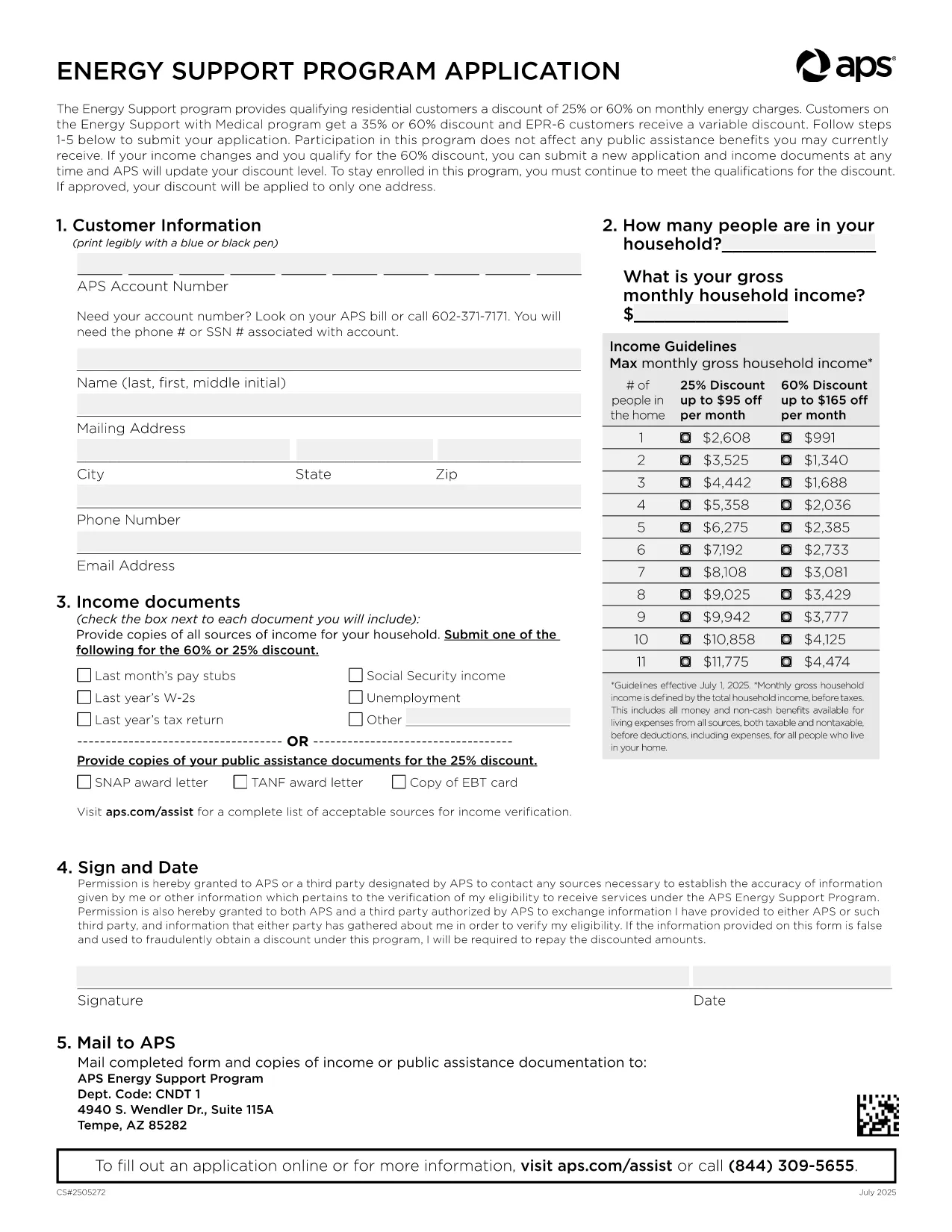
Arizona Public Service (APS) offers the Energy Support Program to help qualifying households lower their monthly electric bill. The official Application Form APS is now available as a fillable PDF that you can complete directly on this page.

Why Choose the APS Energy Support Application?

The APS Energy Support Program provides a discount of up to 60% on your electricity charges. Using the online fillable PDF saves you time, eliminates printing errors, and speeds up processing—your application can be submitted in minutes.

How to Fill the APS Application Form Online

Simply click the "Fill out this form" button below. The Formize PDF Filler will load, allowing you to type, select, and sign directly in your browser. No additional software is required.

Common Mistakes to Avoid

  • Leaving required fields blank – the filler highlights missing information.
  • Submitting incomplete income documents – attach clear scans or photos of each document.
  • Forgetting the signature – the digital signature field must be completed before submission.

Eligibility & Required Documents

To qualify, you must meet the household income guidelines and provide proof for every adult in the home. Acceptable documents include recent pay stubs, tax returns, Social Security statements, SNAP benefits letters, or other listed income sources.

Submit Your Completed Form

After filling the form, click Submit. Your application will be securely sent to APS for processing. You’ll receive a confirmation email with a reference number and next‑step instructions.

Need help? Review the FAQs below or contact APS Customer Care at (602) 371‑7171.

자주하는 질문
  • What is the APS Energy Support Program?

    It is a discount program offered by Arizona Public Service that reduces eligible households' electric bills by up to 60% based on income.

  • Do I need to print the form?

    No. The fillable PDF can be completed entirely online using the Formize PDF Filler, then submitted electronically.

  • Which documents are required?

    Proof of income for every adult (pay stubs, tax returns, Social Security statements, SNAP letters, etc.) and a valid signature from the account holder.

  • How long does processing take?

    APS typically processes online applications within 10‑15 business days. You will receive an email notification of the decision.

  • Can I edit the form after submitting?

    Once submitted, the form cannot be edited. If you need to make changes, contact APS Customer Care to request a new application.

  • Is my information secure?

    Yes. Formize uses SSL encryption to protect all data entered in the PDF filler. APS also follows strict privacy standards.

  • How often do I need to reapply?

    Eligibility must be recertified every 24 months. APS will mail a re‑certification form before your current enrollment expires.

  • What if I have trouble with the online filler?

    Refresh the page, ensure your browser is up‑to‑date, and try again. If the issue persists, you can download the PDF (link below) and complete it manually.

어떻게

5개의 간단한 단계를 통해 온라인으로 APS application form를 무료로 작성하는 방법:

  1. 1
    Open the Fillable Form
    Click the "Fill out this form" button on the page. The Formize PDF Filler loads instantly in your browser.
  2. 2
    Enter Your Information
    Type directly into each field, select options from dropdowns, and upload required documents using the attachment icons.
  3. 3
    Add Your Digital Signature
    Use the signature field to draw or type your name. The filler validates the signature before allowing submission.
  4. 4
    Review and Submit
    Check all entered data, ensure every required document is attached, then click the Submit button to send your application to APS.
  5. 5
    Save a Copy
    After submission, download a PDF copy for your records by clicking the "Download Completed Form" link.
Formize PDF 필러 앱
에 대한

{키워드} 템플릿

PDF 문서를 보고 작성하기 위한 기존 기능 세트와 웹 애플리케이션 및 반응형 레이아웃의 이점을 결합하면 몇 분 만에 APS application form을(를) 완료할 수 있습니다.
특징

PDF 필러

온라인에서 PDF 양식을 채우는 가장 쉬운 방법

  • APS application form를 빠르게 작성하세요.
    온라인에서 APS application form을(를) 빠르게 채우는 방법을 찾고 계십니까? 온라인 무료 PDF 양식 필러를 사용하면 1분 이내에 이 PDF 문서를 편집하고 채우는 방법을 알 수 있습니다.
  • 사용하기 쉬운 온라인 PDF 편집기
    다시 스캔하여 다시 보내기 전에 편집할 수 있도록 PDF 파일을 인쇄하는 데 지쳤습니까? 온라인에서 무료로 PDF 문서를 편집하세요. 온라인 PDF 편집기를 사용하여 시간과 종이를 절약하십시오.
  • 훌륭한 도구, 모든 플랫폼
    Mac에서 APS application form를 채우는 방법이나 PDF 필러를 무료로 사용하는 방법이 궁금하십니까? 당사의 온라인 PDF 도구는 모든 플랫폼에서 작동합니다.
  • 안전한 파일 저장
    완료된 "APS application form" 파일은 Amazon 클라우드 호스팅에서 관리하는 보안 데이터베이스에 저장됩니다. 언제든지 시스템에서 파일을 삭제할 수 있습니다. 어쨌든 이러한 파일은 24시간 후에 자동으로 삭제됩니다.
  • APS application form님과 채팅
    무료 PDF 리더 도우미인 Chatize에서 "APS application form"와 채팅하세요. "APS application form"에서 질문하고 답변을 받으세요. 위의 문서와 채팅 버튼을 클릭하세요.

필링 세션 삭제

선택한 필링 세션을 삭제하시겠습니까?이 경우 양식 작성 진행 상황이 손실됩니다.

편집 세션 삭제

선택한 편집 세션을 삭제하시겠습니까? 이 경우 양식 작성 및 편집 진행 상황이 손실됩니다.