
언어 선택

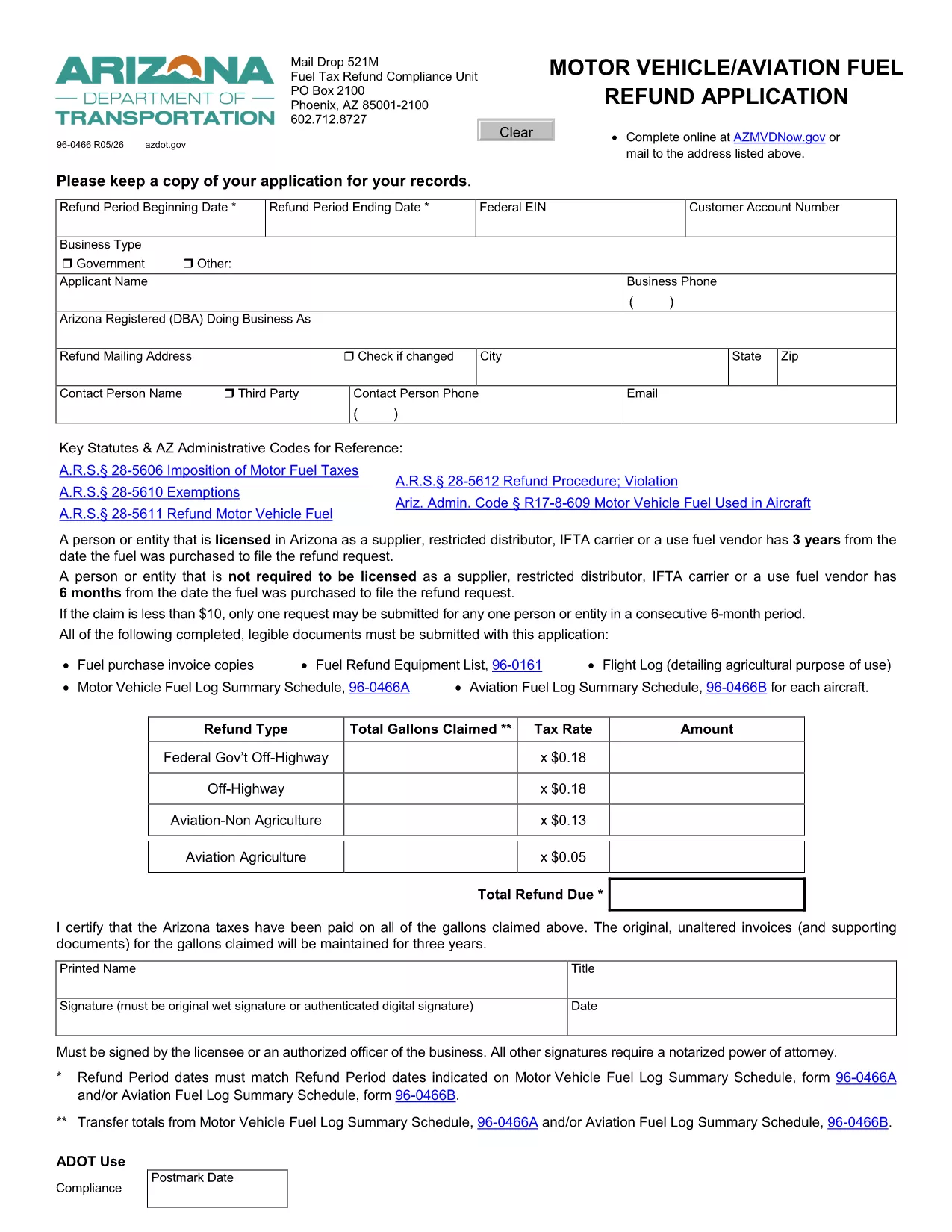
Arizona Form 96-0466 – Motor & Aviation Fuel Refund Application

  1. 언어 영어
  2. 국가 미국
  3. 활동 차량 등록
  4. 상태 애리조나
Arizona Form 96-0466 – Motor & Aviation Fuel Refund Application

Form 96-0466 is the official Motor Fuel/Aviation Fuel Refund Application used by the Arizona Department of Transportation (AZDOT). Whether you’re a commercial driver, fleet manager, or aircraft operator, this fillable PDF lets you claim refunds on fuel taxes paid in Arizona.

What Is Form 96-0466?

The form collects details about your fuel purchases, vehicle or aircraft registration, and the refund period you’re claiming. It works in tandem with the Fuel Log Summary Schedule (Form 96-0466B) for aviation users.

How to Fill Out Form 96-0466 Online

Instead of downloading, printing, and scanning, you can complete the form directly on our site using the Formize PDF Filler app:

  1. Click the "Fill out this form" button below.
  2. Wait a few seconds while the Formize PDF Filler loads the fillable version of Form 96-0466.
  3. Enter all required information – vehicle/aircraft details, fuel tax amounts, and refund dates.
  4. Review your entries for accuracy.
  5. Save, print, or submit the completed PDF as instructed by AZDOT.

Common Mistakes to Avoid

  • Incorrect refund period dates: The dates must match those on your Fuel Log Summary Schedule.
  • Missing signatures: Both the applicant and the authorized company representative must sign.
  • Wrong fuel type codes: Use the codes listed in the form instructions for motor vs. aviation fuel.
  • Incomplete supporting documents: Attach copies of fuel receipts and the completed Schedule B if applicable.

Where to Submit Your Completed Form

After filling out Form 96-0466, mail it to the AZDOT Fuel Tax Refund Compliance Unit:

AZDOT – Fuel Tax Refund Compliance Unit
PO Box 2100
Phoenix, AZ 85001-2100

Or deliver it in person to any Arizona Motor Vehicle Division office.

Fill out this form

자주하는 질문
  • Who can use Form 96-0466?

    Any individual or business that paid Arizona motor or aviation fuel tax and is eligible for a refund can use this form.

  • Do I need a separate schedule for each aircraft?

    Yes. Aviation users must complete a separate Form 96-0466B (Fuel Log Summary Schedule) for each aircraft.

  • Can I submit the form electronically?

    AZDOT currently requires a printed and signed PDF. Use the online filler for accuracy, then print and mail the form.

  • What supporting documents are required?

    Attach original fuel receipts, the completed Schedule B (if applicable), and any relevant registration documents.

  • How long does the refund process take?

    Processing times vary, but AZDOT typically issues refunds within 30‑45 days after receiving a complete application.

  • Is there a filing fee for Form 96-0466?

    No. There is no fee to file the refund application, but you must provide accurate tax paid amounts.

  • What if I make a mistake on the form?

    Correct any errors before signing. If you submit an incorrect form, AZDOT may reject it and request a new submission.

어떻게

5개의 간단한 단계를 통해 온라인으로 form 96-0466를 무료로 작성하는 방법:

  1. 1
    Click the Fill‑out Button
    Select the “Fill out this form” button on the page to launch the Formize PDF Filler.
  2. 2
    Wait for the Filler to Load
    The fillable version of Form 96-0466 will appear in a few seconds.
  3. 3
    Enter Your Information
    Complete each field with accurate vehicle, fuel, and refund‑period details.
  4. 4
    Review and Save
    Double‑check for errors, then save the PDF to your device or print it.
  5. 5
    Submit to AZDOT
    Mail or deliver the completed form to the AZDOT Fuel Tax Refund Compliance Unit as instructed.
Formize PDF 필러 앱
에 대한

차량 등록 양식

form 96-0466는 관련 정부 기관(일반적으로 차량국(DMV) 또는 이와 동등한 기관)에 자동차를 등록하는 데 사용되는 문서인 차량 등록 양식 중 하나입니다. 이러한 양식은 개인이 새 차량이나 중고 차량을 구입하거나 차량 소유권을 이전하거나 차량을 가지고 새로운 관할 구역으로 이동할 때 필요합니다.

특정 차량 등록 양식은 관할권에 따라 다를 수 있지만 일반적으로 다음 정보가 필요합니다.

차량 정보: 여기에는 제조사, 모델, 연도, 차량 식별 번호(VIN), 주행 거리계 판독값 등 차량에 대한 세부정보가 포함됩니다.

소유주 정보: 양식에는 이름, 주소, 연락처 정보, 운전면허증 번호 등 차량 소유자에 대한 정보가 필요합니다.

소유권 증명: 상황에 따라 소유권 증명서, 판매 명세서 또는 제조업체 원산지 증명서(신차의 경우) 등 소유권 증명이 필요할 수 있습니다.

보험 정보: 일반적으로 유효한 차량 보험 보장 증명서가 필요합니다. 여기에는 보험 증권 번호, 보장 날짜, 보험 회사 세부 정보 제공이 포함될 수 있습니다.

수수료 지불: 차량 등록에는 등록 수수료, 세금 및 관할권에 따른 기타 요금 등 다양한 수수료를 지불하는 과정이 포함됩니다.

이러한 기본 요구 사항 외에도 일부 관할권에는 추가 양식 또는 문서 요구 사항이 있을 수 있습니다. 예를 들어 특정 지역에서는 배출 테스트 결과, 안전 검사 또는 거주 증명이 필요할 수 있습니다.

차량 등록 양식을 작성하여 제출하면 정부 당국에서 등록증, 번호판, 등록 스티커를 발급합니다. 이 문서는 차량이 합법적으로 등록되어 있으며 공공 도로에서 운행할 권한이 있음을 나타냅니다.

차량 등록 요구 사항은 관할권에 따라 크게 다를 수 있다는 점에 유의하는 것이 중요합니다. 따라서 귀하의 지역에 적용되는 특정 양식 및 절차에 대해서는 지역 DMV 또는 이에 상응하는 기관에 문의하는 것이 좋습니다.

특징

PDF 필러

온라인에서 PDF 양식을 채우는 가장 쉬운 방법

  • form 96-0466를 빠르게 작성하세요.
    온라인에서 form 96-0466을(를) 빠르게 채우는 방법을 찾고 계십니까? 온라인 무료 PDF 양식 필러를 사용하면 1분 이내에 이 PDF 문서를 편집하고 채우는 방법을 알 수 있습니다.
  • 사용하기 쉬운 온라인 PDF 편집기
    다시 스캔하여 다시 보내기 전에 편집할 수 있도록 PDF 파일을 인쇄하는 데 지쳤습니까? 온라인에서 무료로 PDF 문서를 편집하세요. 온라인 PDF 편집기를 사용하여 시간과 종이를 절약하십시오.
  • 훌륭한 도구, 모든 플랫폼
    Mac에서 form 96-0466를 채우는 방법이나 PDF 필러를 무료로 사용하는 방법이 궁금하십니까? 당사의 온라인 PDF 도구는 모든 플랫폼에서 작동합니다.
  • 안전한 파일 저장
    완료된 "form 96-0466" 파일은 Amazon 클라우드 호스팅에서 관리하는 보안 데이터베이스에 저장됩니다. 언제든지 시스템에서 파일을 삭제할 수 있습니다. 어쨌든 이러한 파일은 24시간 후에 자동으로 삭제됩니다.
  • form 96-0466님과 채팅
    무료 PDF 리더 도우미인 Chatize에서 "form 96-0466"와 채팅하세요. "form 96-0466"에서 질문하고 답변을 받으세요. 위의 문서와 채팅 버튼을 클릭하세요.

필링 세션 삭제

선택한 필링 세션을 삭제하시겠습니까?이 경우 양식 작성 진행 상황이 손실됩니다.

편집 세션 삭제

선택한 편집 세션을 삭제하시겠습니까? 이 경우 양식 작성 및 편집 진행 상황이 손실됩니다.