
언어 선택

VR-095 Multipurpose Vehicle Form – Download & Fill Online

  1. 언어 영어
  2. 국가 미국
  3. 활동 차량 등록
  4. 상태 메릴랜드
VR-095 Multipurpose Vehicle Form – Download & Fill Online

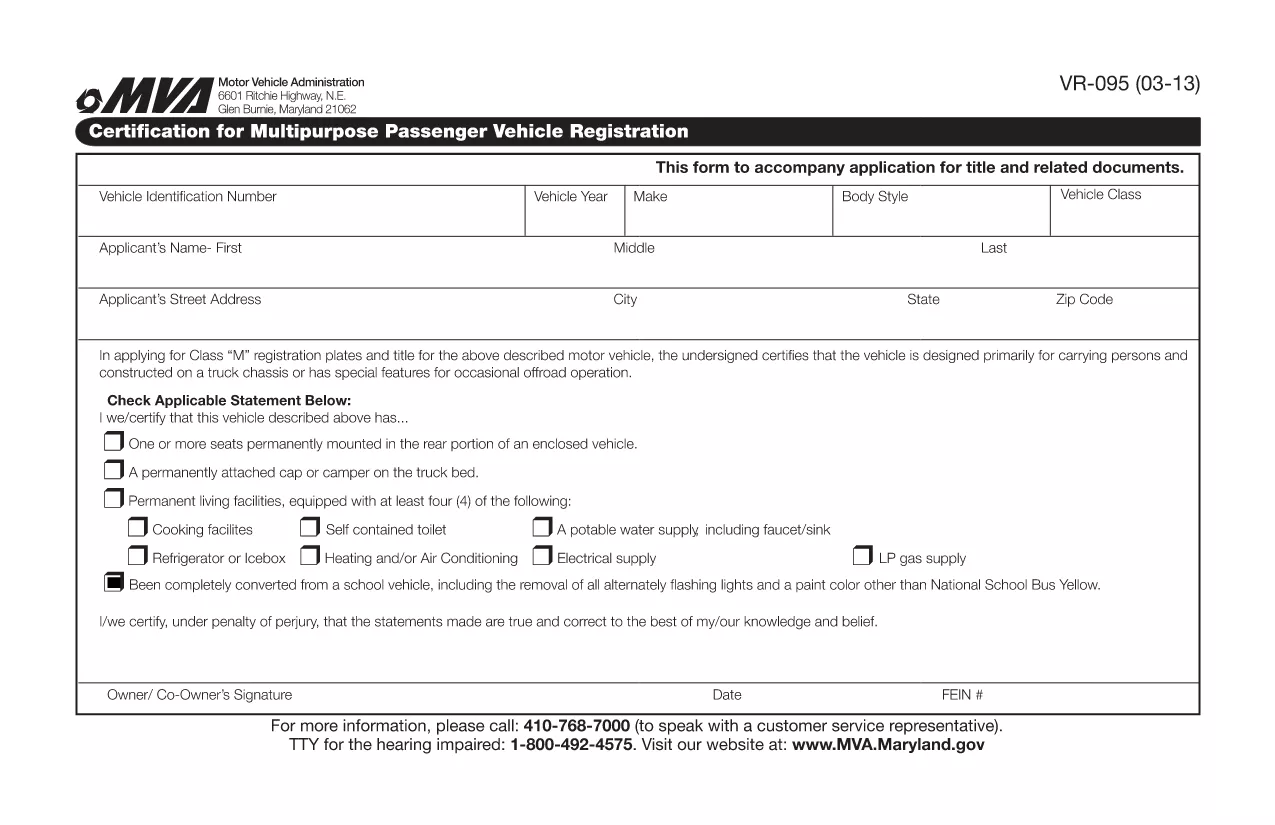
The VR-095 is Maryland’s official application for registering a multipurpose vehicle, such as a utility truck, golf cart, or a custom‑built vehicle that does not fit standard classifications. This form is required by the Maryland Motor Vehicle Administration (MVA) before the vehicle can receive a title, license plates, and registration stickers.

Formize.com hosts a fully fillable PDF version of the VR-095, so you can complete the entire application from any web browser—no need to print, write, or scan.

What is the VR-095 Form?

The VR-095 collects essential information about the vehicle (VIN, weight, dimensions, intended use) and the owner (name, address, insurance). It also includes sections for safety certifications, emissions testing, and any required exemptions.

How to Complete the VR-095 Online

Follow the simple steps below to fill out the form directly on Formize:

  • Click the “Fill out this form” button on the page.
  • Wait for the Formize PDF Filler app to load (usually a few seconds).
  • Enter the required data in each field – the filler automatically validates formats for VIN, dates, and numeric entries.
  • Save your progress at any time, or click Submit to generate a completed PDF.
  • Print the finished document or download it to attach to your MVA submission.

Common Mistakes to Avoid

  • Incorrect VIN entry: Double‑check the 17‑character VIN; a single typo will cause the MVA to reject the form.
  • Missing signatures: The owner and, if applicable, the dealer must sign the form; the online filler lets you add a digital signature.
  • Weight or dimension errors: Use the vehicle’s official weight sticker; inaccurate numbers can delay registration.
  • Out‑of‑date insurance info: Ensure the policy dates cover the registration period.

Download the Fillable PDF

If you prefer to work offline, you can download the original VR-095 PDF from the link below. The file is compatible with Adobe Acrobat Reader and other PDF editors.

Download VR-095 Fillable PDF

Need Help?

For additional guidance, visit the Maryland MVA website or contact your local MVA office. The Formize filler includes tooltips on every field to help you understand exactly what information is required.

자주하는 질문
  • What is the purpose of the VR-095 form?

    VR-095 is used to register multipurpose vehicles in Maryland, allowing the MVA to issue a title, plates, and registration stickers.

  • Can I submit the VR-095 online?

    No. After filling the form online with Formize, you must print the completed PDF and submit it in person or by mail to your local MVA office.

  • Do I need a certified mechanic’s signature?

    If the vehicle’s weight or safety equipment differs from the manufacturer’s specifications, a certified mechanic must sign the appropriate section.

  • Is the PDF truly fillable on mobile devices?

    Yes. Formize’s PDF filler works on most modern smartphones and tablets, but for best experience we recommend a desktop browser.

  • What if I make a mistake after submitting?

    You can download a fresh copy of the VR-095 PDF, correct the error, and re‑submit. The MVA does not accept handwritten corrections on the original.

  • How long does the registration process take after I submit VR-095?

    Processing typically takes 7‑10 business days, provided all required documents and fees are included.

어떻게

4개의 간단한 단계를 통해 온라인으로 VR-095를 무료로 작성하는 방법:

  1. 1
    Click the Fill‑Out Button
    On the landing page, click the bright “Fill out this form” button to launch the Formize PDF Filler.
  2. 2
    Wait for the Filler to Load
    The browser will load the fillable PDF in a secure iframe. This usually takes 2‑5 seconds.
  3. 3
    Enter Your Information
    Complete each highlighted field. The filler validates VINs, dates, and numeric entries in real time.
  4. 4
    Save, Print, or Download
    When you’re finished, click “Save” to store a copy, “Print” for a hard copy, or “Download” to get the finished PDF for MVA submission.
Formize PDF 필러 앱
에 대한

차량 등록 양식

VR-095는 관련 정부 기관(일반적으로 차량국(DMV) 또는 이와 동등한 기관)에 자동차를 등록하는 데 사용되는 문서인 차량 등록 양식 중 하나입니다. 이러한 양식은 개인이 새 차량이나 중고 차량을 구입하거나 차량 소유권을 이전하거나 차량을 가지고 새로운 관할 구역으로 이동할 때 필요합니다.

특정 차량 등록 양식은 관할권에 따라 다를 수 있지만 일반적으로 다음 정보가 필요합니다.

차량 정보: 여기에는 제조사, 모델, 연도, 차량 식별 번호(VIN), 주행 거리계 판독값 등 차량에 대한 세부정보가 포함됩니다.

소유주 정보: 양식에는 이름, 주소, 연락처 정보, 운전면허증 번호 등 차량 소유자에 대한 정보가 필요합니다.

소유권 증명: 상황에 따라 소유권 증명서, 판매 명세서 또는 제조업체 원산지 증명서(신차의 경우) 등 소유권 증명이 필요할 수 있습니다.

보험 정보: 일반적으로 유효한 차량 보험 보장 증명서가 필요합니다. 여기에는 보험 증권 번호, 보장 날짜, 보험 회사 세부 정보 제공이 포함될 수 있습니다.

수수료 지불: 차량 등록에는 등록 수수료, 세금 및 관할권에 따른 기타 요금 등 다양한 수수료를 지불하는 과정이 포함됩니다.

이러한 기본 요구 사항 외에도 일부 관할권에는 추가 양식 또는 문서 요구 사항이 있을 수 있습니다. 예를 들어 특정 지역에서는 배출 테스트 결과, 안전 검사 또는 거주 증명이 필요할 수 있습니다.

차량 등록 양식을 작성하여 제출하면 정부 당국에서 등록증, 번호판, 등록 스티커를 발급합니다. 이 문서는 차량이 합법적으로 등록되어 있으며 공공 도로에서 운행할 권한이 있음을 나타냅니다.

차량 등록 요구 사항은 관할권에 따라 크게 다를 수 있다는 점에 유의하는 것이 중요합니다. 따라서 귀하의 지역에 적용되는 특정 양식 및 절차에 대해서는 지역 DMV 또는 이에 상응하는 기관에 문의하는 것이 좋습니다.

특징

PDF 필러

온라인에서 PDF 양식을 채우는 가장 쉬운 방법

  • VR-095를 빠르게 작성하세요.
    온라인에서 VR-095을(를) 빠르게 채우는 방법을 찾고 계십니까? 온라인 무료 PDF 양식 필러를 사용하면 1분 이내에 이 PDF 문서를 편집하고 채우는 방법을 알 수 있습니다.
  • 사용하기 쉬운 온라인 PDF 편집기
    다시 스캔하여 다시 보내기 전에 편집할 수 있도록 PDF 파일을 인쇄하는 데 지쳤습니까? 온라인에서 무료로 PDF 문서를 편집하세요. 온라인 PDF 편집기를 사용하여 시간과 종이를 절약하십시오.
  • 훌륭한 도구, 모든 플랫폼
    Mac에서 VR-095를 채우는 방법이나 PDF 필러를 무료로 사용하는 방법이 궁금하십니까? 당사의 온라인 PDF 도구는 모든 플랫폼에서 작동합니다.
  • 안전한 파일 저장
    완료된 "VR-095" 파일은 Amazon 클라우드 호스팅에서 관리하는 보안 데이터베이스에 저장됩니다. 언제든지 시스템에서 파일을 삭제할 수 있습니다. 어쨌든 이러한 파일은 24시간 후에 자동으로 삭제됩니다.
  • VR-095님과 채팅
    무료 PDF 리더 도우미인 Chatize에서 "VR-095"와 채팅하세요. "VR-095"에서 질문하고 답변을 받으세요. 위의 문서와 채팅 버튼을 클릭하세요.

필링 세션 삭제

선택한 필링 세션을 삭제하시겠습니까?이 경우 양식 작성 진행 상황이 손실됩니다.

편집 세션 삭제

선택한 편집 세션을 삭제하시겠습니까? 이 경우 양식 작성 및 편집 진행 상황이 손실됩니다.