
언어 선택

Missouri Form 1576 – Application for Replacement Plates & Tabs (Fillable PDF)

  1. 언어 영어
  2. 국가 미국
  3. 활동 차량 등록
  4. 상태 미주리
Missouri Form 1576 – Application for Replacement Plates & Tabs (Fillable PDF)

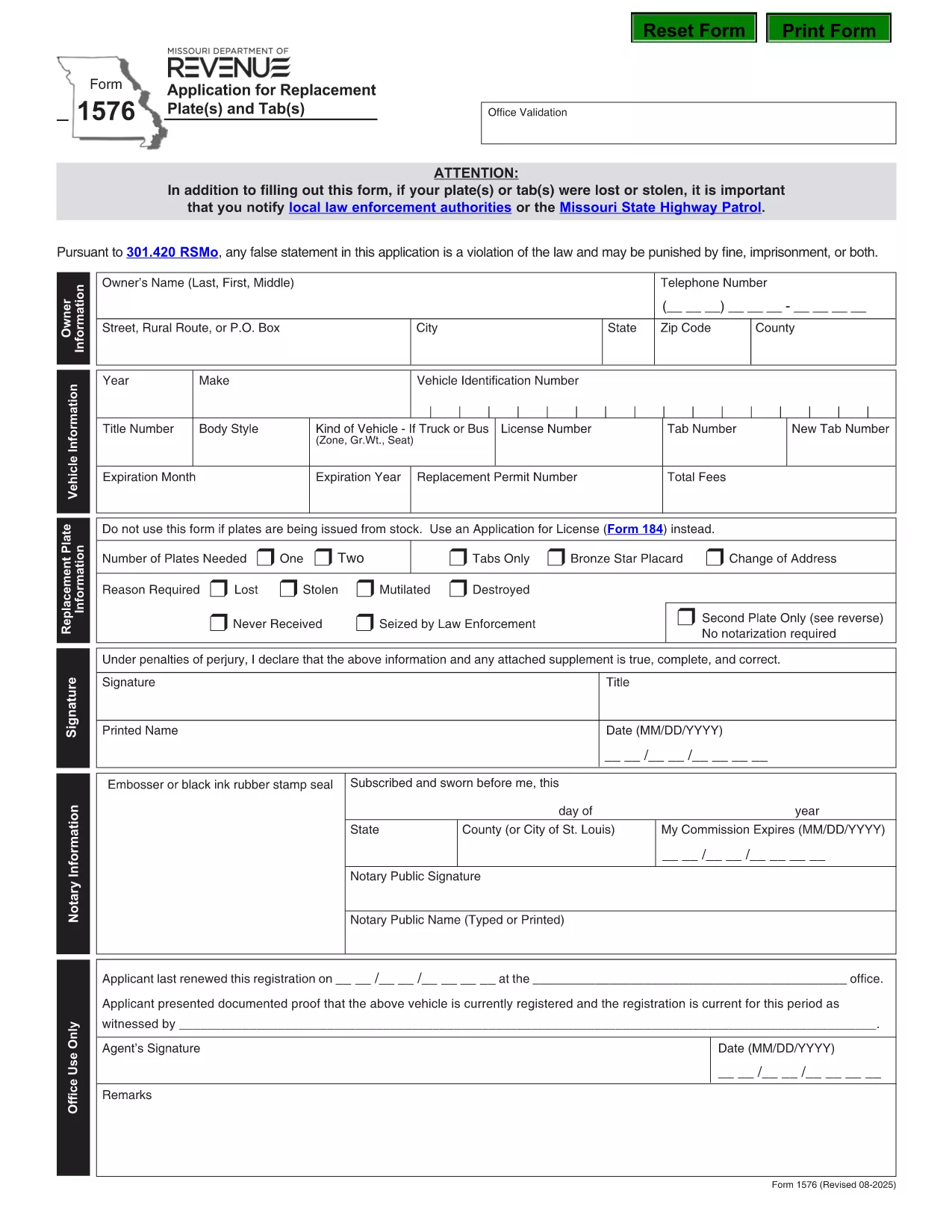
Form 1576 is the official Missouri Department of Revenue (DOR) application used when you need a replacement for lost, stolen, mutilated, destroyed, or never‑received license plates or registration tabs. The form must be notarized before submission, and it includes sections for vehicle details, owner information, and payment.

What Is Form 1576 and When Is It Required?

Missouri drivers file Form 1576 whenever any of the following occurs:

  • License plates are lost or stolen.
  • Registration tabs are missing, damaged, or never received.
  • Plates are mutilated, destroyed by fire, flood, or other accident.
  • You need a duplicate set because the original was never delivered.

The form is processed by the Missouri DOR and must be accompanied by the appropriate fee and a notarized signature.

How to Complete the Fillable PDF with Formize

Instead of printing, scanning, or editing the PDF manually, use the Formize PDF Filler – a fast, browser‑based solution that keeps the document fully fillable.

  1. Click the “Fill out this form” button on this page.
  2. The Formize PDF Filler app loads directly in your browser.
  3. Enter your information field‑by‑field: owner name, address, vehicle VIN, make, model, and year.
  4. Upload a digital notarization if you have a remote notary, or print the completed form for a traditional notary.
  5. Review the completed form, then click “Download” or “Print” to submit to your local DOR office.

Common Mistakes & Tips for a Successful Submission

  • Missing notarization: The DOR will reject the form without a notarized signature.
  • \n
  • Incorrect VIN: Double‑check the Vehicle Identification Number; a typo can delay processing.
  • Fee amount: Verify the current replacement fee on the DOR website before paying.
  • Incomplete sections: Leave no required field blank; use “N/A” only when the form explicitly allows it.

Following these tips helps ensure a quick turnaround and avoids unnecessary trips to the DOR office.

자주하는 질문
  • Do I need a notarized signature on Form 1576?

    Yes. Missouri law requires a notarized signature on Form 1576 before the DOR will process your replacement request.

  • Can I submit Form 1576 electronically?

    The DOR currently accepts only paper submissions. Use the fillable PDF to avoid errors, then print and have it notarized before mailing or delivering it in person.

  • How much does a replacement plate or tab cost?

    Fees vary by vehicle type and plate style. Check the latest fee schedule on the Missouri DOR website before paying.

  • What if my VIN is incorrect on the form?

    An incorrect VIN will delay processing. Verify the VIN on your registration or title and correct any typos before submitting.

  • Do I need to provide proof of ownership?

    A copy of your current registration or title is recommended, but not mandatory if the DOR can verify ownership through the VIN and your personal information.

  • How long does it take to receive replacement plates?

    Processing time is typically 7–10 business days after the DOR receives a complete, notarized Form 1576 and the required fee.

  • Can I use Form 1576 for a personalized plate replacement?

    Yes, Form 1576 covers all standard, personalized, and specialty plates as long as the reason is loss, theft, or damage.

어떻게

5개의 간단한 단계를 통해 온라인으로 Form 1576를 무료로 작성하는 방법:

  1. 1
    Open the Fillable Form
    Click the “Fill out this form” button on the page. The Formize PDF Filler loads instantly in your browser.
  2. 2
    Enter Your Information
    Complete each field – owner details, vehicle VIN, make, model, year, and reason for replacement.
  3. 3
    Add Notarization
    If you have a digital notarization, upload it now. Otherwise, print the completed form for a traditional notary signature.
  4. 4
    Review and Save
    Double‑check all entries, then click “Download” or “Print” to obtain a final copy for submission.
  5. 5
    Submit to the DOR
    Take the printed, notarized form (or submit the digital copy if accepted) to your local Missouri Department of Revenue office along with the required fee.
Formize PDF 필러 앱
에 대한

차량 등록 양식

자동차, 트레일러 또는 보트를 소유하거나 임대하는 경우 차량을 법적으로 등록하고 안전하게 유지하기 위해 특정 의무를 충족해야 합니다.

Form 1576는 차량 등록 양식 중 하나로 해당 주 또는 지방 당국에 자동차를 등록하는 데 사용되는 문서입니다. 이러한 양식은 일반적으로 사람이 신차 또는 중고차를 구입하거나 차량을 가지고 새로운 주 또는 지방으로 이사할 때 필요합니다.

차량 등록에 필요한 정확한 요구 사항과 양식은 위치에 따라 다를 수 있지만 일반적으로 프로세스에는 차량, 소유자 및 차량에 대한 모든 유치권에 대한 정보를 제공하는 것이 포함됩니다.

등록 양식과 수수료가 제출되면 주 또는 지방 당국은 차량 소유자에게 등록 증명서 또는 번호판을 발급합니다. 이 등록을 통해 차량은 일반 도로와 고속도로에서 합법적으로 운행할 수 있습니다.

특징

PDF 필러

온라인에서 PDF 양식을 채우는 가장 쉬운 방법

  • Form 1576를 빠르게 작성하세요.
    온라인에서 Form 1576을(를) 빠르게 채우는 방법을 찾고 계십니까? 온라인 무료 PDF 양식 필러를 사용하면 1분 이내에 이 PDF 문서를 편집하고 채우는 방법을 알 수 있습니다.
  • 사용하기 쉬운 온라인 PDF 편집기
    다시 스캔하여 다시 보내기 전에 편집할 수 있도록 PDF 파일을 인쇄하는 데 지쳤습니까? 온라인에서 무료로 PDF 문서를 편집하세요. 온라인 PDF 편집기를 사용하여 시간과 종이를 절약하십시오.
  • 훌륭한 도구, 모든 플랫폼
    Mac에서 Form 1576를 채우는 방법이나 PDF 필러를 무료로 사용하는 방법이 궁금하십니까? 당사의 온라인 PDF 도구는 모든 플랫폼에서 작동합니다.
  • 안전한 파일 저장
    완료된 "Form 1576" 파일은 Amazon 클라우드 호스팅에서 관리하는 보안 데이터베이스에 저장됩니다. 언제든지 시스템에서 파일을 삭제할 수 있습니다. 어쨌든 이러한 파일은 24시간 후에 자동으로 삭제됩니다.
  • Form 1576님과 채팅
    무료 PDF 리더 도우미인 Chatize에서 "Form 1576"와 채팅하세요. "Form 1576"에서 질문하고 답변을 받으세요. 위의 문서와 채팅 버튼을 클릭하세요.

필링 세션 삭제

선택한 필링 세션을 삭제하시겠습니까?이 경우 양식 작성 진행 상황이 손실됩니다.

편집 세션 삭제

선택한 편집 세션을 삭제하시겠습니까? 이 경우 양식 작성 및 편집 진행 상황이 손실됩니다.