
언어 선택

MVR-27RK Fillable PDF Form – Download & Complete Online

  1. 언어 영어
  2. 국가 미국
  3. 활동 차량 등록
  4. 상태 노스 캐롤라이나
MVR-27RK Fillable PDF Form – Download & Complete Online

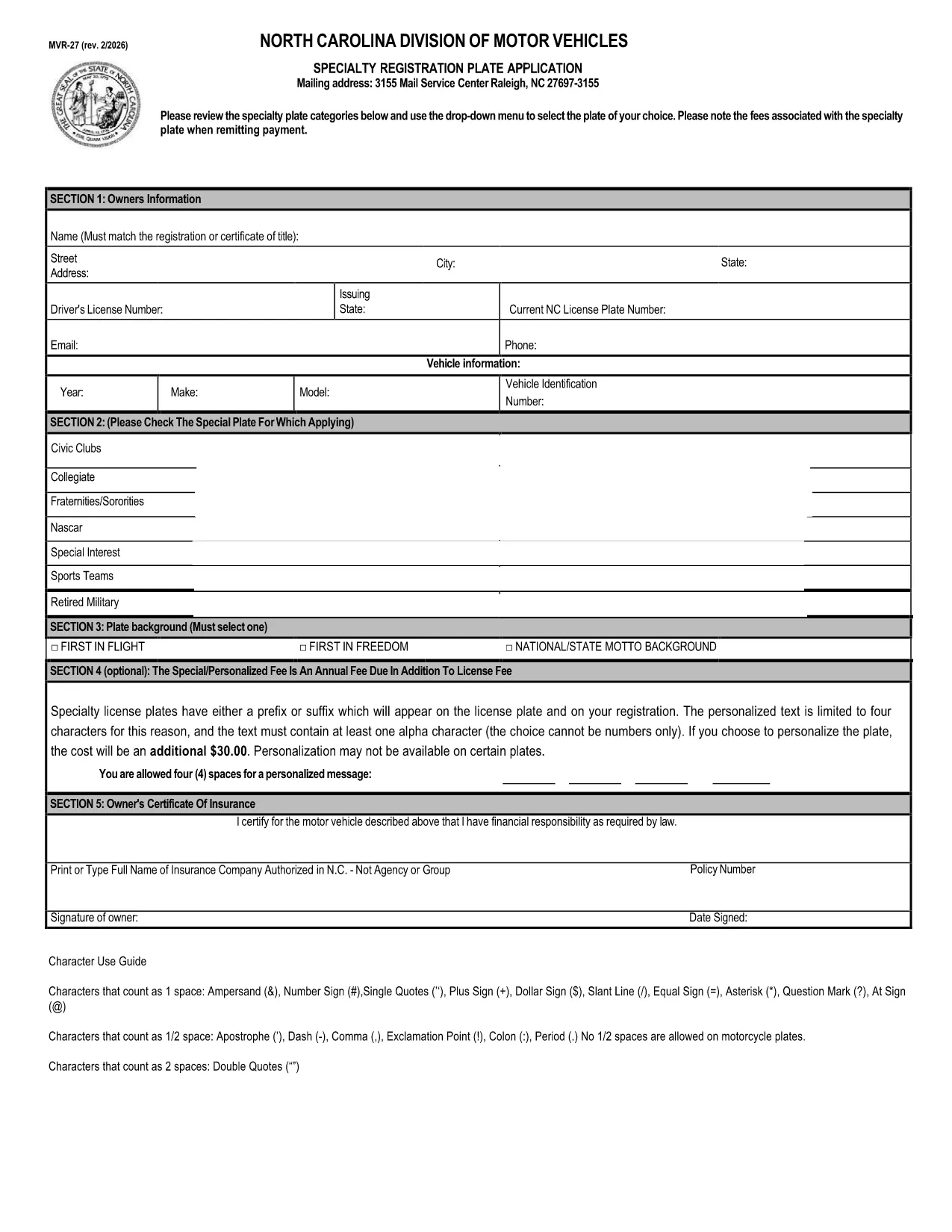
The MVR-27RK is North Carolina’s combined application form for specialty license plates. It replaces a handful of older, separate applications and streamlines the process for veterans, organization members, and other eligible drivers.

Formize hosts a fillable PDF version of the MVR-27RK so you can complete the entire application directly in your browser—no printer, scanner, or PDF editor required. Simply click the "Fill out this form" button, let the Formize PDF Filler load, and start entering your information.

Using the online filler saves time, reduces errors, and ensures that the DMV receives a clear, legible copy of your request. Once you’ve finished, you can download the completed PDF, print it for a signature if needed, or submit it electronically where accepted.

Below you’ll find step‑by‑step instructions, tips to avoid common pitfalls, and answers to the most frequently asked questions about the MVR-27RK.

자주하는 질문
  • What does the "RK" in MVR-27RK stand for?

    "RK" identifies the version of the combined application that includes specific fields for specialty‑plate eligibility codes used by the North Carolina DMV.

  • Do I need to print the form after filling it out online?

    If the DMV requires a handwritten signature, you’ll need to print the completed PDF, sign it, and mail or deliver it. Otherwise, you can submit the electronic PDF directly if the agency accepts digital submissions.

  • Can I save my progress and finish later?

    Yes. The Formize filler lets you download a partially completed PDF. Open it again in the filler to continue where you left off.

  • Is there a fee to use the Formize PDF Filler?

    No. Formize provides the filler for free; any DMV fees are paid directly to the North Carolina DMV, not to Formize.

  • What common mistakes should I avoid?

    Make sure VIN numbers are entered exactly as shown on the vehicle title, double‑check specialty‑plate eligibility codes, and verify that your mailing address matches DMV records.

  • Where can I find the official PDF version of MVR-27RK?

    The official PDF is hosted by the North Carolina Department of Transportation and is linked below for direct download.

  • Is the MVR-27RK form accepted for all specialty plates?

    Most North Carolina specialty plates use the MVR-27RK, but a few older plates may still require a separate form. Check the DMV’s specialty‑plate list for details.

  • How long does it take for the DMV to process my application?

    Processing times vary, but most specialty‑plate requests are completed within 7‑10 business days after the DMV receives a complete, signed application.

어떻게

5개의 간단한 단계를 통해 온라인으로 MVR-27RK를 무료로 작성하는 방법:

  1. 1
    Open the Fillable Form
    Click the "Fill out this form" button on this page. The Formize PDF Filler app will load in a new window.
  2. 2
    Enter Your Information
    Use the on‑screen fields to type your name, address, vehicle details, and any specialty‑plate eligibility codes.
  3. 3
    Review & Validate
    When you finish, click the "Validate" button. The filler will highlight any missing or incorrectly formatted fields.
  4. 4
    Save or Print
    After validation, choose "Download Completed PDF" to save a copy, or click "Print" to produce a hard‑copy for a signature.
  5. 5
    Submit to the DMV
    Mail or bring the printed form to your local NCDOT DMV office, or follow any electronic submission instructions provided by the agency.
Formize PDF 필러 앱
에 대한

차량 등록 양식

자동차, 트레일러 또는 보트를 소유하거나 임대하는 경우 차량을 법적으로 등록하고 안전하게 유지하기 위해 특정 의무를 충족해야 합니다.

MVR-27RK는 차량 등록 양식 중 하나로 해당 주 또는 지방 당국에 자동차를 등록하는 데 사용되는 문서입니다. 이러한 양식은 일반적으로 사람이 신차 또는 중고차를 구입하거나 차량을 가지고 새로운 주 또는 지방으로 이사할 때 필요합니다.

차량 등록에 필요한 정확한 요구 사항과 양식은 위치에 따라 다를 수 있지만 일반적으로 프로세스에는 차량, 소유자 및 차량에 대한 모든 유치권에 대한 정보를 제공하는 것이 포함됩니다.

등록 양식과 수수료가 제출되면 주 또는 지방 당국은 차량 소유자에게 등록 증명서 또는 번호판을 발급합니다. 이 등록을 통해 차량은 일반 도로와 고속도로에서 합법적으로 운행할 수 있습니다.

특징

PDF 필러

온라인에서 PDF 양식을 채우는 가장 쉬운 방법

  • MVR-27RK를 빠르게 작성하세요.
    온라인에서 MVR-27RK을(를) 빠르게 채우는 방법을 찾고 계십니까? 온라인 무료 PDF 양식 필러를 사용하면 1분 이내에 이 PDF 문서를 편집하고 채우는 방법을 알 수 있습니다.
  • 사용하기 쉬운 온라인 PDF 편집기
    다시 스캔하여 다시 보내기 전에 편집할 수 있도록 PDF 파일을 인쇄하는 데 지쳤습니까? 온라인에서 무료로 PDF 문서를 편집하세요. 온라인 PDF 편집기를 사용하여 시간과 종이를 절약하십시오.
  • 훌륭한 도구, 모든 플랫폼
    Mac에서 MVR-27RK를 채우는 방법이나 PDF 필러를 무료로 사용하는 방법이 궁금하십니까? 당사의 온라인 PDF 도구는 모든 플랫폼에서 작동합니다.
  • 안전한 파일 저장
    완료된 "MVR-27RK" 파일은 Amazon 클라우드 호스팅에서 관리하는 보안 데이터베이스에 저장됩니다. 언제든지 시스템에서 파일을 삭제할 수 있습니다. 어쨌든 이러한 파일은 24시간 후에 자동으로 삭제됩니다.
  • MVR-27RK님과 채팅
    무료 PDF 리더 도우미인 Chatize에서 "MVR-27RK"와 채팅하세요. "MVR-27RK"에서 질문하고 답변을 받으세요. 위의 문서와 채팅 버튼을 클릭하세요.

필링 세션 삭제

선택한 필링 세션을 삭제하시겠습니까?이 경우 양식 작성 진행 상황이 손실됩니다.

편집 세션 삭제

선택한 편집 세션을 삭제하시겠습니까? 이 경우 양식 작성 및 편집 진행 상황이 손실됩니다.