
언어 선택

MVR-7 Fillable PDF – North Carolina DMV Form

  1. 언어 영어
  2. 국가 미국
  3. 활동 차량 등록
  4. 상태 노스 캐롤라이나
MVR-7 Fillable PDF – North Carolina DMV Form

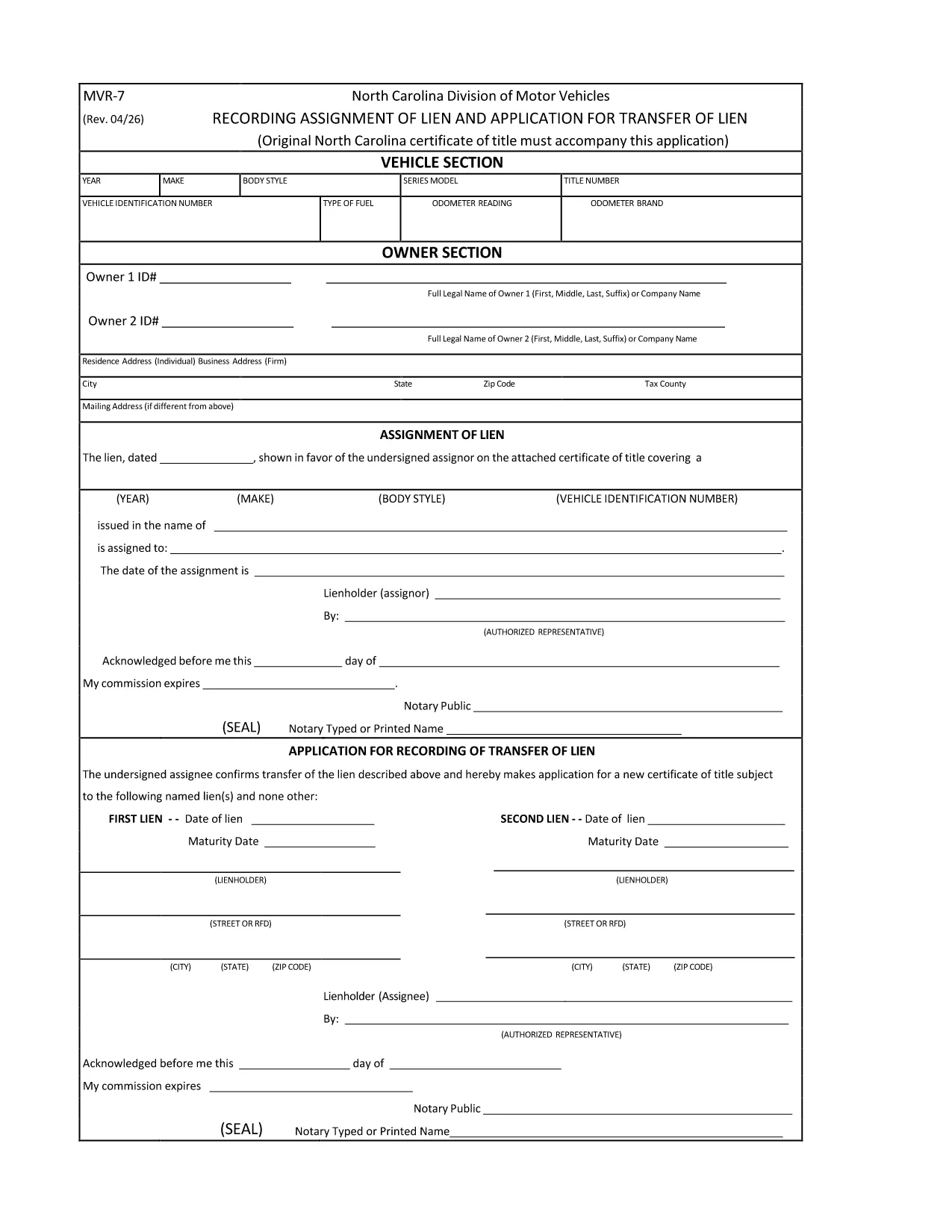
The MVR-7 is the North Carolina Department of Transportation (NCDOT) vehicle registration application used for new titles, transfers, and other title‑related actions. Historically you had to print, hand‑write, and mail the form, but with Formize you can fill it out instantly in a secure, browser‑based PDF filler.

What Is the MVR-7 Form?

The MVR-7 collects essential vehicle information such as VIN, make, model, year, odometer reading, and ownership details. It is required when you:

  • Apply for a new title for a newly purchased vehicle.
  • Transfer ownership of a used vehicle.
  • Correct title information or remove a lien.

How to Complete the MVR-7 Online with Formize

Follow these simple steps to fill out the form without printing a single page:

  1. Click the "Fill out this form" button below.
  2. The Formize PDF Filler app loads in your browser. All fields become interactive.
  3. Enter the required information, use the dropdowns where available, and upload any supporting documents.
  4. When finished, click Save & Download to get a completed PDF you can print or email to the NCDOT.

Common Mistakes to Avoid

  • Incorrect VIN: Double‑check the 17‑character VIN; a single typo can delay processing.
  • Missing signatures: Both buyer and seller must sign; the Formize app lets you add a digital signature.
  • Odometer disclosure errors: Provide the exact mileage at the time of sale; do not round.
  • Leaving optional fields blank: If a field is marked "required" by the NCDOT, the Formize validator will alert you before you can save.

Where to Submit the Completed MVR-7

After downloading the filled PDF, you have two options:

  • In‑person: Bring the form to any North Carolina DMV office.
  • Mail: Send it to the address listed on the form along with any required fees.

Using Formize ensures the PDF meets the NCDOT’s formatting standards, reducing the chance of a rejection.

자주하는 질문
  • Is the MVR-7 form available as a fillable PDF?

    Yes. The original PDF from NCDOT can be used with Formize, which turns it into a fully interactive, fillable document.

  • Can I submit the MVR-7 electronically?

    North Carolina still requires a printed copy with signatures, but you can fill it out electronically, print, sign, and mail it.

  • Do I need a PDF editor to use the Formize filler?

    No. Formize works entirely in your web browser—no additional software or Adobe Acrobat is required.

  • How long does it take to fill out the MVR-7 with Formize?

    Most users complete the form in 5‑10 minutes, depending on how many details need to be entered.

  • What should I do if I make a mistake after saving?

    Open the saved PDF again with Formize, edit the incorrect fields, and re‑save. The app preserves all previous entries.

  • Are there any fees for using Formize?

    Formize’s online filler is free for standard PDF forms like the MVR‑7. Fees only apply for the DMV processing itself.

어떻게

3개의 간단한 단계를 통해 온라인으로 MVR-7를 무료로 작성하는 방법:

  1. 1
    Click the Fill‑out Button
    Press the "Fill out this form" button on the page. The Formize PDF Filler will open in a new tab.
  2. 2
    Enter Your Information
    All fields become editable. Type the required data, select options from dropdowns, and upload any supporting documents.
  3. 3
    Save and Download
    When every field is complete, click "Save & Download". The finished MVR‑7 PDF is ready to print or email to the NCDOT.
Formize PDF 필러 앱
에 대한

차량 등록 양식

자동차, 트레일러 또는 보트를 소유하거나 임대하는 경우 차량을 법적으로 등록하고 안전하게 유지하기 위해 특정 의무를 충족해야 합니다.

MVR-7는 차량 등록 양식 중 하나로 해당 주 또는 지방 당국에 자동차를 등록하는 데 사용되는 문서입니다. 이러한 양식은 일반적으로 사람이 신차 또는 중고차를 구입하거나 차량을 가지고 새로운 주 또는 지방으로 이사할 때 필요합니다.

차량 등록에 필요한 정확한 요구 사항과 양식은 위치에 따라 다를 수 있지만 일반적으로 프로세스에는 차량, 소유자 및 차량에 대한 모든 유치권에 대한 정보를 제공하는 것이 포함됩니다.

등록 양식과 수수료가 제출되면 주 또는 지방 당국은 차량 소유자에게 등록 증명서 또는 번호판을 발급합니다. 이 등록을 통해 차량은 일반 도로와 고속도로에서 합법적으로 운행할 수 있습니다.

특징

PDF 필러

온라인에서 PDF 양식을 채우는 가장 쉬운 방법

  • MVR-7를 빠르게 작성하세요.
    온라인에서 MVR-7을(를) 빠르게 채우는 방법을 찾고 계십니까? 온라인 무료 PDF 양식 필러를 사용하면 1분 이내에 이 PDF 문서를 편집하고 채우는 방법을 알 수 있습니다.
  • 사용하기 쉬운 온라인 PDF 편집기
    다시 스캔하여 다시 보내기 전에 편집할 수 있도록 PDF 파일을 인쇄하는 데 지쳤습니까? 온라인에서 무료로 PDF 문서를 편집하세요. 온라인 PDF 편집기를 사용하여 시간과 종이를 절약하십시오.
  • 훌륭한 도구, 모든 플랫폼
    Mac에서 MVR-7를 채우는 방법이나 PDF 필러를 무료로 사용하는 방법이 궁금하십니까? 당사의 온라인 PDF 도구는 모든 플랫폼에서 작동합니다.
  • 안전한 파일 저장
    완료된 "MVR-7" 파일은 Amazon 클라우드 호스팅에서 관리하는 보안 데이터베이스에 저장됩니다. 언제든지 시스템에서 파일을 삭제할 수 있습니다. 어쨌든 이러한 파일은 24시간 후에 자동으로 삭제됩니다.
  • MVR-7님과 채팅
    무료 PDF 리더 도우미인 Chatize에서 "MVR-7"와 채팅하세요. "MVR-7"에서 질문하고 답변을 받으세요. 위의 문서와 채팅 버튼을 클릭하세요.

필링 세션 삭제

선택한 필링 세션을 삭제하시겠습니까?이 경우 양식 작성 진행 상황이 손실됩니다.

편집 세션 삭제

선택한 편집 세션을 삭제하시겠습니까? 이 경우 양식 작성 및 편집 진행 상황이 손실됩니다.