
언어 선택

Virginia DMV OA142 Fillable Form – Download & Complete Online

  1. 언어 영어
  2. 국가 미국
  3. 활동 차량 등록
  4. 상태 여자 이름
Virginia DMV OA142 Fillable Form – Download & Complete Online

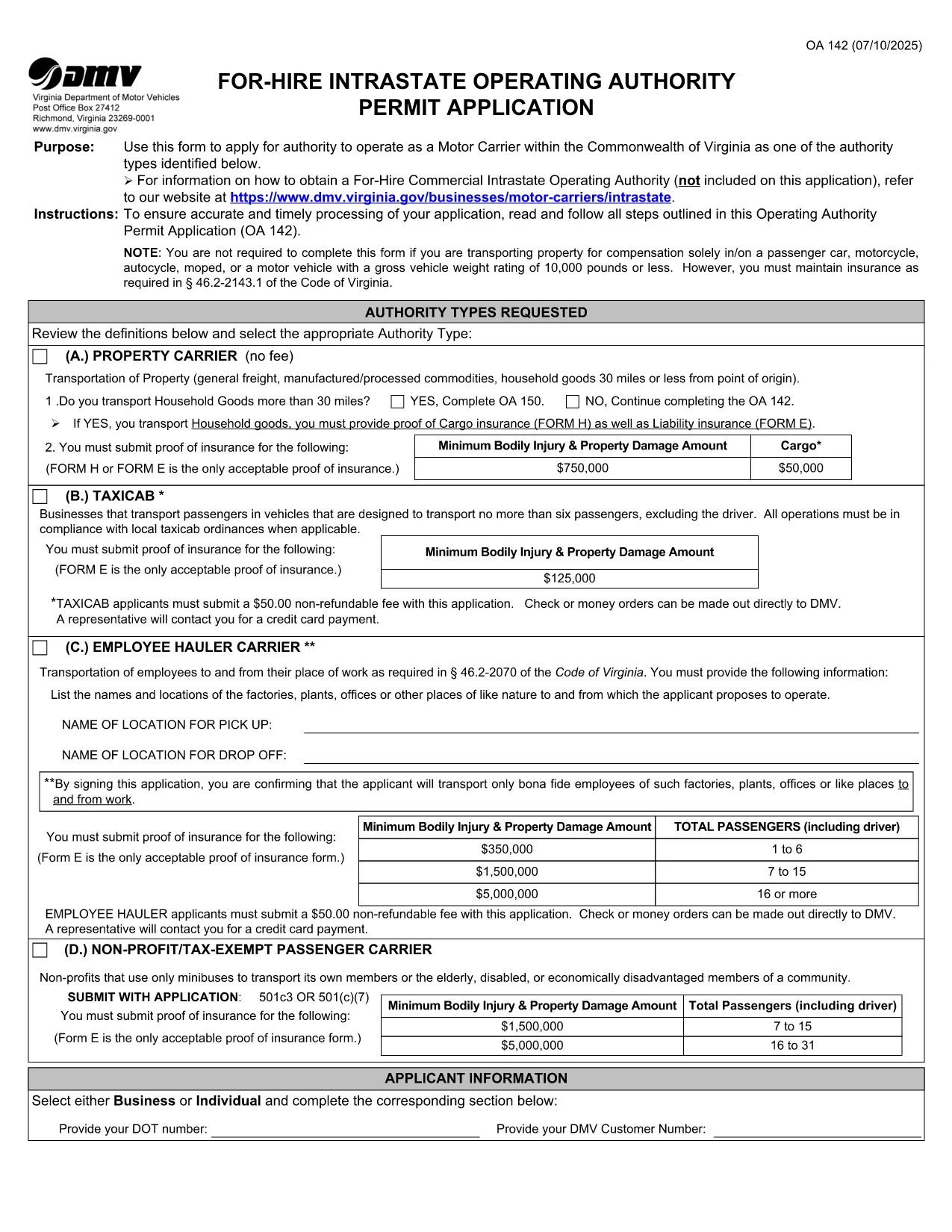
The OA142 is the Virginia Department of Motor Vehicles (DMV) application for a For‑Hire Intrastate Operating Authority Permit. Whether you run a taxi service, local freight company, or any business that transports passengers or property within Virginia, you need this form to stay compliant.

What Is the OA142 Form?

The OA142 collects essential information about your business, insurance coverage, vehicle details, and the type of authority you are requesting. It is required for any for‑hire carrier operating solely inside Virginia’s borders.

Why Use a Fillable PDF?

  • Instant Editing: No need to print, scan, or rewrite.
  • Auto‑Save: Your data is saved as you type, preventing loss.
  • eSignature Ready: Sign electronically and submit faster.
  • Secure & Compliant: Formize’s PDF Filler meets e‑sign standards.

Step‑by‑Step Guide to Complete OA142

  1. Click the "Fill out this form" button on this page.
  2. Wait a few seconds while the Formize PDF Filler app loads.
  3. Enter your business name, address, and contact information.
  4. Provide insurance details and attach proof of coverage if required.
  5. Select the type of authority (passenger, property, or both) and fill in vehicle data.
  6. Review all entries for accuracy; the app will highlight any missing fields.
  7. Electronically sign under penalty of perjury.
  8. Download the completed PDF or send it directly to the Virginia DMV from the app.

Common Mistakes & Tips

Missing Insurance Proof: The DMV will reject the application if proof of insurance is not attached. Upload a clear PDF or image before signing.

Incorrect Weight Rating: Verify the gross vehicle weight rating (GVWR) of each vehicle. An error can lead to a denial.

Signature Errors: Use the built‑in e‑signature tool; handwritten signatures scanned later are often rejected.

Where to Submit Your Completed Form

After filling out and signing the OA142, you can:

  • Mail the printed form to the Virginia DMV address listed on the form.
  • Upload the PDF through the Virginia DMV online portal (if available).
  • Deliver it in person to any DMV customer service center.

Keeping a digital copy for your records is recommended.

자주하는 질문
  • What is the purpose of the OA142 form?

    The OA142 is required for businesses that want a For‑Hire Intrastate Operating Authority Permit to transport passengers or property within Virginia.

  • Can I submit the OA142 electronically?

    Yes. After completing the fillable PDF, you can upload the file through the Virginia DMV online portal or email it if the DMV accepts electronic submissions.

  • Do I need to print the form after filling it online?

    Printing is optional. You can submit the PDF electronically, but keeping a printed copy for your records is a good practice.

  • What insurance documentation is required?

    You must provide proof of liability insurance that meets Virginia DMV standards. Upload a clear PDF or image of the policy when prompted.

  • How long does it take for the DMV to process the OA142?

    Processing times vary, but most applications are reviewed within 10‑15 business days after receipt of a complete, signed form.

  • Is there a fee to file the OA142?

    Yes, the DMV charges a filing fee that depends on the type of authority requested. The exact amount is listed on the form’s fee schedule.

  • Can I edit the form after I’ve signed it?

    Once signed, the form is locked to maintain legal integrity. If you need changes, you must start a new form and re‑sign.

  • What happens if I make a mistake on the OA142?

    Minor errors can be corrected before signing. If you submit a form with mistakes, the DMV will reject it and request a corrected version.

어떻게

4개의 간단한 단계를 통해 온라인으로 OA142를 무료로 작성하는 방법:

  1. 1
    Open the Fillable Form
    Click the "Fill out this form" button on this page. The Formize PDF Filler will launch in your browser.
  2. 2
    Enter Your Information
    Type directly into each field—business details, insurance info, vehicle specifications, and authority type.
  3. 3
    Add Your eSignature
    Use the built‑in e‑signature tool to sign under penalty of perjury. The signature is legally binding.
  4. 4
    Save or Submit
    Download the completed PDF for your records or send it directly to the Virginia DMV using the app’s share feature.
Formize PDF 필러 앱
에 대한

차량 등록 양식

자동차, 트레일러 또는 보트를 소유하거나 임대하는 경우 차량을 법적으로 등록하고 안전하게 유지하기 위해 특정 의무를 충족해야 합니다.

OA142는 차량 등록 양식 중 하나로 해당 주 또는 지방 당국에 자동차를 등록하는 데 사용되는 문서입니다. 이러한 양식은 일반적으로 사람이 신차 또는 중고차를 구입하거나 차량을 가지고 새로운 주 또는 지방으로 이사할 때 필요합니다.

차량 등록에 필요한 정확한 요구 사항과 양식은 위치에 따라 다를 수 있지만 일반적으로 프로세스에는 차량, 소유자 및 차량에 대한 모든 유치권에 대한 정보를 제공하는 것이 포함됩니다.

등록 양식과 수수료가 제출되면 주 또는 지방 당국은 차량 소유자에게 등록 증명서 또는 번호판을 발급합니다. 이 등록을 통해 차량은 일반 도로와 고속도로에서 합법적으로 운행할 수 있습니다.

특징

PDF 필러

온라인에서 PDF 양식을 채우는 가장 쉬운 방법

  • OA142를 빠르게 작성하세요.
    온라인에서 OA142을(를) 빠르게 채우는 방법을 찾고 계십니까? 온라인 무료 PDF 양식 필러를 사용하면 1분 이내에 이 PDF 문서를 편집하고 채우는 방법을 알 수 있습니다.
  • 사용하기 쉬운 온라인 PDF 편집기
    다시 스캔하여 다시 보내기 전에 편집할 수 있도록 PDF 파일을 인쇄하는 데 지쳤습니까? 온라인에서 무료로 PDF 문서를 편집하세요. 온라인 PDF 편집기를 사용하여 시간과 종이를 절약하십시오.
  • 훌륭한 도구, 모든 플랫폼
    Mac에서 OA142를 채우는 방법이나 PDF 필러를 무료로 사용하는 방법이 궁금하십니까? 당사의 온라인 PDF 도구는 모든 플랫폼에서 작동합니다.
  • 안전한 파일 저장
    완료된 "OA142" 파일은 Amazon 클라우드 호스팅에서 관리하는 보안 데이터베이스에 저장됩니다. 언제든지 시스템에서 파일을 삭제할 수 있습니다. 어쨌든 이러한 파일은 24시간 후에 자동으로 삭제됩니다.
  • OA142님과 채팅
    무료 PDF 리더 도우미인 Chatize에서 "OA142"와 채팅하세요. "OA142"에서 질문하고 답변을 받으세요. 위의 문서와 채팅 버튼을 클릭하세요.

필링 세션 삭제

선택한 필링 세션을 삭제하시겠습니까?이 경우 양식 작성 진행 상황이 손실됩니다.

편집 세션 삭제

선택한 편집 세션을 삭제하시겠습니까? 이 경우 양식 작성 및 편집 진행 상황이 손실됩니다.