언어 선택

VSA-40 Vehicle Removal Certificate – Fillable PDF

  1. 언어 영어
  2. 국가 미국
  3. 활동 차량 등록
  4. 상태 여자 이름
VSA-40 Vehicle Removal Certificate – Fillable PDF

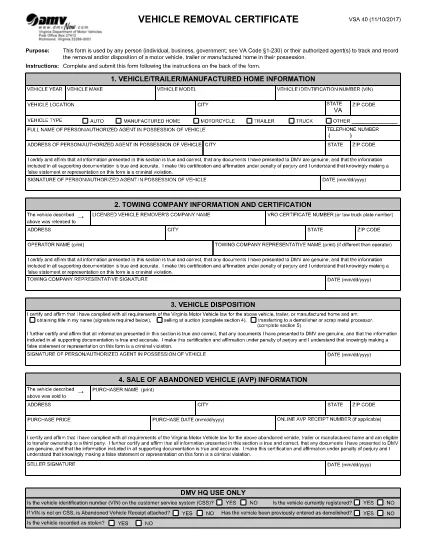
The VSA-40 Vehicle Removal Certificate is the official Virginia DMV form used to record the removal, disposal, or transfer of a motor vehicle, trailer, or manufactured home. Whether you are an individual, a business, or a government agency, this form provides a legal trail for any vehicle that leaves your possession.

Because the VSA-40 is required by Virginia Code §1‑230, completing it accurately protects you from future liability and ensures compliance with state regulations.

What Is the VSA-40 Vehicle Removal Certificate?

The VSA-40 captures essential details such as the vehicle identification number (VIN), owner information, reason for removal, and the date of disposition. It serves as proof that the vehicle was properly removed from the owner's records.

Who Must Complete the VSA-40 Form?

  • Private owners selling or disposing of a vehicle.
  • Dealerships transferring ownership to another party.
  • Government agencies handling fleet disposals.
  • Authorized agents acting on behalf of the owner.

How to Fill Out the VSA-40 Online with Formize

Instead of downloading the PDF and opening a separate editor, simply click the "Fill out this form" button on this page. The Formize PDF Filler app will load instantly, letting you complete every field directly in your browser.

Common Mistakes to Avoid

  • Leaving the VIN or license plate number blank.
  • Using an outdated address for the owner.
  • Forgetting to sign and date the form.
  • Submitting the form without attaching required supporting documents (e.g., bill of sale).

Where to Submit the Completed Form

After you finish the fillable VSA-40, you can:

  • Print and mail it to your local Virginia DMV office.
  • Upload a scanned copy through the DMV’s online portal.
  • Deliver it in person to the DMV service center.

Using the Formize filler saves time, reduces errors, and creates a clean, searchable PDF ready for submission.

자주하는 질문
  • What is the purpose of the VSA‑40 form?

    The VSA‑40 records the removal, disposal, or transfer of a vehicle, trailer, or manufactured home, providing legal proof for the Virginia DMV.

  • Can I fill out the VSA‑40 on a mobile device?

    Yes. The Formize PDF Filler works on all major browsers, including mobile Safari and Chrome, so you can complete the form on a phone or tablet.

  • Do I need a digital signature?

    A digital signature created in the Formize filler is accepted for most DMV submissions. Check your local office if a wet signature is specifically required.

  • How long does the VSA‑40 remain valid after completion?

    Once submitted to the DMV, the certificate is considered valid indefinitely as a record of the vehicle’s removal.

  • Is there a filing fee for the VSA‑40?

    No, the VSA‑40 itself does not carry a fee. However, related DMV services (e.g., title transfer) may have separate charges.

  • What supporting documents should I attach?

    Include a bill of sale, transfer notice, or any document that proves the vehicle’s disposition, as required by the DMV.

  • Can I save my progress and finish later?

    Yes. The Formize filler lets you download a partially completed PDF, which you can reopen later to finish.

어떻게

4개의 간단한 단계를 통해 온라인으로 VSA 40를 무료로 작성하는 방법:

  1. 1
    Open the Fillable Form
    Click the "Fill out this form" button on the page. The Formize PDF Filler loads directly in your browser.
  2. 2
    Enter All Required Information
    Complete each field—owner details, VIN, removal reason, and date—using the on‑screen keyboard or your own typing.
  3. 3
    Review and Sign
    Double‑check every entry for accuracy, then use the built‑in signature tool to sign the form.
  4. 4
    Save or Submit
    Download the completed PDF, print and mail it, or upload it to the Virginia DMV portal as instructed.
Formize PDF 필러 앱
에 대한

차량 등록 양식

VSA 40는 자동차와 관련된 다양한 거래 및 프로세스에 사용되는 문서인 자동차 관리국 양식이라고도 하는 DMV 양식 중 하나입니다. DMV는 운전면허, 차량 등록, 자동차법 집행을 담당하는 정부 기관입니다. 사용 가능한 특정 DMV 양식은 관할 구역에 따라 다를 수 있지만 다음은 몇 가지 일반적인 예입니다.

운전 면허증 양식: 이 양식은 운전 면허증을 신청하거나 변경 또는 갱신을 요청하는 데 사용됩니다. 일반적으로 개인 정보, 신원 증명이 필요하며 의료 정보 또는 운전 기록에 대한 섹션이 포함될 수 있습니다.

차량 등록 양식: 이 양식은 DMV에 자동차를 등록하는 데 사용됩니다. 차량 정보, 소유권 세부 정보 및 보험 증빙이 필요합니다.

소유권 이전 양식: 차량을 구매하거나 판매할 때 이 양식은 한 당사자에서 다른 당사자로 소유권을 이전하는 데 사용됩니다. 구매자, 판매자, 차량 세부정보에 대한 정보가 필요하며 판매 명세서가 포함될 수도 있습니다.

차량 책임 면제 양식: 차량을 판매하거나 소유권을 양도할 때 이 양식은 판매자가 더 이상 차량에 대한 책임이 없음을 DMV에 통지합니다. 이는 판매 후 차량과 관련된 사고나 사고에 대한 책임으로부터 판매자를 보호하는 데 도움이 됩니다.

번호판 및 등록 갱신 양식: 이 양식은 차량 등록을 갱신하거나 새 번호판을 요청하는 데 사용됩니다. 일반적으로 등록된 소유자, 현재 등록 세부정보 및 해당 수수료 지불에 대한 정보가 필요합니다.

운전 기록 요청 양식: 이 양식을 사용하면 개인이 운전 위반, 면허 상태 및 기타 관련 세부정보에 대한 정보를 제공하는 운전 기록을 DMV에 요청할 수 있습니다.

특수 또는 맞춤형 번호판 양식: 이 양식은 개인이 특정 문자나 디자인으로 번호판을 맞춤 설정할 수 있는 맞춤형 또는 특수 번호판을 신청하는 데 사용됩니다.

이는 DMV를 통해 제공될 수 있는 다양한 양식 중 몇 가지 예입니다. 구체적인 양식과 요구 사항은 관할권에 따라 다를 수 있으므로 지역 DMV 웹사이트를 참조하거나 DMV 사무소를 방문하여 특정 요구 사항에 맞는 올바른 양식을 얻는 것이 중요합니다.

특징

PDF 필러

온라인에서 PDF 양식을 채우는 가장 쉬운 방법

  • VSA 40를 빠르게 작성하세요.
    온라인에서 VSA 40을(를) 빠르게 채우는 방법을 찾고 계십니까? 온라인 무료 PDF 양식 필러를 사용하면 1분 이내에 이 PDF 문서를 편집하고 채우는 방법을 알 수 있습니다.
  • 사용하기 쉬운 온라인 PDF 편집기
    다시 스캔하여 다시 보내기 전에 편집할 수 있도록 PDF 파일을 인쇄하는 데 지쳤습니까? 온라인에서 무료로 PDF 문서를 편집하세요. 온라인 PDF 편집기를 사용하여 시간과 종이를 절약하십시오.
  • 훌륭한 도구, 모든 플랫폼
    Mac에서 VSA 40를 채우는 방법이나 PDF 필러를 무료로 사용하는 방법이 궁금하십니까? 당사의 온라인 PDF 도구는 모든 플랫폼에서 작동합니다.
  • 안전한 파일 저장
    완료된 "VSA 40" 파일은 Amazon 클라우드 호스팅에서 관리하는 보안 데이터베이스에 저장됩니다. 언제든지 시스템에서 파일을 삭제할 수 있습니다. 어쨌든 이러한 파일은 24시간 후에 자동으로 삭제됩니다.
  • VSA 40님과 채팅
    무료 PDF 리더 도우미인 Chatize에서 "VSA 40"와 채팅하세요. "VSA 40"에서 질문하고 답변을 받으세요. 위의 문서와 채팅 버튼을 클릭하세요.

필링 세션 삭제

선택한 필링 세션을 삭제하시겠습니까?이 경우 양식 작성 진행 상황이 손실됩니다.

편집 세션 삭제

선택한 편집 세션을 삭제하시겠습니까? 이 경우 양식 작성 및 편집 진행 상황이 손실됩니다.