
언어 선택

VSA-59 Rebuilt Vehicle Disclosure Form – Fill Online

  1. 언어 영어
  2. 국가 미국
  3. 활동 차량 등록
  4. 상태 여자 이름
VSA-59 Rebuilt Vehicle Disclosure Form – Fill Online

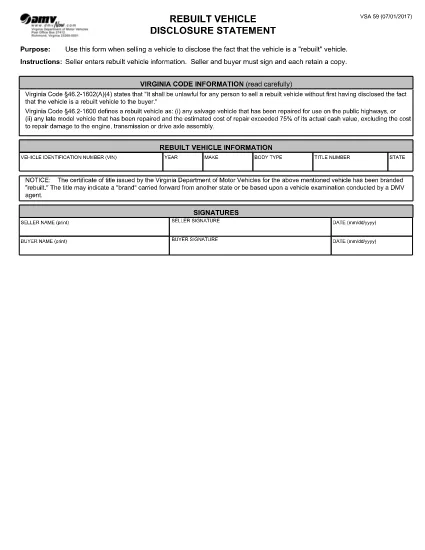
The VSA-59 is the official Virginia Department of Motor Vehicles (DMV) disclosure statement used when selling a rebuilt vehicle. It ensures the buyer is informed that the vehicle has a rebuilt title, protecting both parties during the title transfer.

What Is the VSA-59 Form?

This fillable PDF requires the seller to provide detailed information about the rebuilt vehicle, including VIN, make, model, year, and the nature of the reconstruction. Both the seller and buyer must sign, and each party keeps a copy.

How to Complete the VSA-59 Online

Instead of downloading the PDF and editing it manually, simply click the "Fill out this form" button on this page. The Formize PDF Filler app will load instantly, allowing you to type directly into each field, add signatures, and save a completed copy.

Common Mistakes to Avoid

  • Leaving any required field blank – the form will not submit.
  • Using an illegible handwritten signature – digital signatures are clearer and accepted.
  • Mismatching the VIN on the title with the VIN entered on the form.
  • Forgetting to attach the rebuilt title documentation when filing with the DMV.

Where to Submit the Completed Form

After filling out the VSA-59, print a copy for your records and bring the original, along with the rebuilt title, to any Virginia DMV customer service center. You can also mail the documents to the address listed on the form.

Frequently Asked Questions

Find quick answers to the most common queries below. If you need more help, consult the Virginia DMV website or your local DMV office.

자주하는 질문
  • Who must sign the VSA-59 form?

    Both the seller and the buyer must sign the VSA-59. Each party should retain a signed copy for their records.

  • Can I submit a digital signature?

    Yes. The Formize PDF Filler app allows you to add a legally accepted digital signature, which the Virginia DMV accepts.

  • Do I need to attach the rebuilt title when I file?

    Yes. The rebuilt title must accompany the VSA-59 when you submit it to the DMV. It proves the vehicle’s rebuilt status.

  • What if I make a mistake after saving?

    Open the saved PDF in the Formize filler again, correct the error, and re‑save. Do not use a handwritten correction on the printed form.

  • Is the VSA-59 required for all rebuilt vehicles?

    Yes. Virginia law mandates that any rebuilt vehicle being sold must have a completed VSA-59 disclosure statement.

  • How long does the Formize filler take to load?

    The app loads within seconds on most browsers. A stable internet connection ensures the fastest experience.

  • Can I file the VSA-59 online without printing?

    The Virginia DMV still requires a physical copy for record‑keeping, so printing the completed form is recommended.

  • Where can I find a list of DMV offices?

    Visit the Virginia DMV website’s "Office Locations" page for the nearest service center.

어떻게

4개의 간단한 단계를 통해 온라인으로 VSA-59를 무료로 작성하는 방법:

  1. 1
    Click the Fill‑out Button
    On this page, locate the "Fill out this form" button and click it. The Formize PDF Filler app will open in a new window.
  2. 2
    Enter Information
    Type directly into each highlighted field—VIN, make, model, year, reconstruction details, and signatures.
  3. 3
    Save and Download
    When all required fields are completed, click "Save". Download the finished PDF for your records and print a copy for the DMV.
  4. 4
    Submit to the DMV
    Take the printed form, the rebuilt title, and any supporting documents to a Virginia DMV office or mail them as instructed on the form.
Formize PDF 필러 앱
에 대한

차량 등록 양식

VSA-59는 자동차와 관련된 다양한 거래 및 프로세스에 사용되는 문서인 자동차 관리국 양식이라고도 하는 DMV 양식 중 하나입니다. DMV는 운전면허, 차량 등록, 자동차법 집행을 담당하는 정부 기관입니다. 사용 가능한 특정 DMV 양식은 관할 구역에 따라 다를 수 있지만 다음은 몇 가지 일반적인 예입니다.

운전 면허증 양식: 이 양식은 운전 면허증을 신청하거나 변경 또는 갱신을 요청하는 데 사용됩니다. 일반적으로 개인 정보, 신원 증명이 필요하며 의료 정보 또는 운전 기록에 대한 섹션이 포함될 수 있습니다.

차량 등록 양식: 이 양식은 DMV에 자동차를 등록하는 데 사용됩니다. 차량 정보, 소유권 세부 정보 및 보험 증빙이 필요합니다.

소유권 이전 양식: 차량을 구매하거나 판매할 때 이 양식은 한 당사자에서 다른 당사자로 소유권을 이전하는 데 사용됩니다. 구매자, 판매자, 차량 세부정보에 대한 정보가 필요하며 판매 명세서가 포함될 수도 있습니다.

차량 책임 면제 양식: 차량을 판매하거나 소유권을 양도할 때 이 양식은 판매자가 더 이상 차량에 대한 책임이 없음을 DMV에 통지합니다. 이는 판매 후 차량과 관련된 사고나 사고에 대한 책임으로부터 판매자를 보호하는 데 도움이 됩니다.

번호판 및 등록 갱신 양식: 이 양식은 차량 등록을 갱신하거나 새 번호판을 요청하는 데 사용됩니다. 일반적으로 등록된 소유자, 현재 등록 세부정보 및 해당 수수료 지불에 대한 정보가 필요합니다.

운전 기록 요청 양식: 이 양식을 사용하면 개인이 운전 위반, 면허 상태 및 기타 관련 세부정보에 대한 정보를 제공하는 운전 기록을 DMV에 요청할 수 있습니다.

특수 또는 맞춤형 번호판 양식: 이 양식은 개인이 특정 문자나 디자인으로 번호판을 맞춤 설정할 수 있는 맞춤형 또는 특수 번호판을 신청하는 데 사용됩니다.

이는 DMV를 통해 제공될 수 있는 다양한 양식 중 몇 가지 예입니다. 구체적인 양식과 요구 사항은 관할권에 따라 다를 수 있으므로 지역 DMV 웹사이트를 참조하거나 DMV 사무소를 방문하여 특정 요구 사항에 맞는 올바른 양식을 얻는 것이 중요합니다.

특징

PDF 필러

온라인에서 PDF 양식을 채우는 가장 쉬운 방법

  • VSA-59를 빠르게 작성하세요.
    온라인에서 VSA-59을(를) 빠르게 채우는 방법을 찾고 계십니까? 온라인 무료 PDF 양식 필러를 사용하면 1분 이내에 이 PDF 문서를 편집하고 채우는 방법을 알 수 있습니다.
  • 사용하기 쉬운 온라인 PDF 편집기
    다시 스캔하여 다시 보내기 전에 편집할 수 있도록 PDF 파일을 인쇄하는 데 지쳤습니까? 온라인에서 무료로 PDF 문서를 편집하세요. 온라인 PDF 편집기를 사용하여 시간과 종이를 절약하십시오.
  • 훌륭한 도구, 모든 플랫폼
    Mac에서 VSA-59를 채우는 방법이나 PDF 필러를 무료로 사용하는 방법이 궁금하십니까? 당사의 온라인 PDF 도구는 모든 플랫폼에서 작동합니다.
  • 안전한 파일 저장
    완료된 "VSA-59" 파일은 Amazon 클라우드 호스팅에서 관리하는 보안 데이터베이스에 저장됩니다. 언제든지 시스템에서 파일을 삭제할 수 있습니다. 어쨌든 이러한 파일은 24시간 후에 자동으로 삭제됩니다.
  • VSA-59님과 채팅
    무료 PDF 리더 도우미인 Chatize에서 "VSA-59"와 채팅하세요. "VSA-59"에서 질문하고 답변을 받으세요. 위의 문서와 채팅 버튼을 클릭하세요.

필링 세션 삭제

선택한 필링 세션을 삭제하시겠습니까?이 경우 양식 작성 진행 상황이 손실됩니다.

편집 세션 삭제

선택한 편집 세션을 삭제하시겠습니까? 이 경우 양식 작성 및 편집 진행 상황이 손실됩니다.