Pasirinkite kalbą

Australian Age Pension Application Form (Fillable PDF)

  1. Kalba Anglų
  2. Šalis Australija
  3. skyrius Centrelink
  4. Veikla Retirement Benefits
Australian Age Pension Application Form (Fillable PDF)

Applying for the Centrelink Age Pension can feel overwhelming, but with the right form and clear instructions you can submit your claim confidently. This page gives you a direct link to the fillable PDF, a quick walkthrough of each section, and answers to the most common questions.

Why You Need the Age Pension Application Form

The Age Pension is a government‑provided income support for Australians aged 67 or older who meet residency and means‑test requirements. To start receiving payments you must complete the official application form, attach supporting documents, and submit it through myGov or a Centrelink service centre.

How to Fill Out the Form with Formize PDF Filler

Instead of downloading the PDF and editing it in a separate program, simply click the “Fill out this form” button on this page. The Formize PDF Filler app will load in your browser, letting you type, select dates, and add checkmarks directly on the form. When you’re done, you can save a copy and submit it online.

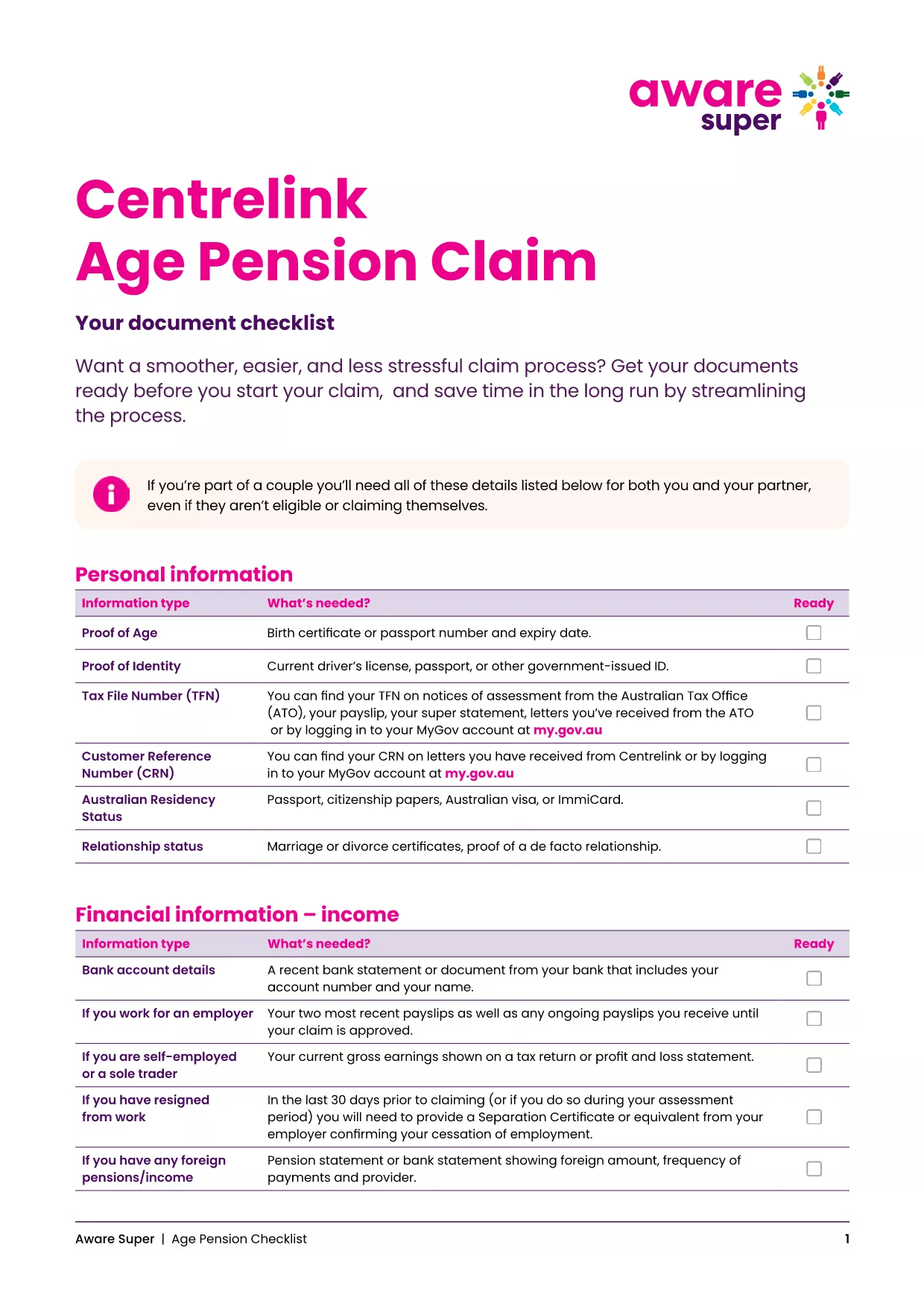
Key Documents & Information Required

  • Proof of identity (passport, driver’s licence, or birth certificate)
  • Centrelink Reference Number (CRN)
  • Bank account details for pension payments
  • Details of assets, superannuation, and income
  • Proof of Australian residency (e.g., rental agreement or utility bill)

Common Mistakes to Avoid

  • Leaving fields blank: Even if a question does not apply, enter “N/A”.
  • Mismatched personal details: Ensure the name, date of birth and address match your Centrelink records.
  • Incorrect bank account: Payments are only made to accounts in the applicant’s name.
  • Out‑of‑date asset values: Use current market values for property, vehicles and investments.

Download & Print the Checklist PDF

For a printable, step‑by‑step checklist that helps you gather all required paperwork before you start the online claim, download the Age Pension Checklist PDF. Use it alongside the fillable application to keep everything organised.

DUK
  • When can I start my Age Pension application?

    You can lodge an application up to 13 weeks before you turn 67. It’s best to gather all documents early to avoid delays.

  • Do I need to fill out a separate form for my partner?

    Yes. Even if your partner is not claiming the pension, you must provide their details and any assets they own.

  • Can I edit the PDF after I’ve saved it?

    Absolutely. The Formize PDF Filler lets you reopen the saved file, make changes, and re‑save before submitting.

  • What if I don’t have a myGov account?

    Create a myGov account at my.gov.au, then link it to your Centrelink profile using your CRN.

  • How long does the Age Pension claim take to process?

    Typical processing time is 2‑4 weeks after all required documents are received. You’ll be notified via email or SMS.

  • Is the PDF form truly fillable on mobile devices?

    Yes. Formize PDF Filler works on all modern browsers, including mobile Safari and Chrome.

  • What happens if I make a mistake on the form?

    Centrelink may contact you for clarification, which can delay payment. Double‑check each section before submitting.

  • Do I need to provide proof of home ownership?

    You must disclose any property you own, even if it’s rented out, and provide a recent valuation or mortgage statement.

  • Can I claim the Age Pension if I have superannuation?

    Yes, but your superannuation balances are counted towards the assets test. Include the current balance in the form.

  • Where can I get help if I’m stuck?

    Visit your nearest Centrelink service centre or call the Seniors Helpline on 132 300.

KAIP

Kaip nemokamai užpildyti age pension application australia internete, atlikdami 5 paprastus veiksmus:

  1. 1
    Open the Fillable Form
    Click the “Fill out this form” button on this page. The Formize PDF Filler will open in a new tab.
  2. 2
    Enter Your Personal Details
    Type your name, date of birth, CRN and contact information into the highlighted fields.
  3. 3
    Add Supporting Information
    Upload or type details about your assets, income, and residency status as prompted.
  4. 4
    Review and Save
    Use the “Review” button to check for empty fields, then click “Save” to download a copy for your records.
  5. 5
    Submit Your Claim
    Log into myGov, link your Centrelink account, and upload the completed PDF. Submit and wait for confirmation.
Formuokite PDF užpildymo programą
APIE

age pension application australia šabloną

Naudodami tradicinį PDF dokumento peržiūros ir pildymo funkcijų rinkinį, žiniatinklio programos pranašumus ir interaktyvų išdėstymą, galite užbaigti age pension application australia per kelias minutes.

FUNKCIJOS

PDF užpildas

Lengviausias būdas užpildyti age pension application australia internete

  • Greitai užpildykite age pension application australia
    Ieškote būdo greitai užpildyti age pension application australia internete? Naudodami internetinį nemokamą PDF formų užpildą sužinosite, kaip redaguoti ir užpildyti šį pdf dokumentą greičiau nei per minutę.
  • Lengva naudoti internetinį PDF redaktorių
    Atsibodo spausdinti PDF failus, kad galėtumėte juos redaguoti prieš nuskaitydami iš naujo ir siųsdami atgal? Redaguoti PDF dokumentus internete nemokamai. Norėdami sutaupyti laiko ir popieriaus, naudokite mūsų internetinį pdf redaktorių.
  • Puikūs įrankiai, visos platformos
    Svarstote, kaip užpildyti age pension application australia „Mac“ kompiuteryje, o gal kaip nemokamai naudoti PDF užpildą? Mūsų internetiniai PDF įrankiai veikia visose platformose.
  • Saugi failų saugykla
    Užbaigti „age pension application australia“ failai saugomi saugioje duomenų bazėje, kurią valdo „Amazon Cloud“ priegloba. Galite bet kada ištrinti failus iš mūsų sistemos. Bet kokiu atveju šie failai automatiškai ištrinami po 24 valandų.
  • Kalbėkitės su age pension application australia
    Kalbėkite su „age pension application australia“ naudodami Chatize, kuri yra nemokama PDF skaitymo priemonė. Užduokite klausimų ir gaukite atsakymus iš „age pension application australia“. Tiesiog spustelėkite aukščiau esantį mygtuką Kalbėtis su dokumentu.

Ištrinti užpildymo seansą

Ištrinti pasirinktą pildymo seansą? Tokiu atveju jūsų pažanga pildant formą bus prarasta.

Ištrinti redagavimo sesiją

Ištrinti pasirinktą redagavimo sesiją? Tokiu atveju jūsų pažanga kuriant ir redaguojant formą bus prarasta.