
Pasirinkite kalbą

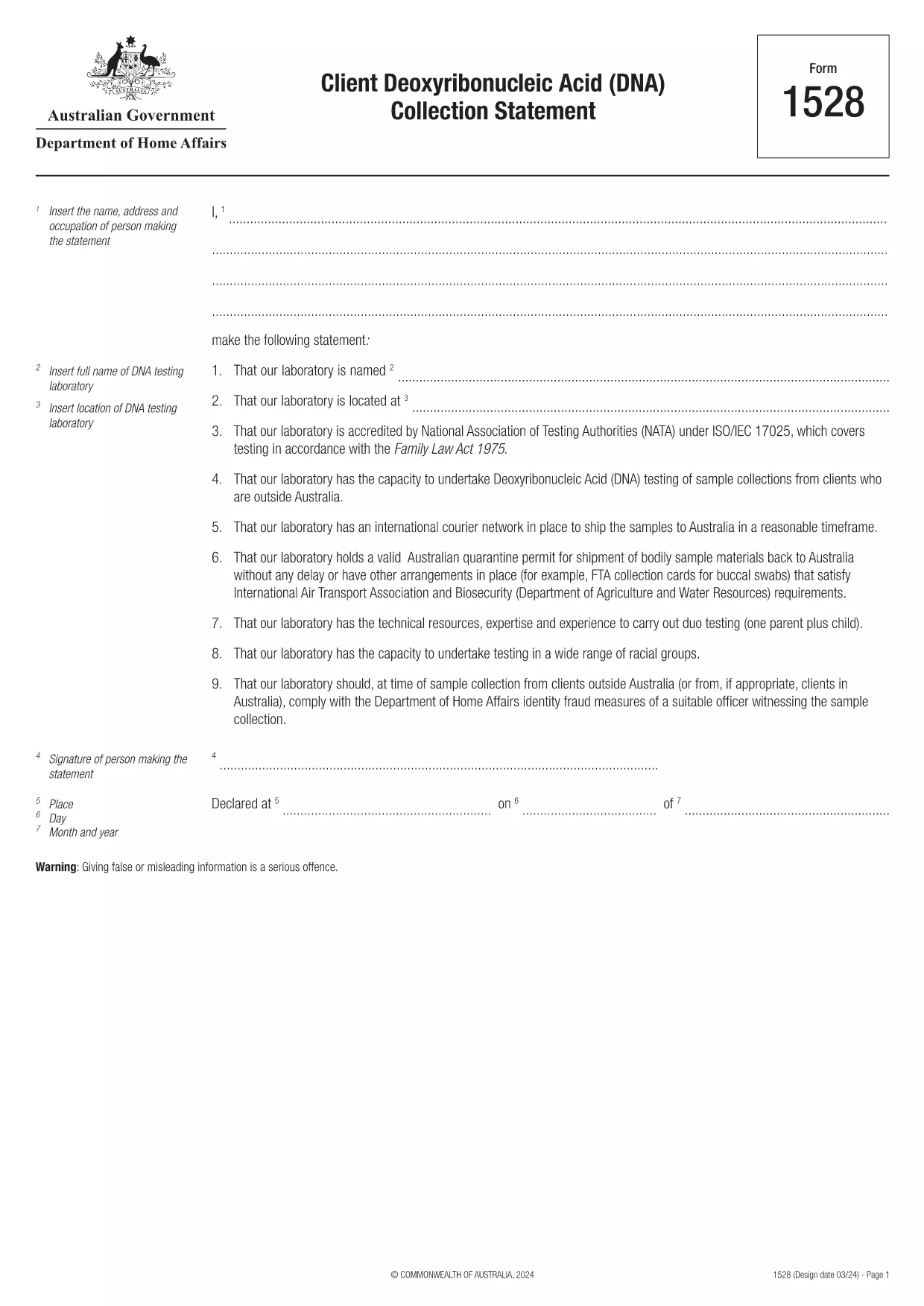
Form 1528 – Client DNA Collection Statement (Fillable PDF)

  1. Šalis Australija
  2. Kalba Anglų
  3. Veikla Charakteris arba tapatybė
Form 1528 – Client DNA Collection Statement (Fillable PDF)

Form 1528 is the official Client Deoxyribonucleic Acid (DNA) Collection Statement required by the Australian Department of Home Affairs. The form captures the name, address and occupation of the person making the statement, as well as details of the DNA testing laboratory.

What Is Form 1528?

This form is used when an individual must provide a DNA sample for immigration, visa, or forensic purposes. It must be completed by the person providing the sample and signed by an authorised DNA testing laboratory.

How to Fill Out Form 1528 with Formize

Instead of printing, scanning, or editing the PDF manually, simply click the “Fill out this form” button on this page. The Formize PDF Filler app will load the fillable version, letting you enter data, add signatures, and save the completed document in seconds.

Common Mistakes & Tips

  • Leave no blank fields – the Department rejects forms with empty required sections.
  • Use the exact laboratory name and address as it appears on the lab’s official letterhead.
  • Check date formats – use DD/MM/YYYY throughout.
  • Sign electronically only after all information is verified; a digital signature is accepted.

Where to Submit the Completed Form

After you download the completed PDF, you can upload it through your online visa portal, email it to the requesting officer, or deliver a printed copy to the nearest Australian Visa Application Centre.

Need More Help?

For detailed guidance, review the instructions on the Department of Home Affairs website or contact your DNA testing laboratory for clarification on laboratory‑specific fields.

DUK
  • Is an electronic signature accepted on Form 1528?

    Yes. The Department of Home Affairs accepts a clear electronic signature created with the Formize PDF Filler.

  • Can I print the form after filling it online?

    Absolutely. After completing the form, you can download the PDF and print a hard copy if you prefer a physical submission.

  • What if I make a mistake after saving the form?

    Open the saved PDF again in Formize, edit the incorrect fields, and re‑save. The fillable PDF allows unlimited edits before final submission.

  • Do I need to attach any supporting documents?

    Typically, the DNA laboratory will provide a separate certification letter. Attach that letter alongside the completed Form 1528 when you submit your application.

  • How long does it take to process Form 1528?

    Processing time varies by case, but the Department generally reviews the statement within 5‑10 business days after receipt.

  • Is there a fee for using Formize’s PDF filler?

    Formize offers a free basic fillable version for Form 1528. Advanced features such as bulk signing require a paid plan, but are not needed for a single submission.

  • Can I fill out Form 1528 on a mobile device?

    Yes. The Formize PDF Filler works on smartphones and tablets, allowing you to complete the form anywhere.

  • What format should I use when uploading the completed form?

    Upload the final document as a PDF file. Ensure the file size does not exceed the portal’s limit (usually 5 MB).

KAIP

Kaip nemokamai užpildyti Form 1528 internete, atlikdami 5 paprastus veiksmus:

  1. 1
    Open the Fillable Form
    Click the “Fill out this form” button on the page. The Formize PDF Filler app will launch in a new tab with the fillable version of Form 1528.
  2. 2
    Enter Your Information
    Type the required details – personal data, laboratory name, and address – directly into the highlighted fields.
  3. 3
    Add Electronic Signatures
    Use the signature tool to sign the statement and, if required, the laboratory representative’s signature.
  4. 4
    Review & Validate
    Double‑check every field for accuracy, especially dates and laboratory information.
  5. 5
    Download or Submit
    When you’re satisfied, click “Save & Download” to get the completed PDF, or use the built‑in “Submit” button to send it directly to the Home Affairs portal.
Formuokite PDF užpildymo programą
APIE

Charakterio ar tapatybės formos

Form 1528 yra vienas iš dokumentų ar formų, susijusių su asmens tapatybės nustatymu arba patvirtinimu. Šioms formoms paprastai reikalinga asmeninė informacija ir dokumentai, patvirtinantys asmens tapatybę. Štai keletas formų, kurios dažniausiai siejamos su tapatybės patvirtinimu, pavyzdžiai:

Tapatybės patvirtinimo formos: šias formas naudoja organizacijos, pvz., darbdaviai, vyriausybinės agentūros ar finansų įstaigos, siekdamos patikrinti asmenų tapatybę. Paprastai jie prašo asmeninės informacijos, pvz., vardo, adreso, gimimo datos ir socialinio draudimo numerio, ir gali reikalauti patvirtinančių dokumentų, pvz., vyriausybės išduoto asmens tapatybės dokumento, paso arba gimimo liudijimo.

Adreso patvirtinimo formos: šios formos naudojamos asmens gyvenamosios vietos adresui patvirtinti. Jie gali reikalauti, kad asmuo pateiktų sąskaitą už komunalines paslaugas, banko išrašą, nuomos sutartį ar kitus dokumentus, įrodančius jo dabartinį adresą.

Pagrindinio patikrinimo įgaliojimo formos: kai organizacija atlieka asmens biografijos patikrinimą, dažnai reikalaujama, kad asmuo užpildytų leidimo atlikti patikrinimą formą. Šiose formose gali būti prašoma pateikti asmeninės informacijos, įskaitant vardą, gimimo datą ir socialinio draudimo numerį, kurie padeda nustatyti asmens tapatybę.

Tapatybės vagystės patvirtinimo formos: tapatybės vagystės atvejais aukoms gali tekti užpildyti tapatybės vagystės patvirtinimo formą. Ši forma padeda asmenims pranešti apie apgaulingą tapatybės naudojimą ir pateikia teisinį įvykio įrašą.

Svarbu pažymėti, kad konkrečios tapatybės nustatymo ar tikrinimo formos ir reikalavimai gali skirtis priklausomai nuo konteksto, pvz., tikslo, jurisdikcijos ar susijusios organizacijos. Norėdami gauti tikslesnę ir naujausią informaciją, visada naudokite konkrečias formas, pateiktas organizacijos ar institucijos, prašančios patvirtinti tapatybę.

FUNKCIJOS

PDF užpildas

Lengviausias būdas užpildyti Form 1528 internete

  • Greitai užpildykite Form 1528
    Ieškote būdo greitai užpildyti Form 1528 internete? Naudodami internetinį nemokamą PDF formų užpildą sužinosite, kaip redaguoti ir užpildyti šį pdf dokumentą greičiau nei per minutę.
  • Lengva naudoti internetinį PDF redaktorių
    Atsibodo spausdinti PDF failus, kad galėtumėte juos redaguoti prieš nuskaitydami iš naujo ir siųsdami atgal? Redaguoti PDF dokumentus internete nemokamai. Norėdami sutaupyti laiko ir popieriaus, naudokite mūsų internetinį pdf redaktorių.
  • Puikūs įrankiai, visos platformos
    Svarstote, kaip užpildyti Form 1528 „Mac“ kompiuteryje, o gal kaip nemokamai naudoti PDF užpildą? Mūsų internetiniai PDF įrankiai veikia visose platformose.
  • Saugi failų saugykla
    Užbaigti „Form 1528“ failai saugomi saugioje duomenų bazėje, kurią valdo „Amazon Cloud“ priegloba. Galite bet kada ištrinti failus iš mūsų sistemos. Bet kokiu atveju šie failai automatiškai ištrinami po 24 valandų.
  • Kalbėkitės su Form 1528
    Kalbėkite su „Form 1528“ naudodami Chatize, kuri yra nemokama PDF skaitymo priemonė. Užduokite klausimų ir gaukite atsakymus iš „Form 1528“. Tiesiog spustelėkite aukščiau esantį mygtuką Kalbėtis su dokumentu.

Ištrinti užpildymo seansą

Ištrinti pasirinktą pildymo seansą? Tokiu atveju jūsų pažanga pildant formą bus prarasta.

Ištrinti redagavimo sesiją

Ištrinti pasirinktą redagavimo sesiją? Tokiu atveju jūsų pažanga kuriant ir redaguojant formą bus prarasta.