
Pasirinkite kalbą

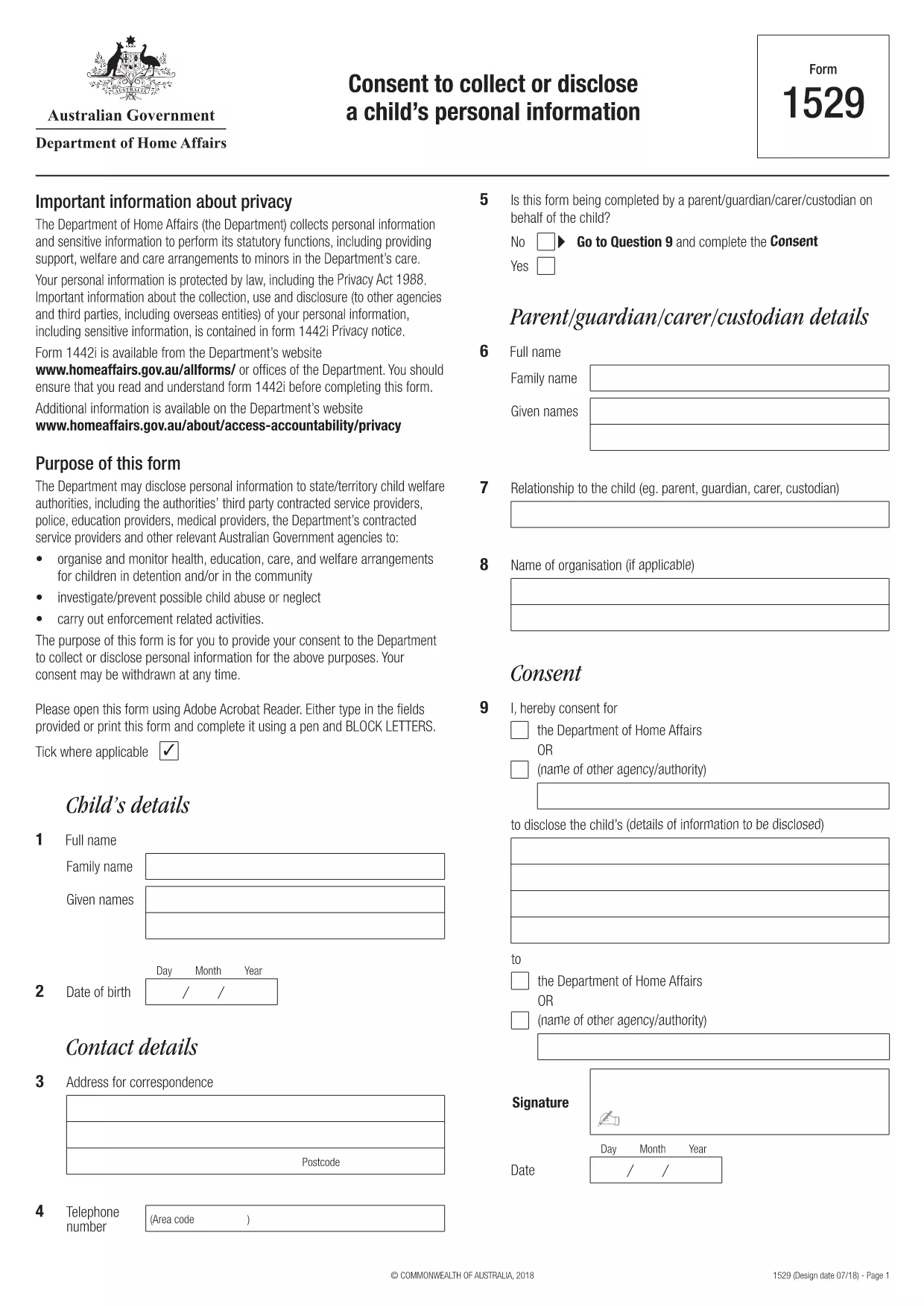
Form 1529 – Consent to Collect or Disclose a Child’s Personal Information

  1. Šalis Australija
  2. Kalba Anglų
  3. Veikla Charakteris arba tapatybė
Form 1529 – Consent to Collect or Disclose a Child’s Personal Information

What is Form 1529?

Form 1529 is the official consent to collect or disclose a child’s personal information required by the Australian Department of Home Affairs. It allows parents or guardians to give permission for government agencies to access or share a minor’s data for immigration, welfare, or protection purposes.

Who Needs to Complete Form 1529?

The form is mandatory for:

  • Parents or legal guardians of children under 18 who are involved in a Home Affairs case.
  • Applicants for visas, citizenship, or refugee status who have dependent children.
  • Legal representatives acting on behalf of a child.

How to Fill Out Form 1529 Online

Instead of downloading the PDF and using a separate editor, you can fill the form directly on Formize:

  1. Click the **"Fill out this form"** button below.
  2. Wait a few seconds while the Formize PDF Filler app loads the fillable version of Form 1529.
  3. Enter the required information in each field – the interface highlights mandatory sections.
  4. Review your answers, then click **"Submit"** to generate a completed PDF.
  5. Download, print, or email the finished form directly from the page.

Common Mistakes to Avoid

  • Leaving mandatory fields blank – the filler will flag these before you can submit.
  • Using an outdated version of the form – always use the PDF linked on this page (2024‑latest).
  • Providing incorrect dates or identification numbers – double‑check passports, birth certificates, and visa numbers.
  • Signing digitally when a handwritten signature is required – follow the instructions on the final page of the PDF.

Where to Submit the Completed Form

After you have downloaded the signed PDF, you can submit it through one of the following channels:

  • Upload via the Home Affairs online portal (ImmiAccount).
  • Attach to your visa or citizenship application.
  • Mail to the address listed on the form’s last page.

Keeping a copy for your records is recommended.

DUK
  • What is the purpose of Form 1529?

    Form 1529 gives parents or guardians consent for the Department of Home Affairs to collect, use, or share a child’s personal information for immigration and welfare decisions.

  • Can I fill Form 1529 on a mobile device?

    Yes. The Formize PDF Filler works on all modern browsers, including smartphones and tablets.

  • Do I need a lawyer to complete this form?

    No. The form is designed for parents or legal guardians. If you have complex legal questions, consult a migration agent.

  • Is an electronic signature accepted?

    The Department accepts electronic signatures for most cases, but check the specific instructions on the last page of the PDF.

  • How long is Form 1529 valid?

    The consent is valid for the duration of the specific visa or immigration process it relates to. A new form may be required for new applications.

  • What should I do if I make a mistake after submitting?

    Contact the Home Affairs help desk immediately and request a revised form. Do not alter a submitted PDF on your own.

  • Is there a fee to download or fill Form 1529?

    Downloading and filling the form via Formize is free. Any government processing fees are separate.

KAIP

Kaip nemokamai užpildyti form 1529 internete, atlikdami 5 paprastus veiksmus:

  1. 1
    Open the Fillable Form
    Click the **"Fill out this form"** button on the page. The Formize PDF Filler app will open in a new window.
  2. 2
    Load the Form
    Wait a few seconds while the system loads the fillable version of Form 1529.
  3. 3
    Enter Your Information
    Complete each highlighted field. Required fields are marked with an asterisk.
  4. 4
    Review and Submit
    Check all entries for accuracy, then click **"Submit"** to generate the completed PDF.
  5. 5
    Download or Print
    Save the finished form to your device, print it if a physical signature is needed, and submit as instructed.
Formuokite PDF užpildymo programą
APIE

Charakterio ar tapatybės formos

form 1529 yra vienas iš dokumentų, naudojamų informacijai apie asmens charakterį ar asmenines savybes rinkti. Šios formos gali būti naudojamos įvairiose situacijose, pavyzdžiui, darbo, būsto ar teisminiuose procesuose, siekiant įvertinti asmens tinkamumą ar patikimumą. Štai keletas formų, kurios skirtinguose kontekstuose gali būti laikomos „simbolių formomis“, pavyzdžiai:

Personalo charakterio formos: šios formos naudojamos informacijai rinkti iš asmenų, galinčių garantuoti asmens charakterį, įgūdžius ir kvalifikacijas. Jų dažnai prašoma kaip darbo paraiškų, nuomos paraiškų ar teisminių procedūrų dalis. Formose paprastai prašoma išsamios informacijos apie santykius su pareiškėju, jų nuomonę apie pareiškėjo charakterį ir bet kokią susijusią patirtį ar pastebėjimus.

Asmeninių pareiškimų formos: tam tikrose situacijose asmenų gali būti paprašyta pateikti asmeninį pareiškimą arba esė, kad perteiktų savo charakterį, vertybes ir motyvus. To gali prireikti stojant į koledžą, teikiant paraiškas dėl stipendijų ar profesiniams licencijavimo procesams.

Personalo liudytojų parodymų formos: teisminiame procese liudytojas gali būti kviečiamas duoti parodymus dėl asmens charakterio, reputacijos ar elgesio. Nors paprastai tai nėra iš anksto apibrėžto dokumento forma, gali būti pateikiamos formos arba šablonai, padedantys liudytojui struktūrizuoti savo parodymus.

Pagrindinio patikrinimo atskleidimo ir įgaliojimo formos: kai kuriais atvejais, pvz., paraiškose įdarbinti, asmenų gali būti paprašyta užpildyti formas, leidžiančias atlikti asmens patikrinimą. Šiose formose gali būti klausimų apie veikėjų nuorodas, ankstesnę kriminalinę istoriją ar kitą svarbią asmeninę informaciją.

Svarbu pažymėti, kad konkrečios formos, naudojamos asmens charakteriui įvertinti, gali skirtis priklausomai nuo konteksto ir dalyvaujančios organizacijos ar institucijos reikalavimų. Todėl, norint suprasti, kokios informacijos ieškoma ir kaip tiksliai užpildyti formas, rekomenduojama kreiptis į konkrečias atitinkamos šalies pateiktas formas.

FUNKCIJOS

PDF užpildas

Lengviausias būdas užpildyti form 1529 internete

  • Greitai užpildykite form 1529
    Ieškote būdo greitai užpildyti form 1529 internete? Naudodami internetinį nemokamą PDF formų užpildą sužinosite, kaip redaguoti ir užpildyti šį pdf dokumentą greičiau nei per minutę.
  • Lengva naudoti internetinį PDF redaktorių
    Atsibodo spausdinti PDF failus, kad galėtumėte juos redaguoti prieš nuskaitydami iš naujo ir siųsdami atgal? Redaguoti PDF dokumentus internete nemokamai. Norėdami sutaupyti laiko ir popieriaus, naudokite mūsų internetinį pdf redaktorių.
  • Puikūs įrankiai, visos platformos
    Svarstote, kaip užpildyti form 1529 „Mac“ kompiuteryje, o gal kaip nemokamai naudoti PDF užpildą? Mūsų internetiniai PDF įrankiai veikia visose platformose.
  • Saugi failų saugykla
    Užbaigti „form 1529“ failai saugomi saugioje duomenų bazėje, kurią valdo „Amazon Cloud“ priegloba. Galite bet kada ištrinti failus iš mūsų sistemos. Bet kokiu atveju šie failai automatiškai ištrinami po 24 valandų.
  • Kalbėkitės su form 1529
    Kalbėkite su „form 1529“ naudodami Chatize, kuri yra nemokama PDF skaitymo priemonė. Užduokite klausimų ir gaukite atsakymus iš „form 1529“. Tiesiog spustelėkite aukščiau esantį mygtuką Kalbėtis su dokumentu.

Ištrinti užpildymo seansą

Ištrinti pasirinktą pildymo seansą? Tokiu atveju jūsų pažanga pildant formą bus prarasta.

Ištrinti redagavimo sesiją

Ištrinti pasirinktą redagavimo sesiją? Tokiu atveju jūsų pažanga kuriant ir redaguojant formą bus prarasta.