
Pasirinkite kalbą

Originating Application Form Part 1 (Fillable PDF)

  1. Kalba Anglų
  2. Šalis Australija
  3. Veikla Legal Forms
  4. skyrius Teisingumo departamentas
Originating Application Form Part 1 (Fillable PDF)

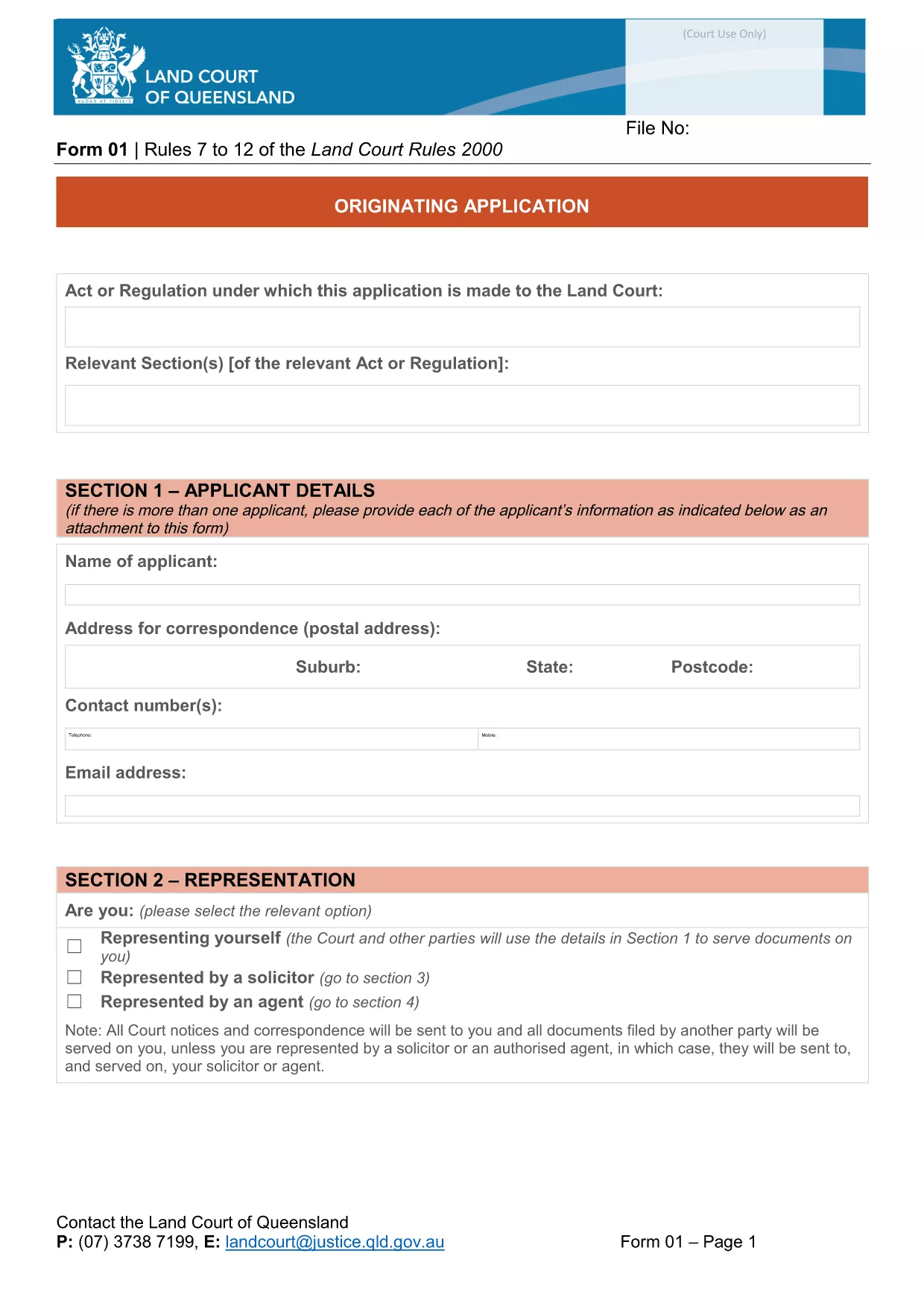
The Originating Application Form Part 1 is the first step in initiating a matter before the Queensland Land Court. Traditionally this PDF had to be printed, filled by hand, and scanned back in – a time‑consuming process that often led to errors.

With Formize’s free Fillable PDF feature, the same form is now completely editable online. The document is not locked, meaning you can type directly into every field, add dates, and even attach supporting files without ever opening a separate PDF editor.

Why Choose a Fillable PDF?

  • Instant validation – required fields are highlighted.
  • Save time – no printing, scanning, or faxing.
  • Reduce mistakes – auto‑formatting for dates, numbers, and checkboxes.
  • Secure storage – your completed form is saved in the cloud until you download it.

How to Complete the Form Online

Simply click the "Fill out this form" button on this page. The Formize PDF Filler app will load in seconds, presenting the exact layout of the official Queensland Courts form.

Enter your details, attach any required documents, and use the navigation tabs to move between sections. When you’re finished, click Save & Download to get a completed PDF ready for submission.

Common Mistakes & Tips

  • Leaving required fields blank: The filler highlights missing information in red.
  • Incorrect date format: Use the calendar picker to avoid format errors.
  • Uploading oversized files: Keep attachments under 5 MB for faster upload.
  • Not saving frequently: The app auto‑saves every 30 seconds, but a manual save gives peace of mind.

Download vs. Online Fill – What’s Best?

If you prefer to keep a local copy, you can still download the original PDF from the link below and fill it with any PDF editor. However, the online filler guarantees that the form stays unlocked and fully editable, which many other PDF viewers lock after the first edit.

Legal Use & Submission Guidelines

Once completed, the form must be signed (electronic signatures are accepted by the Queensland Land Court) and lodged according to the court’s filing instructions. Keep a copy for your records and submit the original as directed.

Ready to start? Click the button below and let Formize handle the rest.

DUK
  • Do I need to download the PDF before I can fill it?

    No. Click the "Fill out this form" button and the Formize online filler will let you edit the document directly in your browser.

  • Is the form compatible with Adobe Acrobat?

    Yes. After you finish online, you can download the PDF and open it in Adobe Acrobat or any other PDF viewer.

  • Can I save my progress and return later?

    The Formize filler auto‑saves every 30 seconds. You can also manually click "Save" to download a draft and continue later.

  • Are electronic signatures accepted?

    The Queensland Land Court accepts electronic signatures on this form. Use the built‑in signature field in the filler or attach a scanned signature image.

  • What if I upload the wrong document?

    Simply delete the attachment in the filler and re‑upload the correct file. The app supports most common formats (PDF, JPG, PNG).

  • Is there a size limit for attachments?

    Each attachment must be under 5 MB to ensure quick upload and processing.

  • Do I need an account to use Formize?

    No account is required for this form. The filler works anonymously and does not store any personal data after you download the completed PDF.

  • Can I print the form after filling it online?

    Absolutely. Once you download the completed PDF, you can print it on any standard printer.

KAIP

Kaip nemokamai užpildyti fillable PDF internete, atlikdami 4 paprastus veiksmus:

  1. 1
    Open the Fillable Form
    Click the "Fill out this form" button on the page. The Formize PDF Filler loads instantly in your browser.
  2. 2
    Enter Your Information
    Type directly into each field, use the date picker for dates, and attach supporting documents where required.
  3. 3
    Validate & Save
    The filler highlights any missing required fields. Click "Save & Download" when all sections are complete.
  4. 4
    Download the Completed PDF
    A fully completed, unlocked PDF will be saved to your device. You can now print, sign electronically, or lodge it with the court.
Formuokite PDF užpildymo programą
APIE

Teisingumo departamento (DOJ) formos

fillable PDF yra viena iš oficialių formų, kurią naudoja Jungtinių Valstijų teisingumo departamentas ir įvairūs jo skyriai, agentūros ir komponentai. DOJ yra federalinis vykdomasis departamentas, atsakingas už federalinių įstatymų vykdymą, Jungtinių Valstijų interesų gynimą teisiniais klausimais ir teisingumo vykdymą.

Štai keletas Teisingumo departamento formų pavyzdžių:

Federalinės pagalbos prašymas (SF-424): šią formą naudoja organizacijos, prašančios federalinės dotacijos arba finansinės paramos, kurią administruoja DOJ arba jo komponentai. Ji renka informaciją apie organizaciją, siūlomą projektą ir biudžetą.

Skundo dėl pilietinių teisių forma: ši forma naudojama norint pateikti skundą DOJ Civilinių teisių skyriui dėl tariamų pilietinių teisių įstatymų pažeidimų, pvz., diskriminacijos dėl rasės, lyties, negalios ar tautinės kilmės.

Prašymo pranešti apie auką forma: šią formą naudoja nusikaltimų aukos, norėdami prašyti pranešimo apie federalinės baudžiamosios bylos būseną ir procesą, nes tai yra dalis DOJ pastangų teikti informaciją ir paramą nusikaltimų aukoms.

Imigracijos formos: DOJ vykdomoji imigracijos peržiūros tarnyba (EOIR) administruoja imigracijos teismus ir su imigracija susijusias bylas. Imigracijos teismo procesuose naudojamos įvairios formos, pvz., EOIR-42B forma prašymui atleisti nuo pašalinimo arba EOIR-28 forma apeliaciniams skundams.

ATF formos: Alkoholio, tabako, šaunamųjų ginklų ir sprogmenų biuras (ATF), DOJ sudedamoji dalis, turi savo formų rinkinį įvairiems tikslams, kaip minėta ankstesniame atsakyme.

Narkotikų kontrolės administracijos (DEA) formos: DEA, kitas DOJ komponentas, naudoja savo formas su kontroliuojamomis medžiagomis susijusiems klausimams, įskaitant registracijos, ataskaitų teikimo ir įrašų saugojimo reikalavimus.

Šiuose pavyzdžiuose išryškinamos kelios DOJ formų kategorijos, tačiau Teisingumo departamento naudojamos konkrečios formos gali skirtis priklausomai nuo padalinio, agentūros ar komponento ir paslaugų ar procedūrų pobūdžio. Patartina apsilankyti oficialioje konkretaus DOJ padalinio ar agentūros svetainėje arba kreiptis į teisinę konsultaciją, kad gautumėte tikslios ir naujausios informacijos apie konkrečias DOJ formas, susijusias su jūsų situacija.

FUNKCIJOS

PDF užpildas

Lengviausias būdas užpildyti fillable PDF internete

  • Greitai užpildykite fillable PDF
    Ieškote būdo greitai užpildyti fillable PDF internete? Naudodami internetinį nemokamą PDF formų užpildą sužinosite, kaip redaguoti ir užpildyti šį pdf dokumentą greičiau nei per minutę.
  • Lengva naudoti internetinį PDF redaktorių
    Atsibodo spausdinti PDF failus, kad galėtumėte juos redaguoti prieš nuskaitydami iš naujo ir siųsdami atgal? Redaguoti PDF dokumentus internete nemokamai. Norėdami sutaupyti laiko ir popieriaus, naudokite mūsų internetinį pdf redaktorių.
  • Puikūs įrankiai, visos platformos
    Svarstote, kaip užpildyti fillable PDF „Mac“ kompiuteryje, o gal kaip nemokamai naudoti PDF užpildą? Mūsų internetiniai PDF įrankiai veikia visose platformose.
  • Saugi failų saugykla
    Užbaigti „fillable PDF“ failai saugomi saugioje duomenų bazėje, kurią valdo „Amazon Cloud“ priegloba. Galite bet kada ištrinti failus iš mūsų sistemos. Bet kokiu atveju šie failai automatiškai ištrinami po 24 valandų.
  • Kalbėkitės su fillable PDF
    Kalbėkite su „fillable PDF“ naudodami Chatize, kuri yra nemokama PDF skaitymo priemonė. Užduokite klausimų ir gaukite atsakymus iš „fillable PDF“. Tiesiog spustelėkite aukščiau esantį mygtuką Kalbėtis su dokumentu.

Ištrinti užpildymo seansą

Ištrinti pasirinktą pildymo seansą? Tokiu atveju jūsų pažanga pildant formą bus prarasta.

Ištrinti redagavimo sesiją

Ištrinti pasirinktą redagavimo sesiją? Tokiu atveju jūsų pažanga kuriant ir redaguojant formą bus prarasta.