
Pasirinkite kalbą

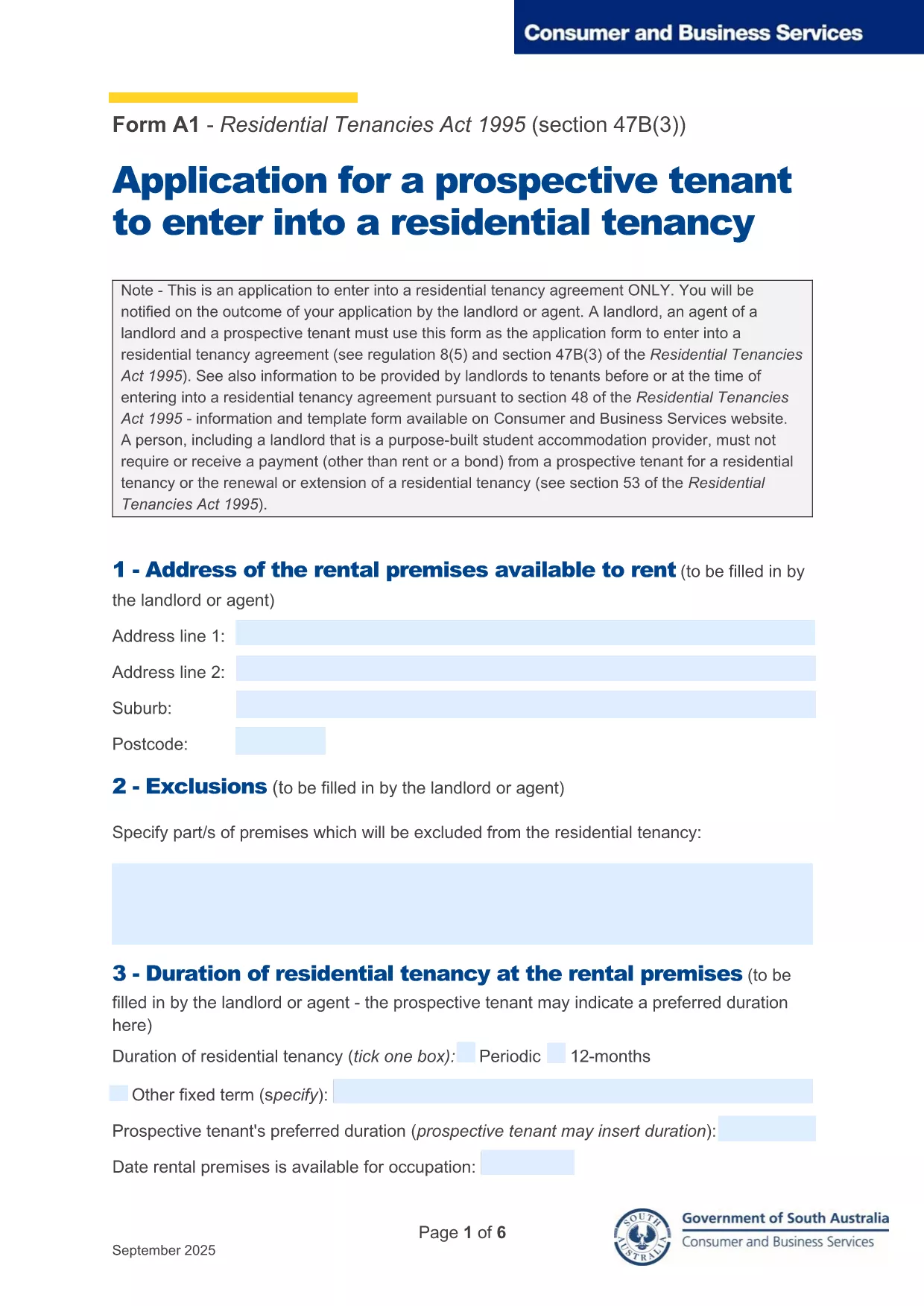
Application Form A – Residential Tenancy Application (Fillable PDF)

  1. Kalba Anglų
  2. Šalis Australija
  3. skyrius Real Estate
  4. Veikla Nuoma
Application Form A – Residential Tenancy Application (Fillable PDF)

Looking for a quick, paper‑less way to submit a residential tenancy application? Our Application Form A is a fully fillable PDF that lets landlords, agents, and prospective tenants complete the entire tenancy request online.

The form complies with Australian tenancy standards and includes fields for personal details, rental history, references, and consent statements. With Formize’s built‑in PDF Filler, you can type, check boxes, and sign without ever printing a single page.

Why Choose This Fillable PDF Form?

  • Instant online completion – no PDF editor required.
  • Secure data handling – all information stays encrypted in your browser.
  • Save time – automatically validates required fields.
  • Print‑ready – generate a clean, signed PDF for the landlord.

How to Complete the Application Form A Online

Follow the simple steps below, then click the "Fill out this form" button on this page. The Formize PDF Filler will load the document, and you can start entering your details immediately.

Common Mistakes to Avoid

  • Leaving mandatory fields blank – the filler will highlight missing info.
  • Using an outdated address or contact number.
  • Forgetting to attach supporting documents (e.g., ID, proof of income) after the PDF is filled.
  • Signing with a scanned image instead of the built‑in e‑signature tool.

Where to Submit Your Completed Form

Once you’ve filled and signed the form, download the final PDF and email it to the landlord or property manager, or upload it through their online portal. Keep a copy for your records.

Download & Save the PDF for Future Use

Even if you prefer to fill the form later, you can download the original PDF from the link below. The file is hosted on a trusted Australian real‑estate site and is kept up‑to‑date.

Download Application Form A (PDF)

DUK
  • Is the Application Form A free to use?

    Yes, the PDF is provided at no cost. Formize’s online filler is also free for standard forms.

  • Can I edit the form after I’ve saved it?

    You can reopen the saved PDF in Formize’s filler to make changes, as long as you have the original file.

  • Do I need Adobe Acrobat to fill this form?

    No. The Formize PDF Filler works in any modern browser – no additional software required.

  • What browsers are supported?

    Chrome, Edge, Firefox, and Safari are fully supported. Ensure your browser is up to date for the best experience.

  • Is my personal data safe?

    All data entered stays in your browser until you choose to download or email the completed PDF. Formize does not store any personal information.

  • Can I print the filled form?

    Absolutely. After completing the form, click “Download PDF” and print the file from any PDF viewer.

KAIP

Kaip nemokamai užpildyti application form a internete, atlikdami 4 paprastus veiksmus:

  1. 1
    Click the Fill Out Button
    On this page, click the bright “Fill out this form” button. The Formize PDF Filler loads instantly.
  2. 2
    Enter Your Information
    Type directly into each field, select dates from the calendar widget, and upload any required documents.
  3. 3
    Add Your Electronic Signature
    Use the built‑in e‑signature tool to sign the form securely. No need to print or scan.
  4. 4
    Download or Email the Completed PDF
    When all fields are filled, click “Save PDF” to download, or use the “Email” option to send it straight to the landlord.
Formuokite PDF užpildymo programą
APIE

Formos, skirtos nuomotojams ir (arba) nuomininkams siūlyti veiksmus, susijusius su nuomos sutartimis.

application form a yra būsto nuomos sutarčių tipas, kurį naudoja dauguma privačių nuomotojų ir būsto asociacijų.

Yra keletas dalykų, kuriais nuomotojai ar nuomininkai privalo laikytis tam tikrų taisyklėse nustatytų taisyklių. Kai kuriais atvejais jiems gali prireikti užpildyti formą, vadinamą „nurodyta forma“, kurioje siūlomas veiksmas, galintis turėti įtakos kitai nuomos sutarties šaliai.

Formos vadinamos nustatytomis formomis, nes formuluotės jose buvo kruopščiai parengtos siekiant užtikrinti, kad formą pildantis asmuo ir asmuo, kuriam ji įteikiama, suprastų, kas yra siūloma ir ką gali daryti atsakydami. Nepateikus tinkamos formos, siūlomas veiksmas gali tapti negaliojančiu.

Jūs negalite keisti šių formų formuluočių, nebent formoje nurodyta, kad galite tai padaryti. Jei pakeisite formuluotę, forma gali tapti negaliojančia. Taip pat turite laikytis bet kokių formoje nurodytų įspėjimo terminų.

FUNKCIJOS

PDF užpildas

Lengviausias būdas užpildyti application form a internete

  • Greitai užpildykite application form a
    Ieškote būdo greitai užpildyti application form a internete? Naudodami internetinį nemokamą PDF formų užpildą sužinosite, kaip redaguoti ir užpildyti šį pdf dokumentą greičiau nei per minutę.
  • Lengva naudoti internetinį PDF redaktorių
    Atsibodo spausdinti PDF failus, kad galėtumėte juos redaguoti prieš nuskaitydami iš naujo ir siųsdami atgal? Redaguoti PDF dokumentus internete nemokamai. Norėdami sutaupyti laiko ir popieriaus, naudokite mūsų internetinį pdf redaktorių.
  • Puikūs įrankiai, visos platformos
    Svarstote, kaip užpildyti application form a „Mac“ kompiuteryje, o gal kaip nemokamai naudoti PDF užpildą? Mūsų internetiniai PDF įrankiai veikia visose platformose.
  • Saugi failų saugykla
    Užbaigti „application form a“ failai saugomi saugioje duomenų bazėje, kurią valdo „Amazon Cloud“ priegloba. Galite bet kada ištrinti failus iš mūsų sistemos. Bet kokiu atveju šie failai automatiškai ištrinami po 24 valandų.
  • Kalbėkitės su application form a
    Kalbėkite su „application form a“ naudodami Chatize, kuri yra nemokama PDF skaitymo priemonė. Užduokite klausimų ir gaukite atsakymus iš „application form a“. Tiesiog spustelėkite aukščiau esantį mygtuką Kalbėtis su dokumentu.

Ištrinti užpildymo seansą

Ištrinti pasirinktą pildymo seansą? Tokiu atveju jūsų pažanga pildant formą bus prarasta.

Ištrinti redagavimo sesiją

Ištrinti pasirinktą redagavimo sesiją? Tokiu atveju jūsų pažanga kuriant ir redaguojant formą bus prarasta.