Pasirinkite kalbą

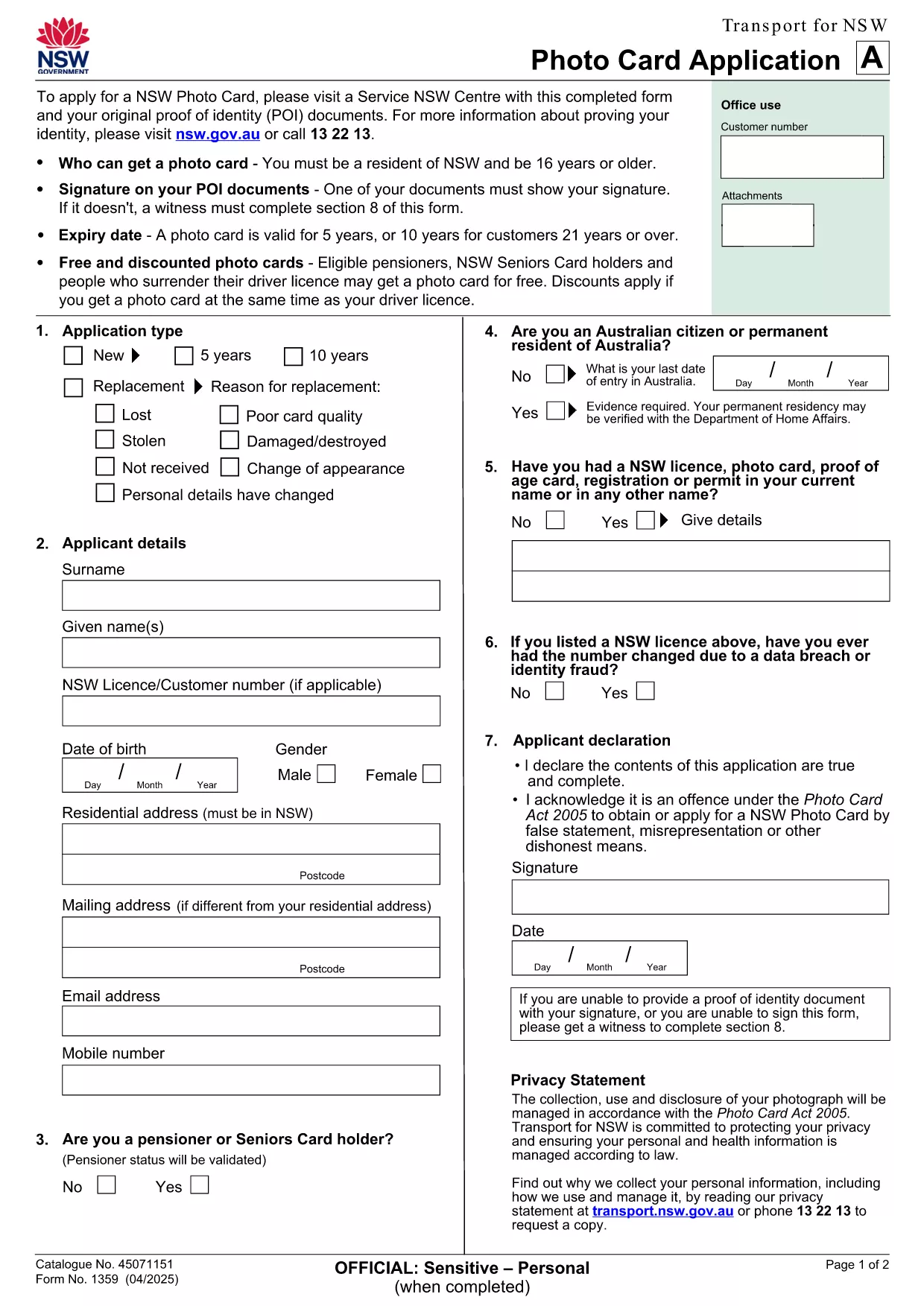
NSW Photo Card Application Form – Fillable PDF with Photo

  1. Šalis Australija
  2. Kalba Anglų
  3. Veikla Identification
  4. skyrius Transport
NSW Photo Card Application Form – Fillable PDF with Photo

Looking for a fast, secure way to apply for a NSW Photo Card? This page gives you direct access to the official NSW Photo Card application form that includes a dedicated photo field. Whether you prefer to download the PDF or fill it out instantly online, Formize makes the process simple.

Why You Need a NSW Photo Card

A NSW Photo Card is an accepted form of identification for residents aged 16 and over who don’t have a driver licence. It displays your name, address, date of birth and a recent photo, and is valid for up to 10 years for eligible customers.

Key Features of the Fillable PDF Form

  • Built‑in photo placeholder – attach a passport‑style picture directly in the form.
  • Editable text fields for personal details, address, and signature.
  • Auto‑calculation of fees based on eligibility and concessions.
  • Compliant with Transport for NSW security standards.

How to Complete the Form Online with Formize

Instead of downloading the PDF and using a separate editor, simply click the "Fill out this form" button on this page. The Formize PDF Filler app loads in seconds, letting you type, upload a photo, and sign electronically.

Common Mistakes to Avoid

  • Uploading a photo that doesn’t meet the NSW guidelines (e.g., glasses glare, incorrect background).
  • Leaving any mandatory field blank – the filler will highlight missing information.
  • Submitting an outdated address proof; always use a current utility bill or bank statement.

Where to Submit Your Application

After completing the form, print it (if required) and visit any Service NSW Centre. Bring your original identity documents, the signed form, and the photo you uploaded. Cash, card, or EFTPOS payments are accepted.

Need extra help? Review the official Service NSW guide for detailed photo requirements and eligibility criteria.

DUK
  • Do I need a driver licence to apply for a NSW Photo Card?

    No. The Photo Card is intended for residents who do not have a driver licence or whose licence has expired.

  • What photo specifications are required?

    The photo must be a clear, front‑facing headshot with a plain background, no glasses glare, and a size of 35mm × 45mm.

  • Can I submit the form entirely online?

    You can fill the form online with Formize, but the final submission must be in person at a Service NSW Centre to have your photo taken and verify identity documents.

  • How long is the Photo Card valid?

    The card is valid for 5 years for most applicants, or 10 years for eligible customers aged 21 and over.

  • Are there any fees or concessions?

    Fees vary based on whether you hold a driver licence and your eligibility for concessions (e.g., seniors, pensioners, carers).

  • What should I do if I cannot attend a Service NSW Centre?

    Eligible applicants with medical reasons can use a photo kit and mail the completed form, as outlined on the Service NSW website.

KAIP

Kaip nemokamai užpildyti application form with photo internete, atlikdami 5 paprastus veiksmus:

  1. 1
    Open the Fillable Form
    Click the "Fill out this form" button on the page. The Formize PDF Filler loads in a new window.
  2. 2
    Enter Your Details
    Type your name, address, date of birth, and any other required information into the highlighted fields.
  3. 3
    Upload Your Photo
    Use the photo placeholder to upload a recent passport‑style picture that meets NSW guidelines.
  4. 4
    Add Your Signature
    Draw or upload a digital signature in the signature field.
  5. 5
    Review & Submit
    Check all fields for completeness, then click "Save & Download" to get a printable copy. Bring the printed form to a Service NSW Centre.
Formuokite PDF užpildymo programą
APIE

application form with photo šabloną

Naudodami tradicinį PDF dokumento peržiūros ir pildymo funkcijų rinkinį, žiniatinklio programos pranašumus ir interaktyvų išdėstymą, galite užbaigti application form with photo per kelias minutes.

FUNKCIJOS

PDF užpildas

Lengviausias būdas užpildyti application form with photo internete

  • Greitai užpildykite application form with photo
    Ieškote būdo greitai užpildyti application form with photo internete? Naudodami internetinį nemokamą PDF formų užpildą sužinosite, kaip redaguoti ir užpildyti šį pdf dokumentą greičiau nei per minutę.
  • Lengva naudoti internetinį PDF redaktorių
    Atsibodo spausdinti PDF failus, kad galėtumėte juos redaguoti prieš nuskaitydami iš naujo ir siųsdami atgal? Redaguoti PDF dokumentus internete nemokamai. Norėdami sutaupyti laiko ir popieriaus, naudokite mūsų internetinį pdf redaktorių.
  • Puikūs įrankiai, visos platformos
    Svarstote, kaip užpildyti application form with photo „Mac“ kompiuteryje, o gal kaip nemokamai naudoti PDF užpildą? Mūsų internetiniai PDF įrankiai veikia visose platformose.
  • Saugi failų saugykla
    Užbaigti „application form with photo“ failai saugomi saugioje duomenų bazėje, kurią valdo „Amazon Cloud“ priegloba. Galite bet kada ištrinti failus iš mūsų sistemos. Bet kokiu atveju šie failai automatiškai ištrinami po 24 valandų.
  • Kalbėkitės su application form with photo
    Kalbėkite su „application form with photo“ naudodami Chatize, kuri yra nemokama PDF skaitymo priemonė. Užduokite klausimų ir gaukite atsakymus iš „application form with photo“. Tiesiog spustelėkite aukščiau esantį mygtuką Kalbėtis su dokumentu.

Ištrinti užpildymo seansą

Ištrinti pasirinktą pildymo seansą? Tokiu atveju jūsų pažanga pildant formą bus prarasta.

Ištrinti redagavimo sesiją

Ištrinti pasirinktą redagavimo sesiją? Tokiu atveju jūsų pažanga kuriant ir redaguojant formą bus prarasta.