
Pasirinkite kalbą

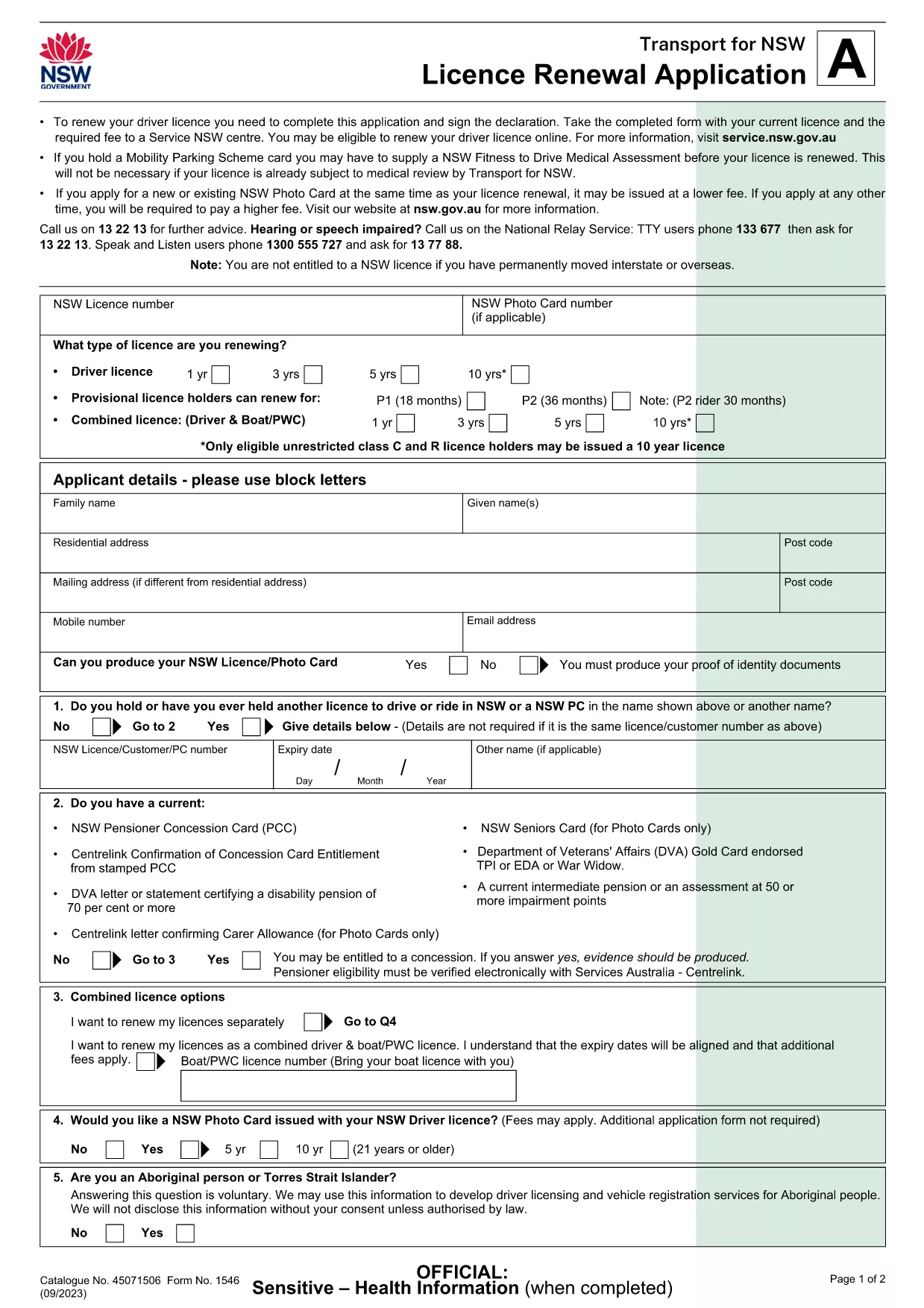
Driver License Renewal Application Form (Fillable PDF)

  1. Kalba Anglų
  2. Šalis Australija
  3. skyrius Transport
  4. Veikla Transporto priemonės registracija
Driver License Renewal Application Form (Fillable PDF)

Renewing your driver’s licence doesn’t have to be a paper‑heavy hassle. Our fillable PDF driver license renewal application lets you enter all required information directly in your browser, sign electronically, and submit with confidence.

Why Use a Fillable PDF for License Renewal

Traditional printed forms are prone to errors, illegible handwriting, and lost paperwork. A fillable PDF provides:

  • Clear, typed fields that eliminate mis‑reading.
  • Automatic validation to catch missing or incorrectly formatted data.
  • Instant saving – you can pause, return later, and never lose your progress.
  • Environmentally friendly, paper‑less processing.

How to Complete the Renewal Form Online

Simply click the "Fill out this form" button below. The Formize PDF Filler app will load, and you can start typing right away. No extra software download is required.

Common Mistakes & Tips for a Smooth Renewal

Even with a digital form, a few slip‑ups can delay your licence:

  • Incorrect personal details: Double‑check your name, address, and date of birth against your ID documents.
  • Missing signatures: Use the built‑in e‑signature field; a handwritten signature on a printed copy will be rejected.
  • Unsupported file uploads: If you need to attach supporting documents, ensure they are PDF or JPG and under 5 MB.

What Happens After You Submit

Once you click Submit, the form is securely transmitted to the transport authority. You’ll receive an email confirmation with a reference number and, if applicable, a downloadable receipt.

Ready to renew? Click the button below and let Formize handle the rest.

DUK
  • Do I need to print the form after filling it out?

    No. The fillable PDF can be completed, signed, and submitted entirely online through Formize.

  • What identification documents are required for renewal?

    You’ll need a current photo ID (passport or existing driver’s licence) and proof of address if your details have changed.

  • Can I save my progress and finish later?

    Yes. The Formize app lets you save a draft locally and resume at any time before submission.

  • Is there a fee for using the fillable PDF?

    The PDF and Formize filler are free to use; any licence renewal fees are paid directly to the transport authority.

  • What if I make a mistake after submitting?

    Contact your local transport office with the reference number provided in the confirmation email; they can guide you on correcting the form.

  • Is my personal data safe?

    Formize uses SSL encryption and does not store your data after the session ends. All information is transmitted securely to the authority.

KAIP

Kaip nemokamai užpildyti driver license renewal form internete, atlikdami 5 paprastus veiksmus:

  1. 1
    Click the Fill‑out Button
    Press the "Fill out this form" button on the page to launch the Formize PDF Filler.
  2. 2
    Wait for the Filler to Load
    The app loads in seconds; you’ll see a clean interface with editable fields.
  3. 3
    Enter Your Information
    Type your personal details, address, and licence number into the highlighted sections.
  4. 4
    Sign Electronically
    Use the built‑in e‑signature field to add your signature and the date.
  5. 5
    Submit and Save Confirmation
    Click Submit, then download the confirmation receipt that is emailed to you.
Formuokite PDF užpildymo programą
APIE

Transporto priemonių registracijos formos

Jei turite arba nuomojatės motorinę transporto priemonę, priekabą ar valtį, turite laikytis tam tikrų įsipareigojimų, kad jūsų transporto priemonė būtų teisėtai registruota ir saugi.

driver license renewal form yra viena iš transporto priemonių registracijos formų, kurios yra dokumentai, naudojami motorinei transporto priemonei įregistruoti atitinkamoje valstijos ar provincijos institucijoje. Šios formos paprastai reikalingos, kai asmuo perka naują ar naudotą transporto priemonę arba kai su transporto priemone persikelia į naują valstiją ar provinciją.

Tikslūs reikalavimai ir formos, reikalingos transporto priemonės registracijai, gali skirtis priklausomai nuo vietos, tačiau paprastai procesas apima informacijos apie transporto priemonę, savininką ir bet kokius transporto priemonės arešto pateikimą.

Kai bus pateiktos registracijos formos ir mokesčiai, valstybės ar provincijos institucija transporto priemonės savininkui išduos registracijos liudijimą arba valstybinį numerį. Ši registracija leidžia teisėtai eksploatuoti transporto priemonę viešuosiuose keliuose ir greitkeliuose.

FUNKCIJOS

PDF užpildas

Lengviausias būdas užpildyti driver license renewal form internete

  • Greitai užpildykite driver license renewal form
    Ieškote būdo greitai užpildyti driver license renewal form internete? Naudodami internetinį nemokamą PDF formų užpildą sužinosite, kaip redaguoti ir užpildyti šį pdf dokumentą greičiau nei per minutę.
  • Lengva naudoti internetinį PDF redaktorių
    Atsibodo spausdinti PDF failus, kad galėtumėte juos redaguoti prieš nuskaitydami iš naujo ir siųsdami atgal? Redaguoti PDF dokumentus internete nemokamai. Norėdami sutaupyti laiko ir popieriaus, naudokite mūsų internetinį pdf redaktorių.
  • Puikūs įrankiai, visos platformos
    Svarstote, kaip užpildyti driver license renewal form „Mac“ kompiuteryje, o gal kaip nemokamai naudoti PDF užpildą? Mūsų internetiniai PDF įrankiai veikia visose platformose.
  • Saugi failų saugykla
    Užbaigti „driver license renewal form“ failai saugomi saugioje duomenų bazėje, kurią valdo „Amazon Cloud“ priegloba. Galite bet kada ištrinti failus iš mūsų sistemos. Bet kokiu atveju šie failai automatiškai ištrinami po 24 valandų.
  • Kalbėkitės su driver license renewal form
    Kalbėkite su „driver license renewal form“ naudodami Chatize, kuri yra nemokama PDF skaitymo priemonė. Užduokite klausimų ir gaukite atsakymus iš „driver license renewal form“. Tiesiog spustelėkite aukščiau esantį mygtuką Kalbėtis su dokumentu.

Ištrinti užpildymo seansą

Ištrinti pasirinktą pildymo seansą? Tokiu atveju jūsų pažanga pildant formą bus prarasta.

Ištrinti redagavimo sesiją

Ištrinti pasirinktą redagavimo sesiją? Tokiu atveju jūsų pažanga kuriant ir redaguojant formą bus prarasta.