Pasirinkite kalbą

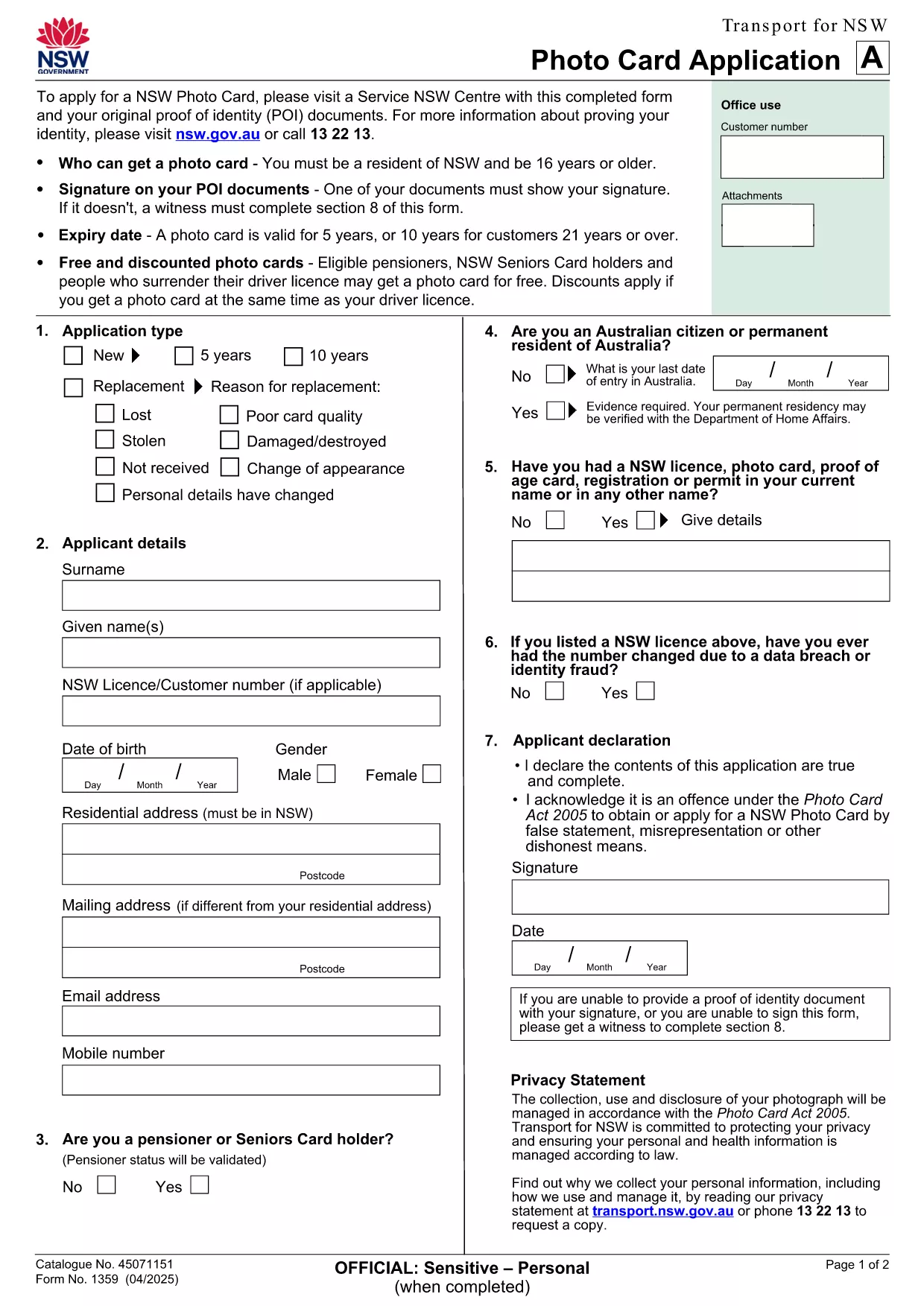
NSW Photo Card Application Form (Fillable PDF)

  1. Šalis Australija
  2. Kalba Anglų
  3. Veikla Identification
  4. skyrius Transport
NSW Photo Card Application Form (Fillable PDF)

Need a new Photo Card in New South Wales? The official NSW Photo Card application form requires a recent photograph of yourself. With Formize, you can download the PDF, attach your picture, and complete the entire form online – no printer or scanner needed.

Why a Photo Card Application Needs a Picture

The Photo Card is a government‑issued ID that verifies your identity. A clear, recent picture helps officers match the card to the holder quickly and reduces fraud.

How to Fill Out the NSW Photo Card Form Online

  1. Click the "Fill out this form" button on this page.
  2. Wait for the Formize PDF Filler app to load (usually a few seconds).
  3. Upload a high‑resolution photo (JPEG or PNG, 2 MB max).
  4. Complete the personal‑details sections – name, address, date of birth, etc.
  5. Review the entered data, then click Save or Print to submit at your nearest Service Centre.

Common Mistakes & Tips

  • Wrong photo size: Use a passport‑style headshot with a plain background.
  • Missing signature: The digital signature field must be filled; you can sign with your mouse or touch screen.
  • Incorrect address format: Follow the example shown on the form to avoid processing delays.

Download & Save Your Completed Form

After you finish, you can download a copy of the completed PDF for your records. Bring the printed form and your original photo to a Service Centre, or submit it digitally if your centre accepts e‑submissions.

Need help? The Service Centre staff can assist with identity verification and photo quality checks.

DUK
  • Do I need a passport‑style photo for the NSW Photo Card?

    Yes. The photo must be a clear headshot with a plain background, taken within the last 12 months.

  • Can I submit the form without printing it?

    Most Service Centres require a printed form, but some locations accept a saved PDF on a USB drive. Check with your local centre.

  • What file formats are accepted for the picture?

    JPEG and PNG files are supported, up to 2 MB in size.

  • Is there a fee for the Photo Card?

    A standard Photo Card costs $30. Seniors and pensioners may be eligible for a free card.

  • How long does it take to receive the card after submission?

    The card is mailed to your address within 3 weeks of submitting the completed application.

  • Can I edit the form after I’ve saved it?

    Yes. Open the saved PDF in Formize again, make changes, and re‑save before you submit.

  • What should I do if my photo is rejected?

    You’ll be asked to provide a new picture that meets the requirements. Bring a compliant photo to the Service Centre for a quick replacement.

KAIP

Kaip nemokamai užpildyti NSW photo card application internete, atlikdami 5 paprastus veiksmus:

  1. 1
    Open the Fillable Form
    Click the "Fill out this form" button on this page. The Formize PDF Filler will open in a new tab.
  2. 2
    Upload Your Photo
    Select the photo field, then choose a recent passport‑style picture (JPEG/PNG, max 2 MB). The image will appear instantly.
  3. 3
    Enter Your Details
    Type in your name, address, date of birth, and any other required information. All fields are searchable and auto‑save.
  4. 4
    Add Your Signature
    Use the signature box to draw your signature with a mouse, trackpad, or touchscreen.
  5. 5
    Review and Save
    Check every field for accuracy, then click "Save PDF" to download the completed form or "Print" to take it to a Service Centre.
Formuokite PDF užpildymo programą
APIE

NSW photo card application šabloną

Naudodami tradicinį PDF dokumento peržiūros ir pildymo funkcijų rinkinį, žiniatinklio programos pranašumus ir interaktyvų išdėstymą, galite užbaigti NSW photo card application per kelias minutes.

FUNKCIJOS

PDF užpildas

Lengviausias būdas užpildyti NSW photo card application internete

  • Greitai užpildykite NSW photo card application
    Ieškote būdo greitai užpildyti NSW photo card application internete? Naudodami internetinį nemokamą PDF formų užpildą sužinosite, kaip redaguoti ir užpildyti šį pdf dokumentą greičiau nei per minutę.
  • Lengva naudoti internetinį PDF redaktorių
    Atsibodo spausdinti PDF failus, kad galėtumėte juos redaguoti prieš nuskaitydami iš naujo ir siųsdami atgal? Redaguoti PDF dokumentus internete nemokamai. Norėdami sutaupyti laiko ir popieriaus, naudokite mūsų internetinį pdf redaktorių.
  • Puikūs įrankiai, visos platformos
    Svarstote, kaip užpildyti NSW photo card application „Mac“ kompiuteryje, o gal kaip nemokamai naudoti PDF užpildą? Mūsų internetiniai PDF įrankiai veikia visose platformose.
  • Saugi failų saugykla
    Užbaigti „NSW photo card application“ failai saugomi saugioje duomenų bazėje, kurią valdo „Amazon Cloud“ priegloba. Galite bet kada ištrinti failus iš mūsų sistemos. Bet kokiu atveju šie failai automatiškai ištrinami po 24 valandų.
  • Kalbėkitės su NSW photo card application
    Kalbėkite su „NSW photo card application“ naudodami Chatize, kuri yra nemokama PDF skaitymo priemonė. Užduokite klausimų ir gaukite atsakymus iš „NSW photo card application“. Tiesiog spustelėkite aukščiau esantį mygtuką Kalbėtis su dokumentu.

Ištrinti užpildymo seansą

Ištrinti pasirinktą pildymo seansą? Tokiu atveju jūsų pažanga pildant formą bus prarasta.

Ištrinti redagavimo sesiją

Ištrinti pasirinktą redagavimo sesiją? Tokiu atveju jūsų pažanga kuriant ir redaguojant formą bus prarasta.