
Pasirinkite kalbą

RTB‑35 45‑Day Notice of Availability (Fillable PDF)

  1. Šalis Kanada
  2. Kalba Anglų
  3. Veikla Nuoma
  4. skyrius Residential Tenancy Branch
RTB‑35 45‑Day Notice of Availability (Fillable PDF)

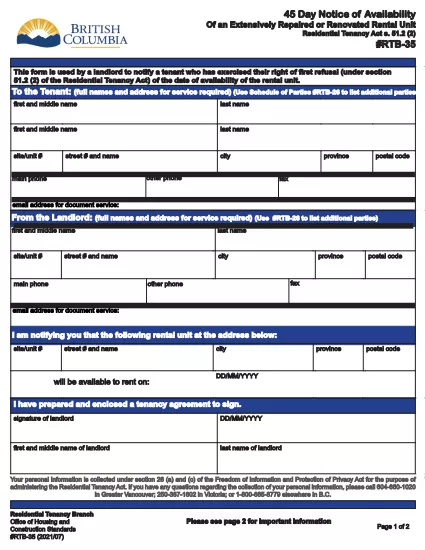
The RTB‑35 is the official 45‑Day Notice of Availability required by British Columbia’s Residential Tenancy Act. Landlords must give tenants at least 45 days’ notice before a rental unit becomes available for a new tenancy. This form ensures the notice is clear, legally compliant, and ready to be filed.

What Is the RTB‑35 Form?

RTB‑35 is a standardized, government‑approved PDF used by landlords across the province. It captures the date the unit will be available, the reason for vacancy, and the landlord’s contact information. Because it is a fillable PDF, you can complete it directly in your browser without printing a paper copy first.

When and Why You Need This Notice

  • When you plan to end a tenancy because the unit will be re‑rented or taken off the market.
  • When you are selling the property or converting it to another use.
  • To comply with the Residential Tenancy Act and avoid disputes or penalties.

How to Complete the RTB‑35 Online

Follow the simple steps below. The Formize PDF Filler loads the fillable version instantly, so you never need to download a separate editor.

Common Mistakes to Avoid

  • Providing a date that is less than 45 days from the notice date.
  • Leaving the “Reason for Vacancy” field blank.
  • Forgetting to sign the form before submitting to the tenant.

Download the Fillable PDF

Click the button below to open the RTB‑35 form in the Formize PDF Filler. When the app loads, you can fill, save, and print the notice in minutes.

Fill out this form

DUK
  • What happens if I give less than 45 days’ notice?

    The notice will be considered invalid under the Residential Tenancy Act, and you may be required to continue the tenancy or face a dispute resolution claim.

  • Can I use a handwritten version of RTB‑35?

    Yes, but a fillable PDF is recommended because it reduces errors, ensures legibility, and creates a digital record.

  • Do I need to attach any supporting documents?

    Only if the reason for vacancy requires proof (e.g., a sale agreement). Otherwise, the RTB‑35 alone is sufficient.

  • Is the Formize PDF Filler free to use?

    Yes. You can fill, save, and download the form at no cost. No software installation is required.

  • Can I email the completed RTB‑35 to my tenant?

    Absolutely. Once you save the completed PDF, you can attach it to an email or upload it to a tenant portal.

  • Do I need to keep a copy of the notice?

    Keep a saved copy for your records for at least the length of the tenancy, as it may be requested during dispute resolution.

  • What if the tenant disputes the notice date?

    Provide the saved PDF with timestamps from the Formize app as evidence of when the notice was completed and sent.

KAIP

Kaip nemokamai užpildyti RTB-35 internete, atlikdami 5 paprastus veiksmus:

  1. 1
    Open the Form
    Click the “Fill out this form” button above. The Formize PDF Filler app will load the RTB‑35 fillable PDF in a new tab.
  2. 2
    Enter Required Information
    Type the date the unit will be available, the reason for vacancy, and your contact details. All fields are interactive and save automatically.
  3. 3
    Review and Sign
    Check each section for accuracy, then add your electronic signature using the built‑in signature field.
  4. 4
    Save or Print
    When you’re finished, click “Save” to download a copy or “Print” to give a hard copy to your tenant.
  5. 5
    Submit to Tenant
    Deliver the completed notice by hand, email, or mail within the 45‑day window required by law.
Formuokite PDF užpildymo programą
APIE

Formos, skirtos nuomotojams ir (arba) nuomininkams siūlyti veiksmus, susijusius su nuomos sutartimis.

RTB-35 yra būsto nuomos sutarčių tipas, kurį naudoja dauguma privačių nuomotojų ir būsto asociacijų.

Yra keletas dalykų, kuriais nuomotojai ar nuomininkai privalo laikytis tam tikrų taisyklėse nustatytų taisyklių. Kai kuriais atvejais jiems gali prireikti užpildyti formą, vadinamą „nurodyta forma“, kurioje siūlomas veiksmas, galintis turėti įtakos kitai nuomos sutarties šaliai.

Formos vadinamos nustatytomis formomis, nes formuluotės jose buvo kruopščiai parengtos siekiant užtikrinti, kad formą pildantis asmuo ir asmuo, kuriam ji įteikiama, suprastų, kas yra siūloma ir ką gali daryti atsakydami. Nepateikus tinkamos formos, siūlomas veiksmas gali tapti negaliojančiu.

Jūs negalite keisti šių formų formuluočių, nebent formoje nurodyta, kad galite tai padaryti. Jei pakeisite formuluotę, forma gali tapti negaliojančia. Taip pat turite laikytis bet kokių formoje nurodytų įspėjimo terminų.

FUNKCIJOS

PDF užpildas

Lengviausias būdas užpildyti RTB-35 internete

  • Greitai užpildykite RTB-35
    Ieškote būdo greitai užpildyti RTB-35 internete? Naudodami internetinį nemokamą PDF formų užpildą sužinosite, kaip redaguoti ir užpildyti šį pdf dokumentą greičiau nei per minutę.
  • Lengva naudoti internetinį PDF redaktorių
    Atsibodo spausdinti PDF failus, kad galėtumėte juos redaguoti prieš nuskaitydami iš naujo ir siųsdami atgal? Redaguoti PDF dokumentus internete nemokamai. Norėdami sutaupyti laiko ir popieriaus, naudokite mūsų internetinį pdf redaktorių.
  • Puikūs įrankiai, visos platformos
    Svarstote, kaip užpildyti RTB-35 „Mac“ kompiuteryje, o gal kaip nemokamai naudoti PDF užpildą? Mūsų internetiniai PDF įrankiai veikia visose platformose.
  • Saugi failų saugykla
    Užbaigti „RTB-35“ failai saugomi saugioje duomenų bazėje, kurią valdo „Amazon Cloud“ priegloba. Galite bet kada ištrinti failus iš mūsų sistemos. Bet kokiu atveju šie failai automatiškai ištrinami po 24 valandų.
  • Kalbėkitės su RTB-35
    Kalbėkite su „RTB-35“ naudodami Chatize, kuri yra nemokama PDF skaitymo priemonė. Užduokite klausimų ir gaukite atsakymus iš „RTB-35“. Tiesiog spustelėkite aukščiau esantį mygtuką Kalbėtis su dokumentu.

Ištrinti užpildymo seansą

Ištrinti pasirinktą pildymo seansą? Tokiu atveju jūsų pažanga pildant formą bus prarasta.

Ištrinti redagavimo sesiją

Ištrinti pasirinktą redagavimo sesiją? Tokiu atveju jūsų pažanga kuriant ir redaguojant formą bus prarasta.