
Pasirinkite kalbą

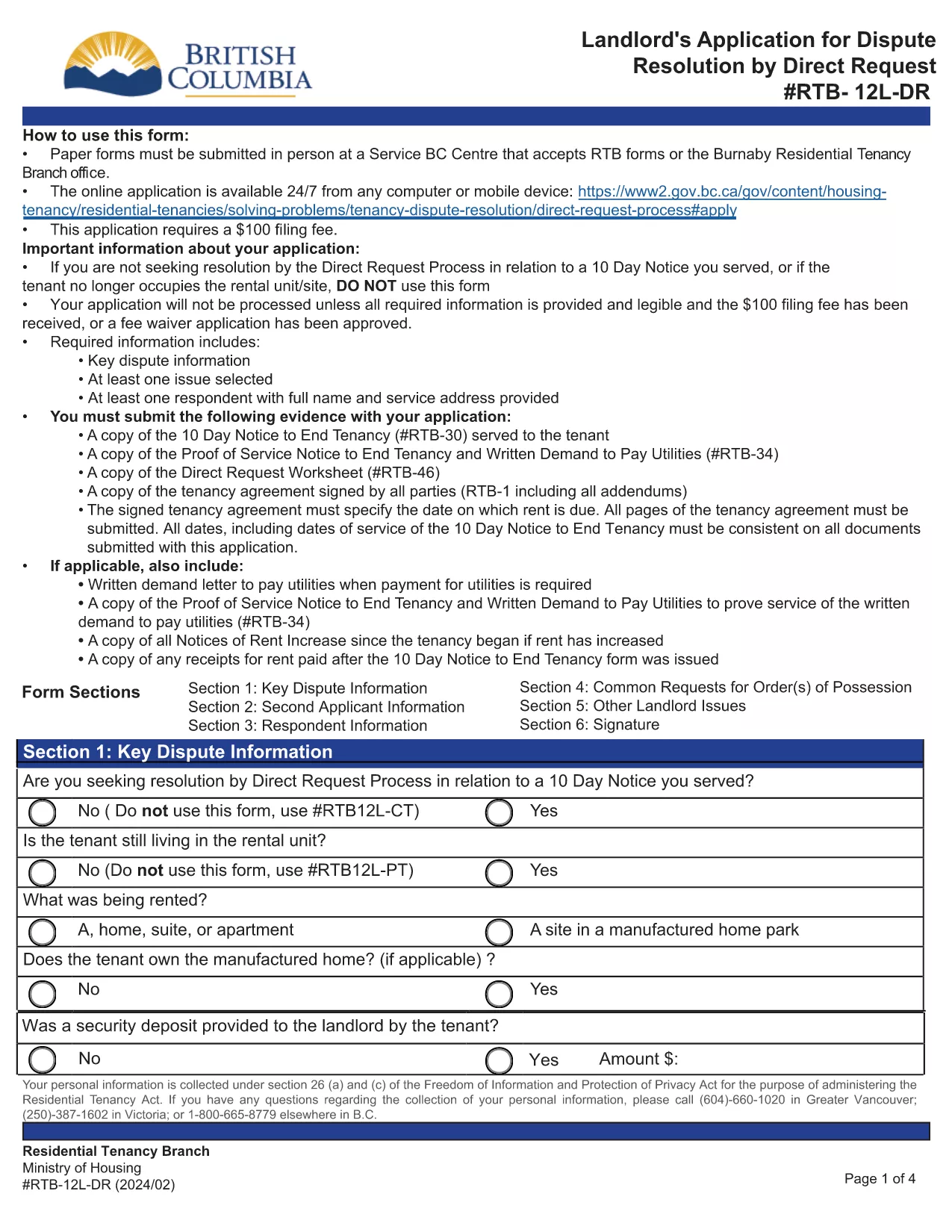
RTB‑12L‑DR Landlord Application for Dispute Resolution (Fillable PDF)

  1. Kalba Anglų
  2. Šalis Kanada
  3. Veikla Nuoma
  4. valstybė Britų Kolumbija
RTB‑12L‑DR Landlord Application for Dispute Resolution (Fillable PDF)

The RTB‑12L‑DR is the official British Columbia Residential Tenancy Branch (RTB) form used by landlords to request a dispute resolution hearing by Direct Request. This form starts the process for resolving issues such as unpaid rent, damage to the rental unit, or breaches of the tenancy agreement.

What Is the RTB‑12L‑DR Form?

Designed for landlords, the RTB‑12L‑DR captures essential information about the tenancy, the nature of the dispute, and the remedy sought. It is required for all direct‑request applications and must be submitted in person or by mail to a Service BC centre that accepts RTB forms.

How to Complete the RTB‑12L‑DR Online

Instead of printing and filling out a paper copy, you can use Formize’s free fillable PDF feature. Follow these simple steps:

  • Click the “Fill out this form” button on this page.
  • Wait for the Formize PDF Filler app to load (usually a few seconds).
  • Enter your information in each field – the form automatically saves your progress.
  • Review the completed form, add your electronic signature, and click “Submit”.
  • Download the finished PDF or print it for submission.

Common Mistakes to Avoid

  • Leaving sections blank: Every field marked with an asterisk (*) is mandatory.
  • Incorrect dates: Use the exact dates from the tenancy agreement and any relevant notices.
  • Mismatched signatures: The landlord or authorized agent must sign; a missing signature will delay processing.
  • Submitting the wrong form: Ensure you are using RTB‑12L‑DR (Direct Request) and not the current‑tenancy or expedited‑hearing versions.

Where to Submit Your Application

After completing the form, you have two options:

  • In‑person: Bring the printed PDF to any Service BC centre that accepts RTB forms or to the Burnaby Residential Tenancy Branch office.
  • Mail: Send the signed PDF to the Residential Tenancy Branch at the address listed on the form.

Download the Official PDF

If you prefer a paper copy, you can download the official RTB‑12L‑DR PDF directly from the Government of British Columbia:

Download RTB‑12L‑DR (Landlord Application for Dispute Resolution – Direct Request)

Using Formize’s fillable version saves time, reduces errors, and ensures your application is ready for submission.

DUK
  • What does RTB‑12L‑DR stand for?

    RTB‑12L‑DR is the “Landlord Application for Dispute Resolution – Direct Request” used by BC landlords to start a tenancy dispute hearing.

  • Can I submit the form electronically?

    The form itself must be printed, signed, and submitted in person or by mail. However, you can fill it out online with Formize and then print the completed PDF.

  • Do I need a lawyer to complete RTB‑12L‑DR?

    No. The form is designed for landlords to complete on their own. If you have complex legal questions, consider consulting a tenancy‑law specialist.

  • How long does it take to process the application?

    Processing time varies, but the Residential Tenancy Branch typically acknowledges receipt within 7‑10 business days.

  • What fees are associated with filing RTB‑12L‑DR?

    There is a filing fee for the dispute resolution hearing. Check the latest fee schedule on the BC Residential Tenancy Branch website.

  • Can I add additional issues not listed on the form?

    Yes. Use the “Additional Issues” section on the form to describe any other disputes you wish the tribunal to consider.

  • Is the fillable PDF version legally accepted?

    Yes, as long as you print, sign, and submit the completed form, the fillable version is considered identical to the paper version.

  • What if I make a mistake after submitting?

    Contact the Residential Tenancy Branch as soon as possible. Minor errors can often be corrected with a written amendment.

KAIP

Kaip nemokamai užpildyti RTB-12L-DR internete, atlikdami 5 paprastus veiksmus:

  1. 1
    Click the Fill‑out Button
    Press the “Fill out this form” button on the page to launch the Formize PDF Filler.
  2. 2
    Wait for the Filler to Load
    The fillable PDF loads in a few seconds. No download or extra software is required.
  3. 3
    Enter Your Information
    Complete each field, following the on‑screen prompts. The form saves your entries automatically.
  4. 4
    Add Your Signature
    Use the built‑in signature field to sign electronically. This satisfies the requirement for a landlord’s signature.
  5. 5
    Download or Print
    When finished, download the completed PDF or print it to submit in person or by mail.
Formuokite PDF užpildymo programą
APIE

Formos, skirtos nuomotojams ir (arba) nuomininkams siūlyti veiksmus, susijusius su nuomos sutartimis.

RTB-12L-DR yra viena iš nuomos formų, nurodančių dokumentus, naudojamus sudarant ir tvarkant nuomos sutartį. Šias formas paprastai naudoja nuomotojai, nekilnojamojo turto valdytojai arba nuomininkai, norėdami apibrėžti nuomos sąlygas. Štai keletas įprastų nuomos formų:

Nuomos sutartis: nuomos sutartis, taip pat žinoma kaip nuomos sutartis arba nuomos sutartis, yra teisiškai įpareigojanti sutartis tarp nuomotojo ir nuomininko. Jame nustatomos abiejų šalių teisės ir pareigos, įskaitant nuomos trukmę, nuomos dydį, mokėjimo sąlygas, užstatą, priežiūros pareigas ir visas kitas su nuomos sutartimi susijusias sąlygas.

Nuomos paraiška: būsimi nuomininkai paprastai užpildo nuomos paraiškos formą teikdami paraišką dėl nekilnojamojo turto. Šioje formoje renkama asmeninė informacija apie pareiškėją, pvz., vardas, pavardė, kontaktiniai duomenys, darbo istorija, nuomos istorija ir nuorodos. Nuomos paraiška padeda savininkams įvertinti nuomininkų tinkamumą ir priimti pagrįstus sprendimus.

Pranešimas apie išvykimą: šią formą naudoja nuomotojas arba nuomininkas, kad praneštų apie ketinimą nutraukti nuomą. Reikalingas įspėjimo laikotarpis gali skirtis priklausomai nuo vietos įstatymų ir nuomos sutarties sąlygų.

Pranešimas apie nuomos padidinimą: jei nuomotojas nuomos laikotarpiu ketina padidinti nuomos mokestį, jis paprastai pateikia nuomininkui pranešimą apie nuomos padidinimą. Šis pranešimas informuoja nuomininką apie būsimą nuomos mokesčio tikslinimą ir atitinka teisės aktų reikalavimus dėl nuomos padidinimo.

Techninės priežiūros ir remonto užklausos formos: šios formos leidžia nuomininkams pranešti apie priežiūros ar remonto problemas savininkui arba turto valdytojui. Formoje pateikiama išsami informacija apie problemą, prašomas remontas ir bet kokia kita svarbi informacija.

Sutikimas atlikti fono ar kredito patikrinimą: nuomotojai gali reikalauti, kad nuomininkai užpildytų sutikimo formą, leidžiančią atlikti asmens patikrinimą arba kredito patikrą. Ši forma leidžia nuomotojui patikrinti nuomininko kilmę, kreditingumą ir nuomos istoriją.

Inventorių ir būklės ataskaita: ši forma naudojama dokumentuoti nuomojamo turto būklę nuomos pradžioje ir pabaigoje. Jame išsamiai aprašoma kiekvieno kambario būklė ir visi esami pažeidimai, užtikrinant, kad abi šalys turėtų įrašą apie turto būklę, kad galėtų išspręsti ginčus dėl užstato ar pretenzijų dėl žalos.

Tai yra keletas nuomos formų, dažniausiai naudojamų nuomos procese, pavyzdžių. Konkrečios formos ir reikalavimai gali skirtis priklausomai nuo vietos įstatymų ir konkrečių nuomos aplinkybių. Svarbu atsižvelgti į vietinius teisės aktus ir kreiptis į profesionalų patarimą, kad užtikrintumėte atitiktį, ir naudoti tinkamas formas jūsų konkrečiai nuomos sutarčiai.

FUNKCIJOS

PDF užpildas

Lengviausias būdas užpildyti RTB-12L-DR internete

  • Greitai užpildykite RTB-12L-DR
    Ieškote būdo greitai užpildyti RTB-12L-DR internete? Naudodami internetinį nemokamą PDF formų užpildą sužinosite, kaip redaguoti ir užpildyti šį pdf dokumentą greičiau nei per minutę.
  • Lengva naudoti internetinį PDF redaktorių
    Atsibodo spausdinti PDF failus, kad galėtumėte juos redaguoti prieš nuskaitydami iš naujo ir siųsdami atgal? Redaguoti PDF dokumentus internete nemokamai. Norėdami sutaupyti laiko ir popieriaus, naudokite mūsų internetinį pdf redaktorių.
  • Puikūs įrankiai, visos platformos
    Svarstote, kaip užpildyti RTB-12L-DR „Mac“ kompiuteryje, o gal kaip nemokamai naudoti PDF užpildą? Mūsų internetiniai PDF įrankiai veikia visose platformose.
  • Saugi failų saugykla
    Užbaigti „RTB-12L-DR“ failai saugomi saugioje duomenų bazėje, kurią valdo „Amazon Cloud“ priegloba. Galite bet kada ištrinti failus iš mūsų sistemos. Bet kokiu atveju šie failai automatiškai ištrinami po 24 valandų.
  • Kalbėkitės su RTB-12L-DR
    Kalbėkite su „RTB-12L-DR“ naudodami Chatize, kuri yra nemokama PDF skaitymo priemonė. Užduokite klausimų ir gaukite atsakymus iš „RTB-12L-DR“. Tiesiog spustelėkite aukščiau esantį mygtuką Kalbėtis su dokumentu.

Ištrinti užpildymo seansą

Ištrinti pasirinktą pildymo seansą? Tokiu atveju jūsų pažanga pildant formą bus prarasta.

Ištrinti redagavimo sesiją

Ištrinti pasirinktą redagavimo sesiją? Tokiu atveju jūsų pažanga kuriant ir redaguojant formą bus prarasta.