
Pasirinkite kalbą

RTB‑17 Application to Waive a Filing Fee (Fillable PDF)

  1. Kalba Anglų
  2. Šalis Kanada
  3. Veikla Nuoma
  4. valstybė Britų Kolumbija
RTB‑17 Application to Waive a Filing Fee (Fillable PDF)

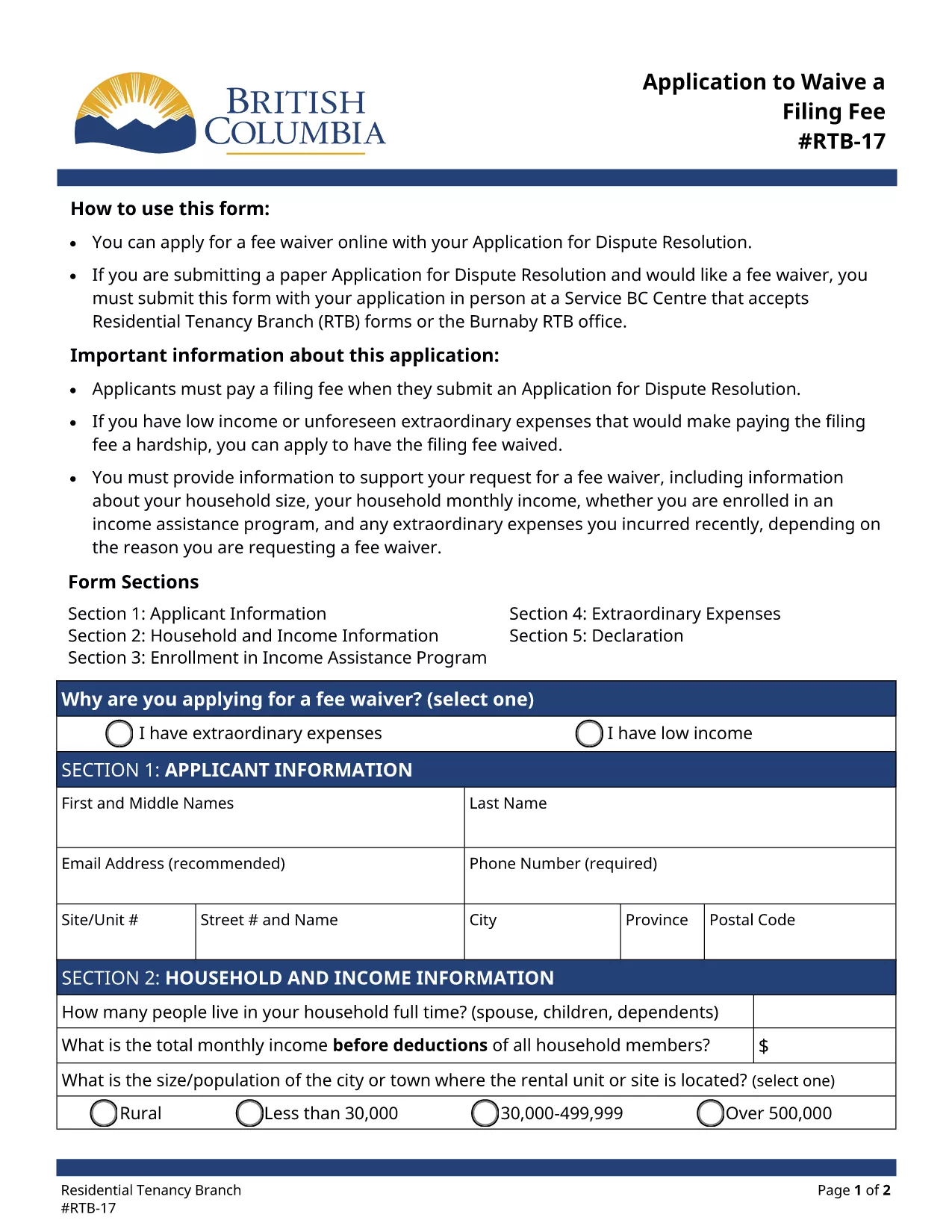
The RTB‑17 Application to Waive a Filing Fee is the official form used by the British Columbia Residential Tenancy Branch (RTB) when a tenant or landlord needs to request a waiver for the filing fee associated with a dispute resolution application. This form is required under the Residential Tenancy Act and must be completed accurately to avoid processing delays.

What is the RTB‑17 Fee Waiver Form?

RTB‑17 allows applicants to explain why they cannot afford the standard filing fee. Typical reasons include low income, loss of employment, or other financial hardships. The form collects basic personal information, details about the dispute, and supporting documentation.

How to Fill Out RTB‑17 Online with Formize

Formize provides a seamless, fillable PDF experience directly in your browser—no Adobe Reader required. Follow the simple steps below to complete the form in minutes.

Common Mistakes to Avoid When Completing RTB‑17

  • Leaving required fields blank – every field marked with an asterisk must be completed.
  • Submitting outdated contact information – ensure phone numbers and email addresses are current.
  • Failing to attach supporting documents – include proof of income or hardship when requested.

Where to Submit the Completed RTB‑17 Form

After you finish the online fillable version, you can either:

  1. Print and deliver the form in person to a Service BC Centre that accepts RTB forms.
  2. Mail the printed form to the Residential Tenancy Branch address listed on the form.
  3. Submit the PDF electronically through the RTB’s online portal (if available).

Download the Fillable RTB‑17 PDF

If you prefer to work offline, you can download the official fillable PDF directly from the government website. The file is fully compatible with Formize’s PDF Filler.

DUK
  • Who is eligible to request a fee waiver using RTB‑17?

    Any tenant or landlord who can demonstrate financial hardship—such as low income, unemployment, or other documented reasons—may apply for a waiver.

  • Can I submit RTB‑17 electronically?

    Yes, after completing the fillable PDF with Formize you can upload the saved file to the RTB’s online portal, if the portal is available for fee‑waiver submissions.

  • What supporting documents should I attach?

    Typical documents include recent pay stubs, a notice of termination of employment, social assistance statements, or any proof that shows you cannot afford the filing fee.

  • How long does it take for the RTB to process a fee waiver?

    Processing times vary, but most fee‑waiver requests are reviewed within 10‑14 business days after receipt of the completed form and supporting evidence.

  • Do I need Adobe Reader to fill out RTB‑17?

    No. Formize’s online PDF filler lets you complete the form directly in your browser without installing Adobe Reader.

  • What if I make a mistake after submitting?

    You can submit a corrected RTB‑17 form with a brief note explaining the changes. Include a copy of the original submission for reference.

  • Is there a cost to use Formize’s fillable PDF service?

    Formize offers free access to fillable PDF forms like RTB‑17. No hidden fees are charged for completing or downloading the form.

KAIP

Kaip nemokamai užpildyti RTB-17 internete, atlikdami 5 paprastus veiksmus:

  1. 1
    Click the Fill‑out Button
    On the page, click the bright "Fill out this form" button to launch the Formize PDF Filler.
  2. 2
    Wait for the Filler to Load
    The fillable PDF loads directly in your browser. No download or extra software is required.
  3. 3
    Enter Your Information
    Complete each required field, attach any supporting documents, and double‑check for accuracy.
  4. 4
    Review and Submit
    When you’re satisfied, click "Submit" to generate a completed PDF you can print or save.
  5. 5
    Save a Copy
    Download the final PDF for your records and bring the printed copy to a Service BC Centre or mail it as instructed.
Formuokite PDF užpildymo programą
APIE

Formos, skirtos nuomotojams ir (arba) nuomininkams siūlyti veiksmus, susijusius su nuomos sutartimis.

RTB-17 yra būsto nuomos sutarčių tipas, kurį naudoja dauguma privačių nuomotojų ir būsto asociacijų.

Yra keletas dalykų, kuriais nuomotojai ar nuomininkai privalo laikytis tam tikrų taisyklėse nustatytų taisyklių. Kai kuriais atvejais jiems gali prireikti užpildyti formą, vadinamą „nurodyta forma“, kurioje siūlomas veiksmas, galintis turėti įtakos kitai nuomos sutarties šaliai.

Formos vadinamos nustatytomis formomis, nes formuluotės jose buvo kruopščiai parengtos siekiant užtikrinti, kad formą pildantis asmuo ir asmuo, kuriam ji įteikiama, suprastų, kas yra siūloma ir ką gali daryti atsakydami. Nepateikus tinkamos formos, siūlomas veiksmas gali tapti negaliojančiu.

Jūs negalite keisti šių formų formuluočių, nebent formoje nurodyta, kad galite tai padaryti. Jei pakeisite formuluotę, forma gali tapti negaliojančia. Taip pat turite laikytis bet kokių formoje nurodytų įspėjimo terminų.

FUNKCIJOS

PDF užpildas

Lengviausias būdas užpildyti RTB-17 internete

  • Greitai užpildykite RTB-17
    Ieškote būdo greitai užpildyti RTB-17 internete? Naudodami internetinį nemokamą PDF formų užpildą sužinosite, kaip redaguoti ir užpildyti šį pdf dokumentą greičiau nei per minutę.
  • Lengva naudoti internetinį PDF redaktorių
    Atsibodo spausdinti PDF failus, kad galėtumėte juos redaguoti prieš nuskaitydami iš naujo ir siųsdami atgal? Redaguoti PDF dokumentus internete nemokamai. Norėdami sutaupyti laiko ir popieriaus, naudokite mūsų internetinį pdf redaktorių.
  • Puikūs įrankiai, visos platformos
    Svarstote, kaip užpildyti RTB-17 „Mac“ kompiuteryje, o gal kaip nemokamai naudoti PDF užpildą? Mūsų internetiniai PDF įrankiai veikia visose platformose.
  • Saugi failų saugykla
    Užbaigti „RTB-17“ failai saugomi saugioje duomenų bazėje, kurią valdo „Amazon Cloud“ priegloba. Galite bet kada ištrinti failus iš mūsų sistemos. Bet kokiu atveju šie failai automatiškai ištrinami po 24 valandų.
  • Kalbėkitės su RTB-17
    Kalbėkite su „RTB-17“ naudodami Chatize, kuri yra nemokama PDF skaitymo priemonė. Užduokite klausimų ir gaukite atsakymus iš „RTB-17“. Tiesiog spustelėkite aukščiau esantį mygtuką Kalbėtis su dokumentu.

Ištrinti užpildymo seansą

Ištrinti pasirinktą pildymo seansą? Tokiu atveju jūsų pažanga pildant formą bus prarasta.

Ištrinti redagavimo sesiją

Ištrinti pasirinktą redagavimo sesiją? Tokiu atveju jūsų pažanga kuriant ir redaguojant formą bus prarasta.