
Pasirinkite kalbą

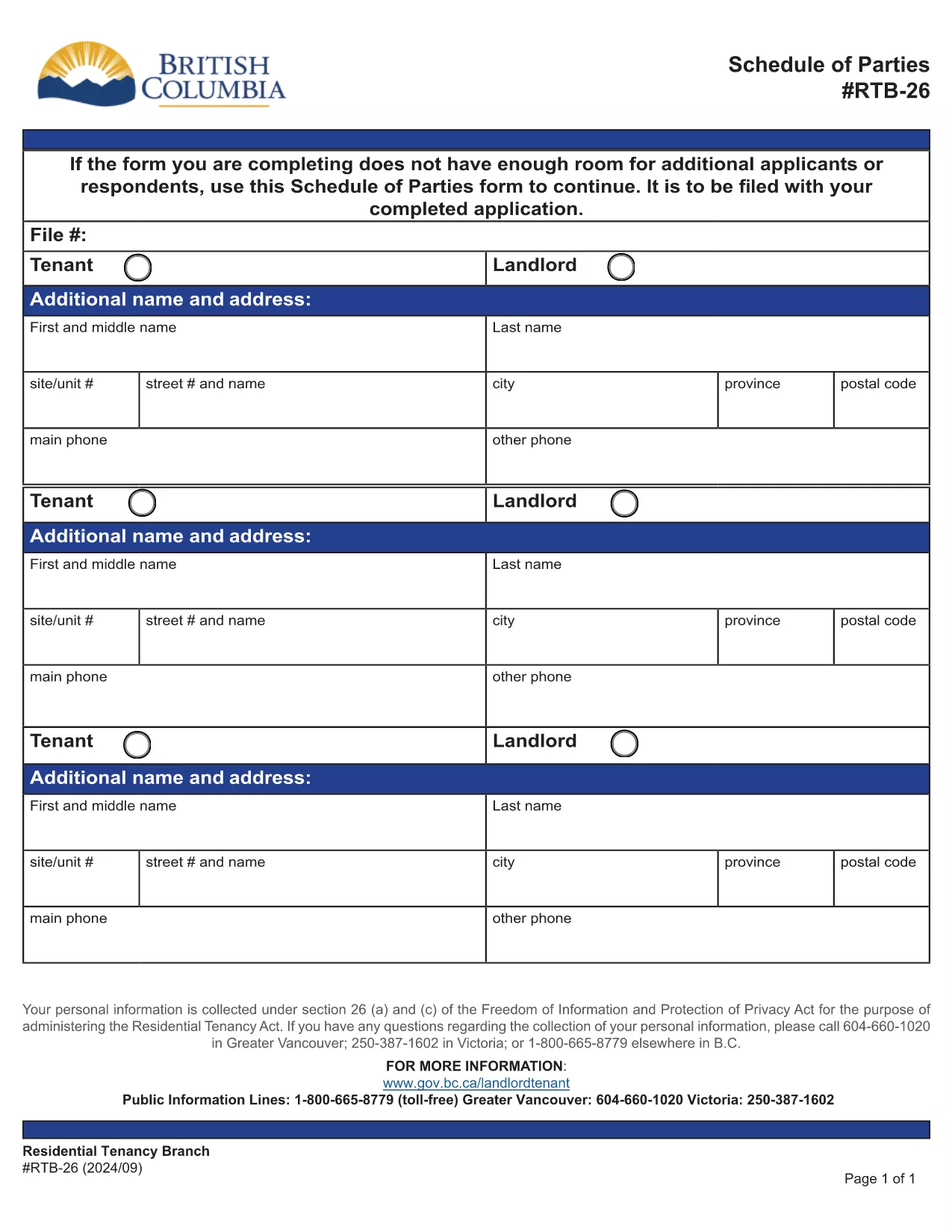
RTB-26 Schedule of Parties – Fillable PDF Form (Canada)

  1. Kalba Anglų
  2. Šalis Kanada
  3. Veikla Nuoma
  4. valstybė Britų Kolumbija
RTB-26 Schedule of Parties – Fillable PDF Form (Canada)

The RTB-26 Schedule of Parties is the official form used under British Columbia's Residential Tenancy Act to list all tenants and landlords involved in a tenancy. Landlords attach this form when there are additional names to add or remove from the original tenancy agreement.

What Is the RTB-26 Schedule of Parties?

RTB‑26 captures the names, contact information, and relationship of each party to the tenancy. It ensures the Residential Tenancy Branch (RTB) has an up‑to‑date record, which is essential for dispute resolution, rent increases, and ending a tenancy.

How to Complete the RTB-26 Form Online

With Formize’s free fillable PDF tool you can complete RTB‑26 directly in your browser—no Adobe Acrobat required. Follow the simple steps below to fill, save, and submit the form.

Common Mistakes to Avoid on RTB-26

  • Leaving fields blank: Every field marked with an asterisk (*) is mandatory.
  • Incorrect dates: Use the exact date format (YYYY‑MM‑DD) as shown in the example.
  • Mismatched signatures: All parties must sign; a missing signature can delay processing.

Why Use Formize’s Fillable PDF Filler?

Formize automatically validates entries, highlights required fields, and lets you download a completed PDF ready for upload to the RTB portal. It saves time, reduces errors, and works on any device.

Ready to get started? Click the “Fill out this form” button below, let the Formize PDF Filler load, and complete the RTB‑26 in minutes.

DUK
  • Who needs to fill out the RTB‑26 Schedule of Parties?

    Both landlords and tenants must complete RTB‑26 whenever a new person is added to or removed from the tenancy agreement.

  • Can I submit a printed version of RTB‑26?

    Yes, you can print the completed form and mail it, but submitting the digital PDF through the RTB portal is faster and reduces processing time.

  • Is the Formize filler free to use?

    Yes, Formize provides a free, web‑based fillable PDF editor for all British Columbia tenancy forms, including RTB‑26.

  • What should I do if I make a mistake after saving?

    Open the saved PDF again in Formize, correct the error, and re‑save. The filler retains all previously entered data.

  • Do I need Adobe Acrobat to fill RTB‑26?

    No. Formize’s online filler works in any modern browser, eliminating the need for Adobe Acrobat or other PDF editors.

  • How long is the RTB‑26 valid after submission?

    The form remains valid until the tenancy ends or another Schedule of Parties is filed to update the party list.

  • Can I attach additional documents to the RTB‑26 PDF?

    Yes, after completing the form you can merge other supporting PDFs using Formize’s “Add Attachment” feature before downloading.

KAIP

Kaip nemokamai užpildyti RTB-26 internete, atlikdami 5 paprastus veiksmus:

  1. 1
    Click the Fill Out Button
    Press the “Fill out this form” button on this page to launch Formize’s PDF filler.
  2. 2
    Wait for the Filler to Load
    The fillable PDF will appear in your browser within a few seconds. No download is required.
  3. 3
    Enter All Required Information
    Complete each highlighted field, double‑check dates and signatures, and use the built‑in validation to avoid errors.
  4. 4
    Review and Save
    When all sections are filled, click “Save” to download a completed copy of the RTB‑26 form.
  5. 5
    Submit to the RTB
    Upload the saved PDF to the British Columbia Residential Tenancy Branch portal or email it as instructed in your tenancy agreement.
Formuokite PDF užpildymo programą
APIE

Formos, skirtos nuomotojams ir (arba) nuomininkams siūlyti veiksmus, susijusius su nuomos sutartimis.

RTB-26 yra vienas iš dokumentų, kurie naudojami nuomojant nekilnojamąjį turtą. Šios formos nustato nekilnojamojo turto savininko (nuomotojo) ir nuomininko teisinę sutartį, kurioje nurodomos nuomos sutarties sąlygos. Štai keletas įprastų nuomos ar nuomos formų:

Nuomos paraiška: šią formą paprastai užpildo būsimi nuomininkai, kurie domisi nekilnojamojo turto nuoma. Ji renka asmeninę informaciją apie pareiškėją, pvz., vardą, pavardę, kontaktinę informaciją, informaciją apie darbą, nuomos istoriją ir nuorodas. Nuomos paraiška padeda savininkams įvertinti nuomininkų tinkamumą ir priimti pagrįstus sprendimus.

Nuomos sutartis: nuomos sutartis yra teisiškai įpareigojanti sutartis, kurioje nurodomos ir nuomotojo, ir nuomininko teisės ir pareigos. Ji apima svarbias detales, tokias kaip nuomos trukmė, nuomos suma, užstatas, mokesčiai už pavėluotą mokėjimą, naminių gyvūnėlių politika, priežiūros pareigos ir visos kitos nuomojamam turtui būdingos sąlygos. Nuomos sutarčių trukmė ir sudėtingumas gali skirtis priklausomai nuo nuomos rinkos ir vietos įstatymų.

Nuomos sutartis: kaip ir nuomos sutartis, nuomos sutartis yra sutartis, reglamentuojanti turto nuomą. Tačiau nuomos sutartys paprastai naudojamos trumpesniam laikotarpiui, pavyzdžiui, kas mėnesį. Nuomos sutartys paprastai yra lankstesnės ir gali būti nutrauktos arba pakeistos trumpesniu įspėjimo terminu, palyginti su ilgesnės trukmės nuomos sutartimis.

Įsikėlimo/išsikraustymo patikrinimo formos: šios formos naudojamos nuomojamo turto būklei nuomos pradžioje ir pabaigoje dokumentuoti. Juose išsamiai aprašoma kiekvieno kambario būklė ir visi esami pažeidimai, užtikrinant, kad abi šalys turėtų įrašą apie turto būklę, kad galėtų išspręsti ginčus dėl užstato arba pretenzijų dėl žalos.

Pranešimas apie išvykimą: šią formą naudoja nuomotojas arba nuomininkas, kad praneštų apie ketinimą nutraukti nuomą. Reikalingas įspėjimo laikotarpis gali skirtis priklausomai nuo vietos įstatymų ir nuomos sutarties ar nuomos sutarties sąlygų.

Svarbu pažymėti, kad nuomos ar nuomos formos gali skirtis priklausomai nuo jurisdikcijos ir konkrečių nuomotojo ar turto valdymo įmonės reikalavimų. Norint užtikrinti, kad būtų laikomasi galiojančių teisės aktų, rekomenduojama vadovautis vietiniais įstatymais ir kreiptis į specialistus, o konkrečiam nuomos ar nuomos sandoriui naudoti atitinkamas formas.

FUNKCIJOS

PDF užpildas

Lengviausias būdas užpildyti RTB-26 internete

  • Greitai užpildykite RTB-26
    Ieškote būdo greitai užpildyti RTB-26 internete? Naudodami internetinį nemokamą PDF formų užpildą sužinosite, kaip redaguoti ir užpildyti šį pdf dokumentą greičiau nei per minutę.
  • Lengva naudoti internetinį PDF redaktorių
    Atsibodo spausdinti PDF failus, kad galėtumėte juos redaguoti prieš nuskaitydami iš naujo ir siųsdami atgal? Redaguoti PDF dokumentus internete nemokamai. Norėdami sutaupyti laiko ir popieriaus, naudokite mūsų internetinį pdf redaktorių.
  • Puikūs įrankiai, visos platformos
    Svarstote, kaip užpildyti RTB-26 „Mac“ kompiuteryje, o gal kaip nemokamai naudoti PDF užpildą? Mūsų internetiniai PDF įrankiai veikia visose platformose.
  • Saugi failų saugykla
    Užbaigti „RTB-26“ failai saugomi saugioje duomenų bazėje, kurią valdo „Amazon Cloud“ priegloba. Galite bet kada ištrinti failus iš mūsų sistemos. Bet kokiu atveju šie failai automatiškai ištrinami po 24 valandų.
  • Kalbėkitės su RTB-26
    Kalbėkite su „RTB-26“ naudodami Chatize, kuri yra nemokama PDF skaitymo priemonė. Užduokite klausimų ir gaukite atsakymus iš „RTB-26“. Tiesiog spustelėkite aukščiau esantį mygtuką Kalbėtis su dokumentu.

Ištrinti užpildymo seansą

Ištrinti pasirinktą pildymo seansą? Tokiu atveju jūsų pažanga pildant formą bus prarasta.

Ištrinti redagavimo sesiją

Ištrinti pasirinktą redagavimo sesiją? Tokiu atveju jūsų pažanga kuriant ir redaguojant formą bus prarasta.