

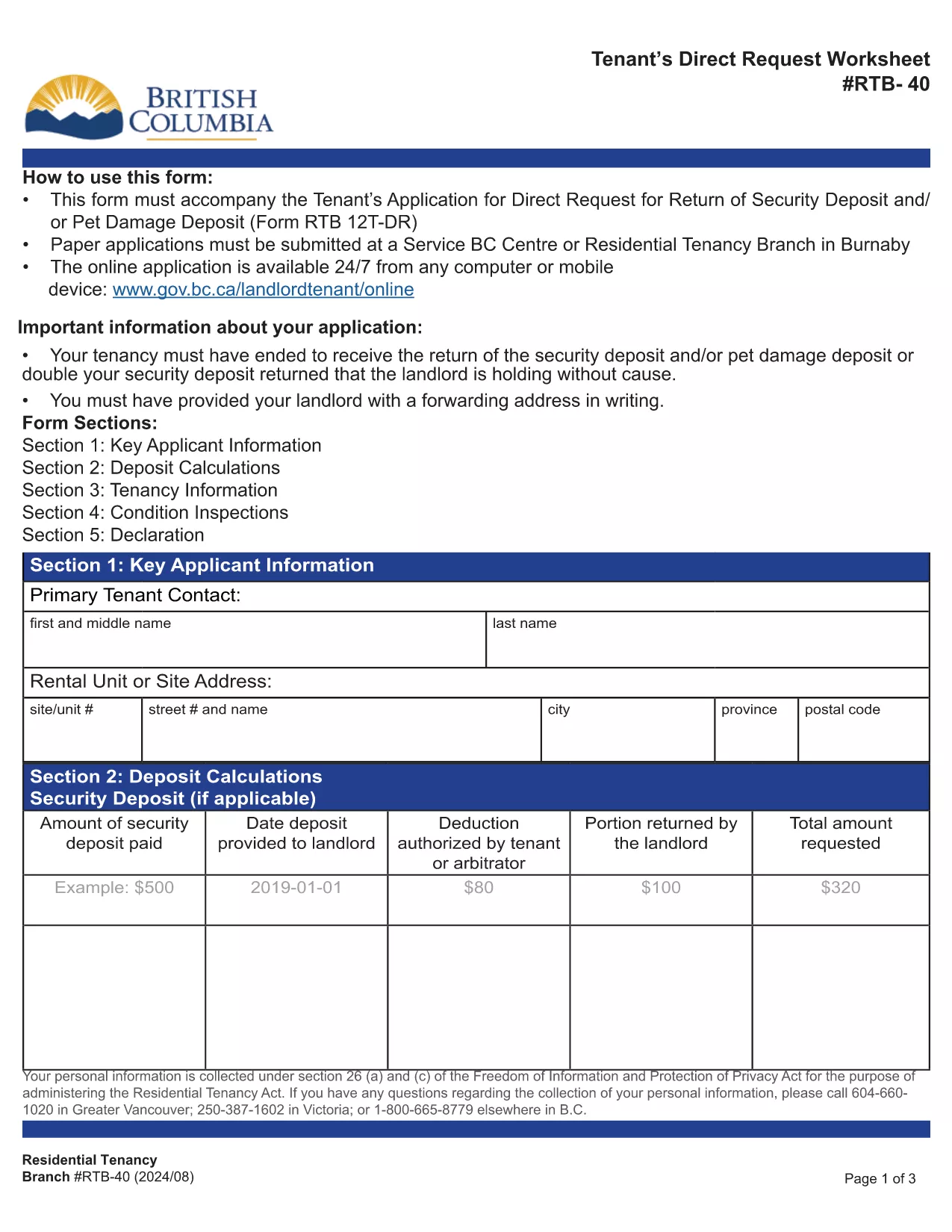

Formos, skirtos nuomotojams ir (arba) nuomininkams siūlyti veiksmus, susijusius su nuomos sutartimis.
RTB-40 yra viena iš nuomos formų, nurodančių dokumentus, naudojamus sudarant ir tvarkant nuomos sutartį. Šias formas paprastai naudoja nuomotojai, nekilnojamojo turto valdytojai arba nuomininkai, norėdami apibrėžti nuomos sąlygas. Štai keletas įprastų nuomos formų:
Nuomos sutartis: nuomos sutartis, taip pat žinoma kaip nuomos sutartis arba nuomos sutartis, yra teisiškai įpareigojanti sutartis tarp nuomotojo ir nuomininko. Jame nustatomos abiejų šalių teisės ir pareigos, įskaitant nuomos trukmę, nuomos dydį, mokėjimo sąlygas, užstatą, priežiūros pareigas ir visas kitas su nuomos sutartimi susijusias sąlygas.
Nuomos paraiška: būsimi nuomininkai paprastai užpildo nuomos paraiškos formą teikdami paraišką dėl nekilnojamojo turto. Šioje formoje renkama asmeninė informacija apie pareiškėją, pvz., vardas, pavardė, kontaktiniai duomenys, darbo istorija, nuomos istorija ir nuorodos. Nuomos paraiška padeda savininkams įvertinti nuomininkų tinkamumą ir priimti pagrįstus sprendimus.
Pranešimas apie išvykimą: šią formą naudoja nuomotojas arba nuomininkas, kad praneštų apie ketinimą nutraukti nuomą. Reikalingas įspėjimo laikotarpis gali skirtis priklausomai nuo vietos įstatymų ir nuomos sutarties sąlygų.
Pranešimas apie nuomos padidinimą: jei nuomotojas nuomos laikotarpiu ketina padidinti nuomos mokestį, jis paprastai pateikia nuomininkui pranešimą apie nuomos padidinimą. Šis pranešimas informuoja nuomininką apie būsimą nuomos mokesčio tikslinimą ir atitinka teisės aktų reikalavimus dėl nuomos padidinimo.
Techninės priežiūros ir remonto užklausos formos: šios formos leidžia nuomininkams pranešti apie priežiūros ar remonto problemas savininkui arba turto valdytojui. Formoje pateikiama išsami informacija apie problemą, prašomas remontas ir bet kokia kita svarbi informacija.
Sutikimas atlikti fono ar kredito patikrinimą: nuomotojai gali reikalauti, kad nuomininkai užpildytų sutikimo formą, leidžiančią atlikti asmens patikrinimą arba kredito patikrą. Ši forma leidžia nuomotojui patikrinti nuomininko kilmę, kreditingumą ir nuomos istoriją.
Inventorių ir būklės ataskaita: ši forma naudojama dokumentuoti nuomojamo turto būklę nuomos pradžioje ir pabaigoje. Jame išsamiai aprašoma kiekvieno kambario būklė ir visi esami pažeidimai, užtikrinant, kad abi šalys turėtų įrašą apie turto būklę, kad galėtų išspręsti ginčus dėl užstato ar pretenzijų dėl žalos.
Tai yra keletas nuomos formų, dažniausiai naudojamų nuomos procese, pavyzdžių. Konkrečios formos ir reikalavimai gali skirtis priklausomai nuo vietos įstatymų ir konkrečių nuomos aplinkybių. Svarbu atsižvelgti į vietinius teisės aktus ir kreiptis į profesionalų patarimą, kad užtikrintumėte atitiktį, ir naudoti tinkamas formas jūsų konkrečiai nuomos sutarčiai.