
Pasirinkite kalbą

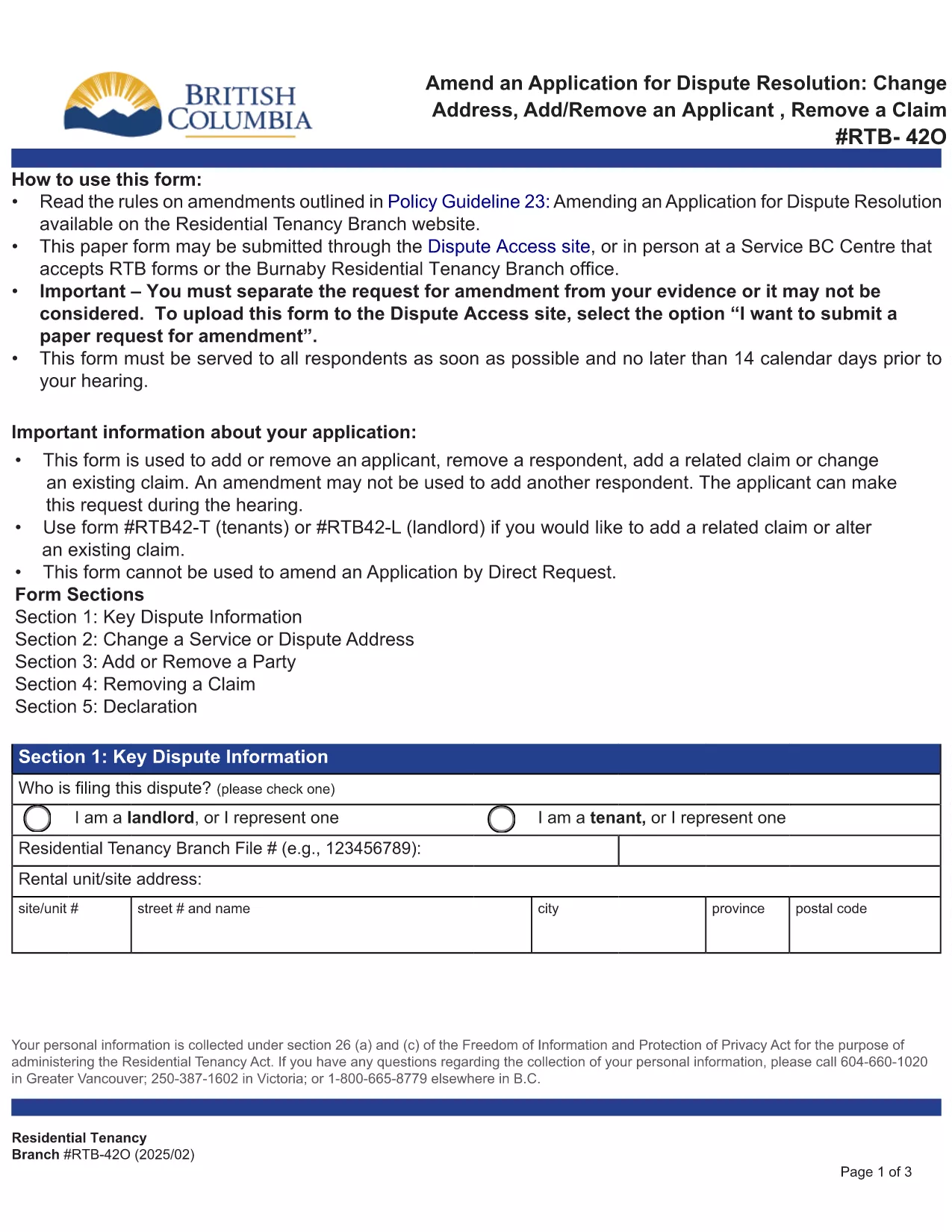
RTB‑42O – Amend an Application for Dispute Resolution (Fillable PDF)

  1. Kalba Anglų
  2. Šalis Kanada
  3. Veikla Nuoma
  4. valstybė Britų Kolumbija
RTB‑42O – Amend an Application for Dispute Resolution (Fillable PDF)

What is the RTB‑42O Form?

The RTB‑42O is the official Residential Tenancy Branch (RTB) form used in British Columbia to request an amendment to an existing dispute‑resolution application. It allows tenants or landlords to change claims, add parties, or correct information after the original filing.

When and Who Should Use RTB‑42O?

  • Tenants or landlords who need to add, delete, or modify a claim.
  • Parties who must change an address, add a co‑tenant, or correct a mistake.
  • Anyone who has already submitted an RTB‑59 or RTB‑42T application and needs to update it before the hearing.

How to Complete the RTB‑42O Online

Instead of downloading and editing the PDF manually, simply click the "Fill out this form" button below. The Formize PDF Filler app will load the fillable version instantly.

  1. Click Fill out this form on the page.
  2. Wait a few seconds while the Formize PDF Filler loads.
  3. Enter your information in each highlighted field. Required fields are marked with an asterisk (*).
  4. Review the entered data for accuracy.
  5. Click Save & Download to get a completed PDF you can email to the RTB.

Common Mistakes to Avoid

  • Leaving required fields blank – the form will not submit.
  • Using an old case number; always copy the number from your original application.
  • Submitting the form after the RTB deadline – check the Rules of Procedure for timing.

Submit and Save Your Completed Form

After you have filled the form, download the PDF, attach it to an email addressed to rtb@gov.bc.ca, and include your original application reference number. Keep a copy for your records.

DUK
  • What is the purpose of the RTB‑42O form?

    The RTB‑42O allows tenants or landlords to amend an existing dispute‑resolution application – adding or removing claims, parties, or correcting details.

  • Can I fill out RTB‑42O on a mobile device?

    Yes. The Formize PDF Filler works on smartphones, tablets and desktop browsers, providing a responsive fillable experience.

  • Do I need to pay a fee to submit an amendment?

    No additional fee is required to submit an RTB‑42O amendment, but the original application fee (usually $100) still applies.

  • How long do I have to submit an amendment after filing the original application?

    Amendments must be filed before the hearing date or within the time limits set out in RTB Rule 4.0.1. Check the latest Rules of Procedure for exact deadlines.

  • What happens if I make a mistake on the RTB‑42O?

    If required fields are left blank or information is incorrect, the RTB will return the form for correction. Use the fillable version to avoid common errors.

  • Do I need a lawyer to complete the RTB‑42O?

    No. The form is designed for self‑representation. However, you may seek legal advice if the amendment is complex.

KAIP

Kaip nemokamai užpildyti RTB-42O internete, atlikdami 5 paprastus veiksmus:

  1. 1
    Open the Fillable Form
    Click the “Fill out this form” button on the page. The Formize PDF Filler loads the RTB‑42O automatically.
  2. 2
    Enter Your Details
    Fill every highlighted field, especially those marked with *. Use the original application number for reference.
  3. 3
    Review & Validate
    Check all entries for accuracy. The filler will highlight any missing required information.
  4. 4
    Download the Completed PDF
    When you’re satisfied, click “Save & Download”. The PDF is ready to email to the Residential Tenancy Branch.
  5. 5
    Submit to the RTB
    Attach the completed PDF to an email addressed to rt​b@gov.bc.ca, include your original case number, and keep a copy for your records.
Formuokite PDF užpildymo programą
APIE

Formos, skirtos nuomotojams ir (arba) nuomininkams siūlyti veiksmus, susijusius su nuomos sutartimis.

RTB-42O yra būsto nuomos sutarčių tipas, kurį naudoja dauguma privačių nuomotojų ir būsto asociacijų.

Yra keletas dalykų, kuriais nuomotojai ar nuomininkai privalo laikytis tam tikrų taisyklėse nustatytų taisyklių. Kai kuriais atvejais jiems gali prireikti užpildyti formą, vadinamą „nurodyta forma“, kurioje siūlomas veiksmas, galintis turėti įtakos kitai nuomos sutarties šaliai.

Formos vadinamos nustatytomis formomis, nes formuluotės jose buvo kruopščiai parengtos siekiant užtikrinti, kad formą pildantis asmuo ir asmuo, kuriam ji įteikiama, suprastų, kas yra siūloma ir ką gali daryti atsakydami. Nepateikus tinkamos formos, siūlomas veiksmas gali tapti negaliojančiu.

Jūs negalite keisti šių formų formuluočių, nebent formoje nurodyta, kad galite tai padaryti. Jei pakeisite formuluotę, forma gali tapti negaliojančia. Taip pat turite laikytis bet kokių formoje nurodytų įspėjimo terminų.

FUNKCIJOS

PDF užpildas

Lengviausias būdas užpildyti RTB-42O internete

  • Greitai užpildykite RTB-42O
    Ieškote būdo greitai užpildyti RTB-42O internete? Naudodami internetinį nemokamą PDF formų užpildą sužinosite, kaip redaguoti ir užpildyti šį pdf dokumentą greičiau nei per minutę.
  • Lengva naudoti internetinį PDF redaktorių
    Atsibodo spausdinti PDF failus, kad galėtumėte juos redaguoti prieš nuskaitydami iš naujo ir siųsdami atgal? Redaguoti PDF dokumentus internete nemokamai. Norėdami sutaupyti laiko ir popieriaus, naudokite mūsų internetinį pdf redaktorių.
  • Puikūs įrankiai, visos platformos
    Svarstote, kaip užpildyti RTB-42O „Mac“ kompiuteryje, o gal kaip nemokamai naudoti PDF užpildą? Mūsų internetiniai PDF įrankiai veikia visose platformose.
  • Saugi failų saugykla
    Užbaigti „RTB-42O“ failai saugomi saugioje duomenų bazėje, kurią valdo „Amazon Cloud“ priegloba. Galite bet kada ištrinti failus iš mūsų sistemos. Bet kokiu atveju šie failai automatiškai ištrinami po 24 valandų.
  • Kalbėkitės su RTB-42O
    Kalbėkite su „RTB-42O“ naudodami Chatize, kuri yra nemokama PDF skaitymo priemonė. Užduokite klausimų ir gaukite atsakymus iš „RTB-42O“. Tiesiog spustelėkite aukščiau esantį mygtuką Kalbėtis su dokumentu.

Ištrinti užpildymo seansą

Ištrinti pasirinktą pildymo seansą? Tokiu atveju jūsų pažanga pildant formą bus prarasta.

Ištrinti redagavimo sesiją

Ištrinti pasirinktą redagavimo sesiją? Tokiu atveju jūsų pažanga kuriant ir redaguojant formą bus prarasta.