
Pasirinkite kalbą

IMM 5476 – Use of a Representative (Canada)

  1. Šalis Kanada
  2. Kalba Anglų Prancūzų kalba
  3. Veikla Vizos
IMM 5476 – Use of a Representative (Canada)

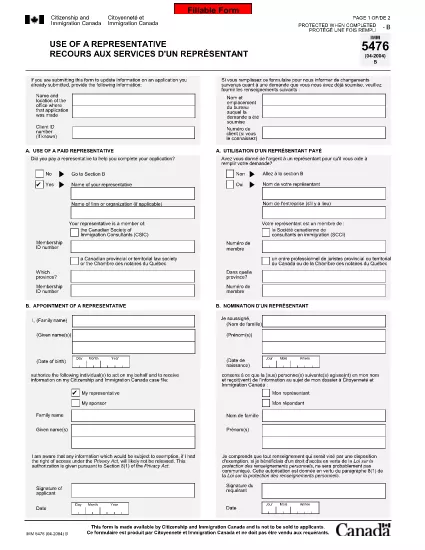
The IMM 5476 – Use of a Representative form allows you to officially appoint an immigration consultant, lawyer, or another authorized person to act on your behalf with Immigration, Refugees and Citizenship Canada (IRCC) and the Canada Border Services Agency (CBSA). This form is required for most permanent‑resident, temporary‑resident, and citizenship applications.

What Is the IMM 5476 Form?

IMM 5476 is a government‑issued PDF that records the details of your chosen representative, their contact information, and the scope of authority you are granting. It is available in both English and French and must be signed by both you (the applicant) and your representative.

How to Fill Out IMM 5476 Online

Instead of downloading the PDF and editing it manually, simply click the "Fill out this form" button on the page. Our Formize PDF Filler app will load the fillable version instantly, letting you complete the form directly in your browser.

Common Mistakes to Avoid

  • Incorrect Representative Details: Double‑check the name, address, and CRA‑issued client number of your representative.
  • Missing Signatures: Both the applicant and the representative must sign; unsigned forms are rejected.
  • Wrong Language Version: Use the official English or French version that matches the rest of your application package.
  • Out‑of‑Date Form: Always use the latest version – the link below always points to the current PDF.

When to Submit the Form

Attach IMM 5476 to the same package as your main application (e.g., Express Entry, Study Permit, Visitor Visa). If you change representatives later, submit a new, signed IMM 5476 with your updated request.

Need More Help?

While Formize does not provide live support, you can find detailed guidance on the IRCC website or consult a licensed immigration professional.

DUK
  • Do I need a lawyer to fill out IMM 5476?

    No. You can appoint any authorized representative, such as a licensed immigration consultant, lawyer, or family member, as long as they have a valid client number.

  • Can I change my representative after submitting the form?

    Yes. Submit a new, signed IMM 5476 with the updated representative’s details and include a brief letter explaining the change.

  • Is a digital signature accepted?

    IRCC accepts electronic signatures generated within a fillable PDF application like Formize, provided the signature field is clearly marked.

  • What happens if I forget to sign the form?

    An unsigned IMM 5476 will be considered incomplete and may delay processing of your entire application.

  • Do I need to submit both English and French versions?

    Submit only the language version that matches the rest of your application package. IRCC does not require both versions.

  • Is there a fee to use the Formize PDF Filler?

    No. Formize provides free access to fillable PDFs for government forms like IMM 5476.

  • Can I print the form after filling it online?

    Yes. Once you finish, click "Download PDF" and print a hard copy if your submission requires a physical signature.

  • Where can I find the latest version of IMM 5476?

    The link on this page always points to the most recent version published by Immigration, Refugees and Citizenship Canada.

KAIP

Kaip nemokamai užpildyti IMM 5476 internete, atlikdami 5 paprastus veiksmus:

  1. 1
    Open the Fillable Form
    Click the "Fill out this form" button on the page. The Formize PDF Filler app will load the IMM 5476 form directly in your browser.
  2. 2
    Enter Applicant Information
    Fill in your full name, client ID, and contact details in the Applicant section. All fields are required.
  3. 3
    Enter Representative Details
    Provide the representative’s name, firm, address, phone, and email. Make sure the CRA client number matches the one on record.
  4. 4
    Add Signatures
    Use the built‑in signature fields to sign electronically. Both you and your representative must sign before saving.
  5. 5
    Download or Submit
    After completing the form, click "Download PDF" to save a copy for your records, then attach it to your immigration application package.
Formuokite PDF užpildymo programą
APIE

Vizos formos

IMM 5476 yra viena iš vizų formų, kurios yra dokumentai, naudojami kreipiantis dėl vizos įvažiuoti į užsienio šalį. Viza – tai dokumentas, leidžiantis užsieniečiui atvykti, būti, o kartais ir dirbti užsienio šalyje tam tikrą laiką. Tikslios vizos formos ir reikalavimai skiriasi priklausomai nuo šalies ir vizos tipo.

Vizos formose paprastai reikalaujama asmeninės informacijos, tokios kaip vardas, pavardė, gimimo data ir paso informacija, taip pat informacija apie kelionės tikslą ir trukmę, numatomą kelionės tikslą ir tai, ar pareiškėjui anksčiau buvo atsisakyta išduoti vizą ar jis buvo deportuotas iš šalies. Formose taip pat gali reikėti patvirtinančių dokumentų, tokių kaip pasas, nuotraukos ir finansinės paramos įrodymas.

Jungtinėse Valstijose labiausiai paplitusios vizos formos yra DS-160 ir DS-260 formos. DS-160 forma naudojama kreipiantis dėl neimigracinės vizos, o forma DS-260 naudojama kreipiantis dėl imigracijos vizos. Šiose formose reikia išsamios informacijos apie pareiškėjo asmeninę ir kelionių istoriją, taip pat patvirtinamuosius dokumentus, tokius kaip pasas, kelionės maršrutas ir finansiniai įrašai.

Kitose šalyse gali būti taikomos skirtingos vizos formos ir reikalavimai, tačiau pagrindinis procesas paprastai apima prašymo išduoti vizą užpildymą, patvirtinančių dokumentų pateikimą ir dalyvavimą pokalbyje su konsuliniu pareigūnu JAV ambasadoje ar konsulate. Svarbu pažymėti, kad prašymo išduoti vizą procesas gali būti sudėtingas ir daug laiko reikalaujantis, todėl asmenims, norintiems gauti vizą, rekomenduojama pasikonsultuoti su imigracijos advokatu ar kitu kvalifikuotu specialistu, kad įsitikintų, jog yra laikomasi visų reikiamų formų ir reikalavimų.

FUNKCIJOS

PDF užpildas

Lengviausias būdas užpildyti IMM 5476 internete

  • Greitai užpildykite IMM 5476
    Ieškote būdo greitai užpildyti IMM 5476 internete? Naudodami internetinį nemokamą PDF formų užpildą sužinosite, kaip redaguoti ir užpildyti šį pdf dokumentą greičiau nei per minutę.
  • Lengva naudoti internetinį PDF redaktorių
    Atsibodo spausdinti PDF failus, kad galėtumėte juos redaguoti prieš nuskaitydami iš naujo ir siųsdami atgal? Redaguoti PDF dokumentus internete nemokamai. Norėdami sutaupyti laiko ir popieriaus, naudokite mūsų internetinį pdf redaktorių.
  • Puikūs įrankiai, visos platformos
    Svarstote, kaip užpildyti IMM 5476 „Mac“ kompiuteryje, o gal kaip nemokamai naudoti PDF užpildą? Mūsų internetiniai PDF įrankiai veikia visose platformose.
  • Saugi failų saugykla
    Užbaigti „IMM 5476“ failai saugomi saugioje duomenų bazėje, kurią valdo „Amazon Cloud“ priegloba. Galite bet kada ištrinti failus iš mūsų sistemos. Bet kokiu atveju šie failai automatiškai ištrinami po 24 valandų.
  • Kalbėkitės su IMM 5476
    Kalbėkite su „IMM 5476“ naudodami Chatize, kuri yra nemokama PDF skaitymo priemonė. Užduokite klausimų ir gaukite atsakymus iš „IMM 5476“. Tiesiog spustelėkite aukščiau esantį mygtuką Kalbėtis su dokumentu.

Ištrinti užpildymo seansą

Ištrinti pasirinktą pildymo seansą? Tokiu atveju jūsų pažanga pildant formą bus prarasta.

Ištrinti redagavimo sesiją

Ištrinti pasirinktą redagavimo sesiją? Tokiu atveju jūsų pažanga kuriant ir redaguojant formą bus prarasta.