
Pasirinkite kalbą

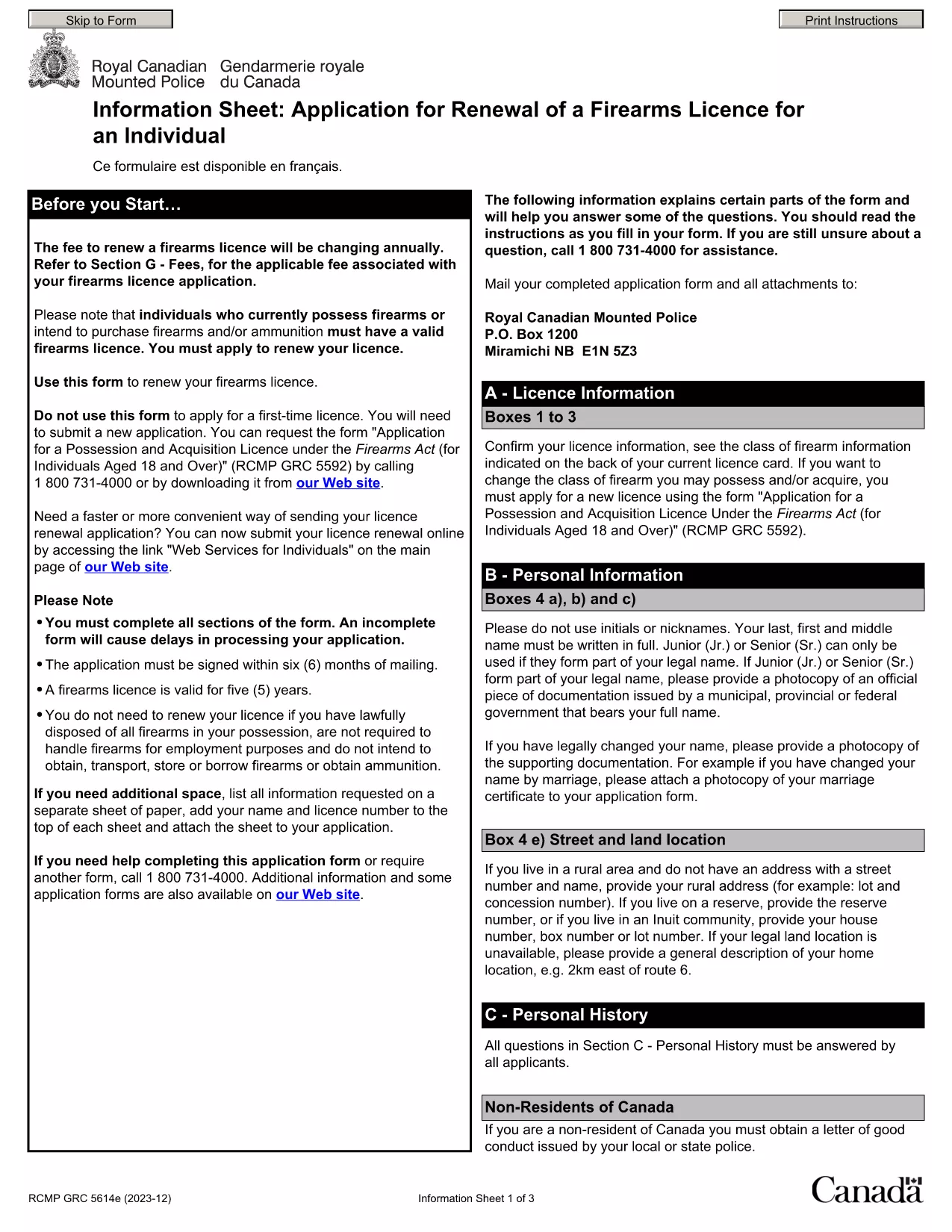
Punjab Renewal of Arms License Form for Individuals (Fillable PDF)

  1. Kalba Anglų hindi
  2. Šalis Indija
  3. valstybė Pandžabas
  4. skyrius Vidaus reikalų ir teisingumo departamentas
Punjab Renewal of Arms License Form for Individuals (Fillable PDF)

Renewing your personal arms license in Punjab has never been easier. Our dedicated page provides the official Punjab renewal of arms license form for individuals as a fully fillable PDF that you can complete directly in your browser.

By using Formize’s PDF Filler, you avoid printing, scanning, and the risk of missing handwritten information. The form is powered by the same structure as the RCMP PAL Renewal Form, which meets international standards for firearm licensing documentation.

Why Use a Fillable PDF for Your Punjab Arms License Renewal

A fillable PDF ensures:

  • Accuracy – fields are validated in real time.
  • Speed – submit within minutes, not days.
  • Security – your data stays encrypted while you work.

Step‑by‑Step Guide to Completing the Form Online

Follow the simple steps below to finish your renewal without leaving the page.

Common Mistakes to Avoid When Renewing Your Arms License

Skipping a required field or uploading an unsupported file format can delay processing. Our guide highlights the most frequent errors and how to prevent them.

Where to Submit Your Completed Form

After you finish, download the completed PDF and submit it to the Punjab Police Arms Licensing Office either in person or via their official online portal.

Ready to start? Click the button below, let Formize load the PDF filler, and complete the form in a few easy steps.

DUK
  • Is the Punjab arms license renewal form available for free?

    Yes. The fillable PDF is provided at no cost. You only need an internet connection to complete it online.

  • Can I edit the form after I download it?

    Once you download the completed PDF, you can open it in any standard PDF viewer, but the official submission should be the version you saved from Formize.

  • What documents do I need to attach with the renewal?

    Typically you must attach a recent passport‑size photograph, a copy of your current license, and any supporting certificates. Check the form’s attachment section for exact requirements.

  • How long does the renewal process take after submission?

    Processing times vary by district, but most renewals are completed within 7‑10 business days once the correct form and documents are received.

  • What if I make a mistake while filling the form?

    The fillable PDF highlights incomplete or incorrectly formatted fields. Correct the information before saving, or you can start over by clicking the reset button.

  • Do I need to print the form to submit it?

    No. The Punjab Police accepts a digitally signed PDF via their online portal or by email. Printing is optional.

  • Is my personal data safe while using Formize?

    Formize uses SSL encryption, and the PDF is processed locally in your browser, ensuring your data never leaves your computer unless you choose to upload it.

  • Can I use this form on a mobile device?

    Yes. The fillable PDF works on most modern smartphones and tablets with a compatible browser.

KAIP

Kaip nemokamai užpildyti Punjab arms license renewal internete, atlikdami 5 paprastus veiksmus:

  1. 1
    Click the Fill Out This Form button
    Press the highlighted button on the page to open the Formize PDF Filler app.
  2. 2
    Wait for the filler to load
    The fillable PDF loads automatically; this usually takes a few seconds.
  3. 3
    Enter your information
    Complete each field – the form validates entries in real time to prevent errors.
  4. 4
    Review and sign
    Double‑check all details, add your digital signature if required, and save the document.
  5. 5
    Download or submit
    Download the finished PDF for your records and submit it to the Punjab Police Arms Licensing Office.
Formuokite PDF užpildymo programą
APIE

Užsienio reikalų ministerijos paraiškos formos

Punjab arms license renewal yra viena iš Užsienio reikalų ministerijos paraiškos formų. Indijos išorės reikalų ministerija siūlo įvairias prašymo formas įvairioms paslaugoms, susijusioms su išorės reikalais ir tarptautiniais santykiais. Kai kurios įprastos paraiškos formos apima:

Paso prašymas: ši forma naudojama norint gauti Indijos pasą. Ji renka asmens duomenis, tokius kaip vardas, adresas, gimimo data ir pilietybė.

Užsienio Indijos pilietybės (OCI) prašymas: ši forma naudojama norint gauti OCI statusą, kuris leidžia Indijos kilmės asmenims gyventi ir dirbti Indijoje neribotą laiką. Ji renka asmens duomenis, įskaitant Indijos kilmės įrodymą.

Prašymas išduoti vizą: ši forma naudojama teikiant paraišką vizai keliauti į užsienio šalį. Ji renka asmeninę informaciją, informaciją apie kelionę ir kelionės tikslą.

Emigracijos leidimo paraiška: šią formą naudoja asmenys, norintys gauti emigracijos leidimą įsidarbinti tam tikrose šalyse. Ji renka asmeninę informaciją ir informaciją apie darbą.

Atestacijos paraiška: ši forma naudojama norint gauti įvairių dokumentų, pvz., išsilavinimo pažymėjimų, santuokos liudijimų ir komercinių dokumentų, atestavimo. Jame renkama informacija apie patvirtintiną dokumentą ir atestavimo tikslą.

Konsulinių paslaugų paraiška: ši forma naudojama įvairioms konsulinėms paslaugoms teikti, įskaitant skubios pagalbos pažymėjimų išdavimą, pagalbą Indijos piliečiams užsienyje ir Indijos piliečių registraciją. Konkreti reikalinga informacija priklauso nuo prašomos paslaugos pobūdžio.

FUNKCIJOS

PDF užpildas

Lengviausias būdas užpildyti Punjab arms license renewal internete

  • Greitai užpildykite Punjab arms license renewal
    Ieškote būdo greitai užpildyti Punjab arms license renewal internete? Naudodami internetinį nemokamą PDF formų užpildą sužinosite, kaip redaguoti ir užpildyti šį pdf dokumentą greičiau nei per minutę.
  • Lengva naudoti internetinį PDF redaktorių
    Atsibodo spausdinti PDF failus, kad galėtumėte juos redaguoti prieš nuskaitydami iš naujo ir siųsdami atgal? Redaguoti PDF dokumentus internete nemokamai. Norėdami sutaupyti laiko ir popieriaus, naudokite mūsų internetinį pdf redaktorių.
  • Puikūs įrankiai, visos platformos
    Svarstote, kaip užpildyti Punjab arms license renewal „Mac“ kompiuteryje, o gal kaip nemokamai naudoti PDF užpildą? Mūsų internetiniai PDF įrankiai veikia visose platformose.
  • Saugi failų saugykla
    Užbaigti „Punjab arms license renewal“ failai saugomi saugioje duomenų bazėje, kurią valdo „Amazon Cloud“ priegloba. Galite bet kada ištrinti failus iš mūsų sistemos. Bet kokiu atveju šie failai automatiškai ištrinami po 24 valandų.
  • Kalbėkitės su Punjab arms license renewal
    Kalbėkite su „Punjab arms license renewal“ naudodami Chatize, kuri yra nemokama PDF skaitymo priemonė. Užduokite klausimų ir gaukite atsakymus iš „Punjab arms license renewal“. Tiesiog spustelėkite aukščiau esantį mygtuką Kalbėtis su dokumentu.

Ištrinti užpildymo seansą

Ištrinti pasirinktą pildymo seansą? Tokiu atveju jūsų pažanga pildant formą bus prarasta.

Ištrinti redagavimo sesiją

Ištrinti pasirinktą redagavimo sesiją? Tokiu atveju jūsų pažanga kuriant ir redaguojant formą bus prarasta.