
Pasirinkite kalbą

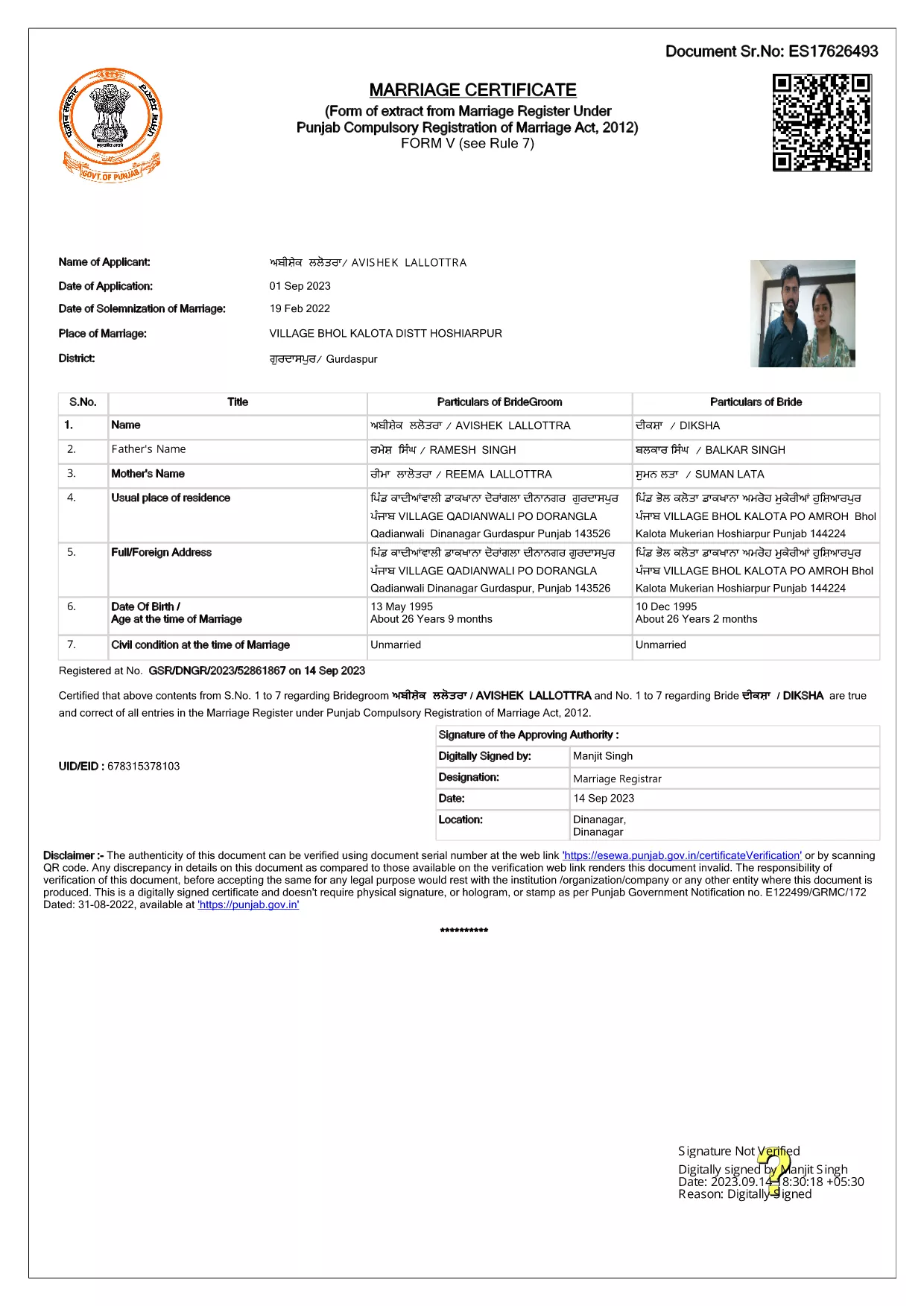
Punjab Solemnization of Marriage Form (Fillable PDF)

  1. Kalba Anglų hindi
  2. Šalis Indija
  3. valstybė Pandžabas
  4. skyrius Vidaus reikalų ir teisingumo departamentas
Užpildykite šią formą
Punjab Solemnization of Marriage Form (Fillable PDF)

Punjab Solemnization of Marriage Form (Fillable PDF)

Getting married in Punjab requires you to submit the official Punjab Solemnization of Marriage form. This form records essential details of the bride, groom, and witnesses, and it is mandatory under the Punjab Compulsory Registration of Marriage Act, 2012.

What Is the Punjab Solemnization of Marriage Form?

The form is a government‑issued marriage certificate that captures personal information, parental details, and the date and place of the marriage ceremony. It is the legal proof needed for future documentation such as passport applications, property registration, and visa requests.

How to Fill Out the Form Online with Formize

Instead of printing, printing‑and‑scanning, or using a third‑party PDF editor, you can complete the form directly in your browser:

  1. Click the **"Fill out this form"** button on this page.
  2. Wait a few seconds while the Formize PDF Filler app loads.
  3. Enter the required information in each fillable field. The interface guides you through mandatory sections.
  4. Review your entries, then click **"Save & Download"** to get a completed PDF copy.

Common Mistakes to Avoid When Completing the Form

  • Incorrect spelling of names: Verify the spelling exactly as it appears on official ID documents.
  • Missing witness details: All three witnesses must be fully listed; incomplete entries will cause rejection.
  • Wrong date format: Use DD‑MM‑YYYY as required by the Punjab Registration Department.
  • Leaving optional fields blank: Even optional fields should be filled with "N/A" if not applicable.

Where to Submit the Completed Form

After you have saved the filled PDF, submit it to the nearest Punjab Registration Office or the designated online portal of the Punjab Registration Department. Bring original identity proofs for both parties and witnesses.

Download the Official PDF

Click the button below to download the original, government‑approved PDF. The file is hosted securely and matches the exact layout required by the registration authority.

DUK
  • Is the Punjab marriage form available in Punjabi?

    The official PDF is printed in English, but you may fill it out in any language. For official submissions, the English version is accepted.

  • Do I need a digital signature?

    A digital signature is not required for the fillable PDF. You must sign the printed copy in the presence of a registrar.

  • Can I edit the form after I download it?

    Yes. The saved PDF remains fully editable with any standard PDF editor, but the Formize filler already lets you complete the form without extra software.

  • How many witnesses are required?

    Three adult witnesses are mandatory. Their full names, addresses, and signatures must be entered in the designated sections.

  • What documents do I need to submit with the form?

    Both parties must provide a valid ID (Aadhar, PAN, or passport), proof of residence, and the original signed marriage certificate.

  • Is there a fee for downloading the PDF?

    No. The PDF is provided free of charge. Any registration fees are paid directly to the Punjab Registration Office.

KAIP

Kaip nemokamai užpildyti Punjab marriage form internete, atlikdami 4 paprastus veiksmus:

  1. 1
    Click the Fill‑Out Button
    Press the **"Fill out this form"** button on the page to launch the Formize PDF Filler.
  2. 2
    Wait for the Filler to Load
    The app loads in a few seconds; you’ll see a clean, searchable interface with all form fields highlighted.
  3. 3
    Enter Your Information
    Type the required details for the bride, groom, and witnesses. The filler validates dates and mandatory fields automatically.
  4. 4
    Save and Download
    After reviewing, click **"Save & Download"** to get a completed PDF you can print or submit electronically.
Formuokite PDF užpildymo programą
APIE

Užsienio reikalų ministerijos paraiškos formos

Punjab marriage form yra viena iš Užsienio reikalų ministerijos paraiškos formų. Indijos išorės reikalų ministerija siūlo įvairias prašymo formas įvairioms paslaugoms, susijusioms su išorės reikalais ir tarptautiniais santykiais. Kai kurios įprastos paraiškos formos apima:

Paso prašymas: ši forma naudojama norint gauti Indijos pasą. Ji renka asmens duomenis, tokius kaip vardas, adresas, gimimo data ir pilietybė.

Užsienio Indijos pilietybės (OCI) prašymas: ši forma naudojama norint gauti OCI statusą, kuris leidžia Indijos kilmės asmenims gyventi ir dirbti Indijoje neribotą laiką. Ji renka asmens duomenis, įskaitant Indijos kilmės įrodymą.

Prašymas išduoti vizą: ši forma naudojama teikiant paraišką vizai keliauti į užsienio šalį. Ji renka asmeninę informaciją, informaciją apie kelionę ir kelionės tikslą.

Emigracijos leidimo paraiška: šią formą naudoja asmenys, norintys gauti emigracijos leidimą įsidarbinti tam tikrose šalyse. Ji renka asmeninę informaciją ir informaciją apie darbą.

Atestacijos paraiška: ši forma naudojama norint gauti įvairių dokumentų, pvz., išsilavinimo pažymėjimų, santuokos liudijimų ir komercinių dokumentų, atestavimo. Jame renkama informacija apie patvirtintiną dokumentą ir atestavimo tikslą.

Konsulinių paslaugų paraiška: ši forma naudojama įvairioms konsulinėms paslaugoms teikti, įskaitant skubios pagalbos pažymėjimų išdavimą, pagalbą Indijos piliečiams užsienyje ir Indijos piliečių registraciją. Konkreti reikalinga informacija priklauso nuo prašomos paslaugos pobūdžio.

FUNKCIJOS

PDF užpildas

Lengviausias būdas užpildyti Punjab marriage form internete

  • Greitai užpildykite Punjab marriage form
    Ieškote būdo greitai užpildyti Punjab marriage form internete? Naudodami internetinį nemokamą PDF formų užpildą sužinosite, kaip redaguoti ir užpildyti šį pdf dokumentą greičiau nei per minutę.
  • Lengva naudoti internetinį PDF redaktorių
    Atsibodo spausdinti PDF failus, kad galėtumėte juos redaguoti prieš nuskaitydami iš naujo ir siųsdami atgal? Redaguoti PDF dokumentus internete nemokamai. Norėdami sutaupyti laiko ir popieriaus, naudokite mūsų internetinį pdf redaktorių.
  • Puikūs įrankiai, visos platformos
    Svarstote, kaip užpildyti Punjab marriage form „Mac“ kompiuteryje, o gal kaip nemokamai naudoti PDF užpildą? Mūsų internetiniai PDF įrankiai veikia visose platformose.
  • Saugi failų saugykla
    Užbaigti „Punjab marriage form“ failai saugomi saugioje duomenų bazėje, kurią valdo „Amazon Cloud“ priegloba. Galite bet kada ištrinti failus iš mūsų sistemos. Bet kokiu atveju šie failai automatiškai ištrinami po 24 valandų.
  • Kalbėkitės su Punjab marriage form
    Kalbėkite su „Punjab marriage form“ naudodami Chatize, kuri yra nemokama PDF skaitymo priemonė. Užduokite klausimų ir gaukite atsakymus iš „Punjab marriage form“. Tiesiog spustelėkite aukščiau esantį mygtuką Kalbėtis su dokumentu.

Ištrinti užpildymo seansą

Ištrinti pasirinktą pildymo seansą? Tokiu atveju jūsų pažanga pildant formą bus prarasta.

Ištrinti redagavimo sesiją

Ištrinti pasirinktą redagavimo sesiją? Tokiu atveju jūsų pažanga kuriant ir redaguojant formą bus prarasta.