Pasirinkite kalbą

Anganwadi Application Form – Fill Online Instantly

  1. Šalis Indija
  2. Kalba Anglų
  3. skyrius Women and Child Development
  4. Veikla Child Development
Užpildykite šią formą
Anganwadi Application Form – Fill Online Instantly

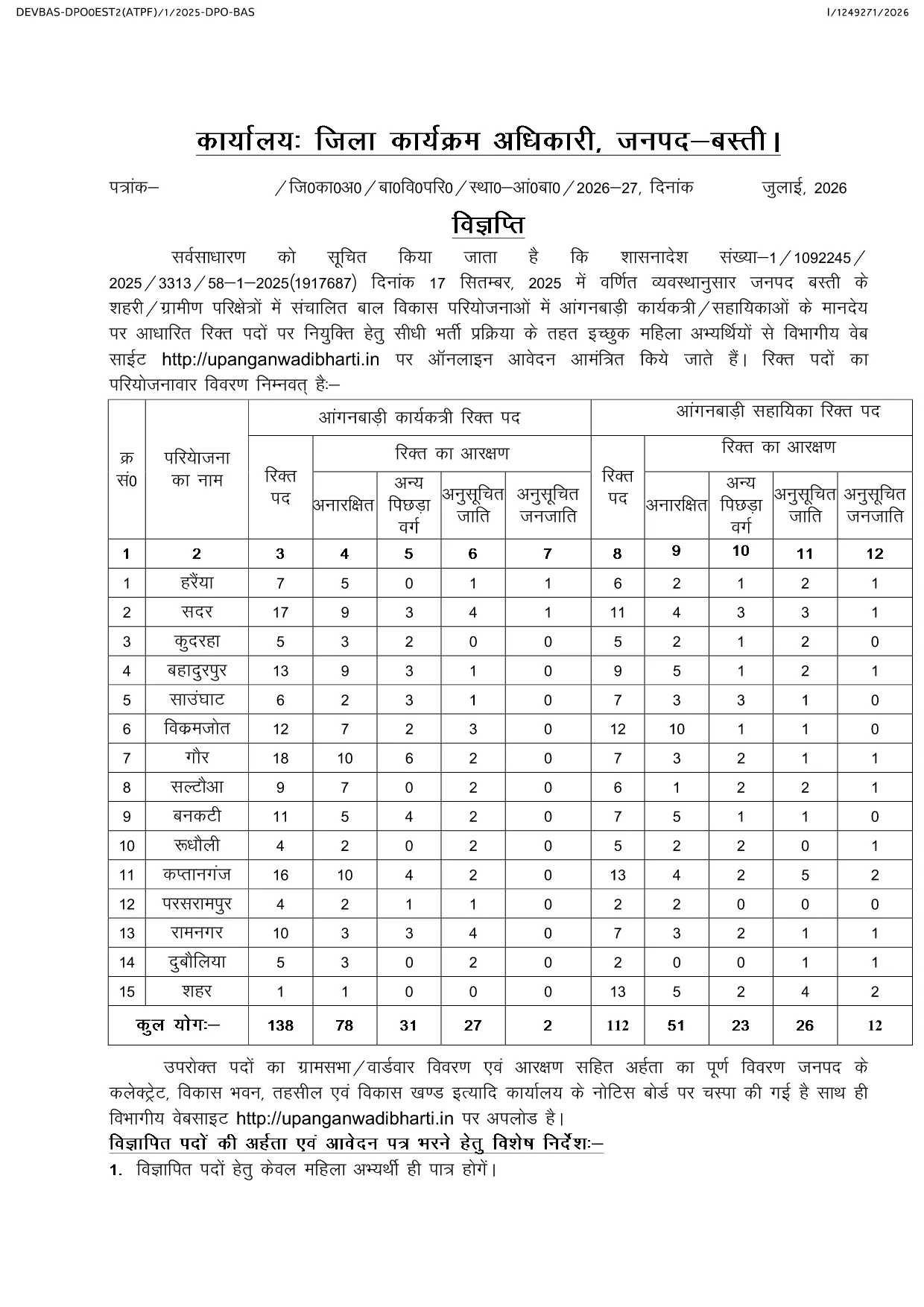
Looking for the official Anganwadi application form for the latest recruitment cycle? Formize lets you open the PDF directly in your browser, fill every field, and submit without ever downloading or printing. The form is fully compatible with the Uttar Pradesh Anganwadi Worker Bharti 2026 notification and follows the Integrated Child Development Services (ICDS) guidelines.

Why Choose Formize for Anganwadi Forms

  • Instant loading of the official PDF – no extra software required.
  • All fields are editable and auto‑saved while you work.
  • Secure, browser‑based filling keeps your personal data private.
  • One‑click download of the completed PDF for submission.

How to Complete the Anganwadi Application Online

Simply click the "Fill out this form" button below. The Formize PDF Filler app will load the document, and you can start entering your details right away.

Eligibility & Required Documents

Before you begin, make sure you meet the basic criteria and have the following documents ready:

  • Age between 18 and 35 years (relaxations applicable as per UP government rules).
  • Minimum educational qualification: 10+2 or equivalent.
  • Proof of residence in the village/ward you are applying for.
  • Recent passport‑size photograph, signature, and scanned ID proof.

Common Mistakes to Avoid

  • Leaving mandatory fields blank – the form will not submit.
  • Uploading photos that do not meet size or format requirements.
  • Entering incorrect village or ward codes – double‑check the official notification.
  • Failing to review the preview before final submission.

Ready to start? Click the button below, fill out the form, and submit your application with confidence.

DUK
  • Is there any fee to fill the Anganwadi application form online?

    No. The Anganwadi application form is completely free to fill and download using Formize.

  • Can I edit the form after I have downloaded it?

    Yes. The PDF remains fully editable, but it is recommended to complete and review the form before the first download to avoid errors.

  • What file formats are accepted for photo and signature uploads?

    Upload JPG or PNG images. The maximum file size is 200 KB for each image.

  • Do I need a PDF reader to use Formize?

    No. Formize works entirely in the browser, so you do not need any additional PDF software.

  • How can I be sure my data is secure?

    All data is processed locally in your browser and never stored on our servers unless you choose to download the completed PDF.

  • What should I do if I encounter an error while filling the form?

    Refresh the page and reopen the form. If the problem persists, clear your browser cache or try a different browser.

  • When is the last date to submit the Anganwadi application?

    The last date varies by district. Refer to the official notification linked on the page for the exact deadline for your district.

KAIP

Kaip nemokamai užpildyti Anganwadi application form internete, atlikdami 4 paprastus veiksmus:

  1. 1
    Open the Form
    Click the "Fill out this form" button on the page. The Formize PDF Filler app will load the Anganwadi application PDF directly in your browser.
  2. 2
    Enter Your Details
    Complete each field—personal information, education, residence, and upload your photo and signature. All changes are saved automatically.
  3. 3
    Review & Validate
    Use the preview function to double‑check every entry. Ensure all mandatory fields are filled and documents meet the size requirements.
  4. 4
    Download & Submit
    After confirming the preview, click the download button to save the filled PDF. Submit the file according to the instructions in the official notification.
Formuokite PDF užpildymo programą
APIE

Anganwadi application form šabloną

Naudodami tradicinį PDF dokumento peržiūros ir pildymo funkcijų rinkinį, žiniatinklio programos pranašumus ir interaktyvų išdėstymą, galite užbaigti Anganwadi application form per kelias minutes.

FUNKCIJOS

PDF užpildas

Lengviausias būdas užpildyti Anganwadi application form internete

  • Greitai užpildykite Anganwadi application form
    Ieškote būdo greitai užpildyti Anganwadi application form internete? Naudodami internetinį nemokamą PDF formų užpildą sužinosite, kaip redaguoti ir užpildyti šį pdf dokumentą greičiau nei per minutę.
  • Lengva naudoti internetinį PDF redaktorių
    Atsibodo spausdinti PDF failus, kad galėtumėte juos redaguoti prieš nuskaitydami iš naujo ir siųsdami atgal? Redaguoti PDF dokumentus internete nemokamai. Norėdami sutaupyti laiko ir popieriaus, naudokite mūsų internetinį pdf redaktorių.
  • Puikūs įrankiai, visos platformos
    Svarstote, kaip užpildyti Anganwadi application form „Mac“ kompiuteryje, o gal kaip nemokamai naudoti PDF užpildą? Mūsų internetiniai PDF įrankiai veikia visose platformose.
  • Saugi failų saugykla
    Užbaigti „Anganwadi application form“ failai saugomi saugioje duomenų bazėje, kurią valdo „Amazon Cloud“ priegloba. Galite bet kada ištrinti failus iš mūsų sistemos. Bet kokiu atveju šie failai automatiškai ištrinami po 24 valandų.
  • Kalbėkitės su Anganwadi application form
    Kalbėkite su „Anganwadi application form“ naudodami Chatize, kuri yra nemokama PDF skaitymo priemonė. Užduokite klausimų ir gaukite atsakymus iš „Anganwadi application form“. Tiesiog spustelėkite aukščiau esantį mygtuką Kalbėtis su dokumentu.

Ištrinti užpildymo seansą

Ištrinti pasirinktą pildymo seansą? Tokiu atveju jūsų pažanga pildant formą bus prarasta.

Ištrinti redagavimo sesiją

Ištrinti pasirinktą redagavimo sesiją? Tokiu atveju jūsų pažanga kuriant ir redaguojant formą bus prarasta.