
Pasirinkite kalbą

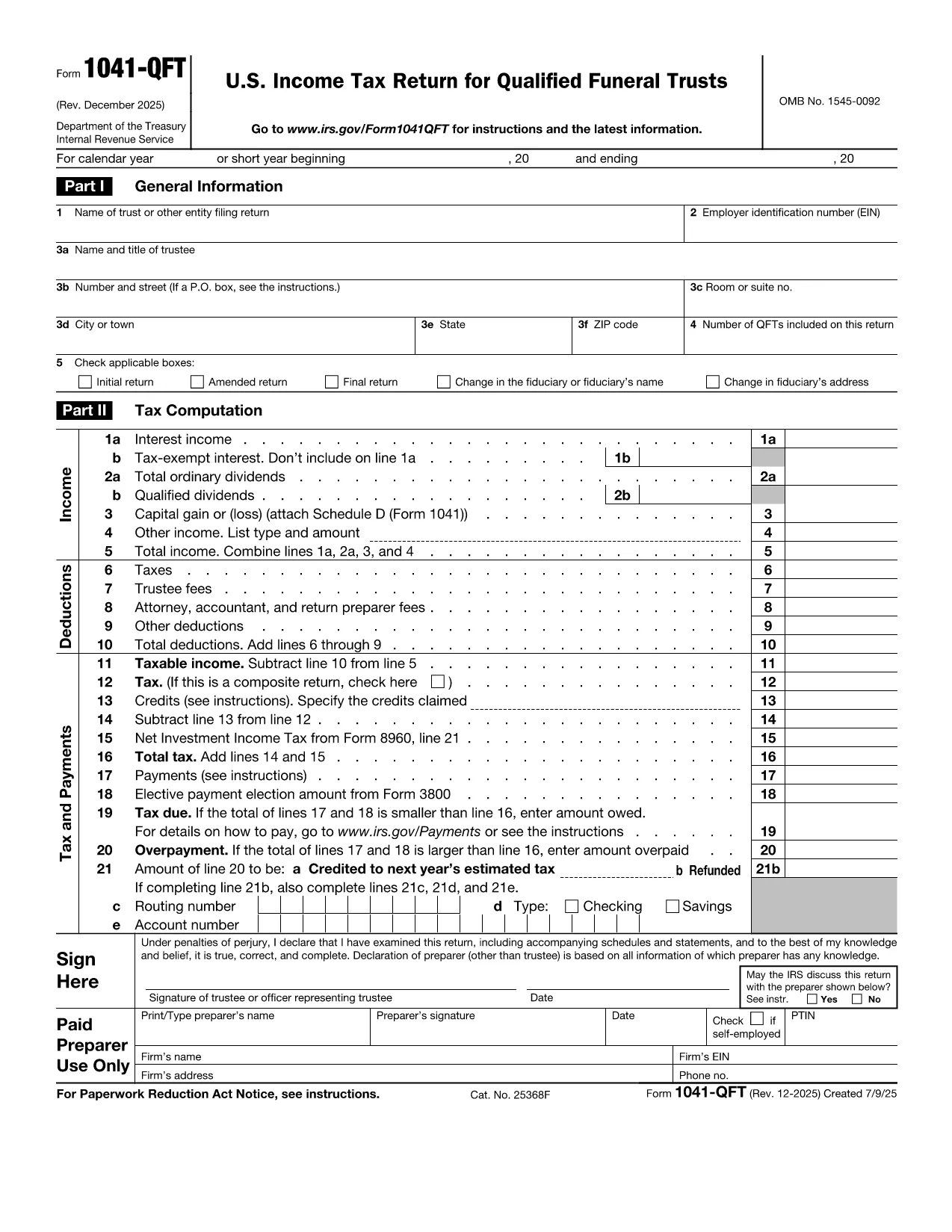
Form 1041‑QFT – Qualified Funeral Trust (Fillable PDF)

  1. Šalis JAV
  2. Kalba Anglų
  3. Veikla Mokesčiai
  4. skyrius Vidaus pajamų tarnyba
Form 1041‑QFT – Qualified Funeral Trust (Fillable PDF)

Form 1041‑QFT is the IRS “Qualified Funeral Trust” form used by trustees to report income, deductions, and tax liability of a funeral trust. The form must be filed annually and attached to the estate’s Form 1041.

Our fillable PDF version lets you complete every line directly in your browser—no extra software required. Simply click the “Fill out this form” button below, wait for the Formize PDF Filler app to load, and start entering data.

The online filler automatically saves your progress, validates numeric entries, and formats dates correctly, reducing the risk of errors that could delay processing.

After you finish, you can download the completed PDF, print it, or submit it electronically through the IRS e‑file system.

  • Key sections: Trust information, income, deductions, tax computation, and signature.
  • Supported formats: All standard PDF fields are available, including checkboxes and dropdowns.
DUK
  • Who must file Form 1041‑QFT?

    Any qualified funeral trust that earns income must file Form 1041‑QFT annually to report that income and calculate any tax due.

  • Can I file Form 1041‑QFT electronically?

    Yes. After completing the fillable PDF, you can upload the file through the IRS e‑file system together with Form 1041.

  • What is the deadline for filing?

    Form 1041‑QFT is due the same day as the estate’s Form 1041, typically April 15th of the year following the tax year.

  • Do I need a separate EIN for the funeral trust?

    Yes. The trust must have its own Employer Identification Number, which you enter on line 1 of the form.

  • What happens if I make a mistake on the form?

    Minor errors can be corrected by filing an amended Form 1041‑QFT. Significant mistakes may trigger penalties, so double‑check entries before submitting.

  • Is there a filing fee for Form 1041‑QFT?

    No separate fee is required; the filing cost is included in the overall estate tax filing.

  • Can I use the same PDF for multiple years?

    Each tax year requires a new, dated Form 1041‑QFT. Use the latest version from the IRS website for each filing.

  • Where can I get help if I’m unsure about any line?

    Consult a tax professional familiar with estate and trust taxation, or refer to the IRS Instructions for Form 1041‑QFT available on the IRS website.

KAIP

Kaip nemokamai užpildyti Form 1041-QFT internete, atlikdami 5 paprastus veiksmus:

  1. 1
    Open the Fillable Form
    Click the bright “Fill out this form” button on the page. The Formize PDF Filler app will launch in a new tab.
  2. 2
    Enter Your Information
    Complete each field—trust name, EIN, income, deductions, and tax calculations. The filler validates numbers and dates as you type.
  3. 3
    Save Your Progress
    Use the “Save” button to store a copy on your device. You can return later without losing any data.
  4. 4
    Download or Print
    When all sections are filled, click “Download” to get the final PDF or “Print” to produce a hard copy for mailing.
  5. 5
    Submit to the IRS
    Attach the completed Form 1041‑QFT to your estate’s Form 1041 and file electronically or mail according to IRS guidelines.
Formuokite PDF užpildymo programą
APIE

Federalinės mokesčių formos

Form 1041-QFT yra viena iš federalinių mokesčių formų, kurios yra dokumentai, naudojami pranešant apie federalinius pajamų mokesčius ir pateikiant juos JAV Vidaus pajamų tarnybai (IRS). Šias formas asmenys, įmonės ir organizacijos naudoja norėdami pranešti apie savo pajamas, atskaitymus ir kitą svarbią informaciją, reikalingą apskaičiuojant jų federalinius mokesčius.

Dažniausiai naudojama federalinė mokesčių forma yra 1040 forma, kurią naudoja individualūs mokesčių mokėtojai, norėdami pranešti apie savo gyventojų pajamų mokestį. Kitos dažniausiai naudojamos formos apima 1065 formą, skirtą partnerystei, 1120 forma korporacijoms ir 990 forma neapmokestinamoms organizacijoms.

Federalinėse mokesčių formose paprastai reikalaujama, kad mokesčių mokėtojai praneštų apie įvairius pajamų šaltinius, tokius kaip darbo užmokestis, atlyginimai ir arbatpinigiai, taip pat pajamas iš investicijų, nuomojamo turto ir kitų šaltinių. Formos taip pat leidžia mokesčių mokėtojams reikalauti atskaityti ir kredituoti įvairias išlaidas, tokias kaip labdaros įnašai, hipotekos palūkanos ir sveikatos priežiūros išlaidos.

Svarbu tiksliai ir laiku pateikti federalines mokesčių formas, nes to nepadarius, IRS gali skirti baudas ir palūkanas.

FUNKCIJOS

PDF užpildas

Lengviausias būdas užpildyti Form 1041-QFT internete

  • Greitai užpildykite Form 1041-QFT
    Ieškote būdo greitai užpildyti Form 1041-QFT internete? Naudodami internetinį nemokamą PDF formų užpildą sužinosite, kaip redaguoti ir užpildyti šį pdf dokumentą greičiau nei per minutę.
  • Lengva naudoti internetinį PDF redaktorių
    Atsibodo spausdinti PDF failus, kad galėtumėte juos redaguoti prieš nuskaitydami iš naujo ir siųsdami atgal? Redaguoti PDF dokumentus internete nemokamai. Norėdami sutaupyti laiko ir popieriaus, naudokite mūsų internetinį pdf redaktorių.
  • Puikūs įrankiai, visos platformos
    Svarstote, kaip užpildyti Form 1041-QFT „Mac“ kompiuteryje, o gal kaip nemokamai naudoti PDF užpildą? Mūsų internetiniai PDF įrankiai veikia visose platformose.
  • Saugi failų saugykla
    Užbaigti „Form 1041-QFT“ failai saugomi saugioje duomenų bazėje, kurią valdo „Amazon Cloud“ priegloba. Galite bet kada ištrinti failus iš mūsų sistemos. Bet kokiu atveju šie failai automatiškai ištrinami po 24 valandų.
  • Kalbėkitės su Form 1041-QFT
    Kalbėkite su „Form 1041-QFT“ naudodami Chatize, kuri yra nemokama PDF skaitymo priemonė. Užduokite klausimų ir gaukite atsakymus iš „Form 1041-QFT“. Tiesiog spustelėkite aukščiau esantį mygtuką Kalbėtis su dokumentu.

Ištrinti užpildymo seansą

Ištrinti pasirinktą pildymo seansą? Tokiu atveju jūsų pažanga pildant formą bus prarasta.

Ištrinti redagavimo sesiją

Ištrinti pasirinktą redagavimo sesiją? Tokiu atveju jūsų pažanga kuriant ir redaguojant formą bus prarasta.