
Pasirinkite kalbą

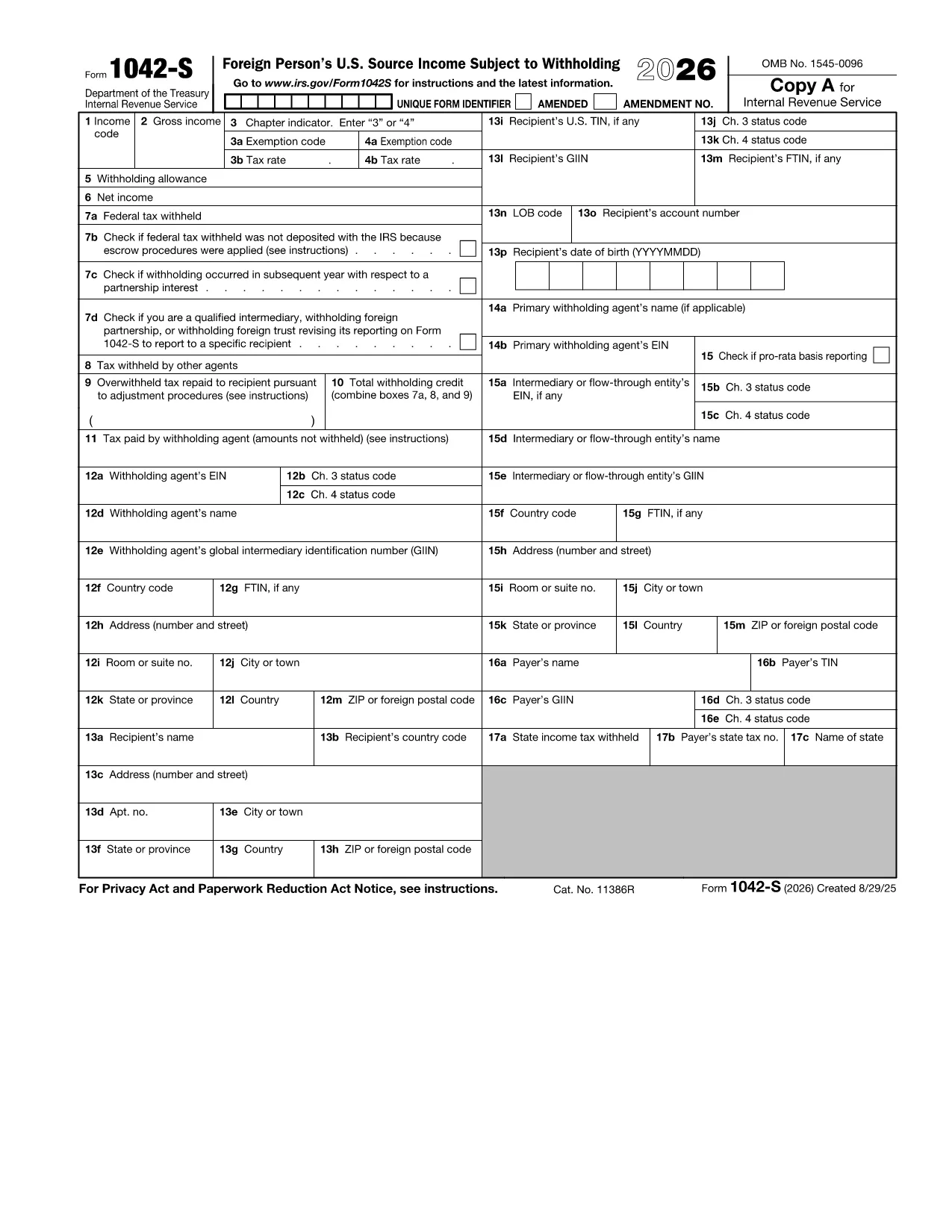
Fillable IRS Form 1042‑S (Foreign Person’s U.S. Source Income)

  1. Šalis JAV
  2. Kalba Anglų
  3. Veikla Mokesčiai
  4. skyrius Vidaus pajamų tarnyba
Fillable IRS Form 1042‑S (Foreign Person’s U.S. Source Income)

Form 1042‑S is the IRS information return used by withholding agents to report U.S. source income paid to foreign persons, such as dividends, royalties, scholarships, and interest. Accurate reporting is required to avoid penalties and to ensure the correct amount of tax is withheld.

With Formize’s fillable PDF, you can complete the official IRS Form 1042‑S directly in your browser. The layout matches the paper form, but you type into each field, add a digital signature, and export a finished PDF that complies with IRS filing rules.

Using an online filler reduces common errors like mis‑aligned text, missing boxes, or incorrect codes—issues that often cause rejections and delays.

Below you’ll find step‑by‑step instructions, tips for avoiding mistakes, and guidance on where to send the completed form.

Instrukcijos

DUK
  • Who must file Form 1042‑S?

    Any withholding agent—such as a university, corporation, or financial institution—that pays U.S. source income to a foreign person must file Form 1042‑S.

  • What types of income are reported on Form 1042‑S?

    Dividends, interest, royalties, rents, scholarships, research prizes, and certain capital‑gain distributions are all reported on Form 1042‑S.

  • Can I file Form 1042‑S electronically?

    Yes. After completing the fillable PDF, you can upload the finished file to the IRS FIRE system or submit it via your tax software.

  • What is the deadline for filing Form 1042‑S?

    The form is generally due to the IRS by March 15 of the year following the calendar year in which the income was paid.

  • What happens if I make a mistake on the form?

    You can file a corrected Form 1042‑S using the same PDF template. Mark the “Corrected” box in Part I and provide the revised amounts.

  • Do I need to send a copy of Form 1042‑S to the recipient?

    Yes. Recipients must receive a copy of their Form 1042‑S by the same March 15 deadline so they can report the income on their own tax returns.

  • Is there a fee to use the Formize fillable PDF?

    No. The fillable PDF is free to use on Formize.com; you only need an internet connection and a modern browser.

KAIP

Kaip nemokamai užpildyti Form 1042-S internete, atlikdami 4 paprastus veiksmus:

  1. 1
    Click the Fillable Form Button
    On this page, press the blue “Fill out this form” button. The Formize PDF Filler app will open in a new tab.
  2. 2
    Wait for the Formize PDF Filler to Load
    The filler loads the exact IRS Form 1042‑S template. This may take a few seconds depending on your connection.
  3. 3
    Enter All Required Information
    Type directly into each box—payer details, recipient TIN, income codes, amounts, and tax withheld. Use the drop‑down menus for codes where provided.
  4. 4
    Review, Sign, and Download
    After completing the fields, review the form for accuracy, add a digital signature, then click “Save & Download” to get your finished PDF.
Formuokite PDF užpildymo programą
APIE

Mokesčių formos

Form 1042-S yra viena iš mokesčių formų, kurios yra dokumentai, naudojami su mokesčiais susijusiai informacijai pranešti atitinkamai mokesčių institucijai. Yra įvairių tipų mokesčių formų, įskaitant federalines, valstijos ir vietines mokesčių formas, kurios gali skirtis priklausomai nuo mokesčių mokėtojo aplinkybių ir vietos.

FUNKCIJOS

PDF užpildas

Lengviausias būdas užpildyti Form 1042-S internete

  • Greitai užpildykite Form 1042-S
    Ieškote būdo greitai užpildyti Form 1042-S internete? Naudodami internetinį nemokamą PDF formų užpildą sužinosite, kaip redaguoti ir užpildyti šį pdf dokumentą greičiau nei per minutę.
  • Lengva naudoti internetinį PDF redaktorių
    Atsibodo spausdinti PDF failus, kad galėtumėte juos redaguoti prieš nuskaitydami iš naujo ir siųsdami atgal? Redaguoti PDF dokumentus internete nemokamai. Norėdami sutaupyti laiko ir popieriaus, naudokite mūsų internetinį pdf redaktorių.
  • Puikūs įrankiai, visos platformos
    Svarstote, kaip užpildyti Form 1042-S „Mac“ kompiuteryje, o gal kaip nemokamai naudoti PDF užpildą? Mūsų internetiniai PDF įrankiai veikia visose platformose.
  • Saugi failų saugykla
    Užbaigti „Form 1042-S“ failai saugomi saugioje duomenų bazėje, kurią valdo „Amazon Cloud“ priegloba. Galite bet kada ištrinti failus iš mūsų sistemos. Bet kokiu atveju šie failai automatiškai ištrinami po 24 valandų.
  • Kalbėkitės su Form 1042-S
    Kalbėkite su „Form 1042-S“ naudodami Chatize, kuri yra nemokama PDF skaitymo priemonė. Užduokite klausimų ir gaukite atsakymus iš „Form 1042-S“. Tiesiog spustelėkite aukščiau esantį mygtuką Kalbėtis su dokumentu.

Ištrinti užpildymo seansą

Ištrinti pasirinktą pildymo seansą? Tokiu atveju jūsų pažanga pildant formą bus prarasta.

Ištrinti redagavimo sesiją

Ištrinti pasirinktą redagavimo sesiją? Tokiu atveju jūsų pažanga kuriant ir redaguojant formą bus prarasta.